Install Python, PyTorch, and Jupyter Lab on your computer. Download source code from Deep Learning with...
Install Python, PyTorch, and Jupyter Lab on your computer.
Download source code from Deep Learning with PyTorch's Web site.
Run jupyter notebook on code in pich3 and submit the screen shots (both jupyter server and the browser display).
Can I have step in step on how to do this I’m very confused and finished picture would be fine
Homework Answers
Note: The following procedure is specified for the windows system as I am on a windows system.
You can install Python, PyTorch which is a deep learning library, and Jupyter Lab on your computer just by installing the Anaconda on your computer system. Anaconda is a package manager for Python that makes it convenient to add/remove packages and create custom “environments,” which are like sandboxes that are isolated from one another. Anaconda also wraps pip and has more capabilities. Package management is the actual beauty of Python. Once you are done installing the anaconda on your system, open the anaconda prompt and write the following command pip list, this will list down all the packages and libraries that got automatically installed while installing the anaconda. You will see the screen like this:
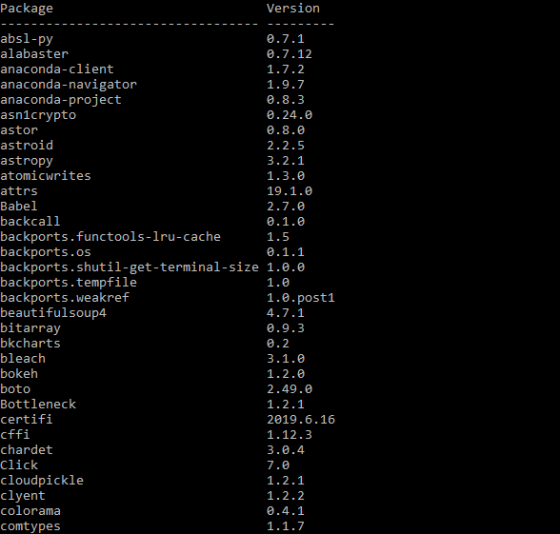
In order to open the jupyter lab, just open the anaconda prompt and give the path of the folder in which you want to save your jupyter notebook, for example, I have created a folder by name MLCourse in drive C of my computer. I will write the following command in Anaconda prompt that is cd c://MLCourse and then I will press enter. After specifying the path you have to type jupyter notebook and you will see the following screen.

The jupyter lab will open on the default browser on your computer. In my system, it is Internet Explorer since I am on a windows system.
To install PyTorch you will have to go to the official website of the PyTorch and follow the instructions from there. The link for the site is https://pytorch.org/get-started/locally/ .
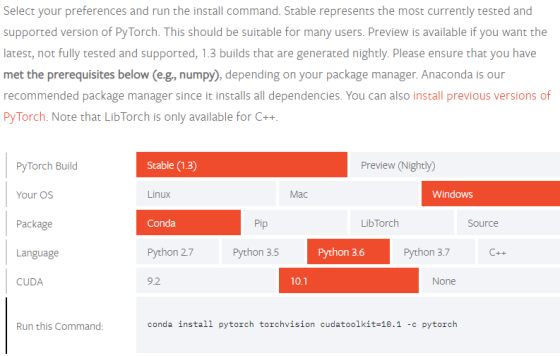
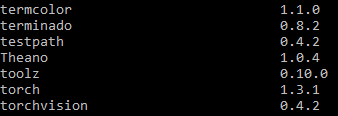
You will have to run this command in your anaconda prompt and the PyTorch would get installed on your system. In order to check whether it has successfully downloaded or not, just type pip list in anaconda prompt and you will get to see all the packages and libraries that have been installed on your system once again. If the PyTorch is successfully installed on your system you will get to see the following list.
Here's the solution to your question. Thanks for asking and happy learning!!!
Add Answer to:
Install
Python, PyTorch, and Jupyter Lab on your computer.
Download
source code from Deep Learning with...
In this hands-on project, you compile and install a program from source code. On your Fedora...
In this hands-on project, you compile and install a program from source code. On your Fedora Linux virtual machine, switch to a graphical terminal (tty1) by pressingCtrl+Alt+F1 and log in to the GNOME desktop using the user name of user1 and the password of LNXrocks!. Open the Firefox Web browser and download the source code tarball for rdesktop 1.8.2 (rdesktop-1.8.2.tar.gz) from www.rdesktop.org. Save the source code tarball to the default location (/home/user1/Downloads) and log out of the GNOME desktop when...
Part - Web Server Setup and Demonstration (AJ Objective The objective of this assignment is to...
 Part - Web Server Setup and Demonstration (AJ Objective The objective of this assignment is to some HTTP as application layer protocol and TCP as reliable transport layer protocol HTTP is carried by TCP. Also, in the assignment you will investigate the working of client-server mechanism from both application and networking perspective There are several different ways to setup an HTTP server, including through Apache Tomcat, Apache Glassfish that integrales in an IDE such as Eclipse/NetBeans or even a browser...
I'm using Python 3.7 with Spyder I need the full code and the same output as...
 I'm using Python 3.7 with Spyder
I need the full code and the same output as the sample above
Resources file:
https://drive.google.com/file/d/1e5a21ZKRj2H_jOnWvg7HcjUKjJlY84KE/view
-
https://drive.google.com/file/d/1XIA41ra8AaKjFuxO5VpwVkn90bxwDyB5/view
Task description Baye's Theorem can be used to build many machine learning applications, including spam classifier Spam Classifier in Python from scratch is a tutorial which explains how to use Bave's Theorem and Python to develop a spam classifier step by step To train the spam classifier, one dataset "spam.csv" is used in the program Its...
I'm using Python 3.7 with Spyder
I need the full code and the same output as the sample above
Resources file:
https://drive.google.com/file/d/1e5a21ZKRj2H_jOnWvg7HcjUKjJlY84KE/view
-
https://drive.google.com/file/d/1XIA41ra8AaKjFuxO5VpwVkn90bxwDyB5/view
Task description Baye's Theorem can be used to build many machine learning applications, including spam classifier Spam Classifier in Python from scratch is a tutorial which explains how to use Bave's Theorem and Python to develop a spam classifier step by step To train the spam classifier, one dataset "spam.csv" is used in the program Its...
URGENT HELP NEEDED: JQuery. PLEASE POST SCREEN SHOTS Task 1: Downloading jQuery Right-click the link to...
URGENT HELP NEEDED: JQuery. PLEASE POST SCREEN SHOTS Task 1: Downloading jQuery Right-click the link to download the uncompressed latest version of jQuery Copy the jQuery.x.x.x.js file in the folder and specified as source file. Task 2: Download and install HTML-Kit 1. Navigate to htmlkit.com. 2. Click Download HTML-Kit 292. After it downloads, launch HKSetup.exe. Choose Full installation (the default) Uncheck Yes, download and install HTML-Kit Tools Trial. 6. Click Next>Finish. Task 3: Creating a Simple jQuery Application Launch HTML-Kit....
You need not run Python programs on a computer in solving the following problems. Place your...
 You need not run Python programs on a computer in solving the following problems. Place your answers into separate "text" files using the names indicated on each problem. Please create your text files using the same text editor that you use for your .py files. Answer submitted in another file format such as .doc, .pages, .rtf, or.pdf will lose least one point per problem! [1] 3 points Use file math.txt What is the precise output from the following code? bar...
Lab Exercise #11 Assignment Overview You will work with a partner on this exercise during your la...
 help with cse problem
Lab Exercise #11 Assignment Overview You will work with a partner on this exercise during your lab session. Two people should work at one computer. Occasionally switch the person who is typing. Talk to each other about what you are doing and why so that both of you understand each step Part A: Class Date . Download the files for this laboratory exercise, then run the Python shell and enter the following commands: >>>import date >>help(...
help with cse problem
Lab Exercise #11 Assignment Overview You will work with a partner on this exercise during your lab session. Two people should work at one computer. Occasionally switch the person who is typing. Talk to each other about what you are doing and why so that both of you understand each step Part A: Class Date . Download the files for this laboratory exercise, then run the Python shell and enter the following commands: >>>import date >>help(...
 Part - Web Server Setup and Demonstration (AJ Objective The objective of this assignment is to some HTTP as application layer protocol and TCP as reliable transport layer protocol HTTP is carried by TCP. Also, in the assignment you will investigate the working of client-server mechanism from both application and networking perspective There are several different ways to setup an HTTP server, including through Apache Tomcat, Apache Glassfish that integrales in an IDE such as Eclipse/NetBeans or even a browser...
 I'm using Python 3.7 with Spyder
I need the full code and the same output as the sample above
Resources file:
https://drive.google.com/file/d/1e5a21ZKRj2H_jOnWvg7HcjUKjJlY84KE/view
-
https://drive.google.com/file/d/1XIA41ra8AaKjFuxO5VpwVkn90bxwDyB5/view
Task description Baye's Theorem can be used to build many machine learning applications, including spam classifier Spam Classifier in Python from scratch is a tutorial which explains how to use Bave's Theorem and Python to develop a spam classifier step by step To train the spam classifier, one dataset "spam.csv" is used in the program Its...
I'm using Python 3.7 with Spyder
I need the full code and the same output as the sample above
Resources file:
https://drive.google.com/file/d/1e5a21ZKRj2H_jOnWvg7HcjUKjJlY84KE/view
-
https://drive.google.com/file/d/1XIA41ra8AaKjFuxO5VpwVkn90bxwDyB5/view
Task description Baye's Theorem can be used to build many machine learning applications, including spam classifier Spam Classifier in Python from scratch is a tutorial which explains how to use Bave's Theorem and Python to develop a spam classifier step by step To train the spam classifier, one dataset "spam.csv" is used in the program Its...
 You need not run Python programs on a computer in solving the following problems. Place your answers into separate "text" files using the names indicated on each problem. Please create your text files using the same text editor that you use for your .py files. Answer submitted in another file format such as .doc, .pages, .rtf, or.pdf will lose least one point per problem! [1] 3 points Use file math.txt What is the precise output from the following code? bar...
 help with cse problem
Lab Exercise #11 Assignment Overview You will work with a partner on this exercise during your lab session. Two people should work at one computer. Occasionally switch the person who is typing. Talk to each other about what you are doing and why so that both of you understand each step Part A: Class Date . Download the files for this laboratory exercise, then run the Python shell and enter the following commands: >>>import date >>help(...
help with cse problem
Lab Exercise #11 Assignment Overview You will work with a partner on this exercise during your lab session. Two people should work at one computer. Occasionally switch the person who is typing. Talk to each other about what you are doing and why so that both of you understand each step Part A: Class Date . Download the files for this laboratory exercise, then run the Python shell and enter the following commands: >>>import date >>help(...
Most questions answered within 3 hours.
-
Where is the error in this code sequence?
String s1 = "Hello";
String s2 = "ello";...
asked 11 months ago -
Financial data for Joel de Paris, Inc., for last year
follow:
Joel de Paris, Inc.
Balance...
asked 11 months ago -
Consider this reaction:
Al2(SO4)3 (aq)+ BaCl3
(aq) Al2Cl6 (aq)- +
3BaSO4(s) . What is the...
asked 11 months ago -
Suppose that Savneet is considering increasing her
recent random sample from 20 car rentals to 40...
asked 11 months ago -
Trucks arrive at an unloading terminal at an average rate of 120
per hour.
Trucks arrive...
asked 11 months ago -
Why are methanol and ethanol completely soluble in water while
octanol is not very little soluble....
asked 11 months ago -
A facilities manager at a university reads in a research report
that the mean amount of...
asked 11 months ago -
When the CuSO4 is rehydrated by adding water to the anhydrous
compound, is this an endothermic...
asked 11 months ago -
A ray of sunlight is passing from diamond into crown glass; the
angle of incidence is...
asked 11 months ago -
A block of mass 0.249 kg is placed on top of a light, vertical
spring of...
asked 11 months ago -
how do the kidneys compensate in the presences of acidosis
a) trigger hyperventilate
b) reserve acid...
asked 11 months ago -
Question 501 pts
The rental rate of capital to the firm increases. Which of the
following...
asked 11 months ago