C#: Write a program that converts Farenheit values to Centigrade. Include a text box for input,...
C#:
Write a program that converts Farenheit
values to Centigrade. Include a text box for
input, a label for output and a picture of a
thermometer. Add additional controls as
necessary. Use your creativity to customize
your program with fonts, colors, anything else
you’d like
Homework Answers
C# Application:
File: Form1.Designer.cs
namespace Fahrenheit_Centigrade
{
partial class Form1
{
/// <summary>
/// Required designer variable.
/// </summary>
private System.ComponentModel.IContainer components = null;
/// <summary>
/// Clean up any resources being used.
/// </summary>
/// <param name="disposing">true if managed resources should
be disposed; otherwise, false.</param>
protected override void Dispose(bool disposing)
{
if (disposing && (components != null))
{
components.Dispose();
}
base.Dispose(disposing);
}
#region Windows Form Designer generated code
/// <summary>
/// Required method for Designer support - do not modify
/// the contents of this method with the code editor.
/// </summary>
private void InitializeComponent()
{
System.ComponentModel.ComponentResourceManager resources = new
System.ComponentModel.ComponentResourceManager(typeof(Form1));
this.btnClear = new System.Windows.Forms.Button();
this.btnQuit = new System.Windows.Forms.Button();
this.lblResult = new System.Windows.Forms.Label();
this.btnConvert = new System.Windows.Forms.Button();
this.txtFahrenheit = new System.Windows.Forms.TextBox();
this.Label1 = new System.Windows.Forms.Label();
this.pictureBox1 = new System.Windows.Forms.PictureBox();
((System.ComponentModel.ISupportInitialize)(this.pictureBox1)).BeginInit();
this.SuspendLayout();
//
// btnClear
//
this.btnClear.Font = new System.Drawing.Font("Segoe Print", 12F,
System.Drawing.FontStyle.Bold, System.Drawing.GraphicsUnit.Point,
((byte)(0)));
this.btnClear.Location = new System.Drawing.Point(221, 239);
this.btnClear.Name = "btnClear";
this.btnClear.Size = new System.Drawing.Size(136, 36);
this.btnClear.TabIndex = 18;
this.btnClear.Text = "Clear";
this.btnClear.UseVisualStyleBackColor = true;
this.btnClear.Click += new
System.EventHandler(this.btnClear_Click);
//
// btnQuit
//
this.btnQuit.Font = new System.Drawing.Font("Segoe Print", 12F,
System.Drawing.FontStyle.Bold, System.Drawing.GraphicsUnit.Point,
((byte)(0)));
this.btnQuit.Location = new System.Drawing.Point(52, 239);
this.btnQuit.Name = "btnQuit";
this.btnQuit.Size = new System.Drawing.Size(136, 36);
this.btnQuit.TabIndex = 17;
this.btnQuit.Text = "Quit";
this.btnQuit.UseVisualStyleBackColor = true;
this.btnQuit.Click += new
System.EventHandler(this.btnQuit_Click);
//
// lblResult
//
this.lblResult.AutoSize = true;
this.lblResult.Font = new System.Drawing.Font("Lucida Handwriting",
14.25F, System.Drawing.FontStyle.Bold,
System.Drawing.GraphicsUnit.Point, ((byte)(0)));
this.lblResult.Location = new System.Drawing.Point(68, 172);
this.lblResult.Name = "lblResult";
this.lblResult.Size = new System.Drawing.Size(0, 24);
this.lblResult.TabIndex = 16;
//
// btnConvert
//
this.btnConvert.Font = new System.Drawing.Font("Segoe Print",
15.75F, System.Drawing.FontStyle.Bold,
System.Drawing.GraphicsUnit.Point, ((byte)(0)));
this.btnConvert.Location = new System.Drawing.Point(149, 94);
this.btnConvert.Name = "btnConvert";
this.btnConvert.Size = new System.Drawing.Size(146, 45);
this.btnConvert.TabIndex = 15;
this.btnConvert.Text = "Convert";
this.btnConvert.UseVisualStyleBackColor = true;
this.btnConvert.Click += new
System.EventHandler(this.btnConvert_Click);
//
// txtFahrenheit
//
this.txtFahrenheit.Font = new System.Drawing.Font("Lucida Console",
20.25F, System.Drawing.FontStyle.Regular,
System.Drawing.GraphicsUnit.Point, ((byte)(0)));
this.txtFahrenheit.Location = new System.Drawing.Point(287,
31);
this.txtFahrenheit.Name = "txtFahrenheit";
this.txtFahrenheit.Size = new System.Drawing.Size(100, 34);
this.txtFahrenheit.TabIndex = 14;
//
// Label1
//
this.Label1.AutoSize = true;
this.Label1.Font = new System.Drawing.Font("Monotype Corsiva",
15.75F, System.Drawing.FontStyle.Italic,
System.Drawing.GraphicsUnit.Point, ((byte)(0)));
this.Label1.Location = new System.Drawing.Point(12, 34);
this.Label1.Name = "Label1";
this.Label1.Size = new System.Drawing.Size(258, 25);
this.Label1.TabIndex = 13;
this.Label1.Text = "Enter Temperature in Fahrenheit";
//
// pictureBox1
//
this.pictureBox1.Image =
((System.Drawing.Image)(resources.GetObject("pictureBox1.Image")));
this.pictureBox1.Location = new System.Drawing.Point(426,
23);
this.pictureBox1.Name = "pictureBox1";
this.pictureBox1.Size = new System.Drawing.Size(268, 255);
this.pictureBox1.SizeMode =
System.Windows.Forms.PictureBoxSizeMode.StretchImage;
this.pictureBox1.TabIndex = 19;
this.pictureBox1.TabStop = false;
//
// Form1
//
this.AutoScaleDimensions = new System.Drawing.SizeF(6F, 13F);
this.AutoScaleMode = System.Windows.Forms.AutoScaleMode.Font;
this.BackColor = System.Drawing.SystemColors.ActiveCaption;
this.ClientSize = new System.Drawing.Size(719, 314);
this.Controls.Add(this.pictureBox1);
this.Controls.Add(this.btnClear);
this.Controls.Add(this.btnQuit);
this.Controls.Add(this.lblResult);
this.Controls.Add(this.btnConvert);
this.Controls.Add(this.txtFahrenheit);
this.Controls.Add(this.Label1);
this.Name = "Form1";
this.Text = "Fahrenheit to Celsius";
((System.ComponentModel.ISupportInitialize)(this.pictureBox1)).EndInit();
this.ResumeLayout(false);
this.PerformLayout();
}
#endregion
internal System.Windows.Forms.Button btnClear;
internal System.Windows.Forms.Button btnQuit;
internal System.Windows.Forms.Label lblResult;
internal System.Windows.Forms.Button btnConvert;
internal System.Windows.Forms.TextBox txtFahrenheit;
internal System.Windows.Forms.Label Label1;
private System.Windows.Forms.PictureBox pictureBox1;
}
}
File: Form1.cs
using System;
using System.Collections.Generic;
using System.ComponentModel;
using System.Data;
using System.Drawing;
using System.Linq;
using System.Text;
using System.Windows.Forms;
namespace Fahrenheit_Centigrade
{
public partial class Form1 : Form
{
public Form1()
{
InitializeComponent();
}
private void btnConvert_Click(object sender, EventArgs e)
{
//Reading temperature from textbox
double tempF = Double.Parse(txtFahrenheit.Text);
//Converting to Centigrade
double tempC = ((5 / 9.0) * (tempF - 32.0));
//Writting results to label
lblResult.Text = "Celsius Temperature: " +
tempC.ToString("0.00");
}
//Quit button
private void btnQuit_Click(object sender, EventArgs e)
{
Application.Exit();
}
//Clears the controls
private void btnClear_Click(object sender, EventArgs e)
{
txtFahrenheit.Text = "";
lblResult.Text = "";
}
}
}
____________________________________________________________________________________________
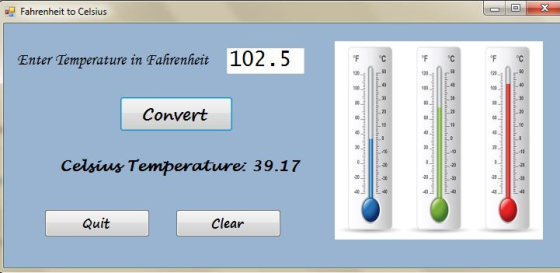
Sample Run:
Add Answer to:
C#:
Write a program that converts Farenheit
values to Centigrade. Include a text box for
input,...
Write a program that takes in a line of text as input, and outputs that line of text in reverse.
Write a program that takes in a line of text as input, and outputs that line of text in reverse. The program repeats, ending when the user enters "Quit", "quit", or "q" for the line of text.Ex: If the input is:Hello there Hey quitthen the output is:ereht olleH yeHThere is a mistake in my code I can not find. my output is : ereht olleH ereht olleHyeHHow can I fix this?I saw some people use void or the function reverse but we didnt...
Write a C++ program to solve: The completed program should include the following: —Program input and...
 Write a C++ program to solve:
The completed program should include the following:
—Program input and output
—Allow the user to input the starting, stopping and increment
values for the insulation thickness and the air temperature. Also,
at the end of the program, provide an opportunity for the user to
use the program again without having to re-execute the program (ie.
Ask them if they want to use the program again).
—your program must find and output the value of...
Write a C++ program to solve:
The completed program should include the following:
—Program input and output
—Allow the user to input the starting, stopping and increment
values for the insulation thickness and the air temperature. Also,
at the end of the program, provide an opportunity for the user to
use the program again without having to re-execute the program (ie.
Ask them if they want to use the program again).
—your program must find and output the value of...
(c++) Write a program that converts a positive integer into the Roman number system.(c++) Roman numbers....
(c++) Write a program that converts a positive integer into the Roman number system.(c++) Roman numbers. Write a program that converts a positive integer into the Roman number system. The Roman number system has digits I 1 V 5 X 10 L 50 C 100 D 500 M 1,000 Numbers are formed according to the following rules. (1) Only numbers up to 3,999 are represented. (2) As in the decimal system, the thousands, hundreds, tens, and ones are expressed separately....
(Java) HELP! Create a program that will ask the user to enter their first name and...
(Java) HELP! Create a program that will ask the user to enter their first name and their favorite number. Ask the user if they would like the information repeated back to them. If they type "Y" display the answers back to them. If they type anything else, display the word "Goodbye". An example of what your output window should look like is below. The system-generated output is in red. The user-provided input is in green. (Your actual program will only...
C++: Write a C++ program with user input, output and using inheritance. Please include comments in...
C++: Write a C++ program with user input, output and using inheritance. Please include comments in your code.
Write a Java program to read customer details from an input text file corresponding to problem...
Write a Java program to read customer details from an input text file corresponding to problem under PA07/Q1, Movie Ticketing System The input text file i.e. customers.txt has customer details in the following format: A sample data line is provided below. “John Doe”, 1234, “Movie 1”, 12.99, 1.99, 2.15, 13.99 Customer Name Member ID Movie Name Ticket Cost Total Discount Sales Tax Net Movie Ticket Cost Note: if a customer is non-member, then the corresponding memberID field is empty in...
To write a C program (not C++) that converts numbers between Decimal and IEEE-754 format and...
To write a C program (not C++) that converts numbers between Decimal and IEEE-754 format and vice versa. Inputs: Number in Decimal format (including special case of 0) Number in IEEE-754 format (including special cases) Output: Equivalent number in IEEE-754 format Equivalent number in Decimal Specification: The program converts a number based on choosing from a menu of choices, where each choice calls the appropriate procedure, where the choices are: Decimal to IEEE-754 conversion IEEE-754 to Decimal conversion Quit program...
1. Specification Write a C program to implement a simple calculator that accepts input in the...
1. Specification Write a C program to implement a simple calculator that accepts input in the following format and displays the result of the computation: calc [operand_1] [operator] [operand_2] The operands operand_1 and operand_2 are non-negative integers. The operator is one of the following: addition (+), subtraction (-), multiplication (x), division (/) and modulo (%). Note: For the multiplication operator, use letter ‘x’. If you use the asterisk ‘*’, your program will not work properly 2. Implementation • The program...
Write a program that reverses a text file by using a stack. The user interface must...
Write a program that reverses a text file by using a stack. The user interface must consist of 2 list boxes and 3 buttons. The 3 buttons are: Read - reads the text file into list box 1. Reverse - reverses the items in list box 1 by pushing them onto stack 1, then popping them from stack 1 (in the reverse order) and adding them to list box 2. Write - writes the contents of list box 2 to...
In C++ Write a program that will calculate the cost of a phone call as follows:...
In C++ Write a program that will calculate the cost of a phone call as follows: The first 10 minutes are charged at a flat rate of $0.99 for the entire 10 minutes (Not 99 cents a minute - but 99 cents for the first 10 minutes total). Every minute after the initial 10 minutes will be charged at $0.10 per minute. Input the number of minutes talked as an integer. Using an IF/ELSE structure, check for an entry of...
 Write a C++ program to solve:
The completed program should include the following:
—Program input and output
—Allow the user to input the starting, stopping and increment
values for the insulation thickness and the air temperature. Also,
at the end of the program, provide an opportunity for the user to
use the program again without having to re-execute the program (ie.
Ask them if they want to use the program again).
—your program must find and output the value of...
Write a C++ program to solve:
The completed program should include the following:
—Program input and output
—Allow the user to input the starting, stopping and increment
values for the insulation thickness and the air temperature. Also,
at the end of the program, provide an opportunity for the user to
use the program again without having to re-execute the program (ie.
Ask them if they want to use the program again).
—your program must find and output the value of...
Most questions answered within 3 hours.
-
Where is the error in this code sequence?
String s1 = "Hello";
String s2 = "ello";...
asked 10 months ago -
Financial data for Joel de Paris, Inc., for last year
follow:
Joel de Paris, Inc.
Balance...
asked 10 months ago -
Consider this reaction:
Al2(SO4)3 (aq)+ BaCl3
(aq) Al2Cl6 (aq)- +
3BaSO4(s) . What is the...
asked 10 months ago -
Suppose that Savneet is considering increasing her
recent random sample from 20 car rentals to 40...
asked 10 months ago -
Trucks arrive at an unloading terminal at an average rate of 120
per hour.
Trucks arrive...
asked 10 months ago -
Why are methanol and ethanol completely soluble in water while
octanol is not very little soluble....
asked 10 months ago -
A facilities manager at a university reads in a research report
that the mean amount of...
asked 10 months ago -
When the CuSO4 is rehydrated by adding water to the anhydrous
compound, is this an endothermic...
asked 10 months ago -
A ray of sunlight is passing from diamond into crown glass; the
angle of incidence is...
asked 10 months ago -
A block of mass 0.249 kg is placed on top of a light, vertical
spring of...
asked 10 months ago -
how do the kidneys compensate in the presences of acidosis
a) trigger hyperventilate
b) reserve acid...
asked 10 months ago -
Question 501 pts
The rental rate of capital to the firm increases. Which of the
following...
asked 10 months ago