I need to implement game logic for tic tac toe in this code. Can someone help...
I need to implement game logic for tic tac toe in this code. Can someone help me. It just needs to be a a player vs player again and ask if you want to play again.


import javax.swing.*;
import java.awt.*;
import java.awt.event.MouseAdapter;
import java.awt.event.MouseEvent;
import java.awt.event.MouseListener;

public class TicTacToe {
    public static void main(String[] args)
    {
        JFrame frame = new JFrame(" TicTacToe");
        frame.setDefaultCloseOperation(JFrame.EXIT_ON_CLOSE);
        frame.setSize(290, 300);
        Board board = new Board();
        frame.add(board);
        frame.setResizable(false);
        frame.setVisible(true);

    }
}

class Board extends JComponent {
    private int w = 265, h = 265;
    char player = 'X';

    public Board(){
        addMouseListener(new MouseAdapter() {
            @Override
            public void mousePressed(MouseEvent me) {
                int x = me.getX();
                int y = me.getY();

                int sideWidth = w / 3;
                int sideHeight = h / 3;

                int a = x / sideWidth;
                int b = y / sideHeight;

                int xStart = sideWidth * a + 10;
                int yStart = sideHeight * b + + sideHeight - 10;

                Graphics g = getGraphics();
                g.setFont(new Font("monospaced", Font.PLAIN, 110));

                g.drawString(player + "", xStart, yStart);
                if (player == 'X') {
                    player = 'O';
                } else {
                    player = 'X';
                }

                if
            }

        });

    }


    public void paint(Graphics g) {
        g.drawLine(90, 0, 90, 300);
        g.drawLine(185, 0, 185, 300);
        g.drawLine(0, 85, 300, 85);
        g.drawLine(0, 175, 300, 175);

    }
}
Homework Answers
import java.applet.*;
import java.awt.*;
import java.awt.event.*;
/*
<applet code="GameEx2" height=500 width=500>
</applet>
*/
public class GameEx2 extends Applet implements
ActionListener{
public void paint(Graphics g){
g.setColor(Color.blue);
g.fillOval(40, 180, 80, 80);
g.setColor(Color.red);
g.fillOval(380, 180, 80, 80);
g.setColor(Color.white);
g.drawString("P1",73,225);
g.drawString("P2",415,225);
g.setColor(Color.red);
g.drawString("Warning : Most
Addictable Game!",170,50);
}
Button a1,a2,a3,a4,a5,a6,a7,a8,a9,ref;
Label l1 = new Label("Tic Tac Toe ");
Font f = new Font("Verdana",Font.BOLD,15);
int i=1;
public void init(){
GridBagLayout gbl = new GridBagLayout();
GridBagConstraints gbc = new
GridBagConstraints();
setLayout(gbl);
gbc.gridx = 1;
gbc.gridy = 4;
gbc.gridwidth=3;
gbc.ipadx = 30;
gbc.ipady = 30;
l1.setFont(f);
add(l1,gbc);
a1 = new Button(" ");
gbc.gridx=0;
gbc.gridy=0;
gbc.gridwidth=1;
a1.setPreferredSize(new Dimension(50,40));
a1.setBackground(Color.lightGray);
add(a1,gbc);
a1.addActionListener(this);
a2 = new Button(" ");
gbc.gridx=1;
gbc.gridy=0;
gbc.gridwidth=1;
a2.setPreferredSize(new Dimension(50,40));
a2.setBackground(Color.lightGray);
add(a2,gbc);
a2.addActionListener(this);
a3 = new Button(" ");
gbc.gridx=2;
gbc.gridy=0;
gbc.gridwidth=1;
a3.setPreferredSize(new Dimension(50,40));
a3.setBackground(Color.lightGray);
add(a3,gbc);
a3.addActionListener(this);
a4 = new Button(" ");
gbc.gridx=0;
gbc.gridy=1;
gbc.gridwidth=1;
a4.setPreferredSize(new Dimension(50,40));
a4.setBackground(Color.lightGray);
add(a4,gbc);
a4.addActionListener(this);
a5 = new Button(" ");
gbc.gridx=1;
gbc.gridy=1;
gbc.gridwidth=1;
a5.setPreferredSize(new Dimension(50,40));
a5.setBackground(Color.lightGray);
add(a5,gbc);
a5.addActionListener(this);
a6 = new Button(" ");
gbc.gridx=2;
gbc.gridy=1;
gbc.gridwidth=1;
a6.setPreferredSize(new Dimension(50,40));
a6.setBackground(Color.lightGray);
add(a6,gbc);
a6.addActionListener(this);
a7 = new Button(" ");
gbc.gridx=0;
gbc.gridy=2;
gbc.gridwidth=1;
a7.setPreferredSize(new Dimension(50,40));
a7.setBackground(Color.lightGray);
add(a7,gbc);
a7.addActionListener(this);
a8 = new Button(" ");
gbc.gridx=1;
gbc.gridy=2;
gbc.gridwidth=1;
a8.setPreferredSize(new Dimension(50,40));
a8.setBackground(Color.lightGray);
add(a8,gbc);
a8.addActionListener(this);
a9 = new Button(" ");
gbc.gridx=2;
gbc.gridy=2;
gbc.gridwidth=1;
a9.setPreferredSize(new Dimension(50,40));
a9.setBackground(Color.lightGray);
add(a9,gbc);
a9.addActionListener(this);
ref = new Button("Refresh");
gbc.gridx=0;
gbc.gridy=5;
gbc.gridwidth=4;
ref.setPreferredSize(new Dimension(14,2));
ref.setBackground(Color.cyan);
add(ref,gbc);
ref.addActionListener(this);
}
public void actionPerformed(ActionEvent e){
if(e.getSource()==a1){
if(i%2==1){
a1.setBackground(Color.blue);
a1.setLabel("|||");
a1.setEnabled(false);
}
else{
a1.setBackground(Color.red);
a1.setLabel("---");
a1.setEnabled(false);
}
}
else if(e.getSource()==a2){
if(i%2==1){
a2.setBackground(Color.blue);
a2.setLabel("|||");
a2.setEnabled(false);
}
else{
a2.setBackground(Color.red);
a2.setLabel("---");
a2.setEnabled(false);
}
}
else if(e.getSource()==a3){
if(i%2==1){
a3.setBackground(Color.blue);
a3.setLabel("|||");
a3.setEnabled(false);
}
else{
a3.setBackground(Color.red);
a3.setLabel("---");
a3.setEnabled(false);
}
}
else if(e.getSource()==a4){
if(i%2==1){
a4.setBackground(Color.blue);
a4.setLabel("|||");
a4.setEnabled(false);
}
else{
a4.setBackground(Color.red);
a4.setLabel("---");
a4.setEnabled(false);
}
}
else if(e.getSource()==a5){
if(i%2==1){
a5.setBackground(Color.blue);
a5.setLabel("|||");
a5.setEnabled(false);
}
else{
a5.setBackground(Color.red);
a5.setLabel("---");
a5.setEnabled(false);
}
}
else if(e.getSource()==a6){
if(i%2==1){
a6.setBackground(Color.blue);
a6.setLabel("|||");
a6.setEnabled(false);
}
else{
a6.setBackground(Color.red);
a6.setLabel("---");
a6.setEnabled(false);
}
}
else if(e.getSource()==a7){
if(i%2==1){
a7.setBackground(Color.blue);
a7.setLabel("|||");
a7.setEnabled(false);
}
else{
a7.setBackground(Color.red);
a7.setLabel("---");
a7.setEnabled(false);
}
}
else if(e.getSource()==a8){
if(i%2==1){
a8.setBackground(Color.blue);
a8.setLabel("|||");
a8.setEnabled(false);
}
else{
a8.setBackground(Color.red);
a8.setLabel("---");
a8.setEnabled(false);
}
}
else if(e.getSource()==a9){
if(i%2==1){
a9.setBackground(Color.blue);
a9.setLabel("|||");
a9.setEnabled(false);
}
else{
a9.setBackground(Color.red);
a9.setLabel("---");
a9.setEnabled(false);
}
}
if(((a1.getLabel()==a2.getLabel()
&& a2.getLabel()==a3.getLabel()) &&
(a1.getLabel()!=" ")) || ((a4.getLabel()==a5.getLabel() &&
a5.getLabel()==a6.getLabel()) && (a4.getLabel()!=" ")) ||
((a7.getLabel()==a8.getLabel() &&
a8.getLabel()==a9.getLabel()) && (a7.getLabel()!="
"))){
if(i%2==1)
l1.setText("P1 Won");
else
l1.setText("P2 Won");
a1.setEnabled(false);
a2.setEnabled(false);
a3.setEnabled(false);
a4.setEnabled(false);
a5.setEnabled(false);
a6.setEnabled(false);
a7.setEnabled(false);
a8.setEnabled(false);
a9.setEnabled(false);
}
else
if(((a1.getLabel()==a4.getLabel() &&
a4.getLabel()==a7.getLabel()) && (a1.getLabel()!=" ")) ||
((a2.getLabel()==a5.getLabel() &&
a5.getLabel()==a8.getLabel()) && (a2.getLabel()!=" ")) ||
((a3.getLabel()==a6.getLabel() &&
a6.getLabel()==a9.getLabel()) && (a6.getLabel()!="
"))){
if(i%2==1)
l1.setText("P1 Won");
else
l1.setText("P2 Won");
a1.setEnabled(false);
a2.setEnabled(false);
a3.setEnabled(false);
a4.setEnabled(false);
a5.setEnabled(false);
a6.setEnabled(false);
a7.setEnabled(false);
a8.setEnabled(false);
a9.setEnabled(false);
}
else
if(((a1.getLabel()==a5.getLabel() &&
a5.getLabel()==a9.getLabel()) && (a1.getLabel()!=" ")) ||
((a3.getLabel()==a5.getLabel() &&
a5.getLabel()==a7.getLabel()) && (a3.getLabel()!="
"))){
if(i%2==1)
l1.setText("P1 Won");
else
l1.setText("P2 Won");
a1.setEnabled(false);
a2.setEnabled(false);
a3.setEnabled(false);
a4.setEnabled(false);
a5.setEnabled(false);
a6.setEnabled(false);
a7.setEnabled(false);
a8.setEnabled(false);
a9.setEnabled(false);
}
else if(i==9)
l1.setText("Match tied");
i++;
if(e.getSource()==ref){
i=1;
a1.setEnabled(true);
a2.setEnabled(true);
a3.setEnabled(true);
a4.setEnabled(true);
a5.setEnabled(true);
a6.setEnabled(true);
a7.setEnabled(true);
a8.setEnabled(true);
a9.setEnabled(true);
a1.setBackground(Color.lightGray);
a1.setLabel("
");
a2.setBackground(Color.lightGray);
a2.setLabel("
");
a3.setBackground(Color.lightGray);
a3.setLabel("
");
a4.setBackground(Color.lightGray);
a4.setLabel("
");
a5.setBackground(Color.lightGray);
a5.setLabel("
");
a6.setBackground(Color.lightGray);
a6.setLabel("
");
a7.setBackground(Color.lightGray);
a7.setLabel("
");
a8.setBackground(Color.lightGray);
a8.setLabel("
");
a9.setBackground(Color.lightGray);
a9.setLabel("
");
l1.setText("Tic
Tac Toe ");
}
}
}
---------Output-------------------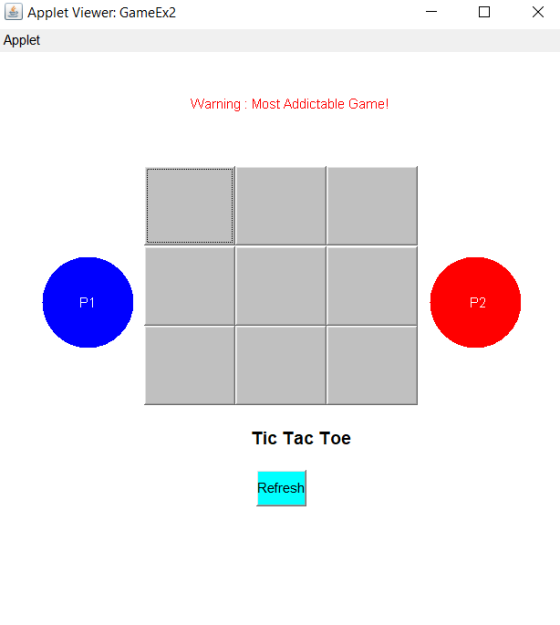
Add Answer to:
I need to implement game logic for tic tac toe in this code. Can someone help...
"Polygon Drawer Write an applet that lets the user click on six points. After the sixth point is clicked, the applet should draw a polygon with a vertex at each point the user clicked." import...
"Polygon Drawer Write an applet that lets the user click on six points. After the sixth point is clicked, the applet should draw a polygon with a vertex at each point the user clicked." import java.awt.*; import java.awt.event.MouseListener; import java.awt.event.MouseEvent; import java.applet.*; public class PolygonDrawer extends Applet implements MouseListener{ //Declares variables private int[] X, Y; private int ptCT; private final static Color polygonColor = Color.BLUE; //Color stuff public void init() { setBackground(Color.BLACK); addMouseListener(this); X = new int [450]; Y =...
JAVA TIC TAC TOE - please help me correct my code Write a program that will...
JAVA TIC TAC TOE - please help me correct my code Write a program that will allow two players to play a game of TIC TAC TOE. When the program starts, it will display a tic tac toe board as below | 1 | 2 | 3 | 4 | 5 | 6 | 7 | 8 | 9 The program will assign X to Player 1, and O to Player The program will ask Player 1, to...
In a game of Tic Tac Toe, two players take turns making an available cell in...
In a game of Tic Tac Toe, two players take turns making an available cell in a 3 x 3 grid with their respective tokens (either X or O). When one player has placed three tokens in a horizontal, vertical, or diagonal row on the grid, the game is over and that player has won. A stalemate occurs when all the cells on the grid have been filled with tokens and neither player has achieved a win. Write a program...
java ****Please fix this tic tac toe coding error *****following is the error I've found difficult...
java ****Please fix this tic tac toe coding error *****following is the error I've found difficult for me to fix. 1. Before I click the board, the grid doesn’t show up at all 2. It is not an automatic system.(if I click, it doesn’t move to next move) 3. if you click a button twice it shows o, x both 4. it is hard to close (you have to close the instruction) 5. instruction keep pops up (start->if you lose...
Please I need your help I have the code below but I need to add one...
Please I need your help I have the code below but I need to add one thing, after player choose "No" to not play the game again, Add a HELP button or page that displays your name, the rules of the game and the month/day/year when you finished the implementation. import java.awt.*; import java.awt.event.*; import java.awt.geom.*; import javax.swing.*; import javax.swing.event.*; import java.util.Random; public class TicTacToe extends JFrame implements ChangeListener, ActionListener { private JSlider slider; private JButton oButton, xButton; private Board...
In a game of Tic Tac Toe, two players take turns making an available cell in...
In a game of Tic Tac Toe, two players take turns making an available cell in a 3 x 3 grid with their respective tokens (either X or O). When one player has placed three tokens in a horizontal, vertical, or diagonal row on the grid, the game is over and that player has won. A stalemate occurs when all the cells on the grid have been filled with tokens and neither player has achieved a win. Write a program...
In a game of Tic Tac Toe, two players take turns making an available cell in...
In a game of Tic Tac Toe, two players take turns making an available cell in a 3 x 3 grid with their respective tokens (either X or O). When one player has placed three tokens in a horizontal, vertical, or diagonal row on the grid, the game is over and that player has won. A stalemate occurs when all the cells on the grid have been filled with tokens and neither player has achieved a win. Write a program...
Tic Tac Toe Game: Help, please. Design and implement a console based Tic Tac Toe game....
Tic Tac Toe Game: Help, please. Design and implement a console based Tic Tac Toe game. The objective of this project is to demonstrate your understanding of various programming concepts including Object Oriented Programming (OOP) and design. Tic Tac Toe is a two player game. In your implementation one opponent will be a human player and the other a computer player. ? The game is played on a 3 x 3 game board. ? The first player is known as...
This is my code for a TicTacToe game. However, I don't know how to write JUnit...
This is my code for a TicTacToe game. However, I don't know how to write JUnit tests. Please help me with my JUnit Tests. I will post below what I have so far. package cs145TicTacToe; import java.util.Scanner; /** * A multiplayer Tic Tac Toe game */ public class TicTacToe { private char currentPlayer; private char[][] board; private char winner; /** * Default constructor * Initializes the board to be 3 by 3 and...
Hi, I am a student in college who is trying to make a tic tac toe...
Hi, I am a student in college who is trying to make a tic tac toe game on Java. Basically, we have to make our own game, even ones that already exist, on Java. We also have to implement an interface, that I have no idea exactly. The professor also stated we need at least 2 different data structures and algorithms for the code. The professor said we could use code online, we'd just have to make some of our...
Most questions answered within 3 hours.
-
Where is the error in this code sequence?
String s1 = "Hello";
String s2 = "ello";...
asked 10 months ago -
Financial data for Joel de Paris, Inc., for last year
follow:
Joel de Paris, Inc.
Balance...
asked 10 months ago -
Consider this reaction:
Al2(SO4)3 (aq)+ BaCl3
(aq) Al2Cl6 (aq)- +
3BaSO4(s) . What is the...
asked 10 months ago -
Suppose that Savneet is considering increasing her
recent random sample from 20 car rentals to 40...
asked 10 months ago -
Trucks arrive at an unloading terminal at an average rate of 120
per hour.
Trucks arrive...
asked 10 months ago -
Why are methanol and ethanol completely soluble in water while
octanol is not very little soluble....
asked 10 months ago -
A facilities manager at a university reads in a research report
that the mean amount of...
asked 10 months ago -
When the CuSO4 is rehydrated by adding water to the anhydrous
compound, is this an endothermic...
asked 10 months ago -
A ray of sunlight is passing from diamond into crown glass; the
angle of incidence is...
asked 10 months ago -
A block of mass 0.249 kg is placed on top of a light, vertical
spring of...
asked 10 months ago -
how do the kidneys compensate in the presences of acidosis
a) trigger hyperventilate
b) reserve acid...
asked 10 months ago -
Question 501 pts
The rental rate of capital to the firm increases. Which of the
following...
asked 10 months ago