I have a button that increases by one each time it is pressed. I'm still confused...
I have a button that increases by one each time it is pressed. I'm still confused on how to position things. If I wanted to move this to the middle right of the page, how would I do that? Here's my code:
<html>
<head>
    <title>Counter</title>
</head>
<body>
    <div id="counter"></div>
    <button onclick="increase()">Increase</button>

<script>
    var counter = 0;
    var counter_div = document.getElementById('counter');
    counter_div.innerText = counter;
    function increase() {
        counter_div.innerText = ++counter;
        return false;
    }
</script>
</body>
</html>Homework Answers
Please find the code below:::::
Left margin will move the content to the right side as per the requirement. Increasing it's value will move the data to right side.
<html>
<head>
<title>Counter</title>
</head>
<body leftmargin="500px">
<div id="counter"></div>
<button onclick="increase()">Increase</button>
<script>
var counter = 0;
var counter_div = document.getElementById('counter');
counter_div.innerText = counter;
function increase() {
counter_div.innerText = ++counter;
return false;
}
</script>
</body>
</html>
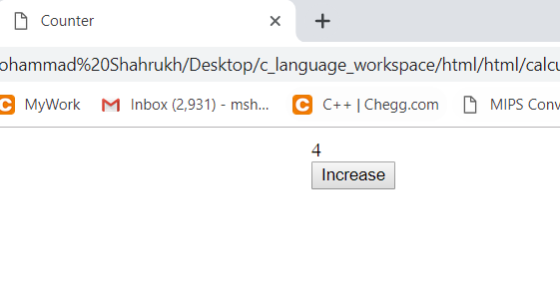
Add Answer to:
I have a button that increases by one each time it is pressed.
I'm still confused...
I created an Html with tabs, then how do I import the constant character content of...
I created an Html with tabs, then how do I import the constant character content of a JS into one of these tabs without editing that JS file? here is my page: <!DOCTYPE html> <html> <body> <div id="main"> <span class="tab"> <button class="current">News</button> <button>Create</button> <button onclick="about()">About</button> <button>Login</button> </span> <div class="con" style="display: block"> For news content</div> <div class="con">For create content</div> <div class="con" id="about">For about content</div> </div> </body> <script type="text/javascript" src='strings.js'></script> <script> var box = document.getElementById('main'); var btns = document.getElementsByTagName('button'); var divs =...
<!DOCTYPE html> <html> <head> <!-- JavaScript 6th Edition Chapter 4 Hands-on Project 4-3 Author: Da...
<!DOCTYPE html> <html> <head> <!-- JavaScript 6th Edition Chapter 4 Hands-on Project 4-3 Author: Date: Filename: index.htm --> <meta charset="utf-8" /> <meta name="viewport" content="width=device-width, initial-scale=1.0" /> <title>Hands-on Project 4-3</title> <link rel="stylesheet" href="styles.css" /> <script src="modernizr.custom.05819.js"></script> </head> <body> <header> <h1> Hands-on Project 4-3 </h1> </header> <article> <div id="results"> <p id="resultsExpl"></p> <ul> <li id="item1"></li> <li id="item2"></li> <li id="item3"></li> <li id="item4"></li> <li id="item5"></li> </ul> </div> <form> <fieldset> <label for="placeBox" id="placeLabel"> Type the name of a place, then click Submit: </label> <input type="text" id="placeBox"...
I have some code for HTML/Javascript but I need to change it up a bit. Heres...
I have some code for HTML/Javascript but I need to change it up a bit. Heres the assignment and what I have. The part in the bold is what I need help with. I need a button called new timer for when it reaches zero... Thank you. Assignment For this assignment, you will write a timer application in HTML and JavaScript. Your HTML document should contain the following elements/features: HTML tags: An <input> tag labeled "Timer Duration" with the initial...
HTML Canvas: I have given my small html + js mix code below. By this program-...
HTML Canvas: I have given my small html + js mix code below. By this program- I can just draw line, but after drawing any image I want to save the "image " on my desktop. I understand, I have to make a "button" to SAVE it and later if I want to load the picture, then I have to make a button on the webpage to "LOAD". But I am unable to understand the function I should write for...
How do i make my html show 10 results per page, and how do i make...
How do i make my html show 10 results per page, and how do i make the books clickable to show results about them? <!DOCTYPE html> <html> <head> <title>Google Books Search</title> <script src="https://code.jquery.com/jquery-2.1.4.min.js"> </script> <script src="https://ajax.googleapis.com/ajax/libs/jquery/2.2.2/jquery.min.js"></script> <style> body{ background:lightblue } .wrap{ max-width:400px; margin:auto; margin-top:10px; } .pagination, pagination-last{ float:left; } a{ text-decoration:none; padding:15px 20px; border:1px solid black; border-right:none; background:#f2f2f2; font-size:18px; font-weight:bold; } .pagination-last a{ border-right:1px solid black; } a:hover { background:orange; color;white; } </style> <!-- <script src="js/main.js"></script> --> <script> function B_Search()...
I am trying to create a slide show using JavaScript. This is what I have so...
I am trying to create a slide show using JavaScript. This is what I have so far: HTML: <!DOCTYPE html> <html lang="en"> <head> <meta charset="utf-8"> <title>Slide Show</title> <link rel="stylesheet" href="main.css"> <script src="http://html5shiv.googlecode.com/svn/trunk/html5.js"></script> <script src="slide_show.js"></script> </head> <body> <section> <h1>Fishing Slide Show</h1> <ul id="image_list"> <li><a href="images/casting1.jpg" title="Casting on the Upper Kings"></a></li> <li><a href="images/casting2.jpg" title="Casting on the Lower Kings"></a></li> <li><a href="images/catchrelease.jpg" title="Catch and Release on the Big Horn"></a></li> <li><a href="images/fish.jpg" title="Catching on the South Fork"></a></li> <li><a href="images/lures.jpg" title="The Lures for Catching"></a></li> </ul>...
I am working on a normal javascript program where i have to take two names and...
I am working on a normal javascript program where i have to take two names and put them in array and print out in sorted order.But,when the user clicks the print button it should show the output,but if user clicks second time,it should start again(basically reload the page).I have done the part about userinput and sorting and printing,but couldn't get the function of when user clicks button second time. <!DOCTYPE html> <html> <body> <input type="text" id="Name1" value=""><br> <input type="text" id="Name2"...
Could you please help me write a Javascript code that will show a smiley face picture...
Could you please help me write a Javascript code that will show a smiley face picture when I click the button. The picture should not display until the button is pressed. Here is my attempt at the code. It does not work. Please keep the code as simple as you can as I am new to coding. Please also use the <div> tag if possible, onclick and use the getElementById. Thank you <html> <body> <img id="exampleImage" src="smileyFace.png" /> <button onclick="pushButton()">Try...
use the sample html file below with a submit button to modify the style of the...
use the sample html file below with a submit button to modify the style of the paragraph text through JavaScript code. By clicking on the button, the font, the font size, and the color of the paragraph text will be changed. <!DOCTYPE html> · <html> · <head> · <meta charset=utf-8 /> · <title>Change Paragraph Text</title> · </head> · <body> · <p id ='text'>I’m going to change this text, I hope.</p> · <div> · <button id="jschange" · onclick="js_style()">Style</button> · </div> · </body> · </html>
How can I connect the html forms to php --> mysql database <!DOCTYPE html> <html lang="en">...
How can I connect the html forms to php --> mysql database <!DOCTYPE html> <html lang="en"> <head> <meta charset="UTF-8"> <title>Title</title> </head> <body> <h2> <center> Average: </h2> <h3> <center> Rate the following: </h2> <h3> <center> Rating Criteria: <br> Developing (0-5), Competent (6-10), Accomplished (10-15); </h3> <center> Judge Name: <input type="text" id="judge"> <br> <br> <center> 1. Articulate requirements and design of the project: <input type="text" id="num1"> <br> <br> 2. Plan the solution and implement the project: <input type="text" id="num2"> <br> <br> 3....
Most questions answered within 3 hours.
-
Where is the error in this code sequence?
String s1 = "Hello";
String s2 = "ello";...
asked 10 months ago -
Financial data for Joel de Paris, Inc., for last year
follow:
Joel de Paris, Inc.
Balance...
asked 10 months ago -
Consider this reaction:
Al2(SO4)3 (aq)+ BaCl3
(aq) Al2Cl6 (aq)- +
3BaSO4(s) . What is the...
asked 10 months ago -
Suppose that Savneet is considering increasing her
recent random sample from 20 car rentals to 40...
asked 10 months ago -
Trucks arrive at an unloading terminal at an average rate of 120
per hour.
Trucks arrive...
asked 10 months ago -
Why are methanol and ethanol completely soluble in water while
octanol is not very little soluble....
asked 10 months ago -
A facilities manager at a university reads in a research report
that the mean amount of...
asked 10 months ago -
When the CuSO4 is rehydrated by adding water to the anhydrous
compound, is this an endothermic...
asked 10 months ago -
A ray of sunlight is passing from diamond into crown glass; the
angle of incidence is...
asked 10 months ago -
A block of mass 0.249 kg is placed on top of a light, vertical
spring of...
asked 10 months ago -
how do the kidneys compensate in the presences of acidosis
a) trigger hyperventilate
b) reserve acid...
asked 10 months ago -
Question 501 pts
The rental rate of capital to the firm increases. Which of the
following...
asked 10 months ago