JAVA Please debug. Has 2 errors. Thanks ---------------------------------------- import javax.swing.*; public class UseCustomerAccount { public...
JAVA
Please debug. Has 2 errors. Thanks
----------------------------------------
import javax.swing.*;
public class UseCustomerAccount
{
public static void main(String[] args)
{
int num;
double balance;
String input;
input =
JOptionPane.showInputDialog(null, "Enter an account number");
num =
Integer.parseInt(input);
input =
JOptionPane.showInputDialog(null, "Enter a balance due");
balance =
Double.parseDouble(input);
try
{
CustomerAccount ca = new CustomerAccount(num, balance);
JOptionPane.showMessageDialog(null, "Customer #" + num + " has a
balance of $" + balance);
}
catch(HighBalanceException hbe)
{
JOptionPane.showMessageDialog(null, "Customer #" + num + " has a
balance of $" + balance + " which is higher than the credit
limit");
}
}
}
public class CustomerAccount
{
private int acctNum;
private double balance;
public static double HIGH_CREDIT_LIMIT =
20000.00;
public CustomerAccount(int num, double bal)
throws HighBalanceException
{
acctNum = num;
balance = bal;
if(balance >
HIGH_CREDIT_LIMIT)
{
throw(new HighBalanceException());
}
}
}
public class HighBalanceException throws
UseCustomerAccount
{
public HighBalanceException()
{
super("Customer balance
is high");
}
}
Homework Answers
Correct Code:
CustomerAccount.java
public class CustomerAccount
{
private int acctNum;
private double balance;
public static double HIGH_CREDIT_LIMIT = 20000.00;
public CustomerAccount(int num, double bal) throws
HighBalanceException
{
acctNum = num;
balance = bal;
if(balance > HIGH_CREDIT_LIMIT)
{
throw(new HighBalanceException());
}
}
}
HighBalanceException.java
public class HighBalanceException extends Exception
{
public HighBalanceException()
{
super("Customer balance is high");
}
}
UseCustomerAccount.java
import javax.swing.*;
public class UseCustomerAccount
{
public static void main(String[] args)
{
int num;
double balance;
String input;
input = JOptionPane.showInputDialog(null, "Enter an account
number");
num = Integer.parseInt(input);
input = JOptionPane.showInputDialog(null, "Enter a balance
due");
balance = Double.parseDouble(input);
try
{
CustomerAccount ca = new CustomerAccount(num, balance);
JOptionPane.showMessageDialog(null, "Customer #" + num + " has a
balance of $" + balance);
}
catch(HighBalanceException hbe)
{
JOptionPane.showMessageDialog(null, "Customer #" + num + " has a
balance of $" + balance + " which is higher than the credit
limit");
}
}
}


if you like the answer please provide a thumbs up.
Add Answer to:
JAVA
Please debug. Has 2 errors. Thanks
----------------------------------------
import javax.swing.*;
public class UseCustomerAccount
{
public...
This is the source code: Please incorporate the Exception Handling import javax.swing.JOptionPane; import java.awt.*; public class...
 This is the source code: Please incorporate the Exception
Handling
import javax.swing.JOptionPane;
import java.awt.*;
public class GuessingGame {
public static void main(String[] args) {
int computerNumber = (int) (Math.random() * 10 + 1);
System.out.println("The correct guess would be " +
computerNumber);
int userAnswer = 0;
int count = 0;
while (computerNumber != userAnswer) {
count++;
String response = JOptionPane.showInputDialog(null,
"Enter a guess between 1 and 10");
userAnswer = Integer.parseInt(response);
String result = null;
if (userAnswer == computerNumber) {
result =...
This is the source code: Please incorporate the Exception
Handling
import javax.swing.JOptionPane;
import java.awt.*;
public class GuessingGame {
public static void main(String[] args) {
int computerNumber = (int) (Math.random() * 10 + 1);
System.out.println("The correct guess would be " +
computerNumber);
int userAnswer = 0;
int count = 0;
while (computerNumber != userAnswer) {
count++;
String response = JOptionPane.showInputDialog(null,
"Enter a guess between 1 and 10");
userAnswer = Integer.parseInt(response);
String result = null;
if (userAnswer == computerNumber) {
result =...
// Arithmetic2.java - This program performs arithmetic, ( +. -, *. /, % ) on two...
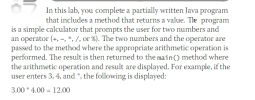 // Arithmetic2.java - This program performs arithmetic, ( +. -, *. /, % ) on two numbers
// Input: Interactive.
// Output: Result of arithmetic operation
import javax.swing.*;
public class Arithmetic2
{
public static void main(String args[])
{
double numberOne, numberTwo;
String numberOneString, numberTwoString;
String operation;
double result;
numberOneString = JOptionPane.showInputDialog("Enter the first number: ");
numberOne = Double.parseDouble(numberOneString);
numberTwoString = JOptionPane.showInputDialog("Enter the second number: ");
numberTwo = Double.parseDouble(numberTwoString);
operation = JOptionPane.showInputDialog("Enter an operator (+.-.*,/,%): ");
// Call performOperation method here...
// Arithmetic2.java - This program performs arithmetic, ( +. -, *. /, % ) on two numbers
// Input: Interactive.
// Output: Result of arithmetic operation
import javax.swing.*;
public class Arithmetic2
{
public static void main(String args[])
{
double numberOne, numberTwo;
String numberOneString, numberTwoString;
String operation;
double result;
numberOneString = JOptionPane.showInputDialog("Enter the first number: ");
numberOne = Double.parseDouble(numberOneString);
numberTwoString = JOptionPane.showInputDialog("Enter the second number: ");
numberTwo = Double.parseDouble(numberTwoString);
operation = JOptionPane.showInputDialog("Enter an operator (+.-.*,/,%): ");
// Call performOperation method here...
Java Programming --- complete the given classes DeLand Space Car Dealer needs a new program for...
Java Programming --- complete the given classes DeLand Space Car Dealer needs a new program for their inventory management system. The program needs the following classes: A main class (SpaceCarDealer.java) that includes the main method and GUI. Two instantiable classes: CarDealer.java o Variables to store the dealer name, and the carsOnLot array in Car type. o A constructor to initialize the name variable with the given dealer name. o An accessor method to return the name of the dealer. o...
Please help, Array does not print properly. I need to print out the 8 class numbers...
Please help, Array does not print properly. I need to print out the 8 class numbers entered by the user ! Java only using J option pane, you cannot use ulti or anything else only J option pane Program compiles but does not print the array correctly! import javax.swing.JOptionPane; public class programtrial { public static void main(String[] args) { int newclass = 0; int countclass = 0; final int class_Max = 8; int[] classarray =...
I'm attempting to convert ch object array to double array public void calculateSalesPrice() { double salePrice[]...
I'm attempting to convert ch object array to double array public void calculateSalesPrice() { double salePrice[] = new double[ch.length]; int p = 0; for (int i = 0; i < ch.length; i += 3) { p = i + 1; for(int j = 0;j } } error message:items.java:16: error: cannot find symbol for(int j = 0;j ^ symbol: variable length location: class Object items.java:17: error: array required, but Object found salePrice[j] = (double full program import java.io.File; import java.util.Scanner; import...
There 2 parts to complete: import javax.swing.*; import java.awt.event.*; import java.awt.*; public class Q4 extends JFrame...
There 2 parts to complete: import javax.swing.*; import java.awt.event.*; import java.awt.*; public class Q4 extends JFrame { private int xPos, yPos; public Q4() { JPanel drawPanel = new JPanel() { @Override public void paintComponent(Graphics g) { super.paintComponent(g); // paint parent's background //complete this: } }; drawPanel.addMouseListener(new MouseAdapter() { public void mouseClicked(MouseEvent evt) { //complete this :- set the xPos, yPos } }); setContentPane(drawPanel); setDefaultCloseOperation(JFrame.EXIT_ON_CLOSE); setTitle("Mouse-Click Demo"); setSize(400, 250); setVisible(true); } public static void main(String[] args) { SwingUtilities.invokeLater(new Runnable() {...
***This is a JAVA question*** ------------------------------------------------------------------------------------------------ import java.awt.*; import java.awt.event.*; import java.awt.image.*; import javax.imageio.*; import javax.swing.*;...
 ***This is a JAVA question***
------------------------------------------------------------------------------------------------
import java.awt.*;
import java.awt.event.*;
import java.awt.image.*;
import javax.imageio.*;
import javax.swing.*;
import javax.swing.event.*;
public class DrawingPanel implements ActionListener {
public static final int DELAY = 50; // delay between repaints in
millis
private static final String DUMP_IMAGE_PROPERTY_NAME =
"drawingpanel.save";
private static String TARGET_IMAGE_FILE_NAME = null;
private static final boolean PRETTY = true; // true to
anti-alias
private static boolean DUMP_IMAGE = true; // true to write
DrawingPanel to file
private int width, height; // dimensions...
***This is a JAVA question***
------------------------------------------------------------------------------------------------
import java.awt.*;
import java.awt.event.*;
import java.awt.image.*;
import javax.imageio.*;
import javax.swing.*;
import javax.swing.event.*;
public class DrawingPanel implements ActionListener {
public static final int DELAY = 50; // delay between repaints in
millis
private static final String DUMP_IMAGE_PROPERTY_NAME =
"drawingpanel.save";
private static String TARGET_IMAGE_FILE_NAME = null;
private static final boolean PRETTY = true; // true to
anti-alias
private static boolean DUMP_IMAGE = true; // true to write
DrawingPanel to file
private int width, height; // dimensions...
Help! Not sure how to create this java program to run efficiently. Current code and assignment...
Help! Not sure how to create this java program to run efficiently. Current code and assignment attached. Assignment :Write a class Movies.java that reads in a movie list file (movies.txt). The file must contain the following fields: name, genre, and time. Provide the user with the options to sort on each field. Allow the user to continue to sort the list until they enter the exit option. ---------------------------------------------------------- import java.util.*; import java.io.*; public class Movies { String movieTitle; String movieGenre;...
please debug this code: import java.util.Scanner; import edhesive.shapes.*; public class U2_L7_Activity_Three{ public static void main(String[] args){...
 please debug this code:
import java.util.Scanner;
import edhesive.shapes.*;
public class U2_L7_Activity_Three{
public static void main(String[] args){
Scanner scan = new Scanner(System.in);
double radius;
double length;
System.out.println("Enter radius:");
double r = scan.nextDouble();
System.out.println("Enter length:");
double l = scan.nextDouble();
System.out.println("Enter sides:");
int s = scan.nextInt();
Circle c = Circle(radius);
p = RegularPolygon(l , s);
System.out.println(c);
System.out.println(p);
}
}
Instructions Debug the code provided in the starter file so it does the following: • creates two Double objects named radius and length creates...
please debug this code:
import java.util.Scanner;
import edhesive.shapes.*;
public class U2_L7_Activity_Three{
public static void main(String[] args){
Scanner scan = new Scanner(System.in);
double radius;
double length;
System.out.println("Enter radius:");
double r = scan.nextDouble();
System.out.println("Enter length:");
double l = scan.nextDouble();
System.out.println("Enter sides:");
int s = scan.nextInt();
Circle c = Circle(radius);
p = RegularPolygon(l , s);
System.out.println(c);
System.out.println(p);
}
}
Instructions Debug the code provided in the starter file so it does the following: • creates two Double objects named radius and length creates...
Write a program in Java that prompts a user for Name and id number. and then...
Write a program in Java that prompts a user for Name and id number. and then the program outputs students GPA MAIN import java.util.StringTokenizer; import javax.swing.JOptionPane; public class Main { public static void main(String[] args) { String thedata = JOptionPane.showInputDialog(null, "Please type in Student Name. ", "Student OOP Program", JOptionPane.INFORMATION_MESSAGE); String name = thedata; Student pupil = new Student(name); //add code here ...
 This is the source code: Please incorporate the Exception
Handling
import javax.swing.JOptionPane;
import java.awt.*;
public class GuessingGame {
public static void main(String[] args) {
int computerNumber = (int) (Math.random() * 10 + 1);
System.out.println("The correct guess would be " +
computerNumber);
int userAnswer = 0;
int count = 0;
while (computerNumber != userAnswer) {
count++;
String response = JOptionPane.showInputDialog(null,
"Enter a guess between 1 and 10");
userAnswer = Integer.parseInt(response);
String result = null;
if (userAnswer == computerNumber) {
result =...
This is the source code: Please incorporate the Exception
Handling
import javax.swing.JOptionPane;
import java.awt.*;
public class GuessingGame {
public static void main(String[] args) {
int computerNumber = (int) (Math.random() * 10 + 1);
System.out.println("The correct guess would be " +
computerNumber);
int userAnswer = 0;
int count = 0;
while (computerNumber != userAnswer) {
count++;
String response = JOptionPane.showInputDialog(null,
"Enter a guess between 1 and 10");
userAnswer = Integer.parseInt(response);
String result = null;
if (userAnswer == computerNumber) {
result =...
 // Arithmetic2.java - This program performs arithmetic, ( +. -, *. /, % ) on two numbers
// Input: Interactive.
// Output: Result of arithmetic operation
import javax.swing.*;
public class Arithmetic2
{
public static void main(String args[])
{
double numberOne, numberTwo;
String numberOneString, numberTwoString;
String operation;
double result;
numberOneString = JOptionPane.showInputDialog("Enter the first number: ");
numberOne = Double.parseDouble(numberOneString);
numberTwoString = JOptionPane.showInputDialog("Enter the second number: ");
numberTwo = Double.parseDouble(numberTwoString);
operation = JOptionPane.showInputDialog("Enter an operator (+.-.*,/,%): ");
// Call performOperation method here...
// Arithmetic2.java - This program performs arithmetic, ( +. -, *. /, % ) on two numbers
// Input: Interactive.
// Output: Result of arithmetic operation
import javax.swing.*;
public class Arithmetic2
{
public static void main(String args[])
{
double numberOne, numberTwo;
String numberOneString, numberTwoString;
String operation;
double result;
numberOneString = JOptionPane.showInputDialog("Enter the first number: ");
numberOne = Double.parseDouble(numberOneString);
numberTwoString = JOptionPane.showInputDialog("Enter the second number: ");
numberTwo = Double.parseDouble(numberTwoString);
operation = JOptionPane.showInputDialog("Enter an operator (+.-.*,/,%): ");
// Call performOperation method here...
 ***This is a JAVA question***
------------------------------------------------------------------------------------------------
import java.awt.*;
import java.awt.event.*;
import java.awt.image.*;
import javax.imageio.*;
import javax.swing.*;
import javax.swing.event.*;
public class DrawingPanel implements ActionListener {
public static final int DELAY = 50; // delay between repaints in
millis
private static final String DUMP_IMAGE_PROPERTY_NAME =
"drawingpanel.save";
private static String TARGET_IMAGE_FILE_NAME = null;
private static final boolean PRETTY = true; // true to
anti-alias
private static boolean DUMP_IMAGE = true; // true to write
DrawingPanel to file
private int width, height; // dimensions...
***This is a JAVA question***
------------------------------------------------------------------------------------------------
import java.awt.*;
import java.awt.event.*;
import java.awt.image.*;
import javax.imageio.*;
import javax.swing.*;
import javax.swing.event.*;
public class DrawingPanel implements ActionListener {
public static final int DELAY = 50; // delay between repaints in
millis
private static final String DUMP_IMAGE_PROPERTY_NAME =
"drawingpanel.save";
private static String TARGET_IMAGE_FILE_NAME = null;
private static final boolean PRETTY = true; // true to
anti-alias
private static boolean DUMP_IMAGE = true; // true to write
DrawingPanel to file
private int width, height; // dimensions...
 please debug this code:
import java.util.Scanner;
import edhesive.shapes.*;
public class U2_L7_Activity_Three{
public static void main(String[] args){
Scanner scan = new Scanner(System.in);
double radius;
double length;
System.out.println("Enter radius:");
double r = scan.nextDouble();
System.out.println("Enter length:");
double l = scan.nextDouble();
System.out.println("Enter sides:");
int s = scan.nextInt();
Circle c = Circle(radius);
p = RegularPolygon(l , s);
System.out.println(c);
System.out.println(p);
}
}
Instructions Debug the code provided in the starter file so it does the following: • creates two Double objects named radius and length creates...
please debug this code:
import java.util.Scanner;
import edhesive.shapes.*;
public class U2_L7_Activity_Three{
public static void main(String[] args){
Scanner scan = new Scanner(System.in);
double radius;
double length;
System.out.println("Enter radius:");
double r = scan.nextDouble();
System.out.println("Enter length:");
double l = scan.nextDouble();
System.out.println("Enter sides:");
int s = scan.nextInt();
Circle c = Circle(radius);
p = RegularPolygon(l , s);
System.out.println(c);
System.out.println(p);
}
}
Instructions Debug the code provided in the starter file so it does the following: • creates two Double objects named radius and length creates...
Most questions answered within 3 hours.
-
Where is the error in this code sequence?
String s1 = "Hello";
String s2 = "ello";...
asked 11 months ago -
Financial data for Joel de Paris, Inc., for last year
follow:
Joel de Paris, Inc.
Balance...
asked 11 months ago -
Consider this reaction:
Al2(SO4)3 (aq)+ BaCl3
(aq) Al2Cl6 (aq)- +
3BaSO4(s) . What is the...
asked 11 months ago -
Suppose that Savneet is considering increasing her
recent random sample from 20 car rentals to 40...
asked 11 months ago -
Trucks arrive at an unloading terminal at an average rate of 120
per hour.
Trucks arrive...
asked 11 months ago -
Why are methanol and ethanol completely soluble in water while
octanol is not very little soluble....
asked 11 months ago -
A facilities manager at a university reads in a research report
that the mean amount of...
asked 11 months ago -
When the CuSO4 is rehydrated by adding water to the anhydrous
compound, is this an endothermic...
asked 11 months ago -
A ray of sunlight is passing from diamond into crown glass; the
angle of incidence is...
asked 11 months ago -
A block of mass 0.249 kg is placed on top of a light, vertical
spring of...
asked 11 months ago -
how do the kidneys compensate in the presences of acidosis
a) trigger hyperventilate
b) reserve acid...
asked 11 months ago -
Question 501 pts
The rental rate of capital to the firm increases. Which of the
following...
asked 11 months ago