Java Programming The following is about creating a class Fish and testing it. In every part,...
Java Programming
The following is about creating a class Fish and testing it. In
every part, correct any syntax errors
indicated by NetBeans until no such error messages.
(i) Create a class Fish with the attributes name and price. The
attributes are used to store the name
and the price of the fish respectively. Choose suitable types for
them. You can copy the class
Counter on p.17 of the unit and modify the content. Copy the
content of the file as the answers
to this part. No screen dump is recommended to minimize the file
size.
(ii) Create another class TestFish with a method main() to test the
class Fish. You can copy the
class TestCounter on p.42 and modify the content. In main(), create
a fish object fishA and
print the message "An object fishA of class Fish has been created".
Run the
program. Copy the content of the file and the output showing the
message as the answers to this
part.
(iii) Add a method setPrice() to the Fish class with appropriate
parameter(s) and return type to set
the price of the fish. Copy the content of the method as the
answers to this part.
(iv) Add another method getName() to the Fish class with
appropriate parameter(s) and return type
to get the name of the fish. Copy the content of the method as the
answers to this part. You should
create other setter/getter methods in your class file but no marks
are allocated for them since they
are similar to the ones here and in part (iii).
(v) Write another method increasePrice(double amount) of the Fish
class which increases the
price by amount. Copy the content of the method as the answers to
this part.
(vi) In the class TestFish, add the following before the end of
main():
• set the name of the fish object to "Salmon" using the method
setName();
• set the price to 98 using the method setPrice();
• increase the price by 3 using the method increasePrice();
• print the current price after getting it using the method
getPrice();
Run the program. Copy the content of the class and the output as
the answers to this part.
(c)
(i) Write a method isCheap() which does not have any parameters and
returns true if the price is
less than 30 and false otherwise. Copy the content of the method as
the answers to this part.
(ii) Write a method category() which returns the category of the
fish as a string using a switchcase
statement. The category of the fish is determined by the following
table.
Category price
"Expensive" not less than 90
"Medium" 30 to less than 90
"Cheap" less than 30
Copy the content of the method as the answers to this part.
(iii) Write a method generateBar(char ch) which prints price and a
simple graph formed by ch.
One character ch is printed for every value of 10 and rounding is
done on the remaining part. For
example, the call aFish.generateBar('*') generate the following
output:
33.8 ***
where aFish is an object of Fish with price being 33.8. You are
required to use a for loop to
generate the bar. Copy the content of the method as the answers to
this part.
(iv) Create another class TestFish2 with a method main() to test
the new methods in class Fish.
You need to perform the tasks:
• create a fish object fishB;
• set the price to 33.8 using the method setPrice() and set the
name to "Sardine" using an
appropriate method;
• make use of the methods getName() and isCheap(), print the name
and the result of calling
isCheap();
• make use of the method category(), print the category of
fishB;
• use the method generateBar() to print a simple graph of for fishB
using "*";
• create another fish object fishC.
Run the program. Copy the content of the class and the output as
the answers to this part.
Homework Answers
Explanation::
- Code in JAVA is given below
- Screenshots of the OUTPUT are given at the end of the code
Code in
JAVA::
Fish.java Code::
public class Fish {
private String name;
private double price;
public Fish() {
}
/**
* @return the name
*/
public String getName() {
return name;
}
/**
* @param name the name to set
*/
public void setName(String name) {
this.name = name;
}
/**
* @return the price
*/
public double getPrice() {
return price;
}
/**
* @param price the price to set
*/
public void setPrice(double price) {
this.price = price;
}
public void increasePrice(double amount) {
this.price=this.price+amount;
}
public boolean isCheap() {
if(this.price<30) {
return
true;
}
return false;
}
public String category() {
/**
* We can't use switch statement for
range values
**/
if(this.price>=90) {
return
"Expensive";
}else if(this.price>=30
&& this.price<90) {
return
"Medium";
}else {
return
"Cheap";
}
}
public void generateBar(char ch) {
int
barLength=(int)(this.price/10);
System.out.print(this.price+"
");
for(int i=1;i<=barLength;i++)
{
System.out.print(ch);
}
System.out.println();
}
}
TestFish.java::
public class TestFish {
public static void main(String[] args) {
Fish fishA = new Fish();
System.out.println("An object fishA
of class Fish has been created");
/**
* Setting the name
* */
fishA.setName("Salmon");
/**
* Setting the price
* */
fishA.setPrice(98);
/**
* Increasing the price by 3
* */
fishA.increasePrice(3);
/**
* Printing the current price
* */
System.out.println("Current price
is "+fishA.getPrice());
}
}
Output 1:
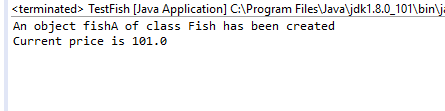
TestFish2.java Code::
public class TestFish2 {
public static void main(String[] args) {
Fish fishB = new Fish();
/**
* Setting the price
* */
fishB.setPrice(33.8);
/**
* Setting the name
**/
fishB.setName("Sardine");
/**
* Calling getName() and
isCheap()
* */
System.out.print(fishB.getName()+"
is ");
if(fishB.isCheap()) {
System.out.println("Cheap");
}else {
System.out.println("Not Cheap");
}
/**
* Printing category
* */
System.out.println("Category is
"+fishB.category());
/**
* Generating the bar
* */
fishB.generateBar('*');
}
}
OUTPUT::
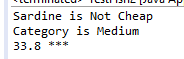
Please provide the feedback!!
Thank You!!
Add Answer to:
Java Programming
The following is about creating a class Fish and testing it. In
every part,...
JAVA The following is about creating a class Ruler and testing it. (i) Create a class...
JAVA The following is about creating a class Ruler and testing it. (i) Create a class Ruler with the attributes brand (which is a string) and length (an integer) which are used to store the brand and length of the ruler respectively. Write a constructor Ruler(String brand, int length) which assigns the brand and length appropriately. Write also the getter/setter methods of the two attributes. Save the content under an appropriate file name. Copy the content of the file as...
2. Create ONE java file in Dr Java according the specifications below: A. Create a Country...
 2. Create ONE java file in Dr Java according the specifications below: A. Create a Country class a. Each Country object of the Country class should know (state) i. its name ii. its area (in square miles) iii. its population b. Each Country object should be able to (behavior) i. set initial population (setter) ii. get density (number of people per square mile) (getter) iii. adjust the set population by some amount (setter) iv. provide its name, area, and population...
java This lab is intended to give you practice creating a class with a constructor method,...
java This lab is intended to give you practice creating a class with a constructor method, accessor methods, mutator methods, equals method , toString method and a equals method. In this lab you need to create two separate classes, one Student class and other Lab10 class. You need to define your instance variables, accessor methods, mutator methods, constructor, toString method and equals method in Student class. You need to create objects in Lab10 class which will have your main method...
JAVA /** * This class stores information about an instructor. */ public class Instructor { private...
JAVA /** * This class stores information about an instructor. */ public class Instructor { private String lastName, // Last name firstName, // First name officeNumber; // Office number /** * This constructor accepts arguments for the * last name, first name, and office number. */ public Instructor(String lname, String fname, String office) { lastName = lname; firstName = fname; officeNumber = office; } /** * The set method sets each field. */ public void set(String lname, String fname, String...
JAVA This PoD, builds off the Book class that you created on Monday (you may copy...
JAVA This PoD, builds off the Book class that you created on Monday (you may copy your previously used code). For today’s problem, you will add a new method to the class called lastName() that will print the last name of the author (you can assume there are only two names in the author name – first and last). You can use the String spilt (“\s”) method that will split the String by the space and will return an array...
Java language (a) Create a class HexEditor with a constructor which creates a 5x10 text area...
 Java language
(a) Create a class HexEditor with a constructor which creates a
5x10 text area in a Frame. Also add a pull-down menu with a menu
item "Load". Copy the class as the answer to this part.
(b) Create another class TestHexEditor with a main() method
which creates an object anEditor of the class HexEditor and
displays the frame in part (a) using setVisible(true). Copy the
class as the answer to this part.
(c) Make changes to the class...
Java language
(a) Create a class HexEditor with a constructor which creates a
5x10 text area in a Frame. Also add a pull-down menu with a menu
item "Load". Copy the class as the answer to this part.
(b) Create another class TestHexEditor with a main() method
which creates an object anEditor of the class HexEditor and
displays the frame in part (a) using setVisible(true). Copy the
class as the answer to this part.
(c) Make changes to the class...
Write a C++ program for the instructions below. Please read the instructions carefully and make sure they are followed correctly. and please put comment with code! Problem:2 1. Class Student Create...
 Write a C++ program for the instructions below. Please
read the instructions carefully and make sure they are followed
correctly.
and please put comment with code!
Problem:2 1. Class Student Create a "Hello C++! I love CS52" Program 10 points Create a program that simply outputs the text Hello C++!I love CS52" when you run it. This can be done by using cout object in the main function. 2. Create a Class and an Object In the same file as...
Write a C++ program for the instructions below. Please
read the instructions carefully and make sure they are followed
correctly.
and please put comment with code!
Problem:2 1. Class Student Create a "Hello C++! I love CS52" Program 10 points Create a program that simply outputs the text Hello C++!I love CS52" when you run it. This can be done by using cout object in the main function. 2. Create a Class and an Object In the same file as...
Book: - title: String - price: double +Book() +Book(String, double) +getTitle(): String +setTitle(String): void +getPrice(): double...
Book: - title: String - price: double +Book() +Book(String, double) +getTitle(): String +setTitle(String): void +getPrice(): double +setPrice(double): void +toString(): String The class has two attributes, title and price, and get/set methods for the two attributes. The first constructor doesn’t have a parameter. It assigns “” to title and 0.0 to price; The second constructor uses passed-in parameters to initialize the two attributes. The toString() method returns values for the two attributes. Notation: - means private, and + means public. 1....
Using your Dog class from earlier this week, complete the following: Create a new class called...
Using your Dog class from earlier this week, complete the following: Create a new class called DogKennel with the following: Instance field(s) - array of Dogs + any others you may want Contructor - default (no parameters) - will make a DogKennel with no dogs in it Methods: public void addDog(Dog d) - which adds a dog to the array public int currentNumDogs() - returns number of dogs currently in kennel public double averageAge() - which returns the average age...
Hello, I need some help creating this class in Java. This is for a larger project....
Hello, I need some help creating this class in Java. This is for a larger project. I am using Eclipse if that helps 1. Create a class named State that will store information about a state and provide methods to get, and set the data, and compare the states by several fields. a. Fields: Name, Capital City, Abbreviation, Population, Region, US House Seats b. Constructor c. Get and set methods for each field d. Compare method to compare State objects...
 2. Create ONE java file in Dr Java according the specifications below: A. Create a Country class a. Each Country object of the Country class should know (state) i. its name ii. its area (in square miles) iii. its population b. Each Country object should be able to (behavior) i. set initial population (setter) ii. get density (number of people per square mile) (getter) iii. adjust the set population by some amount (setter) iv. provide its name, area, and population...
 Java language
(a) Create a class HexEditor with a constructor which creates a
5x10 text area in a Frame. Also add a pull-down menu with a menu
item "Load". Copy the class as the answer to this part.
(b) Create another class TestHexEditor with a main() method
which creates an object anEditor of the class HexEditor and
displays the frame in part (a) using setVisible(true). Copy the
class as the answer to this part.
(c) Make changes to the class...
Java language
(a) Create a class HexEditor with a constructor which creates a
5x10 text area in a Frame. Also add a pull-down menu with a menu
item "Load". Copy the class as the answer to this part.
(b) Create another class TestHexEditor with a main() method
which creates an object anEditor of the class HexEditor and
displays the frame in part (a) using setVisible(true). Copy the
class as the answer to this part.
(c) Make changes to the class...
 Write a C++ program for the instructions below. Please
read the instructions carefully and make sure they are followed
correctly.
and please put comment with code!
Problem:2 1. Class Student Create a "Hello C++! I love CS52" Program 10 points Create a program that simply outputs the text Hello C++!I love CS52" when you run it. This can be done by using cout object in the main function. 2. Create a Class and an Object In the same file as...
Write a C++ program for the instructions below. Please
read the instructions carefully and make sure they are followed
correctly.
and please put comment with code!
Problem:2 1. Class Student Create a "Hello C++! I love CS52" Program 10 points Create a program that simply outputs the text Hello C++!I love CS52" when you run it. This can be done by using cout object in the main function. 2. Create a Class and an Object In the same file as...
Most questions answered within 3 hours.
-
Where is the error in this code sequence?
String s1 = "Hello";
String s2 = "ello";...
asked 11 months ago -
Financial data for Joel de Paris, Inc., for last year
follow:
Joel de Paris, Inc.
Balance...
asked 11 months ago -
Consider this reaction:
Al2(SO4)3 (aq)+ BaCl3
(aq) Al2Cl6 (aq)- +
3BaSO4(s) . What is the...
asked 11 months ago -
Suppose that Savneet is considering increasing her
recent random sample from 20 car rentals to 40...
asked 11 months ago -
Trucks arrive at an unloading terminal at an average rate of 120
per hour.
Trucks arrive...
asked 11 months ago -
Why are methanol and ethanol completely soluble in water while
octanol is not very little soluble....
asked 11 months ago -
A facilities manager at a university reads in a research report
that the mean amount of...
asked 11 months ago -
When the CuSO4 is rehydrated by adding water to the anhydrous
compound, is this an endothermic...
asked 11 months ago -
A ray of sunlight is passing from diamond into crown glass; the
angle of incidence is...
asked 11 months ago -
A block of mass 0.249 kg is placed on top of a light, vertical
spring of...
asked 11 months ago -
how do the kidneys compensate in the presences of acidosis
a) trigger hyperventilate
b) reserve acid...
asked 11 months ago -
Question 501 pts
The rental rate of capital to the firm increases. Which of the
following...
asked 11 months ago