do it in python 1. Import the proper libraries: Pandas and NumPy and create aliases pd,...
do it in python
1. Import the proper libraries: Pandas and NumPy and create aliases pd, np respectively.
2. Load sample data (car_loan.csv) into data frame: df
3. Export Pandas DataFrames to csv. Save file name as out.csv. hint: help(df.to_csv)
4. Run the command: df.info (). What do you see, how many columns? also what about
number of entries for each column
5. It is often the case where you change your column names or remove unnecessary
columns.
a. Change the following columns names:
Starting Balance: starting_balance
Interest Paid: interest_paid
Principal Paid: principal_paid
New Balance': new_balance
b. Remove the two columns “term”, and “Repayment”.
6. Run the command: interest_missing = df['interest_paid'].isna(), what do you see ?
7. Can you fix the problem in 6 above? hint: use the function df.loc.
property DataFrame.loc: Access a group of rows and columns by label(s) or a boolean
array.
8. Find the total = amount of interest paid over the course of the loan
9. Find the sum of all values across all columns
10. Convert Pandas DataFrames to NumPy arrays
11. Import the library pyplot from matplotlib and create alias plt
12. import seaborn library (wrapper of matplotlib) and create alias: sns
13. load data out.csv
14. use the loc property to find the values of the followings: month_numbe, interest_paid,
principal_paid.
For example: month_number = df.loc[:, 'Month'].values will return:
array([ 1, 2, 3, 4, 5, 6, 7, 8, 9, 10, 11, 12, 13, 14, 15, 16, 17,
18, 19, 20, 21, 22, 23, 24, 25, 26, 27, 28, 29, 30, 31, 32, 33, 34,
35, 36, 37, 38, 39, 40, 41, 42, 43, 44, 45, 46, 47, 48, 49, 50, 51,
52, 53, 54, 55, 56, 57, 58, 59, 60])
# The values attribute converts a column of values into a numpy array
15. Check the type of the month_number array?
16. Plot the interest paid vs the number of months.
17. On the same graph plot the principal paid vs the number of months
18. you can use plt.style.available to select an appropriate aesthetic styles for your figures.
Run the following command: plt.style.available, you should see a list of different styles.
19. Re-do 16 and 17 using the “plt.style.use('classic')”. What did you notice different?
20. Re-do 19 using the “plt.style.use(‘fivethirtyeight’)”. What did you notice different?
21. Re-do 19 using the “plt.style.use(‘seaborn’)”. What did you notice different?
22. Add legend to your figures. Add it to be "center right”.
23. Add markers and colors. The interest_paid in Black, and principal_paid in blue
24. Setting plot titles, labels choose font size of 12
a. Set xlabel and ylabel : x:Month, y: Dollars
b. Set Title: Interest and Principal Paid Each Month
25. Saving plots to files.
Homework Answers
ANSWER :
As per terms and conditions of Chegg, I am supposed to answer only the top four questions when multiple sub parts of the questions are given,
so i can answer only the first four questions for you, please post next 4 question again to be answered.
CODE:
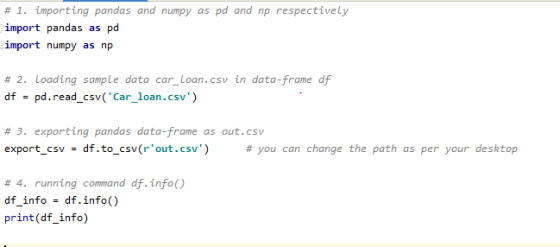
# 1. importing pandas and numpy as pd and np respectively
import pandas as pd
import numpy as np

# 2. loading sample data car_loan.csv in data-frame df
df = pd.read_csv('Car_loan.csv')

# 3. exporting pandas data-frame as out.csv
export_csv = df.to_csv(r'out.csv')      # you can change the path as per your desktop

# 4. running command df.info()
df_info = df.info()
print(df_info)
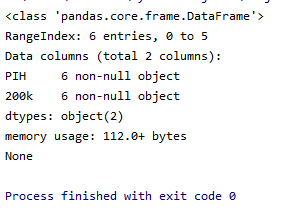
OUTPUT :
for part 4., I printed result of function df.info(), so we can see below in the screenshot it is showing
Data colums(total 2 columns)
6 entries
it is giving such answer because , the car_loan.csv file which i have taken as input contains such data
The data of car_loan.csv:
PIH,200k
FLWS,300k
FCCY,340k
SRCE,345k
VNEt,234k
tWOU,876K
JOBS,343K
when you will give path of your original car_loan.csv, this result will change.
please post next 4 questions again if you want them to be answered.
THANK YOU....!!!
Add Answer to:
do it in python
1. Import the proper libraries: Pandas and NumPy and create
aliases pd,...
Problem 2 using Python NumPy and Pandas libraries NOTES: Import NumPy as np and Pandas as...
Problem 2 using Python NumPy and Pandas libraries NOTES: Import NumPy as np and Pandas as pd Given the following piece of code to create a NumPy array, anIntArray: anIntArray = np.random.randint(5, 72, 48) Add Python code to convert this array into a Pandas series and then extract values stored at the positions 0, 5, 10, 15, 20 of the series.
PYTHON import numpy as np import pandas as pd import matplotlib.pyplot as plt from sklearn.linear_model import...
 PYTHON
import numpy as np
import pandas as pd
import matplotlib.pyplot as plt
from sklearn.linear_model import LinearRegression
from sklearn.linear_model import LogisticRegression
from sklearn.model_selection import train_test_split
Our goal is to create a linear regression model to estimate
values of ln_price using ln_carat as the only feature. We will now
prepare the feature and label arrays.
"carat" "cut" "color"
"clarity" "depth" "table"
"price" "x" "y" "z"
"1" 0.23 "Ideal" "E" "SI2" 61.5 55 326
3.95 3.98 2.43
"2" 0.21 "Premium" "E" "SI1"...
PYTHON
import numpy as np
import pandas as pd
import matplotlib.pyplot as plt
from sklearn.linear_model import LinearRegression
from sklearn.linear_model import LogisticRegression
from sklearn.model_selection import train_test_split
Our goal is to create a linear regression model to estimate
values of ln_price using ln_carat as the only feature. We will now
prepare the feature and label arrays.
"carat" "cut" "color"
"clarity" "depth" "table"
"price" "x" "y" "z"
"1" 0.23 "Ideal" "E" "SI2" 61.5 55 326
3.95 3.98 2.43
"2" 0.21 "Premium" "E" "SI1"...
Python Programming language. Complete the problems below using Jupyter Notebook. Problem Needs to be solved from...
Python Programming language. Complete the problems below using Jupyter Notebook. Problem Needs to be solved from number #1 link provided for the Data: -----> https://docs.google.com/spreadsheets/d/1TqhyxFKQlOHAyXpQBL-4C96kgZFBoMwUgE8-b33CqPQ/edit?usp=sharing PROBLEMS # 0.0 Import the libraries (pandas, matplotlib, and seaborn) Include the code line: %matplotlib inline #Include the code line: plt.style.use(“ggplot”) #Load the data using pandas #Inspect the data using head(), dtypes ANSWERD: import pandas as pd import matplotlib.pyplot as plt import seaborn as sns plt.style.use('ggplot') %matplotlib inline df = pd.read_csv() print(df.head()) print(df.dtypes) # 1...
Before you start For this homework, we will need to import some libraries. You need to...
Before you start For this homework, we will need to import some libraries. You need to execute the following cell only once; you don't need to copy this in every cell you run. In [ ]: import pandas import numpy from urllib.request import urlretrieve from matplotlib import pyplot %matplotlib inline #This library is needed for testing from IPython.display import set_matplotlib_close set_matplotlib_close(False) Introduction In this homework, you will work with data from the World Bank. The subject of study is...
This is my code: import numpy as np import pandas as pd import sys from keras.models...
This is my code: import numpy as np import pandas as pd import sys from keras.models import Sequential from keras.layers import Dense from sklearn.preprocessing import StandardScaler from keras.layers.normalization import BatchNormalization from keras.layers import Dropout file_full=pd.read_csv("/Users/anwer/Desktop/copy/FULL.csv") file_bottom=pd.read_csv("/Users/anwer/Desktop/copy/bottom.csv") train=[] train_targets=[] test=[] test_targets=[] p=[] q=[] # We will generate train data using 50% of full data and 50% of bottom data. #is train target for labeling ? yes for train data train_df = file_full[:len(file_full)//2] labels=[ 0 for i in range(len(file_full)//2)] train_df=train_df.append(file_bottom[:len(file_bottom)//2]) for...
need help with this python progam using numpy Create a 4x4 two dimensional array with numbers...
need help with this python progam using numpy Create a 4x4 two dimensional array with numbers from 1 thru 16. show this then: Change the last element by dividing it in half. Show that the original array has changed. show this then: Set all values in row 2 to zero. Show the original array contains this change show this then: Set all values in column 1 to one. Shoe the original array contains this change. show this then: Display the...
(a) Load the data file data/tips.csv into a pandas DataFrame called tips_df using the pandas read_table()...
(a) Load the data file data/tips.csv into a pandas DataFrame called tips_df using the pandas read_table() function. Check the first five rows. (b) Create a new dataframe called tips by randomly sampling 6 records from the dataframe tips_df. Refer to the sample() function documentation. (c) Add a new column to tips called idx as a list ['one', 'two', 'three', 'four', 'five', 'six'] and then later assign it as the index of tips dataframe. Display the dataframe. (d) Create a new...
python Problem 3-6 points First, start with the following code: import numpy as np A np.random....
 python
Problem 3-6 points First, start with the following code: import numpy as np A np.random. randint (0, 10, sie n,n)) np. savetxt ('exam2.txt', A, fmt-idelimiter B-# np. zeros ( (n, n) , dtypes, int 64, ) When run, it will produce a file named "exam2.txt" that has 5 rows each with 5 numbers separated by commas,. In addition, a 5 by 5 array of zeros named B is defined. Run this code, but do not change it Your job...
python
Problem 3-6 points First, start with the following code: import numpy as np A np.random. randint (0, 10, sie n,n)) np. savetxt ('exam2.txt', A, fmt-idelimiter B-# np. zeros ( (n, n) , dtypes, int 64, ) When run, it will produce a file named "exam2.txt" that has 5 rows each with 5 numbers separated by commas,. In addition, a 5 by 5 array of zeros named B is defined. Run this code, but do not change it Your job...
Question:- Please create the 5*3 two dimensional data having numerical value by using pandas dataframe (You...
 Question:- Please create the 5*3 two dimensional data having numerical value by using pandas dataframe (You can give any name to the columns), please make sure that there should be at least one null value in each column. Once you are done with creating the matrix, please answer below questions:- (You have to do all the operations on jupyter notebook) e) Is there any way that you can put the restrictions on column wise or row wise to drop the...
Python Help: Using the stock.py data, write a program that does the following: Create a NumPy...
Python Help: Using the stock.py data, write a program that does the following: Create a NumPy array from the nasdaq list from stocks.py. Do the same with the other three lists from stocks.py. Thus, at the end of this tasks, you will have four NumPy arrays. Print out the type (that is, the object type, not the element type) of each array in #1 and the data type typecode of the elements in each array in #1. This task is...
 PYTHON
import numpy as np
import pandas as pd
import matplotlib.pyplot as plt
from sklearn.linear_model import LinearRegression
from sklearn.linear_model import LogisticRegression
from sklearn.model_selection import train_test_split
Our goal is to create a linear regression model to estimate
values of ln_price using ln_carat as the only feature. We will now
prepare the feature and label arrays.
"carat" "cut" "color"
"clarity" "depth" "table"
"price" "x" "y" "z"
"1" 0.23 "Ideal" "E" "SI2" 61.5 55 326
3.95 3.98 2.43
"2" 0.21 "Premium" "E" "SI1"...
PYTHON
import numpy as np
import pandas as pd
import matplotlib.pyplot as plt
from sklearn.linear_model import LinearRegression
from sklearn.linear_model import LogisticRegression
from sklearn.model_selection import train_test_split
Our goal is to create a linear regression model to estimate
values of ln_price using ln_carat as the only feature. We will now
prepare the feature and label arrays.
"carat" "cut" "color"
"clarity" "depth" "table"
"price" "x" "y" "z"
"1" 0.23 "Ideal" "E" "SI2" 61.5 55 326
3.95 3.98 2.43
"2" 0.21 "Premium" "E" "SI1"...
 python
Problem 3-6 points First, start with the following code: import numpy as np A np.random. randint (0, 10, sie n,n)) np. savetxt ('exam2.txt', A, fmt-idelimiter B-# np. zeros ( (n, n) , dtypes, int 64, ) When run, it will produce a file named "exam2.txt" that has 5 rows each with 5 numbers separated by commas,. In addition, a 5 by 5 array of zeros named B is defined. Run this code, but do not change it Your job...
python
Problem 3-6 points First, start with the following code: import numpy as np A np.random. randint (0, 10, sie n,n)) np. savetxt ('exam2.txt', A, fmt-idelimiter B-# np. zeros ( (n, n) , dtypes, int 64, ) When run, it will produce a file named "exam2.txt" that has 5 rows each with 5 numbers separated by commas,. In addition, a 5 by 5 array of zeros named B is defined. Run this code, but do not change it Your job...
 Question:- Please create the 5*3 two dimensional data having numerical value by using pandas dataframe (You can give any name to the columns), please make sure that there should be at least one null value in each column. Once you are done with creating the matrix, please answer below questions:- (You have to do all the operations on jupyter notebook) e) Is there any way that you can put the restrictions on column wise or row wise to drop the...
Most questions answered within 3 hours.
-
Where is the error in this code sequence?
String s1 = "Hello";
String s2 = "ello";...
asked 11 months ago -
Financial data for Joel de Paris, Inc., for last year
follow:
Joel de Paris, Inc.
Balance...
asked 11 months ago -
Consider this reaction:
Al2(SO4)3 (aq)+ BaCl3
(aq) Al2Cl6 (aq)- +
3BaSO4(s) . What is the...
asked 11 months ago -
Suppose that Savneet is considering increasing her
recent random sample from 20 car rentals to 40...
asked 11 months ago -
Trucks arrive at an unloading terminal at an average rate of 120
per hour.
Trucks arrive...
asked 11 months ago -
Why are methanol and ethanol completely soluble in water while
octanol is not very little soluble....
asked 11 months ago -
A facilities manager at a university reads in a research report
that the mean amount of...
asked 11 months ago -
When the CuSO4 is rehydrated by adding water to the anhydrous
compound, is this an endothermic...
asked 11 months ago -
A ray of sunlight is passing from diamond into crown glass; the
angle of incidence is...
asked 11 months ago -
A block of mass 0.249 kg is placed on top of a light, vertical
spring of...
asked 11 months ago -
how do the kidneys compensate in the presences of acidosis
a) trigger hyperventilate
b) reserve acid...
asked 11 months ago -
Question 501 pts
The rental rate of capital to the firm increases. Which of the
following...
asked 11 months ago