Create a class called CarNode which has fields for the data (a Car) and next (CarNode)...
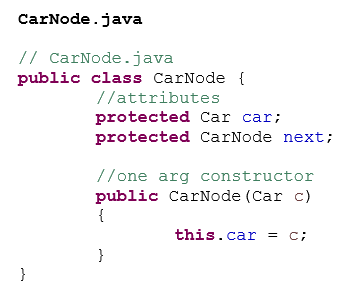
Create a class called CarNode which has fields for the data (a Car) and next (CarNode) instance variables. Include a one-argument constructor which takes a Car as a parameter. (For hints, see the PowerPoint on "Static vs. Dynamic Structures”.)
public CarNode (Car c) { . . }
The instance variables should have protected access. There will not be any get and set methods for the two instance variables.
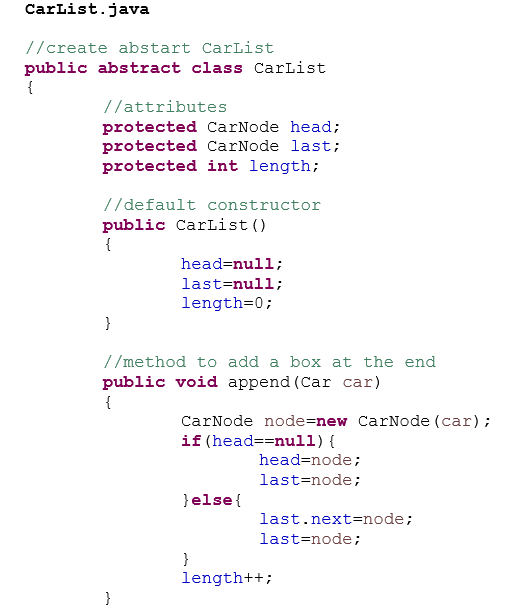
Create an abstract linked list class called CarList. This should be a linked list with head node as described in lecture. Modify it so that the data type in the nodes is Car. The no-argument constructor should create an empty list with first and last pointing to an empty head node, and length equal to zero. Include an append method in this class.
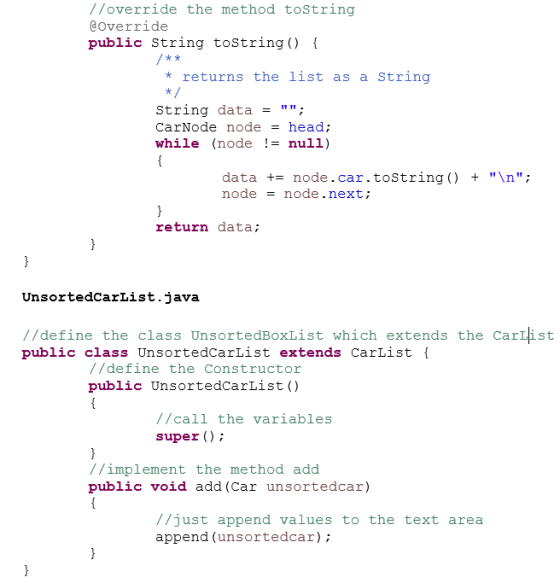
Create two more linked list classes that extend the abstract class CarList: One called UnsortedCarList and one called SortedCarList, each with appropriate no-argument constructors. Each of these classes should have a method called add(Car) that will add a new node to the list. In the case of the UnsortedCarList it will add it to the end of the list by calling the append method in the super class. In the case of the SortedCarList it will insert the node in the proper position to keep the list sorted.
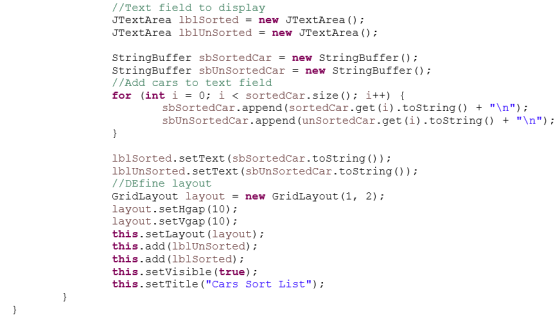
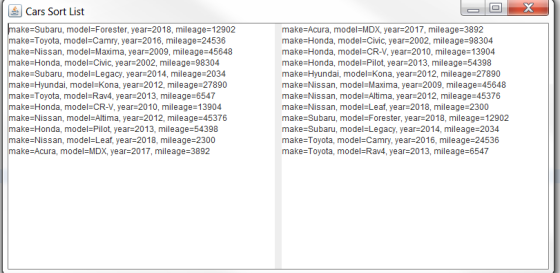
Instantiate two linked lists, and for every car read from the file, add it to the unsorted and sorted lists using the add method. You will end up with the first list having the cars from the input file in the order they were read, and in the second list the cars will be in sorted order. Display the unsorted and sorted cars in the GUI just as in project 1.
Submitting the Project.
You should now have the following files to submit for this project:
Project2.java
Car.java
CarGUI.java
CarNode.java
CarList.java
UnsortedCarList.java
SortedCarList.java
Homework Answers

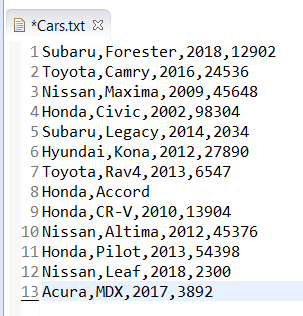
Sample Input:
Sample Output:
Code to be Copied:
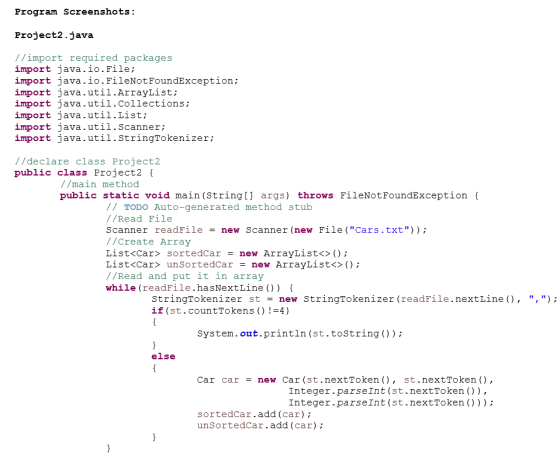
Project2.java
//import required packages
import java.io.File;
import java.io.FileNotFoundException;
import java.util.ArrayList;
import java.util.Collections;
import java.util.List;
import java.util.Scanner;
import java.util.StringTokenizer;
//declare class Project2
public class Project2 {
//main method
public static void main(String[] args) throws
FileNotFoundException {
// TODO Auto-generated method
stub
//Read File
Scanner readFile = new Scanner(new
File("Cars.txt"));
//Create Array
List<Car> sortedCar = new
ArrayList<>();
List<Car> unSortedCar = new
ArrayList<>();
//Read and put it in array
while(readFile.hasNextLine())
{
StringTokenizer
st = new StringTokenizer(readFile.nextLine(), ",");
if(st.countTokens()!=4)
{
System.out.println(st.toString());
}
else
{
Car car = new Car(st.nextToken(),
st.nextToken(),
Integer.parseInt(st.nextToken()),
Integer.parseInt(st.nextToken()));
sortedCar.add(car);
unSortedCar.add(car);
}
}
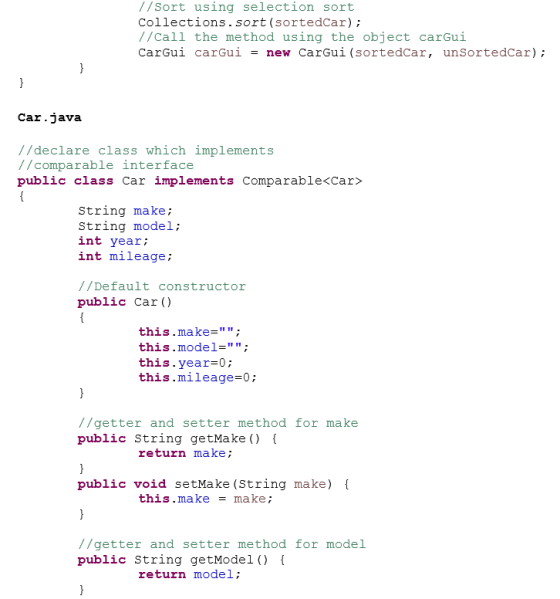
//Sort using selection sort
Collections.sort(sortedCar);
//Call the method using the object
carGui
CarGui carGui = new
CarGui(sortedCar, unSortedCar);
}
}
Car.java
//declare class which implements
//comparable interface
public class Car implements Comparable<Car>
{
String make;
String model;
int year;
int mileage;
//Default constructor
public Car()
{
this.make="";
this.model="";
this.year=0;
this.mileage=0;
}
//getter and setter method for make
public String getMake() {
return make;
}
public void setMake(String make) {
this.make = make;
}
//getter and setter method for model
public String getModel() {
return model;
}
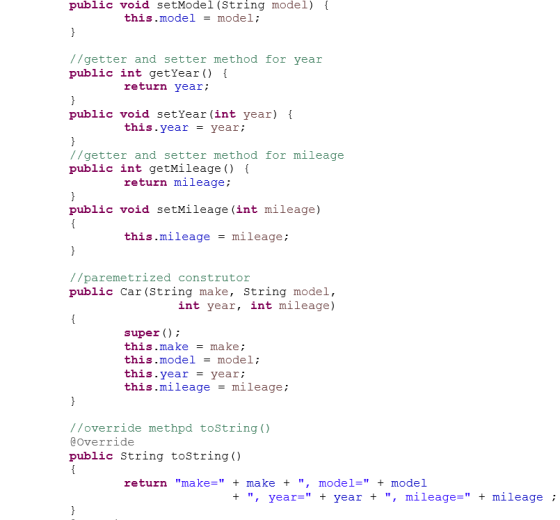
public void setModel(String model) {
this.model = model;
}
//getter and setter method for year
public int getYear() {
return year;
}
public void setYear(int year) {
this.year = year;
}
//getter and setter method for mileage
public int getMileage() {
return mileage;
}
public void setMileage(int mileage)
{
this.mileage = mileage;
}
//paremetrized construtor
public Car(String make, String model,
int year, int
mileage)
{
super();
this.make = make;
this.model = model;
this.year = year;
this.mileage = mileage;
}
//override methpd toString()
@Override
public String toString()
{
return "make=" + make + ", model="
+ model
+ ", year=" + year + ", mileage=" + mileage
;
}
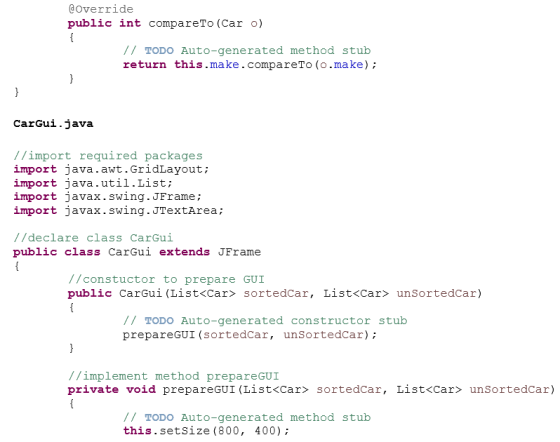
@Override
public int compareTo(Car o)
{
// TODO Auto-generated method
stub
return
this.make.compareTo(o.make);
}
}
CarGui.java
//import required packages
import java.awt.GridLayout;
import java.util.List;
import javax.swing.JFrame;
import javax.swing.JTextArea;
//declare class CarGui
public class CarGui extends JFrame
{
//constuctor to prepare GUI
public CarGui(List<Car> sortedCar,
List<Car> unSortedCar)
{
// TODO Auto-generated constructor
stub
prepareGUI(sortedCar,
unSortedCar);
}
//implement method prepareGUI
private void prepareGUI(List<Car> sortedCar,
List<Car> unSortedCar)
{
// TODO Auto-generated method
stub
this.setSize(800, 400);
//Text field to display
JTextArea lblSorted = new
JTextArea();
JTextArea lblUnSorted = new
JTextArea();
StringBuffer sbSortedCar = new
StringBuffer();
StringBuffer sbUnSortedCar = new
StringBuffer();
//Add cars to text field
for (int i = 0; i <
sortedCar.size(); i++) {
sbSortedCar.append(sortedCar.get(i).toString() + "\n");
sbUnSortedCar.append(unSortedCar.get(i).toString() + "\n");
}
lblSorted.setText(sbSortedCar.toString());
lblUnSorted.setText(sbUnSortedCar.toString());
//DEfine layout
GridLayout layout = new
GridLayout(1, 2);
layout.setHgap(10);
layout.setVgap(10);
this.setLayout(layout);
this.add(lblUnSorted);
this.add(lblSorted);
this.setVisible(true);
this.setTitle("Cars Sort
List");
}
}
CarNode.java
// CarNode.java
public class CarNode {
//attributes
protected Car car;
protected CarNode next;
//one arg constructor
public CarNode(Car c)
{
this.car = c;
}
}
CarList.java
//create abstart CarList
public abstract class CarList
{
//attributes
protected CarNode head;
protected CarNode last;
protected int length;
//default constructor
public CarList()
{
head=null;
last=null;
length=0;
}
//method to add a box at the end
public void append(Car car)
{
CarNode node=new
CarNode(car);
if(head==null){
head=node;
last=node;
}else{
last.next=node;
last=node;
}
length++;
}
//override the method toString
@Override
public String toString() {
/**
* returns the list as a
String
*/
String data = "";
CarNode node = head;
while (node != null)
{
data +=
node.car.toString() + "\n";
node =
node.next;
}
return data;
}
}
UnsortedCarList.java
//define the class UnsortedBoxList which extends the
CarList
public class UnsortedCarList extends CarList {
//define the Constructor
public UnsortedCarList()
{
//call the variables
super();
}
//implement the method add
public void add(Car unsortedcar)
{
//just append values to the text
area
append(unsortedcar);
}
}
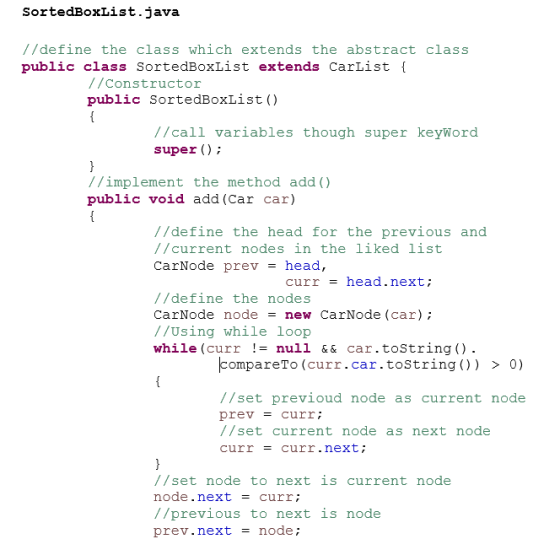
SortedBoxList.java
//define the class which extends the abstract class
public class SortedBoxList extends CarList {
//Constructor
public SortedBoxList()
{
//call variables though super
keyWord
super();
}
//implement the method add()
public void add(Car car)
{
//define the head for the previous
and
//current nodes in the liked
list
CarNode prev = head,curr =
head.next;
//define the nodes
CarNode node = new
CarNode(car);
//Using while loop
while(curr != null &&
car.toString().
compareTo(curr.car.toString()) > 0)
{
//set previoud
node as current node
prev =
curr;
//set current
node as next node
curr =
curr.next;
}
//set node to next is current
node
node.next = curr;
//previous to next is node
prev.next = node;
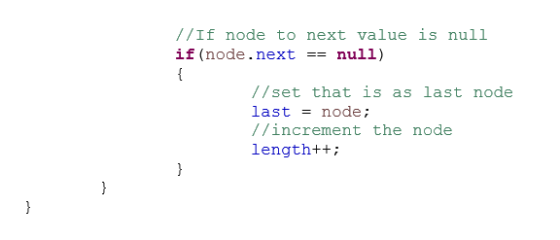
//If node to next value is
null
if(node.next == null)
{
//set that is as
last node
last =
node;
//increment the
node
length++;
}
}
}
Text file to be Copied:
Cars.txt
Subaru,Forester,2018,12902
Toyota,Camry,2016,24536
Nissan,Maxima,2009,45648
Honda,Civic,2002,98304
Subaru,Legacy,2014,2034
Hyundai,Kona,2012,27890
Toyota,Rav4,2013,6547
Honda,Accord
Honda,CR-V,2010,13904
Nissan,Altima,2012,45376
Honda,Pilot,2013,54398
Nissan,Leaf,2018,2300
Acura,MDX,2017,3892
Add Answer to:
Create a class called CarNode which has fields for the data (a
Car) and next (CarNode)...
List of Candles Create a class called CandleNode which has fields for the data (a Candle)...
List of Candles Create a class called CandleNode which has fields for the data (a Candle) and next (CandleNode) instance variables. Include a one-argument constructor which takes a Candle as a parameter. (For hints, see the PowerPoint on "Static vs. Dynamic Structures”.) public CandleNode (Candle c) { . . } The instance variables should have protected access. There will not be any get and set methods for the two instance variables. Create an abstract linked list class called CandleList. This...
Please try to write the code with Project 1,2 and 3 in mind. And use java language, thank you very much. Create an Edit Menu in your GUI Add a second menu to the GUI called Edit which will have one me...
 Please try to write the code with Project 1,2 and 3 in
mind. And use java language, thank you very much.
Create an Edit Menu in your GUI
Add a second menu to the GUI called Edit which will have one
menu item called Search. Clicking on search should prompt the user
using a JOptionPane input dialog to enter a car make. The GUI
should then display only cars of that make. You will need to write
a second menu...
Please try to write the code with Project 1,2 and 3 in
mind. And use java language, thank you very much.
Create an Edit Menu in your GUI
Add a second menu to the GUI called Edit which will have one
menu item called Search. Clicking on search should prompt the user
using a JOptionPane input dialog to enter a car make. The GUI
should then display only cars of that make. You will need to write
a second menu...
Implement the following classes in the UML: 1. List class includes: constructor List(): Create an...
Implement the following classes in the UML: 1. List class includes: constructor List(): Create an empty list with a length of 100. Hint: double [] list = new double [100]; constructor List(len: int): Create a List with a user specified maximum length. Hint: double [] list = new double [len]; add: add a new element to the end of the unsorted list. print: display the list 2.SortedList class includes two constructors : similar to the...
Need help to create general class Classes Data Element - Ticket Create an abstract class called...
 Need help to create general
class
Classes Data Element - Ticket Create an abstract class called Ticket with: two abstract methods called calculateTicketPrice which returns a double and getld0 which returns an int instance variables (one of them is an object of the enumerated type Format) which are common to all the subclasses of Ticket toString method, getters and setters and at least 2 constructors, one of the constructors must be the default (no-arg) constructor. . Data Element - subclasses...
Need help to create general
class
Classes Data Element - Ticket Create an abstract class called Ticket with: two abstract methods called calculateTicketPrice which returns a double and getld0 which returns an int instance variables (one of them is an object of the enumerated type Format) which are common to all the subclasses of Ticket toString method, getters and setters and at least 2 constructors, one of the constructors must be the default (no-arg) constructor. . Data Element - subclasses...
Static methods can be called directly from the name of the class that contains the method....
Static methods can be called directly from the name of the class that contains the method. Static methods are usually created to do utility operations. For example: public class Test{ public static int timesTwo(int value){ return value * value; } } public class TestDriver{ public static void main(String[] args){ int var = Test.timesTwo(5); System.out.println(var); } } For your final exercise, create a class called ManyLinkedLists. It will contain a static method called createLinkedList(). That method takes an argument that is...
Static methods can be called directly from the name of the class that contains the method. Static methods are usually created to do utility operations. For example: public class Test{ public static i...
Static methods can be called directly from the name of the class that contains the method. Static methods are usually created to do utility operations. For example: public class Test{ public static int timesTwo(int value){ return value * value; } } public class TestDriver{ public static void main(String[] args){ int var = Test.timesTwo(5); System.out.println(var); } } For your final exercise, create a class called ManyLinkedLists. It will contain a static method called createLinkedList(). That method takes an argument that is...
Write a program that meets the following requirements: Sandwich Class Create a class called Sandwich which has the following instance variables. No other instance variables should be used: - ingredi...
Write a program that meets the following requirements: Sandwich Class Create a class called Sandwich which has the following instance variables. No other instance variables should be used: - ingredients (an array of up to 10 ingredients, such as ham, capicola, American cheese, lettuce, tomato) -condiments (an array of up to 5 condiments, such as mayonnaise, oil, vinegar and mustard) Create a two argument constructor Write the getters and setters for the instance variables Override the toString method using the...
Use BlueJ to write a program that reads a sequence of data for several car objects...
Use BlueJ to write a program that reads a sequence of data for several car objects from an input file. It stores the data in an ArrayList<Car> list . Program should work for input file containing info for any number of cars. (You should not assume that it will always be seven lines in the input file). Use notepad to create input file "inData.txt". File should be stored in the same folder where all files from BlueJ for this program...
Create an abstract class “Appointment” that represents an event on a calendar. The “Appointment” class will...
Create an abstract class “Appointment” that represents an event on a calendar. The “Appointment” class will have four instance variables: • An instance variable called “year” which will be of type int • An instance variable called “month” which will be of type int • An instance variable called “day” which will be of type int • An instance variable called “description” which will be of type String The “Appointment” class must also implement the following methods: • A getter...
Question #1 (CLO: 1,2.3) Make a class called Car. Declate its data, model, colour, price Also...
 Question #1 (CLO: 1,2.3) Make a class called Car. Declate its data, model, colour, price Also make a constructor to initialize these data variables. Make a getPrice() method to return price. Make a Child class of Car, called Truck. It has a data variable, weight. Make a constructor that takes all the data variables including weight and those of Car class. Also override getPrice() method, which return 20% discount price if the weight is more than 20,000 else it returns...
 Please try to write the code with Project 1,2 and 3 in
mind. And use java language, thank you very much.
Create an Edit Menu in your GUI
Add a second menu to the GUI called Edit which will have one
menu item called Search. Clicking on search should prompt the user
using a JOptionPane input dialog to enter a car make. The GUI
should then display only cars of that make. You will need to write
a second menu...
Please try to write the code with Project 1,2 and 3 in
mind. And use java language, thank you very much.
Create an Edit Menu in your GUI
Add a second menu to the GUI called Edit which will have one
menu item called Search. Clicking on search should prompt the user
using a JOptionPane input dialog to enter a car make. The GUI
should then display only cars of that make. You will need to write
a second menu...
 Need help to create general
class
Classes Data Element - Ticket Create an abstract class called Ticket with: two abstract methods called calculateTicketPrice which returns a double and getld0 which returns an int instance variables (one of them is an object of the enumerated type Format) which are common to all the subclasses of Ticket toString method, getters and setters and at least 2 constructors, one of the constructors must be the default (no-arg) constructor. . Data Element - subclasses...
Need help to create general
class
Classes Data Element - Ticket Create an abstract class called Ticket with: two abstract methods called calculateTicketPrice which returns a double and getld0 which returns an int instance variables (one of them is an object of the enumerated type Format) which are common to all the subclasses of Ticket toString method, getters and setters and at least 2 constructors, one of the constructors must be the default (no-arg) constructor. . Data Element - subclasses...
 Question #1 (CLO: 1,2.3) Make a class called Car. Declate its data, model, colour, price Also make a constructor to initialize these data variables. Make a getPrice() method to return price. Make a Child class of Car, called Truck. It has a data variable, weight. Make a constructor that takes all the data variables including weight and those of Car class. Also override getPrice() method, which return 20% discount price if the weight is more than 20,000 else it returns...
Most questions answered within 3 hours.
-
Where is the error in this code sequence?
String s1 = "Hello";
String s2 = "ello";...
asked 11 months ago -
Financial data for Joel de Paris, Inc., for last year
follow:
Joel de Paris, Inc.
Balance...
asked 11 months ago -
Consider this reaction:
Al2(SO4)3 (aq)+ BaCl3
(aq) Al2Cl6 (aq)- +
3BaSO4(s) . What is the...
asked 11 months ago -
Suppose that Savneet is considering increasing her
recent random sample from 20 car rentals to 40...
asked 11 months ago -
Trucks arrive at an unloading terminal at an average rate of 120
per hour.
Trucks arrive...
asked 11 months ago -
Why are methanol and ethanol completely soluble in water while
octanol is not very little soluble....
asked 11 months ago -
A facilities manager at a university reads in a research report
that the mean amount of...
asked 11 months ago -
When the CuSO4 is rehydrated by adding water to the anhydrous
compound, is this an endothermic...
asked 11 months ago -
A ray of sunlight is passing from diamond into crown glass; the
angle of incidence is...
asked 11 months ago -
A block of mass 0.249 kg is placed on top of a light, vertical
spring of...
asked 11 months ago -
how do the kidneys compensate in the presences of acidosis
a) trigger hyperventilate
b) reserve acid...
asked 11 months ago -
Question 501 pts
The rental rate of capital to the firm increases. Which of the
following...
asked 11 months ago