why the login page in f5 is not showing up? could some one fix it and...
Homework Answers
NOTE: Just add frame size and a pseudo frame f5.


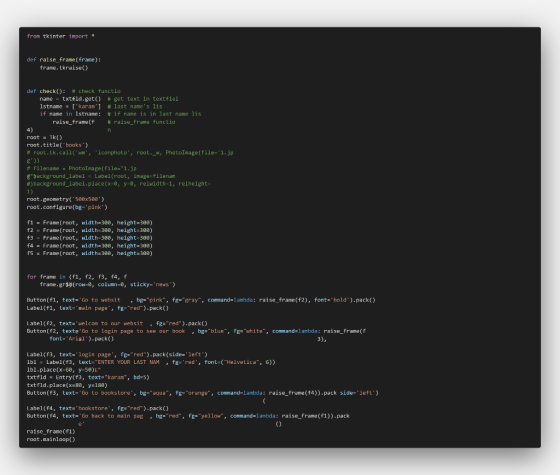
from tkinter import *


def raise_frame(frame):
    frame.tkraise()


def check():  # check function
    name = txtfld.get()  # get text in textfield
    lstname = ['karam']  # last name's list
    if name in lstname:  # if name is in last name list
        raise_frame(f4)  # raise_frame function

root = Tk()
root.title('books')
# root.tk.call('wm', 'iconphoto', root._w, PhotoImage(file='1.jpg'))

# filename = PhotoImage(file="1.jpg")
# background_label = Label(root, image=filename)
# background_label.place(x=0, y=0, relwidth=1, relheight=1)

root.geometry('500x500')
root.configure(bg='pink')

f1 = Frame(root, width=300, height=300)
f2 = Frame(root, width=300, height=300)
f3 = Frame(root, width=300, height=300)
f4 = Frame(root, width=300, height=300)
f5 = Frame(root, width=300, height=300)


for frame in (f1, f2, f3, f4, f5):
    frame.grid(row=0, column=0, sticky='news')

Button(f1, text='Go to website ', bg="pink", fg="gray", command=lambda: raise_frame(f2), font='bold').pack()
Label(f1, text='main page', fg="red").pack()

Label(f2, text='welcom to our website', fg="red").pack()
Button(f2, text='Go to login page to see our books', bg="blue", fg="white", command=lambda: raise_frame(f3),
       font='Arial').pack()

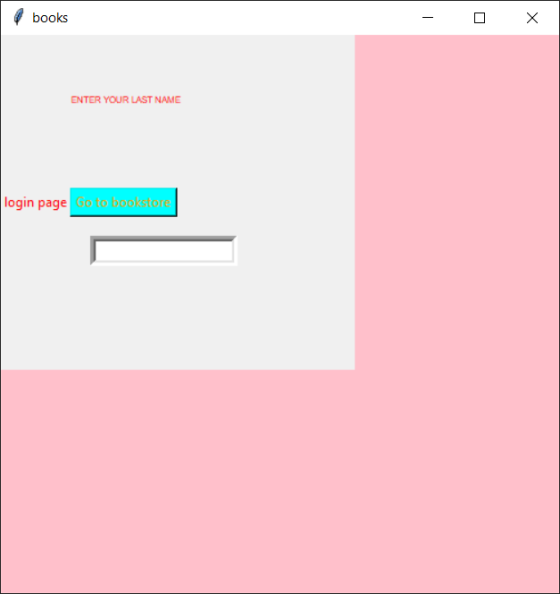
Label(f3, text='login page', fg="red").pack(side='left')
lbl = Label(f3, text="ENTER YOUR LAST NAME", fg='red', font=("Helvetica", 6))
lbl.place(x=60, y=50)
txtfld = Entry(f3, text="karam", bd=5)
txtfld.place(x=80, y=180)
Button(f3, text='Go to bookstore', bg="aqua", fg="orange", command=lambda: raise_frame(f4)).pack(side='left')

Label(f4, text='bookstore', fg="red").pack()
Button(f4, text='Go back to main page', bg="red", fg="yellow", command=lambda: raise_frame(f1)).pack()

raise_frame(f1)
root.mainloop()
NOTE: Please use python ide like pycharm.
Add Answer to:
why the login page in f5 is not showing up?
could some one fix it and...
Question: I am unable to get a output of my function on my label1 when I...
 Question:
I am unable to get a output of my function on my label1 when I
click on button 1, please help?
- x Lè DRAFT P1.py - C:\Users\Darren Louw\Desktop\DRAFT P1.py (3.8.2)* File Edit Format Run Options Window Help from tkinter import* HEIGHT=300 WIDTH=400 root=Tk) lowerframe=Frame (root, bg='green', bd=10) lowerframe.place (relx=0.5, rely=0.6, relwidth=0.75, relheight=0.2, anchor='n') labell-Label (lowerframe, bg='white', font=30) labell.place (relwidth=0.25, relheight=0.8, relx=0) def countl(): countl=0 for i in range (1,1001): num= i*i if num>1000: countl=countlul print('numbers in range 1...
Question:
I am unable to get a output of my function on my label1 when I
click on button 1, please help?
- x Lè DRAFT P1.py - C:\Users\Darren Louw\Desktop\DRAFT P1.py (3.8.2)* File Edit Format Run Options Window Help from tkinter import* HEIGHT=300 WIDTH=400 root=Tk) lowerframe=Frame (root, bg='green', bd=10) lowerframe.place (relx=0.5, rely=0.6, relwidth=0.75, relheight=0.2, anchor='n') labell-Label (lowerframe, bg='white', font=30) labell.place (relwidth=0.25, relheight=0.8, relx=0) def countl(): countl=0 for i in range (1,1001): num= i*i if num>1000: countl=countlul print('numbers in range 1...
Lab #7 CSE110 - Arizona State University Topics • Basic arrays Coding Guidelines • Give identifiers...
Lab #7 CSE110 - Arizona State University Topics • Basic arrays Coding Guidelines • Give identifiers semantic meaning and make them easy to read (examples numStudents, grossPay, etc). • Keep identifiers to a reasonably short length. • Use upper case for constants. Use title case (first letter is upper case) for classes. Use lower case with uppercase word separators for all other identifiers (variables, methods, objects). • Use tabs or spaces to indent code within blocks (code surrounded by braces)....
 Question:
I am unable to get a output of my function on my label1 when I
click on button 1, please help?
- x Lè DRAFT P1.py - C:\Users\Darren Louw\Desktop\DRAFT P1.py (3.8.2)* File Edit Format Run Options Window Help from tkinter import* HEIGHT=300 WIDTH=400 root=Tk) lowerframe=Frame (root, bg='green', bd=10) lowerframe.place (relx=0.5, rely=0.6, relwidth=0.75, relheight=0.2, anchor='n') labell-Label (lowerframe, bg='white', font=30) labell.place (relwidth=0.25, relheight=0.8, relx=0) def countl(): countl=0 for i in range (1,1001): num= i*i if num>1000: countl=countlul print('numbers in range 1...
Question:
I am unable to get a output of my function on my label1 when I
click on button 1, please help?
- x Lè DRAFT P1.py - C:\Users\Darren Louw\Desktop\DRAFT P1.py (3.8.2)* File Edit Format Run Options Window Help from tkinter import* HEIGHT=300 WIDTH=400 root=Tk) lowerframe=Frame (root, bg='green', bd=10) lowerframe.place (relx=0.5, rely=0.6, relwidth=0.75, relheight=0.2, anchor='n') labell-Label (lowerframe, bg='white', font=30) labell.place (relwidth=0.25, relheight=0.8, relx=0) def countl(): countl=0 for i in range (1,1001): num= i*i if num>1000: countl=countlul print('numbers in range 1...
Most questions answered within 3 hours.
-
Where is the error in this code sequence?
String s1 = "Hello";
String s2 = "ello";...
asked 11 months ago -
Financial data for Joel de Paris, Inc., for last year
follow:
Joel de Paris, Inc.
Balance...
asked 11 months ago -
Consider this reaction:
Al2(SO4)3 (aq)+ BaCl3
(aq) Al2Cl6 (aq)- +
3BaSO4(s) . What is the...
asked 11 months ago -
Suppose that Savneet is considering increasing her
recent random sample from 20 car rentals to 40...
asked 11 months ago -
Trucks arrive at an unloading terminal at an average rate of 120
per hour.
Trucks arrive...
asked 11 months ago -
Why are methanol and ethanol completely soluble in water while
octanol is not very little soluble....
asked 11 months ago -
A facilities manager at a university reads in a research report
that the mean amount of...
asked 11 months ago -
When the CuSO4 is rehydrated by adding water to the anhydrous
compound, is this an endothermic...
asked 11 months ago -
A ray of sunlight is passing from diamond into crown glass; the
angle of incidence is...
asked 11 months ago -
A block of mass 0.249 kg is placed on top of a light, vertical
spring of...
asked 11 months ago -
how do the kidneys compensate in the presences of acidosis
a) trigger hyperventilate
b) reserve acid...
asked 11 months ago -
Question 501 pts
The rental rate of capital to the firm increases. Which of the
following...
asked 11 months ago