using microsoft visuals studio c# 2017 Your "goal" is to create a soccer team registration program....
using microsoft visuals studio c# 2017
Your "goal" is to create a soccer team registration program.
This is an individual assignment.
Your program should:
1. Ask the coach to select a team from a list (maybe listbox or radio buttons).
1. Accept athlete names from the "coach". There can be up to twelve athletes on a team. You can do this many ways, for example, have twelve textboxes to accept the information. However, after you received the information from the coach, make the boxes disappear (visibility property set to "false" for each box).
2. As the athlete names are entered (or after they are entered), they should appear in a listbox (you will need to use the "add" function of the listbox to place them in the box).
3. After all the players are entered and show up in the listbox, the program should allow the coach to fix any problems. The easiest way to do this is allow the coach to respond, "yes" or "no" that the roster is correct (could use radio buttons, or textbox). If the coach answers "no", you can just empty out the listbox and go back to requesting all the player again.
Homework Answers
Dear Student ,
As per the requirement submitted above , kindly find the below solution.
Here a new Windows Forms Application in C# is created using Visual Studio 2017 with name "soccerTeamRegistration".This application contains a form with name "Form1.cs".Below are the files associated with form1.
1.Form1.cs[Design]
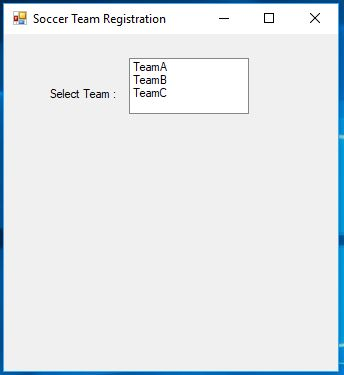
2.Form1.Designer.cs
namespace soccerTeamRegistration
{
partial class Form1
{
/// <summary>
/// Required designer variable.
/// </summary>
private System.ComponentModel.IContainer components = null;
/// <summary>
/// Clean up any resources being used.
/// </summary>
/// <param name="disposing">true if managed resources should
be disposed; otherwise, false.</param>
protected override void Dispose(bool disposing)
{
if (disposing && (components != null))
{
components.Dispose();
}
base.Dispose(disposing);
}
#region Windows Form Designer generated code
/// <summary>
/// Required method for Designer support - do not modify
/// the contents of this method with the code editor.
/// </summary>
private void InitializeComponent()
{
this.lblSelectTeam = new System.Windows.Forms.Label();
this.lstTeam = new System.Windows.Forms.ListBox();
this.lblPlayer = new System.Windows.Forms.Label();
this.txtPlayers = new System.Windows.Forms.TextBox();
this.lstTeamPlayers = new System.Windows.Forms.ListBox();
this.btnAddPlayer = new System.Windows.Forms.Button();
this.SuspendLayout();
//
// lblSelectTeam
//
this.lblSelectTeam.AutoSize = true;
this.lblSelectTeam.Location = new System.Drawing.Point(43,
53);
this.lblSelectTeam.Name = "lblSelectTeam";
this.lblSelectTeam.Size = new System.Drawing.Size(76, 13);
this.lblSelectTeam.TabIndex = 0;
this.lblSelectTeam.Text = "Select Team : ";
//
// lstTeam
//
this.lstTeam.FormattingEnabled = true;
this.lstTeam.Items.AddRange(new object[] {
"TeamA",
"TeamB",
"TeamC"});
this.lstTeam.Location = new System.Drawing.Point(125, 24);
this.lstTeam.Name = "lstTeam";
this.lstTeam.Size = new System.Drawing.Size(120, 56);
this.lstTeam.TabIndex = 1;
this.lstTeam.SelectedIndexChanged += new
System.EventHandler(this.lstTeam_SelectedIndexChanged);
//
// lblPlayer
//
this.lblPlayer.AutoSize = true;
this.lblPlayer.Location = new System.Drawing.Point(56, 105);
this.lblPlayer.Name = "lblPlayer";
this.lblPlayer.Size = new System.Drawing.Size(0, 13);
this.lblPlayer.TabIndex = 2;
this.lblPlayer.Visible = false;
//
// txtPlayers
//
this.txtPlayers.Location = new System.Drawing.Point(166, 98);
this.txtPlayers.Name = "txtPlayers";
this.txtPlayers.Size = new System.Drawing.Size(100, 20);
this.txtPlayers.TabIndex = 3;
this.txtPlayers.Visible = false;
//
// lstTeamPlayers
//
this.lstTeamPlayers.FormattingEnabled = true;
this.lstTeamPlayers.Location = new System.Drawing.Point(46,
181);
this.lstTeamPlayers.Name = "lstTeamPlayers";
this.lstTeamPlayers.Size = new System.Drawing.Size(135, 186);
this.lstTeamPlayers.TabIndex = 4;
this.lstTeamPlayers.Visible = false;
//
// btnAddPlayer
//
this.btnAddPlayer.Location = new System.Drawing.Point(125,
134);
this.btnAddPlayer.Name = "btnAddPlayer";
this.btnAddPlayer.Size = new System.Drawing.Size(120, 30);
this.btnAddPlayer.TabIndex = 5;
this.btnAddPlayer.Text = "Add Player in Team";
this.btnAddPlayer.UseVisualStyleBackColor = true;
this.btnAddPlayer.Visible = false;
this.btnAddPlayer.Click += new
System.EventHandler(this.btnAddPlayer_Click);
//
// Form1
//
this.AutoScaleDimensions = new System.Drawing.SizeF(6F, 13F);
this.AutoScaleMode = System.Windows.Forms.AutoScaleMode.Font;
this.ClientSize = new System.Drawing.Size(334, 372);
this.Controls.Add(this.btnAddPlayer);
this.Controls.Add(this.lstTeamPlayers);
this.Controls.Add(this.txtPlayers);
this.Controls.Add(this.lblPlayer);
this.Controls.Add(this.lstTeam);
this.Controls.Add(this.lblSelectTeam);
this.Name = "Form1";
this.Text = "Soccer Team Registration";
this.ResumeLayout(false);
this.PerformLayout();
}
#endregion
private System.Windows.Forms.Label lblSelectTeam;
private System.Windows.Forms.ListBox lstTeam;
private System.Windows.Forms.Label lblPlayer;
private System.Windows.Forms.TextBox txtPlayers;
private System.Windows.Forms.ListBox lstTeamPlayers;
private System.Windows.Forms.Button btnAddPlayer;
}
}
3.Form1.cs
//namespace
using System;
using System.Collections.Generic;
using System.ComponentModel;
using System.Data;
using System.Drawing;
using System.Linq;
using System.Text;
using System.Threading.Tasks;
using System.Windows.Forms;
//application namespace
namespace soccerTeamRegistration
{
public partial class Form1 : Form
{
//declaring static variable i
static int i = 0;
//declaring array to store player name
string[] playerNames = new string[12];
public Form1()
{
InitializeComponent();
}
//When team from the listbox is selected
private void lstTeam_SelectedIndexChanged(object sender, EventArgs
e)
{
//make label and textbox visible
lblPlayer.Visible = true;
txtPlayers.Visible = true;
btnAddPlayer.Visible = true;
lblPlayer.Text = "Enter " + (i + 1) + " Player : ";
}
//button add player
private void btnAddPlayer_Click(object sender, EventArgs e)
{
if (txtPlayers.Text != "") //if player name is not empty
{
//get name from textbox and store in the array
playerNames[i] = txtPlayers.Text;
}
//clear text form the textbox
txtPlayers.Text = "";
if (i <= 12)
{
//display player number
lblPlayer.Text = "Enter " + (i + 1) + " Player : ";
}
//checking if i=12
if (i == 11)
{
//if 12 players are entered
lblPlayer.Visible = false;
txtPlayers.Visible = false;
btnAddPlayer.Visible = false;
//making listbox visible
lstTeamPlayers.Visible = true;
//calling method and passing players add
add(playerNames);
}
i++;//increment value of i
}
public void add(string[] playernames)
{
//using for loop add player in the listbox
lstTeamPlayers.Items.Clear();//clear items from listbox
for (int j = 0; j < 12; j++)
{
//add player into the listbox
lstTeamPlayers.Items.Add(playernames[j]);
}
//asking user to whether roster is correct
DialogResult dr = MessageBox.Show("Is Roster correct?", "Roster
Details", MessageBoxButtons.YesNo);
//checking coach response
if (dr == DialogResult.No)
{
//if no is selected then empty listboxPlayers
lstTeamPlayers.Items.Clear();
//resetting value of i
i = 0;
//make label and textbox visible
lblPlayer.Visible = true;
txtPlayers.Visible = true;
btnAddPlayer.Visible = true;
}
else
{ //if team is Ok then display message
MessageBox.Show("Team Formed");
}
}
}
}
======================================================
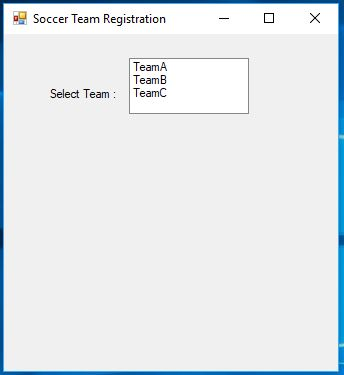
Output : Run application using F5 and will get the screen as shown below
Screen 1 :
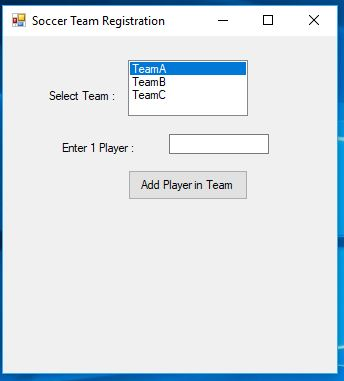
Screen 2 :Screen showing textbox for player name after selecting team name
Screen 3 :Screen showing player names
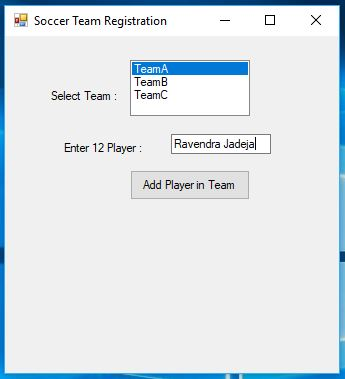
Screen 4 :Screen showing player names
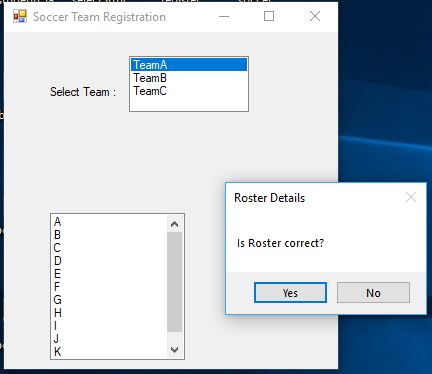
Screen 5 :Screen showing when team is formed.
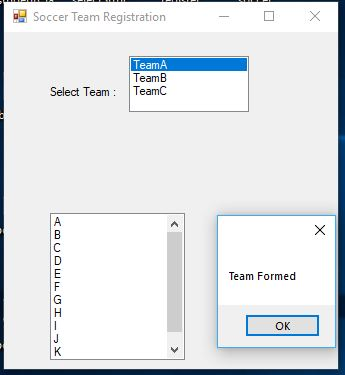
NOTE : PLEASE FEEL FREE TO PROVIDE FEEDBACK ABOUT THE SOLUTION.
Add Answer to:
using microsoft visuals studio c# 2017
Your "goal" is to create a soccer team registration program....
Create an order entry screen program in C# to give a total for an individual pizza...
Create an order entry screen program in C# to give a total for an individual pizza order. The Pizza order should have radio buttons for small $7, medium $9, and large $12 choices for the pizza. There should be a checkbox for drink (where a drink is $2 added if it is checked and nothing added if it is not checked. Include a textbox for the customer’s name. Have a button to calculate the subtotal (pizza choice and whether there...
Project 2 Description Create a Visual C# project that when an employee's biweekly sales amount is...
Project 2 Description Create a Visual C# project that when an employee's biweekly sales amount is entered and the Calculate button is pressed, the gross pay, deductions, and net pay will be displayed. Each employee will receive a base pay of $1200 plus a sales commission of 8% of sales. Once the net pay has been calculated, display the budget amount for each category listed below based on the percentages given. base pay = $1200; use a named...
In C Program This program will store the roster and rating information for a soccer team. There w...
In C Program This program will store the roster and rating information for a soccer team. There will be 3 pieces of information about each player: Name: string, 1-100 characters (nickname or first name only, NO SPACES) Jersey Number: integer, 1-99 (these must be unique) Rating: double, 0.0-100.0 You must create a struct called "playData" to hold all the information defined above for a single player. You must use an array of your structs to to store this information. You...
Programming question. Using Visual Studio 2019 C# Windows Form Application (.NET Framework) Please include code for...
 Programming question. Using Visual Studio 2019 C#
Windows Form Application (.NET Framework)
Please include code for program with ALL conditions met.
Conditions to be met:
Word Problem A person inherits a large amount of money. The person wants to invest it. He also has to withdraw it annually. How many years will it take him/her to spend all of the investment that earns at a 7% annual interest rate? Note that he/she needs to withdraw $40,000.00 a year. Also there...
Programming question. Using Visual Studio 2019 C#
Windows Form Application (.NET Framework)
Please include code for program with ALL conditions met.
Conditions to be met:
Word Problem A person inherits a large amount of money. The person wants to invest it. He also has to withdraw it annually. How many years will it take him/her to spend all of the investment that earns at a 7% annual interest rate? Note that he/she needs to withdraw $40,000.00 a year. Also there...
This C++ Programs should be written in Visual studio 2017 PROGRAM 1: Comparing Using Arrays to...
This C++ Programs should be written in Visual studio 2017 PROGRAM 1: Comparing Using Arrays to Using Individual Variables One of the main advantages of using arrays instead of individual variables to store values is that the program code becomes much smaller. Write two versions of a program, one using arrays to hold the input values, and one using individual variables to hold the input values. The programs should ask the user to enter 10 integer values, and then it...
C++ programming Phone Book Create a class that can be used for a Phone Book. The...
C++ programming Phone Book Create a class that can be used for a Phone Book. The class should have attributes for the name and phone number. The constructor should accept a name and a phone number. You should have methods that allow the name to be retrieved, the phone number to be retrieved, and one to allow the phone number to be changed. Create a toString() method to allow the name and number to be printed. Write a program that...
C# Temp. Converter program. Create a Celsius and Fahrenheit Temperature Converter application. The application must have...
 C# Temp. Converter program.
Create a Celsius and Fahrenheit Temperature Converter
application. The application must have 2 Labels (each one of them
assigned only to Celsius and Fahrenheit), 2 TextBoxes (each one of
them assigned only to Celsius and Fahrenheit), only 1 Convert
Button, 1 Clear Button, and 1 Exit Button. Also, 1 Error message
label which will display the error messages.
The application should only allow the user to enter the
desired temperature just in one of the TextBoxes...
C# Temp. Converter program.
Create a Celsius and Fahrenheit Temperature Converter
application. The application must have 2 Labels (each one of them
assigned only to Celsius and Fahrenheit), 2 TextBoxes (each one of
them assigned only to Celsius and Fahrenheit), only 1 Convert
Button, 1 Clear Button, and 1 Exit Button. Also, 1 Error message
label which will display the error messages.
The application should only allow the user to enter the
desired temperature just in one of the TextBoxes...
Using System; using System.Collections.Generic; using System.ComponentModel; using System.Data; u...
 using System;
using System.Collections.Generic;
using System.ComponentModel;
using System.Data;
using System.Drawing;
using System.Linq;
using System.Text;
using System.Threading.Tasks;
using System.Windows.Forms;
using System.IO;
namespace FileWriter
{
public partial class Form1 : Form
{
public Form1()
{
InitializeComponent();
}
private void btnCreate_Click(object sender, EventArgs e)
{
try
{
//write code that assigns the value in the textbox to an Integer
variable
if // write code that validates whether or not the data entered in
the textbox is greater than or equal to 1 *...
using System;
using System.Collections.Generic;
using System.ComponentModel;
using System.Data;
using System.Drawing;
using System.Linq;
using System.Text;
using System.Threading.Tasks;
using System.Windows.Forms;
using System.IO;
namespace FileWriter
{
public partial class Form1 : Form
{
public Form1()
{
InitializeComponent();
}
private void btnCreate_Click(object sender, EventArgs e)
{
try
{
//write code that assigns the value in the textbox to an Integer
variable
if // write code that validates whether or not the data entered in
the textbox is greater than or equal to 1 *...
COP2860 - Introduction to C# Programming Module #5 Assignment 10 points Program Functionality: Create a C#.NET...
 COP2860 - Introduction to C# Programming Module #5 Assignment 10 points Program Functionality: Create a C#.NET program that calculates customer bills for a food truck: Assignment Requirements: Build a custom order pad for a burger truck. It should look roughly like the following: Customer Bill - OX Bob's Burgers cheese fried egg bacon avocado O rare medium well done O yes no payment? O cash credit total clear Customer Bill - 0x Bob's Burgers cheese fried egg bacon avocado Add...
PYTHON PROGRAMMING LANGUAGE (NEEDED ASAP) Using a structured approach to writing the program: This section will...
 PYTHON PROGRAMMING LANGUAGE (NEEDED ASAP)
Using a structured approach to writing the program: This section will guide you in starting the program in a methodical way. The program will display a window with GUI widgets that are associated with particular functions: Employee Payroll O X -- - - - - - - - - - - Show Payroll Find Employee by Name Highest Lowest Find Employee by Amount Write Output to Fie Cancel - -------- ------------- Notice that some of...
PYTHON PROGRAMMING LANGUAGE (NEEDED ASAP)
Using a structured approach to writing the program: This section will guide you in starting the program in a methodical way. The program will display a window with GUI widgets that are associated with particular functions: Employee Payroll O X -- - - - - - - - - - - Show Payroll Find Employee by Name Highest Lowest Find Employee by Amount Write Output to Fie Cancel - -------- ------------- Notice that some of...
 Programming question. Using Visual Studio 2019 C#
Windows Form Application (.NET Framework)
Please include code for program with ALL conditions met.
Conditions to be met:
Word Problem A person inherits a large amount of money. The person wants to invest it. He also has to withdraw it annually. How many years will it take him/her to spend all of the investment that earns at a 7% annual interest rate? Note that he/she needs to withdraw $40,000.00 a year. Also there...
Programming question. Using Visual Studio 2019 C#
Windows Form Application (.NET Framework)
Please include code for program with ALL conditions met.
Conditions to be met:
Word Problem A person inherits a large amount of money. The person wants to invest it. He also has to withdraw it annually. How many years will it take him/her to spend all of the investment that earns at a 7% annual interest rate? Note that he/she needs to withdraw $40,000.00 a year. Also there...
 C# Temp. Converter program.
Create a Celsius and Fahrenheit Temperature Converter
application. The application must have 2 Labels (each one of them
assigned only to Celsius and Fahrenheit), 2 TextBoxes (each one of
them assigned only to Celsius and Fahrenheit), only 1 Convert
Button, 1 Clear Button, and 1 Exit Button. Also, 1 Error message
label which will display the error messages.
The application should only allow the user to enter the
desired temperature just in one of the TextBoxes...
C# Temp. Converter program.
Create a Celsius and Fahrenheit Temperature Converter
application. The application must have 2 Labels (each one of them
assigned only to Celsius and Fahrenheit), 2 TextBoxes (each one of
them assigned only to Celsius and Fahrenheit), only 1 Convert
Button, 1 Clear Button, and 1 Exit Button. Also, 1 Error message
label which will display the error messages.
The application should only allow the user to enter the
desired temperature just in one of the TextBoxes...
 using System;
using System.Collections.Generic;
using System.ComponentModel;
using System.Data;
using System.Drawing;
using System.Linq;
using System.Text;
using System.Threading.Tasks;
using System.Windows.Forms;
using System.IO;
namespace FileWriter
{
public partial class Form1 : Form
{
public Form1()
{
InitializeComponent();
}
private void btnCreate_Click(object sender, EventArgs e)
{
try
{
//write code that assigns the value in the textbox to an Integer
variable
if // write code that validates whether or not the data entered in
the textbox is greater than or equal to 1 *...
using System;
using System.Collections.Generic;
using System.ComponentModel;
using System.Data;
using System.Drawing;
using System.Linq;
using System.Text;
using System.Threading.Tasks;
using System.Windows.Forms;
using System.IO;
namespace FileWriter
{
public partial class Form1 : Form
{
public Form1()
{
InitializeComponent();
}
private void btnCreate_Click(object sender, EventArgs e)
{
try
{
//write code that assigns the value in the textbox to an Integer
variable
if // write code that validates whether or not the data entered in
the textbox is greater than or equal to 1 *...
 COP2860 - Introduction to C# Programming Module #5 Assignment 10 points Program Functionality: Create a C#.NET program that calculates customer bills for a food truck: Assignment Requirements: Build a custom order pad for a burger truck. It should look roughly like the following: Customer Bill - OX Bob's Burgers cheese fried egg bacon avocado O rare medium well done O yes no payment? O cash credit total clear Customer Bill - 0x Bob's Burgers cheese fried egg bacon avocado Add...
 PYTHON PROGRAMMING LANGUAGE (NEEDED ASAP)
Using a structured approach to writing the program: This section will guide you in starting the program in a methodical way. The program will display a window with GUI widgets that are associated with particular functions: Employee Payroll O X -- - - - - - - - - - - Show Payroll Find Employee by Name Highest Lowest Find Employee by Amount Write Output to Fie Cancel - -------- ------------- Notice that some of...
PYTHON PROGRAMMING LANGUAGE (NEEDED ASAP)
Using a structured approach to writing the program: This section will guide you in starting the program in a methodical way. The program will display a window with GUI widgets that are associated with particular functions: Employee Payroll O X -- - - - - - - - - - - Show Payroll Find Employee by Name Highest Lowest Find Employee by Amount Write Output to Fie Cancel - -------- ------------- Notice that some of...
Most questions answered within 3 hours.
-
Where is the error in this code sequence?
String s1 = "Hello";
String s2 = "ello";...
asked 10 months ago -
Financial data for Joel de Paris, Inc., for last year
follow:
Joel de Paris, Inc.
Balance...
asked 10 months ago -
Consider this reaction:
Al2(SO4)3 (aq)+ BaCl3
(aq) Al2Cl6 (aq)- +
3BaSO4(s) . What is the...
asked 10 months ago -
Suppose that Savneet is considering increasing her
recent random sample from 20 car rentals to 40...
asked 10 months ago -
Trucks arrive at an unloading terminal at an average rate of 120
per hour.
Trucks arrive...
asked 10 months ago -
Why are methanol and ethanol completely soluble in water while
octanol is not very little soluble....
asked 10 months ago -
A facilities manager at a university reads in a research report
that the mean amount of...
asked 10 months ago -
When the CuSO4 is rehydrated by adding water to the anhydrous
compound, is this an endothermic...
asked 10 months ago -
A ray of sunlight is passing from diamond into crown glass; the
angle of incidence is...
asked 10 months ago -
A block of mass 0.249 kg is placed on top of a light, vertical
spring of...
asked 10 months ago -
how do the kidneys compensate in the presences of acidosis
a) trigger hyperventilate
b) reserve acid...
asked 10 months ago -
Question 501 pts
The rental rate of capital to the firm increases. Which of the
following...
asked 10 months ago