Read the following problem: You order some groceries online and buy 5 things: Yellow Corn Tortillas...
Read the following problem:
You order some groceries online and buy 5 things:
- Yellow Corn Tortillas $3.32
- Cheddar Cheese $5.89
- Avocados $4.41
- Cilantro $0.99
- Jalapeno pepper $0.39
The website calculates the price and it is displayed as the "Subtotal".
The website charges 11% sales tax and it is displayed as the "Sales tax".
The overall price is calculated and it is displayed as the "Total price".
Based on the following HTML:
<table>
<caption>Details</caption>
<thead>
<tr><th>Item</th><th>Price</th></tr>
</thead>
<tbody>
<tr><td>Yellow Corn
Tortillas</td><td
id="price1">3.32</td></tr>
<tr><td>Cheddar
Cheese</td><td
id="price2">5.89</td></tr>
<tr><td>Avocados</td><td
id="price3">4.41</td></tr>
<tr><td>Cilantro</td><td
id="price4">0.99</td></tr>
<tr><td>Jalapeno
pepper</td><td
id="price5">0.39</td></tr>
</tbody>
<table>
<table>
<caption>Totals</caption>
<tbody>
<tr><td>Subtotal</td><td
id="subtotal"></td></tr>
<tr><td>Sales
tax</td><td
id="salestax"></td></tr>
<tr><td>Total
price</td><td
id="total"></td></tr>
</tbody>
<table>
<p></p>
Write a JavaScript function to read the grocery item prices from the above HTML, calculate the Subtotal, Tax, and Total price, and then output the results back into the HTML.
Yes, write some JavaScript for this question!
HTML Editor Keyboard Shortcuts
Homework Answers
Please find the code and sample outputs
<!DOCTYPE html>
<html>
<head>
</head>
<body>
<table>
<caption>Details</caption>
<thead>
<tr><th>Item</th><th>Price</th></tr>
</thead>
<tbody>
<tr><td>Yellow Corn Tortillas</td><td
id="price1">3</td></tr>
<tr><td>Cheddar Cheese</td><td
class="price"id="price2">2</td></tr>
<tr><td>Avocados</td><td
class="price"id="price3">4</td></tr>
<tr><td>Cilantro</td><td
class="price"id="price4">1</td></tr>
<tr><td>Jalapeno pepper</td><td
class="price"id="price5">90</td></tr>
</tbody>
<table>
<table>
<caption onclick="sumTable()">Totals</caption>
<tbody>
<tr><td>Subtotal</td><td
id="subtotal"></td></tr>
<tr><td>Sales tax</td><td
id="salestax"></td></tr>
<tr><td>Total price</td><td
id="total"></td></tr>
</tbody>
<table>
<p></p>
<script type="text/javascript">
function sumTable() {
var a =
document.getElementById("price1").innerHTML;
var b =
document.getElementById("price2").innerHTML;
var c =
document.getElementById("price3").innerHTML;
var d =
document.getElementById("price4").innerHTML;
var e =
document.getElementById("price5").innerHTML;
var SubTotal = parseFloat(a) +
parseFloat(b) + parseFloat(c) + parseFloat(d) +
parseFloat(e);
console.log(SubTotal);
var salesTax = parseFloat(SubTotal)
* parseFloat(.11);
console.log(salesTax)
var Total = SubTotal +
salesTax;
console.log(Total);
document.getElementById("subtotal").innerHTML = SubTotal;
document.getElementById("salestax").innerHTML = salesTax;
document.getElementById("total").innerHTML = Total;
}
</script>
</body>
</html>
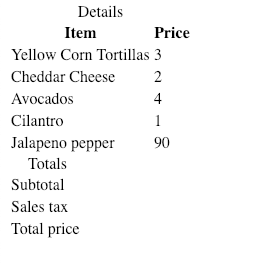
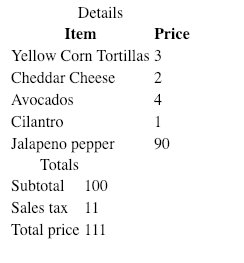
Please comment for any further clarifications.
Add Answer to:
Read the following problem:
You order some groceries online and buy 5
things:
Yellow Corn Tortillas...
I need help writting a Javascript function that does the following its for a HTML/CSS Shopping...
 I need help writting a Javascript function that does the
following its for a HTML/CSS Shopping Cart Page
CODE
This page contains a list of the selected products that includes an image, name, price, quantity, and cost) Because the process is implemented not as real, three products along with its image and price are displayed on the page. The product ID of each product is stored in a hidden textbox. The default amount of each product is 1 and the...
I need help writting a Javascript function that does the
following its for a HTML/CSS Shopping Cart Page
CODE
This page contains a list of the selected products that includes an image, name, price, quantity, and cost) Because the process is implemented not as real, three products along with its image and price are displayed on the page. The product ID of each product is stored in a hidden textbox. The default amount of each product is 1 and the...
 I need help writting a Javascript function that does the
following its for a HTML/CSS Shopping Cart Page
CODE
This page contains a list of the selected products that includes an image, name, price, quantity, and cost) Because the process is implemented not as real, three products along with its image and price are displayed on the page. The product ID of each product is stored in a hidden textbox. The default amount of each product is 1 and the...
I need help writting a Javascript function that does the
following its for a HTML/CSS Shopping Cart Page
CODE
This page contains a list of the selected products that includes an image, name, price, quantity, and cost) Because the process is implemented not as real, three products along with its image and price are displayed on the page. The product ID of each product is stored in a hidden textbox. The default amount of each product is 1 and the...
Most questions answered within 3 hours.
-
Where is the error in this code sequence?
String s1 = "Hello";
String s2 = "ello";...
asked 10 months ago -
Financial data for Joel de Paris, Inc., for last year
follow:
Joel de Paris, Inc.
Balance...
asked 10 months ago -
Consider this reaction:
Al2(SO4)3 (aq)+ BaCl3
(aq) Al2Cl6 (aq)- +
3BaSO4(s) . What is the...
asked 10 months ago -
Suppose that Savneet is considering increasing her
recent random sample from 20 car rentals to 40...
asked 10 months ago -
Trucks arrive at an unloading terminal at an average rate of 120
per hour.
Trucks arrive...
asked 10 months ago -
Why are methanol and ethanol completely soluble in water while
octanol is not very little soluble....
asked 10 months ago -
A facilities manager at a university reads in a research report
that the mean amount of...
asked 10 months ago -
When the CuSO4 is rehydrated by adding water to the anhydrous
compound, is this an endothermic...
asked 10 months ago -
A ray of sunlight is passing from diamond into crown glass; the
angle of incidence is...
asked 10 months ago -
A block of mass 0.249 kg is placed on top of a light, vertical
spring of...
asked 10 months ago -
how do the kidneys compensate in the presences of acidosis
a) trigger hyperventilate
b) reserve acid...
asked 10 months ago -
Question 501 pts
The rental rate of capital to the firm increases. Which of the
following...
asked 10 months ago