Blynk. How do reflect the status (on/off) of my LED on my ESP8266 to the widget...
Blynk. How do reflect the status (on/off) of my LED on my ESP8266 to the widget in Blynk App?
Homework Answers
After sign up click on ‘New Project’ to start your project.
Now provide your project a name and as blynk app works with diffferent hardware models. Thus opt for your device from choices.
Here, we are using ESP8266 node MCU.
So I am proceeding with node MCU.
While selecting your board opt for your association sort whether or not it's Wi-Fi or LAN or USB association.
After these steps click on ‘Create’ button to form your project.
As, the blank project opens, add Widgets to it by clicking on Add button (Plus sign button)
Now after this click on ‘Button’ to add a button in your project.
Now in button settings provide a name to your button. After this assign the pin number to the ‘OUTPUT’. Also, give names to your On/Off labels.
Things to note:-
Include all the required libraries for ESP8266 and Blynk App in the code, as shown below:
#define BLYNK_PRINT Serial
#include <ESP8266WiFi.h>
#include <BlynkSimpleEsp8266.h>
Enter the Auth Token in the code, which you can get from the Blynk App or from the mail you have received from Blynk.
char auth[ ] = "YourAuthToken";
To connect with WIFI enter your SSID name and password
char ssid[ ] = "YourNetworkName";
char pass[ ] = "YourPassword";
Here, void blinkLedWidget() function is used for switching ON and OFF the LED.
void blinkLedWidget()
{
  if (led1.getValue()) {
    led1.off();
    Serial.println("LED on V1: off");
  } else {
    led1.on();
    Serial.println("LED on V1: on");
  }
}
In void setup( ) function, we will initialize the baud rate, LED output and will connect the module with the Wi-Fi using Blynk.begin(auth,ssid,password); function. This function begins the Wi-Fi connection.
void setup()
{
  Serial.begin(9600);
  Blynk.begin(auth, ssid, pass);
  timer.setInterval(1000L, blinkLedWidget);
}
Now, copy and paste the complete code into Arduino IDE. Then upload the code into the ESP8266.
Then, open the Blynk App for controlling the LED from the button widget.
So we have successfully designed the Blynk App dashboard and controlled the LED through Blynk app using ESP8266.
CODE:
Now in programming, first we need to include the libraries
#define BLYNK_PRINT Serial
#include <ESP8266WiFi.h>
#include <BlynkSimpleEsp8266.h>
char auth[ ] = "YourAuthToken"
char ssid[ ] = "YourNetworkName";
char pass[ ] = "YourPassword";
WidgetLED led1(V1);
BlynkTimer timer;
void blinkLedWidget()
{
if (led1.getValue()) {
led1.off();
Serial.println("LED on V1: off");
} else {
led1.on();
Serial.println("LED on V1: on");
}
}
void setup()
{
Serial.begin(9600);
Blynk.begin(auth, ssid, pass);
timer.setInterval(1000L, blinkLedWidget);
}
void loop()
{
Blynk.run();
timer.run();
}
Add Answer to:
Blynk. How do reflect the status (on/off) of my LED on my
ESP8266 to the widget...
my dependent variable is revenue and my variables for this research are whether they order off...
my dependent variable is revenue and my variables for this research are whether they order off an app, use take out, and or delivery. If I were to add one new explanatory variable to your data, do you think you will find statistical significance? Why and why not?
Please explain how the smart home system circuit design below is connected and designed. The smar...
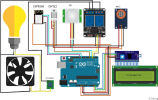 Please explain how the smart home system circuit design below is
connected and designed. The smart home will be able to automatic
on/off light through motion sensor, automatic on/off fan after
reaching 27 degree, send email when detect smoke. The bulb was
changed into a LED which is connected directly to the relay instead
of parallel with the fan.
PIR MQ-2 ESP8266 DHT22 13S Arduino LCD Karakter 16x2 AC Socket fritzing
PIR MQ-2 ESP8266 DHT22 13S Arduino LCD Karakter 16x2...
Please explain how the smart home system circuit design below is
connected and designed. The smart home will be able to automatic
on/off light through motion sensor, automatic on/off fan after
reaching 27 degree, send email when detect smoke. The bulb was
changed into a LED which is connected directly to the relay instead
of parallel with the fan.
PIR MQ-2 ESP8266 DHT22 13S Arduino LCD Karakter 16x2 AC Socket fritzing
PIR MQ-2 ESP8266 DHT22 13S Arduino LCD Karakter 16x2...
Connect NodeMCU to Arduino, write codes on Arduino to make the LED on NodeMCU do the...
Connect NodeMCU to Arduino, write codes on Arduino to make the LED on NodeMCU do the followings: Using your NodeMCU, write a program to blink the onboard LED in a particular pattern: First, turn the LED on for one second, then off for one second. Then, blink the LED five times – on for 200ms, and off for 200ms. (Use a for loop.) Finally, turn the LED on for half a second, then off for half a second. Loop this...
We present the case of a person whose presumed code-status preference led him to tattoo “Do...
We present the case of a person whose presumed code-status preference led him to tattoo “Do Not Resuscitate” on his chest. Paramedics brought an unconscious 70-year-old man with a history of chronic obstructive pulmonary disease, diabetes mellitus, and atrial fibrillation to the emergency department, where he was found to have an elevated blood alcohol level. The staff of the medical intensive care unit evaluated him several hours later when hypotension and an anion-gap metabolic acidosis with a pH of 6.81...
How do you think low economic status in developed countries compares to low economic status of...
How do you think low economic status in developed countries compares to low economic status of undeveloped countries? How would a carbon footprint differ between these two groups? (take into account production and transportation costs)
Based off of my results, how do I compute the rate of diffusion of the potassium...
 Based off of my results, how do I compute the rate of
diffusion of the potassium permanganate molecules in millimeters
per minute.? And how do I compute the rate of diffusion of the
methylene blue molecules in millimeter per minute?
Calculate the diffusion Activity 1: Dye Diffusion Results Diffusion of I Diffusion of methylene blue potassium Time (min) (mm) permanganate (mm) 15 amm | amm I amm 8 mm amm 11mm 18mm 12mm Which dye diffused more rapidly? 2 What...
Based off of my results, how do I compute the rate of
diffusion of the potassium permanganate molecules in millimeters
per minute.? And how do I compute the rate of diffusion of the
methylene blue molecules in millimeter per minute?
Calculate the diffusion Activity 1: Dye Diffusion Results Diffusion of I Diffusion of methylene blue potassium Time (min) (mm) permanganate (mm) 15 amm | amm I amm 8 mm amm 11mm 18mm 12mm Which dye diffused more rapidly? 2 What...
Based off of my results, how do I compute the rate of diffusion of the potassium...
 Based off of my results, how do I compute the rate of diffusion of
the potassium permanganate molecules in millimeters per minute.?
And how do I compute the rate of diffusion of the methylene blue
molecules in millimeter per minute?
56 Exercise 5 Calculate the diffision te Activity 1: Dye Diffusion Results 3 F time Diffusion of methylene blue Diffusion of potassium permanganate (mm) dye Time (min) (mm) Time 15 mm Qmm 8mm I mm 1amm Time 30 amm amm...
Based off of my results, how do I compute the rate of diffusion of
the potassium permanganate molecules in millimeters per minute.?
And how do I compute the rate of diffusion of the methylene blue
molecules in millimeter per minute?
56 Exercise 5 Calculate the diffision te Activity 1: Dye Diffusion Results 3 F time Diffusion of methylene blue Diffusion of potassium permanganate (mm) dye Time (min) (mm) Time 15 mm Qmm 8mm I mm 1amm Time 30 amm amm...
Reflect on how do you think your own pregnancy (or your wife’s) will be (was) the...
Reflect on how do you think your own pregnancy (or your wife’s) will be (was) the same or different than your mother’s? (200 words)
How do imaginary audience and personal fable relate to the adolescent's abilities to reflect on their...
How do imaginary audience and personal fable relate to the adolescent's abilities to reflect on their own thoughts? How do the roles of the adolescent's family and peers change during this stage? Do these changes influence the adolescent's view of the imaginary audience and the personal fable? Why? Are the imaginary audience and the personal fable normative and beneficial? Why?
Why do research study designs differ? Describe how disease status, exposure status and population affect research...
Why do research study designs differ? Describe how disease status, exposure status and population affect research design selection. Minimum 150 words.
 Please explain how the smart home system circuit design below is
connected and designed. The smart home will be able to automatic
on/off light through motion sensor, automatic on/off fan after
reaching 27 degree, send email when detect smoke. The bulb was
changed into a LED which is connected directly to the relay instead
of parallel with the fan.
PIR MQ-2 ESP8266 DHT22 13S Arduino LCD Karakter 16x2 AC Socket fritzing
PIR MQ-2 ESP8266 DHT22 13S Arduino LCD Karakter 16x2...
Please explain how the smart home system circuit design below is
connected and designed. The smart home will be able to automatic
on/off light through motion sensor, automatic on/off fan after
reaching 27 degree, send email when detect smoke. The bulb was
changed into a LED which is connected directly to the relay instead
of parallel with the fan.
PIR MQ-2 ESP8266 DHT22 13S Arduino LCD Karakter 16x2 AC Socket fritzing
PIR MQ-2 ESP8266 DHT22 13S Arduino LCD Karakter 16x2...
 Based off of my results, how do I compute the rate of
diffusion of the potassium permanganate molecules in millimeters
per minute.? And how do I compute the rate of diffusion of the
methylene blue molecules in millimeter per minute?
Calculate the diffusion Activity 1: Dye Diffusion Results Diffusion of I Diffusion of methylene blue potassium Time (min) (mm) permanganate (mm) 15 amm | amm I amm 8 mm amm 11mm 18mm 12mm Which dye diffused more rapidly? 2 What...
Based off of my results, how do I compute the rate of
diffusion of the potassium permanganate molecules in millimeters
per minute.? And how do I compute the rate of diffusion of the
methylene blue molecules in millimeter per minute?
Calculate the diffusion Activity 1: Dye Diffusion Results Diffusion of I Diffusion of methylene blue potassium Time (min) (mm) permanganate (mm) 15 amm | amm I amm 8 mm amm 11mm 18mm 12mm Which dye diffused more rapidly? 2 What...
 Based off of my results, how do I compute the rate of diffusion of
the potassium permanganate molecules in millimeters per minute.?
And how do I compute the rate of diffusion of the methylene blue
molecules in millimeter per minute?
56 Exercise 5 Calculate the diffision te Activity 1: Dye Diffusion Results 3 F time Diffusion of methylene blue Diffusion of potassium permanganate (mm) dye Time (min) (mm) Time 15 mm Qmm 8mm I mm 1amm Time 30 amm amm...
Based off of my results, how do I compute the rate of diffusion of
the potassium permanganate molecules in millimeters per minute.?
And how do I compute the rate of diffusion of the methylene blue
molecules in millimeter per minute?
56 Exercise 5 Calculate the diffision te Activity 1: Dye Diffusion Results 3 F time Diffusion of methylene blue Diffusion of potassium permanganate (mm) dye Time (min) (mm) Time 15 mm Qmm 8mm I mm 1amm Time 30 amm amm...
Most questions answered within 3 hours.
-
Where is the error in this code sequence?
String s1 = "Hello";
String s2 = "ello";...
asked 11 months ago -
Financial data for Joel de Paris, Inc., for last year
follow:
Joel de Paris, Inc.
Balance...
asked 11 months ago -
Consider this reaction:
Al2(SO4)3 (aq)+ BaCl3
(aq) Al2Cl6 (aq)- +
3BaSO4(s) . What is the...
asked 11 months ago -
Suppose that Savneet is considering increasing her
recent random sample from 20 car rentals to 40...
asked 11 months ago -
Trucks arrive at an unloading terminal at an average rate of 120
per hour.
Trucks arrive...
asked 11 months ago -
Why are methanol and ethanol completely soluble in water while
octanol is not very little soluble....
asked 11 months ago -
A facilities manager at a university reads in a research report
that the mean amount of...
asked 11 months ago -
When the CuSO4 is rehydrated by adding water to the anhydrous
compound, is this an endothermic...
asked 11 months ago -
A ray of sunlight is passing from diamond into crown glass; the
angle of incidence is...
asked 11 months ago -
A block of mass 0.249 kg is placed on top of a light, vertical
spring of...
asked 11 months ago -
how do the kidneys compensate in the presences of acidosis
a) trigger hyperventilate
b) reserve acid...
asked 11 months ago -
Question 501 pts
The rental rate of capital to the firm increases. Which of the
following...
asked 11 months ago