CIST 2371 Introduction to Java Unit 04 Lab Due Date: ________ Create a folder called Unit04...
CIST 2371 Introduction to Java
Unit 04 Lab
Due Date: ________
Create a folder called Unit04 and put all your source files in this
folder. You will create a UML
diagram and two Java class files and that implements the classes in
the UML diagram.
Diagram
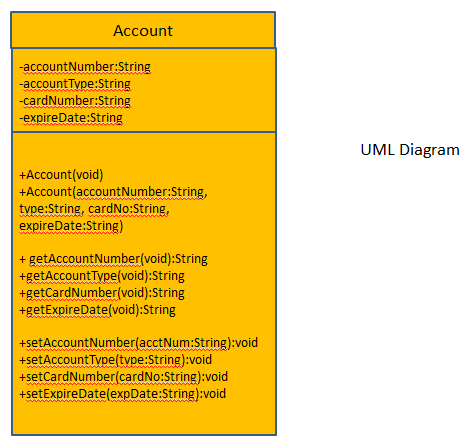
Create a UML diagram that shows an Account class and an
AccountTester class. The Account class
holds the following data as Strings: account Number, type of
account, card number and expire
date. Include getter and setter methods for each field. Include a
multi-arg constructor that will
set all the fields. This class will NOT have a main() method. The
AccountTester class file will have
only a main() method. Show the relationship between the two. The
AccountTester has a "has-a"
association with the Account class.
The UML diagram should be drawn using UMLet drawing tool. The
diagram should be exported as
an image and then imported into a word processing document as
demonstrated in class. The
document should have your name, course assignment and date at the
top like this:
Sally Doe
CIS 2371 Spring 2017
Unit 04 Lab
Feb 20, 2017
The file should be an PDF formatted file and be named
Unit04_<first initial><lastname>.pdf, for
example Unit04_sdoe.pdf. Any word processor can save or export to
PDF.
Java
Create an Account.java class file according to your UML diagram
with all the fields and methods
indicated there.
Create an AccountTester.java class file using your UML class
diagram. In the main() method,
prompt the user from the console for each data field that the
Account class has. Then create an
Account object and set the object's data fields using the multi-arg
constructor. Then, get the data
out of each field and print it out.
Prompt the user again from the console for each data field. Create
another Account object and
this time set all its fields using the setter methods. Then get the
data back out again using the
getter methods like before and print out the data.
This way you will have used all the methods in the Account class at
least once with one piece of
data.
What To Turn In
You will zip up the source code files in the Unit 04 folder into a
zip file named Unit04_<your first
initial><your lastname>.zip. For example Tom Swift's zip
file would look like this:
Unit04_tswift.zip
Turn in your PDF file as a separate submission. So you will submit
two files, the PDF and the ZIP.
Be sure to test the zip file before turning it in. Copy it into a
temp folder, unzip it and try to
compile and run the java file in that temp folder.
Once you are satisfied that your zip file is OK, turn it in via the
Blackboard drop box for this Unit.
Homework Answers
Thanks for the question.

Here is the completed code for this problem.

Comments are included, go through it, learn how things work and let me know if you have any doubts or if you need anything to change.

If you are satisfied with the solution, please rate the answer. Thanks
===========================================================================

public class Account {

    private String accountNumber;
    private String accountType;
    private String cardNumber;
    private String expireDate;

    // default constructor
    public Account() {
        this.accountNumber = "";
        this.accountType = "";
        this.cardNumber = "";
        this.expireDate = "";
    }
    // parameterized constructor
    public Account(String accountNumber, String accountType, String cardNumber, String expireDate) {
        this.accountNumber = accountNumber;
        this.accountType = accountType;
        this.cardNumber = cardNumber;
        this.expireDate = expireDate;
    }

    // getter method
    public String getAccountNumber() {
        return accountNumber;
    }
    // setter method
    public void setAccountNumber(String accountNumber) {
        this.accountNumber = accountNumber;
    }
    // getter method
    public String getAccountType() {
        return accountType;
    }
    // setter method
    public void setAccountType(String accountType) {
        this.accountType = accountType;
    }
    // getter method
    public String getCardNumber() {
        return cardNumber;
    }
    // setter method
    public void setCardNumber(String cardNumber) {
        this.cardNumber = cardNumber;
    }
    // getter method
    public String getExpireDate() {
        return expireDate;
    }
    // setter method
    public void setExpireDate(String expireDate) {
        this.expireDate = expireDate;
    }
}
======================================================================
import java.util.Scanner;

public class AccountTester {

    public static void main(String[] args) {

        //prompt the user from the console for each data field that the Account class has. Then create an
        //Account object and set the object's data fields using the multi-arg constructor. Then, get the data
        //out of each field and print it out.
        Scanner scanner = new Scanner(System.in);

        System.out.print("Enter account number: ");
        String acctNumber = scanner.nextLine();

        System.out.print("Enter account type: ");
        String acctType = scanner.nextLine();

        System.out.print("Enter card number: ");
        String cardNumber = scanner.nextLine();

        System.out.print("Enter expire date (mm/dd/yyyy): ");
        String expireDate = scanner.nextLine();

        Account accountA = new Account(acctNumber, acctType, cardNumber, expireDate);
        System.out.println("You have entered - ");
        System.out.println("Account Number: " + accountA.getAccountNumber());
        System.out.println("Account Type: " + accountA.getAccountType());
        System.out.println("Card Number: " + accountA.getCardNumber());
        System.out.println("Expire Date: " + accountA.getExpireDate());

        // Create another Account object and
        //this time set all its fields using the setter methods. Then get the data back out again using the
        //getter methods like before and print out the data.
        Account accountB = new Account();

        System.out.print("Enter account number: ");
         acctNumber = scanner.nextLine();
        accountB.setAccountNumber(acctNumber);
        System.out.print("Enter account type: ");
         acctType = scanner.nextLine();
        accountB.setAccountType(acctType);
        System.out.print("Enter card number: ");
         cardNumber = scanner.nextLine();
        accountB.setCardNumber(cardNumber);
        System.out.print("Enter expire date (mm/dd/yyyy): ");
         expireDate = scanner.nextLine();
        accountB.setExpireDate(expireDate);

        System.out.println("You have entered - ");
        System.out.println("Account Number: " + accountB.getAccountNumber());
        System.out.println("Account Type: " + accountB.getAccountType());
        System.out.println("Card Number: " + accountB.getCardNumber());
        System.out.println("Expire Date: " + accountB.getExpireDate());

    }
}
======================================================================
Add Answer to:
CIST 2371 Introduction to Java
Unit 04 Lab
Due Date: ________
Create a folder called Unit04...
CIST 2371 Introduction to Java Unit 03 Lab Due Date: ________ Part 1 – Using methods...
CIST 2371 Introduction to Java Unit 03 Lab Due Date: ________ Part 1 – Using methods Create a folder called Unit03 and put all your source files in this folder. Write a program named Unit03Prog1.java. This program will contain a main() method and a method called printChars() that has the following header: public static void printChars(char c1, char c2) The printChars() method will print out on the console all the characters between c1 and c2 inclusive. It will print 10...
Exercise: (2) Create a class called Dog containing two Strings: name and says. In main(), create...
Exercise: (2) Create a class called Dog containing two Strings: name and says. In main(), create two dog objects with names “spot” (who says, “Ruff!”) and “scruffy” (who says, “Wurf!”). Then display their names and what they say. Be sure to use setter and getter methods to assign(set) and retrieve(get) values for both Strings name and says. Your Task: Create the program using Netbeans and easyUML (i.e: Open a project in NetBeans then create the classes, attributes, and methods in...
CIST 1305 Unit 06 Drop Box Assignment General Instructions You will create a word processing document...
CIST 1305 Unit 06 Drop Box Assignment General Instructions You will create a word processing document and save it in "PDF" format. If you turn your document in using the wrong format, you will get no credit for it. ONLY ONE FILE may be turned in for the assignment. If you make a mistake and need to turn in your work again, you may do so. I will only grade the latest file you turn in. The older ones will...
Create a class named BankAccount with data fields for a count number and a balance. Include...
Create a class named BankAccount with data fields for a count number and a balance. Include a constructor that takes arguments for each field. The constructor sets the balance to 0 if it is below the required $200.00 minimum for an account. Include a method that displays the account details, including an explanation if the balance was reduced to 0. Write the class TestAccount in which you instantiate two BankAccount objects, prompt a user for values of the account number...
FOR JAVA: Summary: Create a program that stores info on textbooks. The solution should be named...
FOR JAVA: Summary: Create a program that stores info on textbooks. The solution should be named TextBookSort.java. Include these steps: Create a class titled TextBook that contains fields for the author, title, page count, ISBN, and price. This TextBook class will also provide setter and getter methods for all fields. Save this class in a file titled TextBook.java. Create a class titled TextBookSort with an array that holds 5 instances of the TextBook class, filled without prompting the user for...
Draw the UML DIAGRAM ALSO PLEASE DRAW THE UML DIAGRAM.ALSO in java should use the program in java For this task you will create a Point3D class to represent a point that has coordinates in thr...
 Draw the UML DIAGRAM ALSO
PLEASE DRAW THE UML DIAGRAM.ALSO
in java
should use the program in java
For this task you will create a Point3D class to represent a point that has coordinates in three dimensions labeled x, y and z. You will then use the class to perform some calculations on an array of these points. You need to draw a UML diagram for the class (Point3D) and then implement the class The Point3D class will have the...
Draw the UML DIAGRAM ALSO
PLEASE DRAW THE UML DIAGRAM.ALSO
in java
should use the program in java
For this task you will create a Point3D class to represent a point that has coordinates in three dimensions labeled x, y and z. You will then use the class to perform some calculations on an array of these points. You need to draw a UML diagram for the class (Point3D) and then implement the class The Point3D class will have the...
JAVA PROGRAMMING In this final review lab from our intro course, use the Name class you...
JAVA PROGRAMMING In this final review lab from our intro course, use the Name class you created in the previous lab. In this lab, create a Student class with the following class variable: Student name: Name (Note: Name is a datatype) Student Id: String Create the getter and setter methods. In addition to these methods, create a toString() method, which overrides the object class toString() method. This override method prints the current value of any of this class object. Complete...
Java Programming assignment. 1. Create a class called Square that takes a width parameter in the...
Java Programming assignment. 1. Create a class called Square that takes a width parameter in the constructor. The Square class should have a draw() method that will draw the square on the screen. Create a class called TestSquare that will take width from the user, create an object of Square, and invoke the draw() method on the square object. Below is a UML diagram for the Square and Rectangle class: 3. Create a zip file that contains your Java programs....
Hi, the language is Java. Learning Outcomes and Introduction In this lab assignment you will practice:...
 Hi, the language is Java.
Learning Outcomes and Introduction In this lab assignment you will practice: . applying access modifiers using getters and setters to mediate access using getters and setters to create derived attributes using static variables and methods testing code using a unit testing approach . For each of the tasks in this lab, you will create a new class or create an improved version of one of the classes from the previous lab. Remember to document all...
Hi, the language is Java.
Learning Outcomes and Introduction In this lab assignment you will practice: . applying access modifiers using getters and setters to mediate access using getters and setters to create derived attributes using static variables and methods testing code using a unit testing approach . For each of the tasks in this lab, you will create a new class or create an improved version of one of the classes from the previous lab. Remember to document all...
Assighment. Creaung Java Classes with methods Note: If you have not yet completed this unit's Discussion,...
 Assighment. Creaung Java Classes with methods Note: If you have not yet completed this unit's Discussion, it is best to complete it before you begin this Assignment As studied in the Discussion, it is important to design a test plan prior to creating a class, as it will help reduce coding problems. In this unit's Assignment, you create, compile, and execute a class containing methods. Be sure to use best coding practices, such as creating a test plan, before you...
 Draw the UML DIAGRAM ALSO
PLEASE DRAW THE UML DIAGRAM.ALSO
in java
should use the program in java
For this task you will create a Point3D class to represent a point that has coordinates in three dimensions labeled x, y and z. You will then use the class to perform some calculations on an array of these points. You need to draw a UML diagram for the class (Point3D) and then implement the class The Point3D class will have the...
Draw the UML DIAGRAM ALSO
PLEASE DRAW THE UML DIAGRAM.ALSO
in java
should use the program in java
For this task you will create a Point3D class to represent a point that has coordinates in three dimensions labeled x, y and z. You will then use the class to perform some calculations on an array of these points. You need to draw a UML diagram for the class (Point3D) and then implement the class The Point3D class will have the...
 Hi, the language is Java.
Learning Outcomes and Introduction In this lab assignment you will practice: . applying access modifiers using getters and setters to mediate access using getters and setters to create derived attributes using static variables and methods testing code using a unit testing approach . For each of the tasks in this lab, you will create a new class or create an improved version of one of the classes from the previous lab. Remember to document all...
Hi, the language is Java.
Learning Outcomes and Introduction In this lab assignment you will practice: . applying access modifiers using getters and setters to mediate access using getters and setters to create derived attributes using static variables and methods testing code using a unit testing approach . For each of the tasks in this lab, you will create a new class or create an improved version of one of the classes from the previous lab. Remember to document all...
 Assighment. Creaung Java Classes with methods Note: If you have not yet completed this unit's Discussion, it is best to complete it before you begin this Assignment As studied in the Discussion, it is important to design a test plan prior to creating a class, as it will help reduce coding problems. In this unit's Assignment, you create, compile, and execute a class containing methods. Be sure to use best coding practices, such as creating a test plan, before you...
Most questions answered within 3 hours.
-
Where is the error in this code sequence?
String s1 = "Hello";
String s2 = "ello";...
asked 11 months ago -
Financial data for Joel de Paris, Inc., for last year
follow:
Joel de Paris, Inc.
Balance...
asked 11 months ago -
Consider this reaction:
Al2(SO4)3 (aq)+ BaCl3
(aq) Al2Cl6 (aq)- +
3BaSO4(s) . What is the...
asked 11 months ago -
Suppose that Savneet is considering increasing her
recent random sample from 20 car rentals to 40...
asked 11 months ago -
Trucks arrive at an unloading terminal at an average rate of 120
per hour.
Trucks arrive...
asked 11 months ago -
Why are methanol and ethanol completely soluble in water while
octanol is not very little soluble....
asked 11 months ago -
A facilities manager at a university reads in a research report
that the mean amount of...
asked 11 months ago -
When the CuSO4 is rehydrated by adding water to the anhydrous
compound, is this an endothermic...
asked 11 months ago -
A ray of sunlight is passing from diamond into crown glass; the
angle of incidence is...
asked 11 months ago -
A block of mass 0.249 kg is placed on top of a light, vertical
spring of...
asked 11 months ago -
how do the kidneys compensate in the presences of acidosis
a) trigger hyperventilate
b) reserve acid...
asked 11 months ago -
Question 501 pts
The rental rate of capital to the firm increases. Which of the
following...
asked 11 months ago