I have created an HTML form. I need to connect this to a database to update...
I have created an HTML form. I need to connect this to a database to update the phone number in the employee table
HTML:
<!DOCTYPE HTML PUBLIC "-//W3C//DTD HTML 4.01
Transitional//EN">
<html>
<head>
<meta http-equiv="Content-Type" content="text/html;
charset=windows-1252">
</head>
<body link="#0000EE" vlink="#551A8B" text="#000000"
bgcolor="#566573"
alink="#EE0000" background="../DOC/brushed-alum.png">
<form method="post" action="phonenumbers.php">
<h1>Update Employee Phone Number Form</h1>
<br>
<br>
<h3>Enter the employee's ID number.</h3>
<br>
<br>
Employee ID Number: <input name="EmployeeNumber" type="text">
<br>
<br>
<h3>Enter the new phone number</h3>
Phone Number: <input name="OfficePhone" type="text">
<br>
<br>
<input name="submit" value="Update" type="submit">
</form>
<p><a href="forms.html">Back to Forms
Page</a></p>
<p>
</p>
</body>
</html>
PHP:
<?php
if(isset($_POST['submit'])){ //check if form has been submitted
//if form has been submitted
}
//values from the form will be pulled and set as the variables below
$employeeNumber = filter_input(INPUT_POST, 'EmployeeNumber');
$officePhone = filter_input(INPUT_POST,'OfficePhone');
//function to validate EmployeeNumber field input
function validId($id_raw){
$Id = stripcslashes(trim($id_raw));
//removes all slashes and trims spaces from input
if(is_numeric($Id)==false){
//checks to see if Employee number only contains numbers
echo "<p>You must enter a valid Employee Number that only contain numbers.</p>";
//if not returns this message
return false;
}
return $Id; //if it only contains numbers it will return the EmployeeNumber
}
//function to validate Phone Number field input
function validPhoneNum($phone_raw){
$phone = stripcslashes(trim($phone_raw));
//removes all slashes and trims spaces from input
if(strlen($phone) !== 10){
//gets the length of the phone number and checks if it's length is 10
echo "<p>please enter a valid 10 digit phone number.</p>";
//if not displays message
return false;
}
if(is_numeric($phone)==false){
//if the length is 10 the input is then checked for only containing numbers
echo "<p>phone number must only contain numbers.</p>";
//if input does not contain only numbers this message is displayed
return false;
}
return $phone;
//if all requirements are met returns the phone number
}
$validId = validID($employeeNumber);
$validPhone = validPhoneNum($officePhone);
if ($validId && $validPhone)
//checks if phone number and employee number is valid
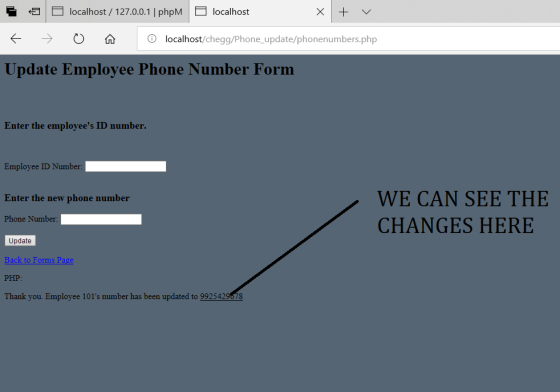
echo "<p>Thank you. Employee $validId's number has been updated to $validPhone</p>";
else{
echo "<p>Please use the \"Back\" button to re-enter the data.</p>";
}
?>
Homework Answers
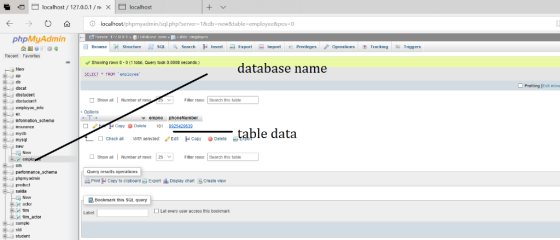
Database Design
create table employee(empno int primary key,phoneNumber
varchar(10));
insert into employee values(101,'9925429639');
Coding:
<!DOCTYPE HTML PUBLIC "-//W3C//DTD HTML 4.01
Transitional//EN">
<html>
<head>
<meta http-equiv="Content-Type" content="text/html;
charset=windows-1252">
</head>
<body link="#0000EE" vlink="#551A8B" text="#000000"
bgcolor="#566573"
alink="#EE0000" background="../DOC/brushed-alum.png">
<form method="post" action="phonenumbers.php">
<h1>Update Employee Phone Number Form</h1>
<br>
<br>
<h3>Enter the employee's ID number.</h3>
<br>
<br>
Employee ID Number: <input name="EmployeeNumber" type="text">
<br>
<br>
<h3>Enter the new phone number</h3>
Phone Number: <input name="OfficePhone" type="text">
<br>
<br>
<input name="submit" value="Update" type="submit">
</form>
<p><a href="forms.html">Back to Forms
Page</a></p>
<p>
</p>
</body>
</html>
PHP:
<?php
if(isset($_POST['submit'])){ //check if form has been submitted
//if form has been submitted
//Database Necessary things like servername
,username,password and database here please poort your username and
password which you set
$servername = "localhost";//local host
$username = "root";//username of mysql
$password = "";//password of mysql
$dbname = "new";#here is database name
// Create connection
$conn = new mysqli($servername, $username, $password,
$dbname);
// Check connection
if ($conn->connect_error) {
die("Connection failed: " .
$conn->connect_error);
}
$employeeNumber = filter_input(INPUT_POST, 'EmployeeNumber');
$officePhone = filter_input(INPUT_POST,'OfficePhone');
$query="Update employee set phoneNumber='$officePhone' where
empno=$employeeNumber";
$conn->query("$query");
$conn->close();
}
//values from the form will be pulled and set as the variables below
$employeeNumber = filter_input(INPUT_POST, 'EmployeeNumber');
$officePhone = filter_input(INPUT_POST,'OfficePhone');
//function to validate EmployeeNumber field input
function validId($id_raw){
$Id = stripcslashes(trim($id_raw));
//removes all slashes and trims spaces from input
if(is_numeric($Id)==false){
//checks to see if Employee number only contains numbers
echo "<p>You must enter a valid Employee Number that only contain numbers.</p>";
//if not returns this message
return false;
}
return $Id; //if it only contains numbers it will return the EmployeeNumber
}
//function to validate Phone Number field input
function validPhoneNum($phone_raw){
$phone = stripcslashes(trim($phone_raw));
//removes all slashes and trims spaces from input
if(strlen($phone) !== 10){
//gets the length of the phone number and checks if it's length is 10
echo "<p>please enter a valid 10 digit phone number.</p>";
//if not displays message
return false;
}
if(is_numeric($phone)==false){
//if the length is 10 the input is then checked for only containing numbers
echo "<p>phone number must only contain numbers.</p>";
//if input does not contain only numbers this message is displayed
return false;
}
return $phone;
//if all requirements are met returns the phone number
}
$validId = validID($employeeNumber);
$validPhone = validPhoneNum($officePhone);
if ($validId && $validPhone)
//checks if phone number and employee number is valid
echo "<p>Thank you. Employee $validId's number has been updated to $validPhone</p>";
else{
echo "<p>Please use the \"Back\" button to re-enter the data.</p>";
}
?>
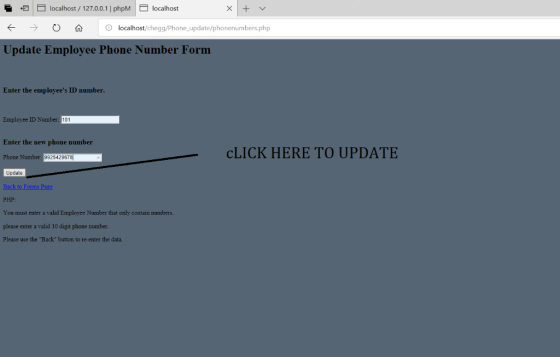
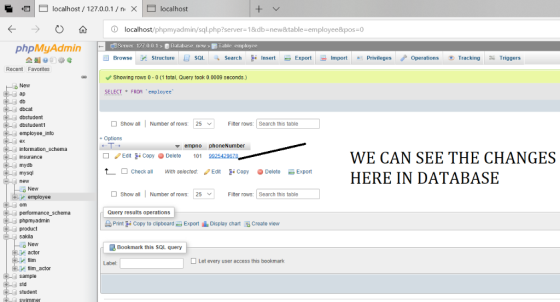
OUTPUT:
if you still have any Problem regarding this question please comment and if you like my code please appreciate me by thumbs up thank you.........
Add Answer to:
I have created an HTML form. I need to connect this to a
database to update...
How can I connect the html forms to php --> mysql database <!DOCTYPE html> <html lang="en">...
How can I connect the html forms to php --> mysql database <!DOCTYPE html> <html lang="en"> <head> <meta charset="UTF-8"> <title>Title</title> </head> <body> <h2> <center> Average: </h2> <h3> <center> Rate the following: </h2> <h3> <center> Rating Criteria: <br> Developing (0-5), Competent (6-10), Accomplished (10-15); </h3> <center> Judge Name: <input type="text" id="judge"> <br> <br> <center> 1. Articulate requirements and design of the project: <input type="text" id="num1"> <br> <br> 2. Plan the solution and implement the project: <input type="text" id="num2"> <br> <br> 3....
NEED HELP with HTML with Javascript embedding for form validation project below. I have my code...
 NEED HELP with HTML with Javascript embedding
for form validation project below. I have my code
below but I'm stuck with validation. If anyone can fix it, I'd
really appreciate.
******************************************************************************
CODE:
<!DOCTYPE html>
<!--
To change this license header, choose License Headers in Project
Properties.
To change this template file, choose Tools | Templates
and open the template in the editor.
-->
<html>
<head>
<title>Nice</title>
<meta charset="UTF-8">
<meta name="viewport" content="width=device-width,
initial-scale=1.0">
<script>
var textFromTextArea;
function getWords(){
var text =...
NEED HELP with HTML with Javascript embedding
for form validation project below. I have my code
below but I'm stuck with validation. If anyone can fix it, I'd
really appreciate.
******************************************************************************
CODE:
<!DOCTYPE html>
<!--
To change this license header, choose License Headers in Project
Properties.
To change this template file, choose Tools | Templates
and open the template in the editor.
-->
<html>
<head>
<title>Nice</title>
<meta charset="UTF-8">
<meta name="viewport" content="width=device-width,
initial-scale=1.0">
<script>
var textFromTextArea;
function getWords(){
var text =...
Hey Guys I am doing a project and need some help with code in HTML and...
Hey Guys I am doing a project and need some help with code in HTML and PHP. I need a form made in HTML that can be sent to a specific email through PHP. For some reason the info is not getting sent to my email, even though it says that it was sent. I have some source code here: <?php if(isset($_POST['submit'])) { $name = $_POST['name']; $email = $_POST['email']; $subject = $_POST['subject']; $message = $_POST['message']; $email = mail('MY_EMAIL', $subject, $message,...
PHP Can't get my code to work, what am I doing wrong? <!DOCTYPE html> <html> <head>...
 PHP
Can't get my code to work, what am I doing wrong?
<!DOCTYPE html>
<html>
<head>
<script>
</script>
</head>
<body>
<h2>Temperature Conversion Table</h2>
<h4>Enter a starting value in degrees Fahrenheit and an
increment value.</h4>
<form name="myTemp"
onsubmit="convertCelcius()" method="post">
<input type="text" name="temperature"> Enter an value in
degrees Fahrenheit<br><br>
<input type="radio" name="degIncrement" id="degIncrement5">
Convert in increment in 5 degrees<br>
<input type="radio" name="degIncrement" id="degIncrement10">
Convert in increment in 10 degrees
<br/><br/><input type="submit"
value="Submit">
</form>
<?php
if( $_POST["temperature"] || $_POST["degincrement"] ) {
//get he...
PHP
Can't get my code to work, what am I doing wrong?
<!DOCTYPE html>
<html>
<head>
<script>
</script>
</head>
<body>
<h2>Temperature Conversion Table</h2>
<h4>Enter a starting value in degrees Fahrenheit and an
increment value.</h4>
<form name="myTemp"
onsubmit="convertCelcius()" method="post">
<input type="text" name="temperature"> Enter an value in
degrees Fahrenheit<br><br>
<input type="radio" name="degIncrement" id="degIncrement5">
Convert in increment in 5 degrees<br>
<input type="radio" name="degIncrement" id="degIncrement10">
Convert in increment in 10 degrees
<br/><br/><input type="submit"
value="Submit">
</form>
<?php
if( $_POST["temperature"] || $_POST["degincrement"] ) {
//get he...
How to write javascript to do following requirement: I have written code like this: How can...
 How to write javascript to do following requirement:
I have written code like
this:
How can i write the javascript
to do the requirement.
Add onblur event handlers on each of the text inputs to perform validation based on the specific requirements listed below. Turn that element's border colour to green or red if that input is found to be valid or invalid, respectively * o Name: valid only if the text length is at least 5 characters o Email:...
How to write javascript to do following requirement:
I have written code like
this:
How can i write the javascript
to do the requirement.
Add onblur event handlers on each of the text inputs to perform validation based on the specific requirements listed below. Turn that element's border colour to green or red if that input is found to be valid or invalid, respectively * o Name: valid only if the text length is at least 5 characters o Email:...
<html> <head> <title>Sign Up page</title> <form name="validationForm" method="post" onsubmit="return checkvalidation()"> &n
<html> <head> <title>Sign Up page</title> <form name="validationForm" method="post" onsubmit="return checkvalidation()"> <!--div class--> <div class="formvalidation"> <label>Your first Name</label> <span id="showname"></span> <!--label for firstname--> <input type="text" name="firstname" class="formsignup" id ="firstn" placeholder="Enter your Name"> <br><br> <!--lastname--> <label>Your last Name</label> <span id="showlname"></span> <input type="text" name="lastname" class="formsignup" id="lastn" placeholder="Enter your last Name"> <br><br> <!--email--> <label>Your Email</label> <span id="showemail"></span> <input type="email" name="emailid" class="formsignup" size="45" id="emailn" placeholder="Enter your Email"> <br><br> <input type="submit" value="send"> </div> </form> <script> function checkvalidation(){ var name = document.forms["validationForm"]["firstname"].value; var lname...
PHP, HTML I have this code in the picture below for a guess game.
 PHP, HTML
I have this code in the picture below for a guess game.
PHP, HTML
I have this code in the picture below for a guess game.
Create a PHP-backed webpage that ask for a number and calculate is square 10 times. Hint...
Create a PHP-backed webpage that ask for a number and calculate is square 10 times. Hint 1: <html> <body> <h1>Iteration Program</h1> Today's date: <?php echo date("1 F d, Y"); ?> <h3>Enter a Value to Iterate</h3> <form action="results.php",method=post> <input type="text" name="data"> <p/> <input type="submit" value="Show Results"> </form> </body> </html> Hint 2: <html> <body> <h1>Iteration Results</h1> <b>Here are 10 iterations of the formula:<br/> y=x<sup>2</sup> </b> <p/> <!-- PHP Calculations start here! --> <?php $num = $_POST['data']; //Write your code Here! ?> </body>...
Develop an HTML form that could be used to enter your book information (Books, Authors, and...
Develop an HTML form that could be used to enter your book information (Books, Authors, and Publishers) start with the HTML/JavaScript template provided Expand upon it! What field information would you enter into a system? Have your form use more then just character text fields ... radio buttons, pick lists, and other elements make your form easier to use and you don't need to do lots of JavaScript checks. What fields would be mandatory ... which could be left blank?...
Modify this code to store the form elements as variables and display them on the page...
Modify this code to store the form elements as variables and display them on the page in an HTML table. <!DOCTYPE html> <html> <head> <script> function getValues() { var result = ""; result += "First Name: " + document.forms["myForm"]["fname"].value + "<br>"; result += "Last Name: " + document.forms["myForm"]["lname"].value + "<br>"; result += "Address: " + document.forms["myForm"]["address"].value + "<br>"; result += "City: " + document.forms["myForm"]["city"].value + "<br>"; result += "State: " + document.forms["myForm"]["state"].value + "<br>"; document.getElementById("output").innerHTML = result; } </script>...
 NEED HELP with HTML with Javascript embedding
for form validation project below. I have my code
below but I'm stuck with validation. If anyone can fix it, I'd
really appreciate.
******************************************************************************
CODE:
<!DOCTYPE html>
<!--
To change this license header, choose License Headers in Project
Properties.
To change this template file, choose Tools | Templates
and open the template in the editor.
-->
<html>
<head>
<title>Nice</title>
<meta charset="UTF-8">
<meta name="viewport" content="width=device-width,
initial-scale=1.0">
<script>
var textFromTextArea;
function getWords(){
var text =...
NEED HELP with HTML with Javascript embedding
for form validation project below. I have my code
below but I'm stuck with validation. If anyone can fix it, I'd
really appreciate.
******************************************************************************
CODE:
<!DOCTYPE html>
<!--
To change this license header, choose License Headers in Project
Properties.
To change this template file, choose Tools | Templates
and open the template in the editor.
-->
<html>
<head>
<title>Nice</title>
<meta charset="UTF-8">
<meta name="viewport" content="width=device-width,
initial-scale=1.0">
<script>
var textFromTextArea;
function getWords(){
var text =...
 PHP
Can't get my code to work, what am I doing wrong?
<!DOCTYPE html>
<html>
<head>
<script>
</script>
</head>
<body>
<h2>Temperature Conversion Table</h2>
<h4>Enter a starting value in degrees Fahrenheit and an
increment value.</h4>
<form name="myTemp"
onsubmit="convertCelcius()" method="post">
<input type="text" name="temperature"> Enter an value in
degrees Fahrenheit<br><br>
<input type="radio" name="degIncrement" id="degIncrement5">
Convert in increment in 5 degrees<br>
<input type="radio" name="degIncrement" id="degIncrement10">
Convert in increment in 10 degrees
<br/><br/><input type="submit"
value="Submit">
</form>
<?php
if( $_POST["temperature"] || $_POST["degincrement"] ) {
//get he...
PHP
Can't get my code to work, what am I doing wrong?
<!DOCTYPE html>
<html>
<head>
<script>
</script>
</head>
<body>
<h2>Temperature Conversion Table</h2>
<h4>Enter a starting value in degrees Fahrenheit and an
increment value.</h4>
<form name="myTemp"
onsubmit="convertCelcius()" method="post">
<input type="text" name="temperature"> Enter an value in
degrees Fahrenheit<br><br>
<input type="radio" name="degIncrement" id="degIncrement5">
Convert in increment in 5 degrees<br>
<input type="radio" name="degIncrement" id="degIncrement10">
Convert in increment in 10 degrees
<br/><br/><input type="submit"
value="Submit">
</form>
<?php
if( $_POST["temperature"] || $_POST["degincrement"] ) {
//get he...
 How to write javascript to do following requirement:
I have written code like
this:
How can i write the javascript
to do the requirement.
Add onblur event handlers on each of the text inputs to perform validation based on the specific requirements listed below. Turn that element's border colour to green or red if that input is found to be valid or invalid, respectively * o Name: valid only if the text length is at least 5 characters o Email:...
How to write javascript to do following requirement:
I have written code like
this:
How can i write the javascript
to do the requirement.
Add onblur event handlers on each of the text inputs to perform validation based on the specific requirements listed below. Turn that element's border colour to green or red if that input is found to be valid or invalid, respectively * o Name: valid only if the text length is at least 5 characters o Email:...
 PHP, HTML
I have this code in the picture below for a guess game.
PHP, HTML
I have this code in the picture below for a guess game.
Most questions answered within 3 hours.
-
Where is the error in this code sequence?
String s1 = "Hello";
String s2 = "ello";...
asked 10 months ago -
Financial data for Joel de Paris, Inc., for last year
follow:
Joel de Paris, Inc.
Balance...
asked 10 months ago -
Consider this reaction:
Al2(SO4)3 (aq)+ BaCl3
(aq) Al2Cl6 (aq)- +
3BaSO4(s) . What is the...
asked 10 months ago -
Suppose that Savneet is considering increasing her
recent random sample from 20 car rentals to 40...
asked 10 months ago -
Trucks arrive at an unloading terminal at an average rate of 120
per hour.
Trucks arrive...
asked 10 months ago -
Why are methanol and ethanol completely soluble in water while
octanol is not very little soluble....
asked 10 months ago -
A facilities manager at a university reads in a research report
that the mean amount of...
asked 10 months ago -
When the CuSO4 is rehydrated by adding water to the anhydrous
compound, is this an endothermic...
asked 10 months ago -
A ray of sunlight is passing from diamond into crown glass; the
angle of incidence is...
asked 10 months ago -
A block of mass 0.249 kg is placed on top of a light, vertical
spring of...
asked 10 months ago -
how do the kidneys compensate in the presences of acidosis
a) trigger hyperventilate
b) reserve acid...
asked 10 months ago -
Question 501 pts
The rental rate of capital to the firm increases. Which of the
following...
asked 10 months ago