Javascript on implementing dynamic calculation using a form. How do I get the text in the...
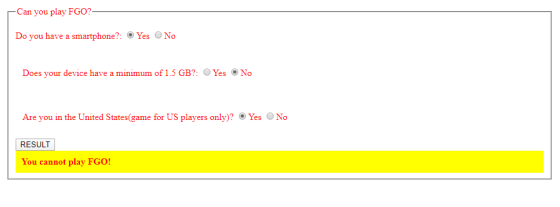
Javascript on implementing dynamic calculation using a form. How do I get the text in the yellow box to display "You can play FGO!" when all yeses are checked, or "You cannot play FGO!" otherwise?
<!DOCTYPE html>
<html lang="en">
<head>
<meta charset="UTF-8">
<meta name="viewport" content="width=device-width,
initial-scale=1.0">
<meta http-equiv="X-UA-Compatible"
content="ie=edge">
<title>Form</title>
<link rel="stylesheet"
href="css\survey.css">
<script src="js\survey.js"></script>
</head>
<body>
<form id="part1">
<fieldset>
<legend>Can you play FGO?</legend>
<p>Do you have a smartphone?:
<label><input type="radio"
name="smartphone" value="Yes1" onclick="calcSmartPhone()"
/>Yes</label>
<label><input type="radio"
name="smartphone" value="No1" onclick="calcSmartPhone()"
/>No</label>
<!--<input type="hidden"
name="xd1" value="0.00" /> -->
</p></form>
<form id="part2">
<p>Does your device have a minimum of 1.5
GB?:
<label><input type="radio"
name="memory" value="Yes2" onclick="calcMemory()"
/>Yes</label>
<label><input type="radio"
name="memory" value="No2" onclick="calcMemory()"
/>No</label>
<!--<input type="hidden"
name="xd2" value="0.00" /> -->
</p></form>
<form id="part3">
<p>Are you in the United States(game for US
players only)?
<label><input type="radio"
name="country" value="Yes3" onclick="calcCountry()"
/>Yes</label>
<label><input type="radio"
name="country" value="No3" onclick="calcCountry()"
/>No</label>
<!--<input type="hidden"
name="xd3" value="0.00" /> -->
</p></form>
<!--<button onclick="myF()"
id="button1">RESULT: </button> -->
<div id="result"></div>
</fieldset>
</body>
</html>
/** survey.js **/
var yes_no = new Array();
yes_no["Yes1"]=1;
yes_no["No1"]=0;
yes_no["Yes2"]=1;
yes_no["No2"]=0;
yes_no["Yes3"]=1;
yes_no["No3"]=0;
var result=0;
function calcSmartPhone()
{
var theForm = document.forms["part1"];
var smartphone = theForm.elements["smartphone"];
for(var i =0; i {
if(smartphone[i].checked)
{
result +=
yes_no[smartphone[i].value];
break;
}
}
return result;
}
function calcMemory()
{
var theForm = document.forms["part2"];
var memory = theForm.elements["memory"];
for(var j =0; j {
if(memory[j].checked)
{
result +=
yes_no[memory[j].value];
break;
}
}
return result;
}
function calcCountry()
{
var theForm = document.forms["part3"];
var country = theForm.elements["country"];
for(var k =0; k {
if(country[k].checked)
{
result +=
yes_no[country[k].value];
break;
}
}
return result;
}
function display()
{
var display = calcSmartPhone() + calcMemory() +
calcCountry();
if(display == 3)
{
document.getElementById('result').innerHTML = "You can play
FGO!";
}else{
document.getElementById('result').innerHTML = "You cannot play
FGO!";
}
}
/* survey.css */
form{
color: red;
padding: 12px;
}
#result
{
padding:10px;
font-weight:bold;
background-color:#ff0;
}
Homework Answers
Here is the answer for your question in JavaScript Scripting Language.
What you need to change ?
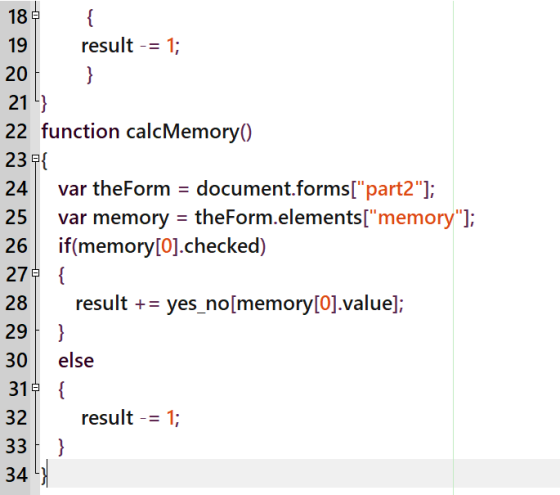
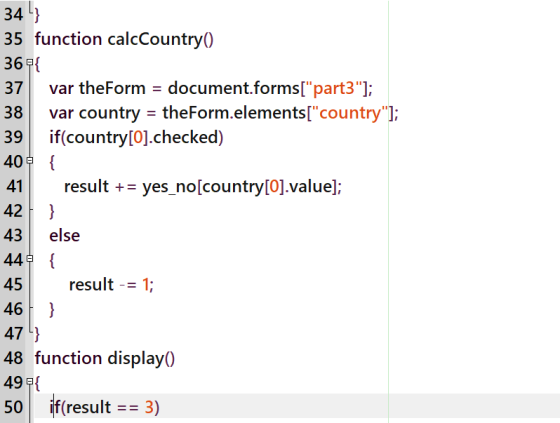
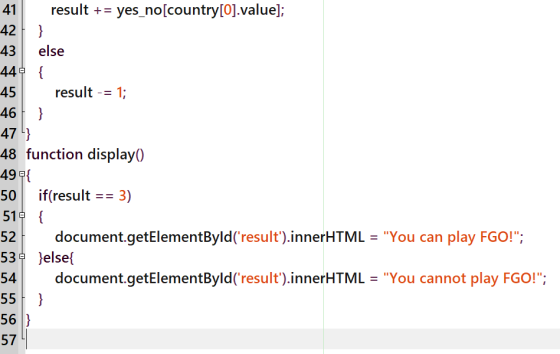
1. In each of these method calcSmartPhone(), calcMemory(), calcCountry() remove the for loop before the if condition.(Keep the if condition) and remove the return statements.
2. In the if condition instead of variable i write "0". It will automatically take the first value of elements in the form. Write an else spot to decrease result by 1 if checked "No".
3. In display() method remove the line var display = calcSmartPhone() + calcMemory() + calcCountry();. In the place of display use the variable result, as it is a global variable the summations remains same all over the code.
4. In HTML file, instead of using <button> use the input tag <input type="button" onclick="display()" value="RESULT"/>.
After doing all these changes the code looks like.
index.html
| <!DOCTYPE html> <html lang="en"> <head> <meta charset="UTF-8"> <meta name="viewport" content="width=device-width, initial-scale=1.0"> <meta http-equiv="X-UA-Compatible" content="ie=edge"> <title>Form</title> <link rel="stylesheet" href="css\survey.css"> <script src="js\survey.js"></script> </head> <body> <form id="part1"> <fieldset> <legend>Can you play FGO?</legend> <p>Do you have a smartphone?: <label><input type="radio" name="smartphone" value="Yes1" onclick="calcSmartPhone()" />Yes</label> <label><input type="radio" name="smartphone" value="No1" onclick="calcSmartPhone()" />No</label> <!--<input type="hidden" name="xd1" value="0.00" /> --> </p></form> <form id="part2"> <p>Does your device have a minimum of 1.5 GB?: <label><input type="radio" name="memory" value="Yes2" onclick="calcMemory()" />Yes</label> <label><input type="radio" name="memory" value="No2" onclick="calcMemory()" />No</label> <!--<input type="hidden" name="xd2" value="0.00" /> --> </p></form> <form id="part3"> <p>Are you in the United States(game for US players only)? <label><input type="radio" name="country" value="Yes3" onclick="calcCountry()" />Yes</label> <label><input type="radio" name="country" value="No3" onclick="calcCountry()" />No</label> <input type="hidden" name="xd3" value="0.00" /> </p></form> <input type="button" onclick="display()" value="RESULT"/> <div id="result"></div> </fieldset> </body> </html> |
survey.css
|
form{ #result |
survey.js
|
var yes_no = new Array(); |
SCREENSHOTS :
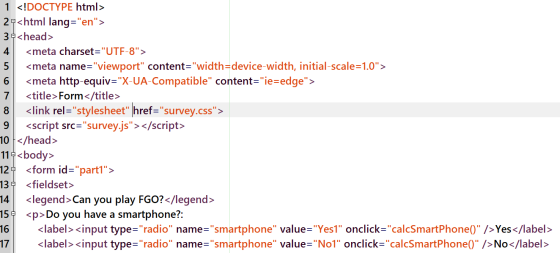
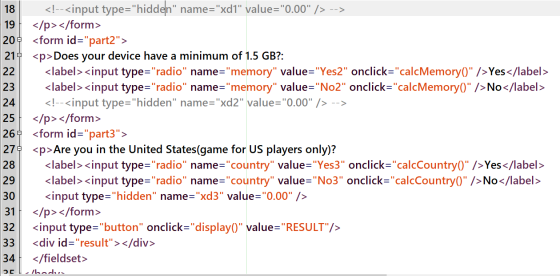
survey.css
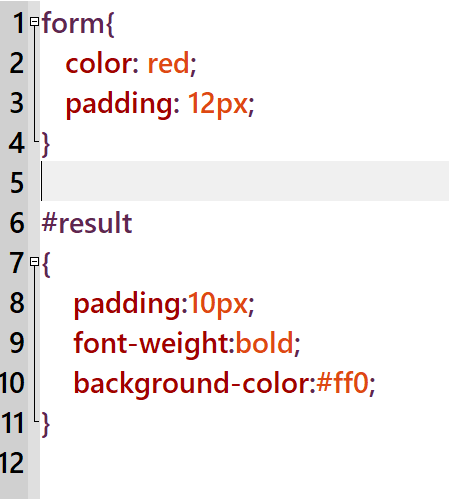
survey.js
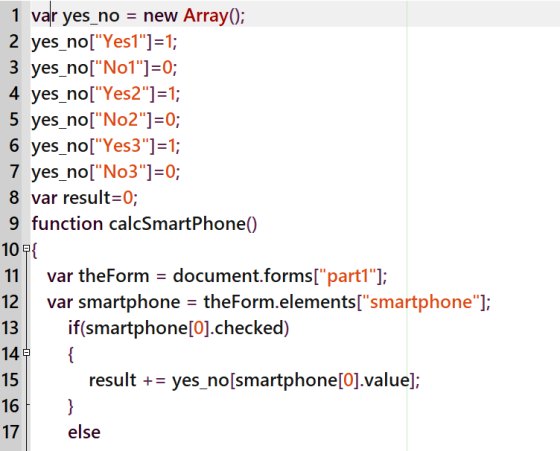
OUTPUT
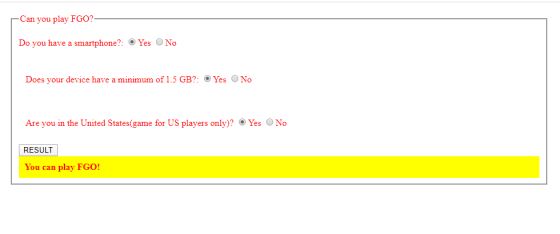
Any doubts regarding this can be explained with pleasure :)
Add Answer to:
Javascript on implementing dynamic calculation using a
form. How do I get the text in the...
Modify this code to store the form elements as variables and display them on the page...
Modify this code to store the form elements as variables and display them on the page in an HTML table. <!DOCTYPE html> <html> <head> <script> function getValues() { var result = ""; result += "First Name: " + document.forms["myForm"]["fname"].value + "<br>"; result += "Last Name: " + document.forms["myForm"]["lname"].value + "<br>"; result += "Address: " + document.forms["myForm"]["address"].value + "<br>"; result += "City: " + document.forms["myForm"]["city"].value + "<br>"; result += "State: " + document.forms["myForm"]["state"].value + "<br>"; document.getElementById("output").innerHTML = result; } </script>...
in the following java script code follow the instructions provided <!DOCTYPE html> <html> <head> <!-- JavaScript...
in the following java script code follow the instructions provided <!DOCTYPE html> <html> <head> <!-- JavaScript 6th Edition Chapter 5 Hands-on Project 5-2 Author: Date: Filename: index.htm --> <meta charset="utf-8" /> <meta name="viewport" content="width=device-width, initial-scale=1.0"> <title>Hands-on Project 5-2</title> <link rel="stylesheet" href="styles.css" /> <script src="modernizr.custom.05819.js"></script> </head> <body> <header> <h1> Hands-on Project 5-2 </h1> </header> <article> <h2>Change of address form</h2> <form> <fieldset id="contactinfo"> <label for="addrinput"> Street Address </label> <input type="text" id="addrinput" name="Address" /> <label for="cityinput"> City </label> <input type="text" id="cityinput" name="City"...
<!DOCTYPE html> <html> <head> <!-- JavaScript 6th Edition Chapter 4 Hands-on Project 4-3 Author: Da...
<!DOCTYPE html> <html> <head> <!-- JavaScript 6th Edition Chapter 4 Hands-on Project 4-3 Author: Date: Filename: index.htm --> <meta charset="utf-8" /> <meta name="viewport" content="width=device-width, initial-scale=1.0" /> <title>Hands-on Project 4-3</title> <link rel="stylesheet" href="styles.css" /> <script src="modernizr.custom.05819.js"></script> </head> <body> <header> <h1> Hands-on Project 4-3 </h1> </header> <article> <div id="results"> <p id="resultsExpl"></p> <ul> <li id="item1"></li> <li id="item2"></li> <li id="item3"></li> <li id="item4"></li> <li id="item5"></li> </ul> </div> <form> <fieldset> <label for="placeBox" id="placeLabel"> Type the name of a place, then click Submit: </label> <input type="text" id="placeBox"...
I am trying to make it so that radio buttons when clicked execute a javascript file....
I am trying to make it so that radio buttons when clicked execute a javascript file. I have to to have the exercises in external files. Here is what I have so far. I am reusing a script that was used to make radio buttons switch CSS files so I think I have to change the set attribute options. HTML <!DOCTYPE html> <html lang="en"> <head> <meta charset="UTF-8"> <title>Document</title> </head> <body> <p> 4.2 Output: The first 20 Fibonacci numbers, which are...
In an external JavaScript file, you need to create two global variables for the Quarter name...
In an external JavaScript file, you need to create two global variables for the Quarter name array and the Sales amount array. Create an anonymous function and connect it to the onclick event of the Add to Array button that adds the values from the fields (Quarter and Sales) to the respective arrays. Create an anonymous function and connect it to the onclick event of Display Sales button displays the contents of the arrays, displays the sum of all the...
Using form events functions to answer this question. Use the attached form html file which contains...
Using form events functions to answer this question. Use the attached form html file which contains 2 html radio buttons. When the first choice is chosen, display the text ”First” under the first choice. When the second choice is chosen, display the text ”Second” under the second choice. Instead of using JavaScript complete this question using JQuery <!DOCTYPE html> <html> <head> <title>midterm exam</title> <link rel="stylesheet" href="css/q1.css" /> </head> <body> <div id = "page"> <form> ...
Using JavaScript, I want to make a function that will open a new alert box that will say hello fi...
Using JavaScript, I want to make a function that will open a new alert box that will say hello first name, last name after the person logs into the sign in form. This will happen aftrer the validation function is invoked. See code below. See the welcomefunction(). <!DOCTYPE html> <html> <head> <script> //validate the login form function validateForm() { var x = document.forms["LoginForm"]["fname"].value; //set x and y to first name and last name var y = document.forms["LoginForm"]["lname"].value; if (x ==...
I have some code for HTML/Javascript but I need to change it up a bit. Heres...
I have some code for HTML/Javascript but I need to change it up a bit. Heres the assignment and what I have. The part in the bold is what I need help with. I need a button called new timer for when it reaches zero... Thank you. Assignment For this assignment, you will write a timer application in HTML and JavaScript. Your HTML document should contain the following elements/features: HTML tags: An <input> tag labeled "Timer Duration" with the initial...
Using Javascript, I have two radio buttons, depending on the value of the radio button 1...
Using Javascript, I have two radio buttons, depending on the value of the radio button 1 or 2, you will send a different form to the user. So, if radio button is value "1" send new form1 or if value "2" send new form 2. New form will ask for letter grades for four courses in textboxes. Onsubmit of new form letter grades A,B,C,D need to be changed to numeric values 1,2,3,4 so an average grade for the four couses can...
<html> <head> <title>Sign Up page</title> <form name="validationForm" method="post" onsubmit="return checkvalidation()"> &n
<html> <head> <title>Sign Up page</title> <form name="validationForm" method="post" onsubmit="return checkvalidation()"> <!--div class--> <div class="formvalidation"> <label>Your first Name</label> <span id="showname"></span> <!--label for firstname--> <input type="text" name="firstname" class="formsignup" id ="firstn" placeholder="Enter your Name"> <br><br> <!--lastname--> <label>Your last Name</label> <span id="showlname"></span> <input type="text" name="lastname" class="formsignup" id="lastn" placeholder="Enter your last Name"> <br><br> <!--email--> <label>Your Email</label> <span id="showemail"></span> <input type="email" name="emailid" class="formsignup" size="45" id="emailn" placeholder="Enter your Email"> <br><br> <input type="submit" value="send"> </div> </form> <script> function checkvalidation(){ var name = document.forms["validationForm"]["firstname"].value; var lname...
Most questions answered within 3 hours.
-
Where is the error in this code sequence?
String s1 = "Hello";
String s2 = "ello";...
asked 11 months ago -
Financial data for Joel de Paris, Inc., for last year
follow:
Joel de Paris, Inc.
Balance...
asked 11 months ago -
Consider this reaction:
Al2(SO4)3 (aq)+ BaCl3
(aq) Al2Cl6 (aq)- +
3BaSO4(s) . What is the...
asked 11 months ago -
Suppose that Savneet is considering increasing her
recent random sample from 20 car rentals to 40...
asked 11 months ago -
Trucks arrive at an unloading terminal at an average rate of 120
per hour.
Trucks arrive...
asked 11 months ago -
Why are methanol and ethanol completely soluble in water while
octanol is not very little soluble....
asked 11 months ago -
A facilities manager at a university reads in a research report
that the mean amount of...
asked 11 months ago -
When the CuSO4 is rehydrated by adding water to the anhydrous
compound, is this an endothermic...
asked 11 months ago -
A ray of sunlight is passing from diamond into crown glass; the
angle of incidence is...
asked 11 months ago -
A block of mass 0.249 kg is placed on top of a light, vertical
spring of...
asked 11 months ago -
how do the kidneys compensate in the presences of acidosis
a) trigger hyperventilate
b) reserve acid...
asked 11 months ago -
Question 501 pts
The rental rate of capital to the firm increases. Which of the
following...
asked 11 months ago