You have created an instance but can’t access this instance with ping, identify the steps, tools,...
You have created an instance but can’t access this instance with ping, identify the steps, tools, and commands that you will use to troubleshoot the reported problem.
Homework Answers
- Try to do telnet id you use the port to connect
- TRACERT Command is used to identify where the instance is not able to contact.
The TRACERT diagnostic utility determines the route to a destination by sending Internet Control Message Protocol (ICMP) echo packets to the destination. In these packets, TRACERT uses varying IP Time-To-Live (TTL) values. Because each router along the path is required to decrement the packet's TTL by at least 1 before forwarding the packet, the TTL is effectively a hop counter. When the TTL on a packet reaches zero (0), the router sends an ICMP "Time Exceeded" message back to the source computer.
3.Tool:-(To trace the network where the network issue is there)
Wireshark is distributed as a free open source packet analyzer. The utility provides a detailed report on the traffic flowing through your Network Interface Card (NIC), and may be used in benchmarking network performance and troubleshooting network issues.
First Steps
If you haven’t done so already, the first thing you’ll need to
do is install Wireshark on your testing system. The setup program
can be obtained from the Download section of the Wireshark
website .Wireshark
is designed to capture and log the activity on your network in real
time, so that you can sort through and analyze the results in your
own time.You should use port mirroring, if you wish to examine
traffic on an Ethernet port other than the one your Wireshark
system is plugged into.
.Wireshark
is designed to capture and log the activity on your network in real
time, so that you can sort through and analyze the results in your
own time.You should use port mirroring, if you wish to examine
traffic on an Ethernet port other than the one your Wireshark
system is plugged into.
Capturing Interfaces:-
Once you’re clear on what you hope to achieve with the software, you can begin capturing network traffic by choosing Capture, then Options. The Options menu enables you to specify the length of time that Wireshark should run for, or the amount of data it should capture before it stops.Select the interface you want, then click Start. Once you’ve clicked Start, you’ll see network traffic movements in real time – and be able to stop Wireshark from running manually, if you haven’t configured an automatic stop.Wireshark produces a log, in which each individual line represents one packet that was exchanged. Individual packets may be selected to get a drill down and deeper analysis of its contents
Memory Allowance
It’s important to realize that Wireshark captures its information to memory, which may cause the program to hang if it’s run for a considerable length of time, or when overall system memory is low. Wireshark’s own documentation specifies that capturing interfaces on a fully saturated 100 Mbit/s Ethernet will produce around 750 MB of data per minute – a rule of thumb worth remembering in relation to your own system’s specifications and available resources.
4.Check firewall.
Add Answer to:
You have created an instance but can’t access this instance with
ping, identify the steps, tools,...
Identify the latency of a host over the local network, it should typically be in milliseconds; • Use the tools tracepath...
Identify the latency of a host over the local network, it should typically be in milliseconds; • Use the tools tracepath, traceroute and ping to determine the route trip times of packets to a host • Install the above tools if not on your system already Q) Can you run the following commands and compare the resulting times to the host www.flinders.edu.au; $ tracepath www.flinders.edu.au $ traceroute www.flinders.edu.au $ ping -c 10 www.flinders.edu.au Q) Identify which hosts/routers create the largest...
Describe how hackers maintain access in a system, the steps they follow and tools they use?
Describe how hackers maintain access in a system, the steps they follow and tools they use?
Project 4-3: In the following steps, you will learn more about the PING (Packet Internet Grouper)...
Project 4-3: In the following steps, you will learn more about the PING (Packet Internet Grouper) utility, which can be used on a network running IPv4 to verify that TCP/IP is configured correctly and communicating with the network. A ping test is typically the first thing network professionals try when troubleshooting a TCP/IP connection problem. For this project, you can use any type of workstation that's running TCP/IPv4, preferably one connected to the Internet. The output described in the following...
how would you ensure that all ordinary files created by you have rw-rw---- as default persmissions?...
how would you ensure that all ordinary files created by you have rw-rw---- as default persmissions? (Unix shell commands)
1. How does online investment tools help you become a better investor. Identify any online tools...
1. How does online investment tools help you become a better investor. Identify any online tools you have used and your experience with using the tool. 2. Identify a brokerage firm. Describe the types of services offered by the brokerage firm. Include the criteria for selecting a suitable stockbroker.
You have a customer who has installed an FTP client on her Windows XP computer and...
You have a customer who has installed an FTP client on her Windows XP computer and wants to use it to update a number of Websites she administers. She says she has a good Internet connection and is able to surf the Web and send and receive e-mails, but she can’t get her FTP client to connect to any of the required Websites. She has verified that her username and password for those sites is good, and she can ping...
Using the task management tools in Microsoft Windows and Linux, you can explore the factors that...
Using the task management tools in Microsoft Windows and Linux, you can explore the factors that affect your personal computer’s (PC’s) performance and troubleshoot problems, such as stopping a hung application. In the Windows operating system, you use Windows Task Manager to obtain information about the programs and processes running on your PC and common performance measurements, such as central processing unit (CPU) and memory usage, for these processes. Similarly, in Linux, you use the pscommand to display a variety...
1. Suppose you have created a vector x in R using the command x <-c(2, 7,...
 1. Suppose you have created a vector x in R using the command x <-c(2, 7, 3, 1, 9) . Please find the results for the following commands (2) xlc(1,3,5)] (3) x [2:4] (5) length(x) (6) x [2: length(x)1 (7) x[1: length(x)-1] (8) max(x) (9) min(x) 2. Besides the vector x in question 1, suppose you have created another vector y in R using the command y <- c(1, 2, 3, 4, 5). Please find the results for the following...
Exercise 3 Say you have a variable, A, which is a 3-by-3 matrix you've created. Use...
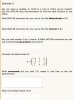 Exercise 3 Say you have a variable, A, which is a 3-by-3 matrix you've created. Use the MATLAB Help Documentation to find the right function to use below. What MATLAB command can you use to find the determinant of A? What MATLAB command can you use to find the inverse of A? Say you had another 3-by-3 matrix, B.What MATLAB command can you use to find the cross product of A and B? Calculate the determinant of A = 1-...
Identify the editing tools you can use to make your document error free. Choose one of...
Identify the editing tools you can use to make your document error free. Choose one of the tools that you would find most useful when correcting errors in your document.
 1. Suppose you have created a vector x in R using the command x <-c(2, 7, 3, 1, 9) . Please find the results for the following commands (2) xlc(1,3,5)] (3) x [2:4] (5) length(x) (6) x [2: length(x)1 (7) x[1: length(x)-1] (8) max(x) (9) min(x) 2. Besides the vector x in question 1, suppose you have created another vector y in R using the command y <- c(1, 2, 3, 4, 5). Please find the results for the following...
 Exercise 3 Say you have a variable, A, which is a 3-by-3 matrix you've created. Use the MATLAB Help Documentation to find the right function to use below. What MATLAB command can you use to find the determinant of A? What MATLAB command can you use to find the inverse of A? Say you had another 3-by-3 matrix, B.What MATLAB command can you use to find the cross product of A and B? Calculate the determinant of A = 1-...
Most questions answered within 3 hours.
-
Where is the error in this code sequence?
String s1 = "Hello";
String s2 = "ello";...
asked 10 months ago -
Financial data for Joel de Paris, Inc., for last year
follow:
Joel de Paris, Inc.
Balance...
asked 10 months ago -
Consider this reaction:
Al2(SO4)3 (aq)+ BaCl3
(aq) Al2Cl6 (aq)- +
3BaSO4(s) . What is the...
asked 10 months ago -
Suppose that Savneet is considering increasing her
recent random sample from 20 car rentals to 40...
asked 10 months ago -
Trucks arrive at an unloading terminal at an average rate of 120
per hour.
Trucks arrive...
asked 10 months ago -
Why are methanol and ethanol completely soluble in water while
octanol is not very little soluble....
asked 10 months ago -
A facilities manager at a university reads in a research report
that the mean amount of...
asked 10 months ago -
When the CuSO4 is rehydrated by adding water to the anhydrous
compound, is this an endothermic...
asked 10 months ago -
A ray of sunlight is passing from diamond into crown glass; the
angle of incidence is...
asked 10 months ago -
A block of mass 0.249 kg is placed on top of a light, vertical
spring of...
asked 10 months ago -
how do the kidneys compensate in the presences of acidosis
a) trigger hyperventilate
b) reserve acid...
asked 10 months ago -
Question 501 pts
The rental rate of capital to the firm increases. Which of the
following...
asked 10 months ago