Using Bootstrap as a basis, and incorporating the grid system from Bootstrap along with your own...
Using Bootstrap as a basis, and incorporating the grid system from Bootstrap along with your own custom HTML and CSS create an e-commerce store. E-commerce store should be about video game items or sports goods. The store should include AT LEAST:
- Homepage with at least a hero, a gallery of products
- About page
- Catalog page
- Cart page
- Check out page
Notes
- The site MUST be responsive and look good on tablet/mobile/desktop
- The cart page should have static products in the cart and do not need to be driven based on the catalog page and user interaction with the site.
- The check out page should be a full-blown checkout page and should be a form to obtain all of the necessary information to fulfill the order (do not collect real credit card data ). The form must include validation.
- The entire site should have its own look and feel and should not look like it was lifted from the Bootstrap examples page.
- Only use HTML and CSS
Homework Answers
This a basic front end platform where one can check products available on ecommerce platform like shopping cart
ORDER OF CODE IS
1. INDEX PAGE
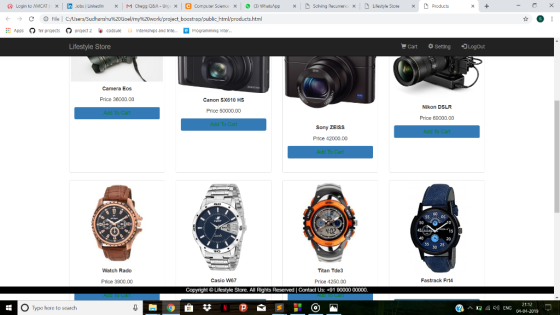
2.PRODUCTS/CATALOG PAGE
3.CART PAGE
4.SIGNUP PAGE (FORM)
5. CONFIRMATION PAGE
THIS ALL MAKE A DEMO OF E-COMMERCE PLATFORM YOU JUST NEED TO TEST THE CODE IN ANY TEXT EDITOR AND MAKE SURE THAT YOUR BROWSER SUPPORTS IT AND JUST IMPLEMENT THE CODES AND SEE IT.
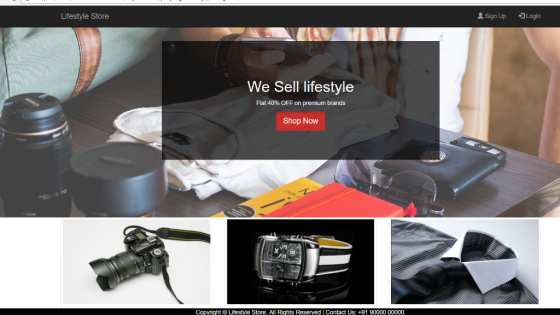
INDEX/Main Page (using HTML CSS BOOTSTRAP)
<!DOCTYPE html>
<html>
<head>
<link rel="stylesheet" href="https://maxcdn.bootstrapcdn.com/bootstrap/3.3.7/css/bootstrap.min.css" >
<!--jQuery library-->
<script src="https://ajax.googleapis.com/ajax/libs/jquery/1.12.4/jquery.min.js"></script>
<!--Latest compiled and minified JavaScript-->
<script src="https://maxcdn.bootstrapcdn.com/bootstrap/3.3.7/js/bootstrap.min.js"></script>
<meta name="viewport" content="width=device-width, initial-scale=1">
<title>Lifestyle Store</title>
<link rel="stylesheet" href="style2.css">
</head>
<body>
<nav class="navbar navbar-inverse navbar-fixed-top">
<div class="container">
<div class="navbar-header">
<button type="button" class="navbar-toggle" data-toggle="collapse" data-target="#myNavbar">
<span class="icon-bar"></span>
<span class="icon-bar"></span>
<span class="icon-bar"></span>
</button>
<a class="navbar-brand" href="index.html">Lifestyle Store</a>
</div>
<div class="collapse navbar-collapse" id="myNavbar">
<ul class="nav navbar-nav navbar-right">
<li><a href="signup.html"><span class="glyphicon glyphicon-user"></span> Sign Up</a></li>
<li><a href="login.html"><span class="glyphicon glyphicon-log-in"></span> Login</a></li>
</ul>
</div>
</div>
</nav>
<div id="content">
<div id="banner_image">
<center>
<div class="container">
<div id="banner_content">
<h1>We Sell lifestyle</h1>
<p>Flat 40% OFF on premium brands</p>
<a href="login.html" class="btn btn-danger btn-lg active">Shop Now</a>
</div>
</div>
</center>
</div>
<div class="container">
<div class="row text-center" id="item_list">
<div class="col-sm-4">
<a href="products.html" >
<div class="thumbnail">
<img src="img1/camera.jpg" >
<div class="caption">
<h3>Cameras</h3>
<p>Choose among the best available in the world.</p>
</div>
</div>
</a>
</div>
<div class="col-sm-4">
<a href="products.html" >
<div class="thumbnail">
<img src="img1/watch.jpg" >
<div class="caption">
<h3>Watches</h3>
<p>Original watches from the best brands.</p>
</div>
</div>
</a>
</div>
<div class="col-sm-4">
<a href="products.html" >
<div class="thumbnail">
<img src="img1/shirt.jpg" >
<div class="caption">
<h3>Shirts</h3>
<p>Our exquisite collection of shirts.</p>
</div>
</div>
</a>
</div>
</div>
</div>
<!--Item categories listing end-->
</div>
<footer>
<div class=" foot">
<center>
<p>Copyright © Lifestyle Store. All Rights Reserved | Contact Us: +91 90000 00000.</p>
</center>
</div>
</footer>
</body>
</html>
The page will look like this
NOW ITS TIME FOR PRODUCTS PAGE/CATALOG
<!DOCTYPE html>
<!--
To change this license header, choose License Headers in Project
Properties.
To change this template file, choose Tools | Templates
and open the template in the editor.
-->
<html>
<head>
<title>Products</title>
<link rel="stylesheet"
href="https://maxcdn.bootstrapcdn.com/bootstrap/3.3.7/css/bootstrap.min.css"
>
<!--jQuery library-->
<script
src="https://ajax.googleapis.com/ajax/libs/jquery/1.12.4/jquery.min.js"></script>
<!--Latest compiled and minified JavaScript-->
<script
src="https://maxcdn.bootstrapcdn.com/bootstrap/3.3.7/js/bootstrap.min.js"></script>
<meta name="viewport" content="width=device-width,
initial-scale=1">
<link rel="stylesheet" href="style2.css">
</head>
<body>
<nav class="navbar navbar-inverse navbar-fixed-top">
<div class="container">
<div class="navbar-header">
<button type="button" class="navbar-toggle"
data-toggle="collapse" data-target="#myNavbar">
<span class="icon-bar"></span>
<span class="icon-bar"></span>
<span class="icon-bar"></span>
</button>
<a class="navbar-brand" href="index.html">Lifestyle
Store</a>
</div>
<div class="collapse navbar-collapse" id="myNavbar">
<ul class="nav navbar-nav navbar-right">
<li><a href="cart.html"><span class="glyphicon
glyphicon-shopping-cart"></span>
Cart</a></li>
<li><a href="settings.html"><span class="glyphicon
glyphicon-cog"></span> Setting</a></li>
<li><a href="login.html"><span class="glyphicon
glyphicon-log-in"></span> LogOut</a></li>
</ul>
</div>
</div>
</nav>
<div class="container">
<div class="jumbotron row-style">
<h1>Welcome to our Lifestyle Store!</h1>
<p>We have the best cameras, watches and shirts for you. No
need to hunt
around, we have all in one place</p>
</div>
<div class="row">
<div class="col-md-3 col-sm-6 ">
<div class="thumbnail img">
<img src="img1/camera.jpg" >
<div class="caption">
<center>
<p><b>Camera Eos</b></p>
<p>Price 36000.00</p>
<a href="cart.html" class="btn btn-primary btn-block">Add To
Cart</a>
</center>
</div>
</div>
</div>
<div class="col-md-3 col-sm-6 ">
<div class="thumbnail img">
<img src="img1/c2.jpg" >
<div class="caption">
<center>
<p><b>Canon SX610 HS </b></p>
<p>Price 50000.00</p>
<a href="cart.html" class="btn btn-primary btn-block">Add To
Cart</a>
</center>
</div>
</div>
</div>
<div class="col-md-3 col-sm-6 ">
<div class="thumbnail img-responsive img">
<img src="img1/c3.jpg" >
<div class="caption">
<center>
<p><b>Sony ZEISS</b> </p>
<p>Price 42000.00</p>
<a href="cart.html" class="btn btn-primary btn-block">Add To
Cart</a>
</center>
</div>
</div>
</div>
<div class="col-md-3 col-sm-6 ">
<div class="thumbnail img-responsive img">
<img src="img1/c4.jpg" >
<div class="caption">
<center>
<p><b>Nikon DSLR</b></p>
<p>Price 60000.00</p>
<a href="cart.html" class="btn btn-primary btn-block">Add To
Cart</a>
</center>
</div>
</div>
</div>
</div>
<div class="col-sm-12">
<br>
</div>
<div class="row">
<div class="col-md-3 col-sm-6 ">
<div class="thumbnail img">
<img src="img1/w1.jpg" >
<div class="caption">
<center>
<p><b>Watch Rado </b></p>
<p>Price 3900.00</p>
<a href="cart.html" class="btn btn-primary btn-block">Add To
Cart</a>
</center>
</div>
</div>
</div>
<div class="col-md-3 col-sm-6 ">
<div class="thumbnail img">
<img src="img1/w2.jpg" >
<div class="caption">
<center>
<p><b>Casio W67 </b></p>
<p>Price 5000.00</p>
<a href="cart.html" class="btn btn-primary btn-block">Add To
Cart</a>
</center>
</div>
</div>
</div>
<div class="col-md-3 col-sm-6 ">
<div class="thumbnail img-responsive img">
<img src="img1/w3.jpg" >
<div class="caption">
<center>
<p><b>Titan Tde3</b> </p>
<p>Price 4250.00</p>
<a href="cart.html" class="btn btn-primary btn-block">Add To
Cart</a>
</center>
</div>
</div>
</div>
<div class="col-md-3 col-sm-6 ">
<div class="thumbnail img-responsive img">
<img src="img1/w4.jpg" >
<div class="caption">
<center>
<p><b>Fastrack Frt4</b></p>
<p>Price 6450.00</p>
<a href="cart.html" class="btn btn-primary btn-block">Add To
Cart</a>
</center>
</div>
</div>
</div>
</div>
<div class="row">
<div class="col-md-3 col-sm-6 ">
<div class="thumbnail img">
<img src="img1/s1.jpg" >
<div class="caption">
<center>
<p><b>H&W</b></p>
<p>Price 4000.00</p>
<select name="size">
<option value="S">S</option>
<option value="L">L</option>
<option value="XL">XL</option>
<option value="XXL">XXL</option>
</select><br><br>
<a href="cart.html" class="btn btn-primary btn-block">Add To
Cart</a>
</center>
</div>
</div>
</div>
<div class="col-md-3 col-sm-6 ">
<div class="thumbnail img">
<img src="img1/s2.jpg" >
<div class="caption">
<center>
<p><b>Luis Phill </b></p>
<p>Price 3599.00</p>
<select name="size">
<option value="S">S</option>
<option value="L">L</option>
<option value="XL">XL</option>
<option value="XXL">XXL</option>
</select><br><br>
<a href="cart.html" class="btn btn-primary btn-block">Add To
Cart</a>
</center>
</div>
</div>
</div>
<div class="col-md-3 col-sm-6 ">
<div class="thumbnail img-responsive img">
<img src="img1/s3.jpg" >
<div class="caption">
<center>
<p><b>Johnn Zok</b> </p>
<p>Price 4299.00</p>
<select name="size">
<option value="S">S</option>
<option value="L">L</option>
<option value="XL">XL</option>
<option value="XXL">XXL</option>
</select><br><br>
<a href="cart.html" class="btn btn-primary btn-block">Add To
Cart</a>
</center>
</div>
</div>
</div>
<div class="col-md-3 col-sm-6 ">
<div class="thumbnail img-responsive img">
<img src="img1/s4.jpg" >
<div class="caption">
<center>
<p><b>Raymond#4SET</b></p>
<p>Price 7999.00</p>
<select name="size">
<option value="S">S</option>
<option value="L">L</option>
<option value="XL">XL</option>
<option value="XXL">XXL</option>
</select><br><br>
<a href="cart.html" class="btn btn-primary btn-block">Add To
Cart</a>
</center>
</div>
</div>
</div>
</div>
</div>
<br><br><br>
<footer>
<div class=" foot">
<center>
<p>Copyright © Lifestyle Store. All Rights Reserved | Contact
Us: +91 90000 00000.</p>
</center>
</div>
</footer>
</body>
</html>
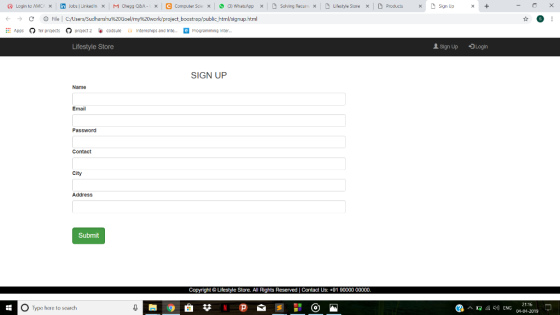
NOW YOU NEED A CART PAGE AND LOGIN/SIGNUP PAGE
THIS WILL MAKE YOUR CART PAGE
<!DOCTYPE html>
<html>
<head>
<title>CART</title>
<link rel="stylesheet"
href="https://maxcdn.bootstrapcdn.com/bootstrap/3.3.7/css/bootstrap.min.css"
>
<!--jQuery library-->
<script
src="https://ajax.googleapis.com/ajax/libs/jquery/1.12.4/jquery.min.js"></script>
<!--Latest compiled and minified JavaScript-->
<script
src="https://maxcdn.bootstrapcdn.com/bootstrap/3.3.7/js/bootstrap.min.js"></script>
<meta name="viewport" content="width=device-width,
initial-scale=1">
<link rel="stylesheet" href="style2.css">
</head>
<body>
<nav class="navbar navbar-inverse navbar-fixed-top">
<div class="container">
<div class="navbar-header">
<button type="button" class="navbar-toggle"
data-toggle="collapse" data-target="#myNavbar">
<span class="icon-bar"></span>
<span class="icon-bar"></span>
<span class="icon-bar"></span>
</button>
<a class="navbar-brand" href="index.html">Lifestyle
Store</a>
</div>
<div class="collapse navbar-collapse" id="myNavbar">
<ul class="nav navbar-nav navbar-right">
<li><a href="cart.html"><span class="glyphicon
glyphicon-shopping-cart"></span>
Cart</a></li>
<li><a href="settings.html"><span class="glyphicon
glyphicon-cog"></span> Setting</a></li>
<li><a href="login.html"><span class="glyphicon
glyphicon-log-in"></span> LogOut</a></li>
</ul>
</div>
</div>
</nav>
<div class="container row-style">
<div class="table-responsive">
<table class="table table-striped table-bordered">
<tbody>
<tr><th>ITEM NUMBER</th><th>ITEM
NAME</th><th>PRICE</th><th></th></tr>
<tr><td></td><td>TOTAL</td><td>Rs:0</td><td>
<a href="success.html" class="btn btn-warning">
BUY NOW</a></td>
</tbody>
</table>
</div>
</div>
<footer>
<div class=" foot">
<center>
<p>Copyright © Lifestyle Store. All Rights Reserved | Contact
Us: +91 90000 00000.</p>
</center>
</div>
</footer>
</body>
</html>
NOW FOR SIGN UP YOU CAN MAKE A FORM WITH VALID INFORMATION THAT YOU NEED LIKE NAME EMAILID PHONENO. ADDRESS ETC
<!DOCTYPE html>
<html>
<head>
<title>Sign Up</title>
<link rel="stylesheet"
href="https://maxcdn.bootstrapcdn.com/bootstrap/3.3.7/css/bootstrap.min.css"
>
<!--jQuery library-->
<script
src="https://ajax.googleapis.com/ajax/libs/jquery/1.12.4/jquery.min.js"></script>
<!--Latest compiled and minified JavaScript-->
<script
src="https://maxcdn.bootstrapcdn.com/bootstrap/3.3.7/js/bootstrap.min.js"></script>
<meta name="viewport" content="width=device-width,
initial-scale=1">
<link rel="stylesheet" href="style2.css">
</head>
<body>
<nav class="navbar navbar-inverse navbar-fixed-top">
<div class="container">
<div class="navbar-header">
<button type="button" class="navbar-toggle"
data-toggle="collapse" data-target="#myNavbar">
<span class="icon-bar"></span>
<span class="icon-bar"></span>
<span class="icon-bar"></span>
</button>
<a class="navbar-brand" href="index.html">Lifestyle
Store</a>
</div>
<div class="collapse navbar-collapse" id="myNavbar">
<ul class="nav navbar-nav navbar-right">
<li><a href="signup.html"><span class="glyphicon
glyphicon-user"></span> Sign Up</a></li>
<li><a href="login.html"><span class="glyphicon
glyphicon-log-in"></span> Login</a></li>
</ul>
</div>
</div>
</nav>
<div class="container">
<div class="row row-style">
<div class="col-sm-8 ">
<form>
<center>
<h3>SIGN UP </h3>
</center>
<div class="form-group" >
<label for="name">Name</label>
<input type="text" class="form-control" name="name">
<label for="email">Email</label>
<input type="text" class="form-control" name="email">
<label for="password">Password</label>
<input type="text" class="form-control"
name="password">
<label for="contact">Contact</label>
<input type="text" class="form-control" name="contact">
<label for="city">City</label>
<input type="text" class="form-control" name="city">
<label for="address">Address</label>
<input type="text" class="form-control"
name="address"><br><br>
<a href="signup-success.html" class="btn btn-success btn-lg
active">Submit</a>
</div>
</form>
</div>
</div>
</div>
<footer>
<div class=" foot">
<center>
<p>Copyright © Lifestyle Store. All Rights Reserved | Contact
Us: +91 90000 00000.</p>
</center>
</div>
</footer>
</body>
</html>
NOW A SIMPLE CONFIRMATION PAGE THAT YOU CAN BUILD ONCE USER CLICK ON BUY
<!DOCTYPE html>
<html>
<head>
<title>Success Status</title>
<link rel="stylesheet"
href="https://maxcdn.bootstrapcdn.com/bootstrap/3.3.7/css/bootstrap.min.css"
>
<!--jQuery library-->
<script
src="https://ajax.googleapis.com/ajax/libs/jquery/1.12.4/jquery.min.js"></script>
<!--Latest compiled and minified JavaScript-->
<script
src="https://maxcdn.bootstrapcdn.com/bootstrap/3.3.7/js/bootstrap.min.js"></script>
<meta name="viewport" content="width=device-width,
initial-scale=1">
<link rel="stylesheet" href="style2.css">
</head>
<body>
<div class="container row-style">
<h4>Your order is confirmed. Thank you for shopping
with us.<a href="products.html"> Click here</a> to
purchase any other item.</h4>
</div>
</body>
</html>
Add Answer to:
Using Bootstrap as a basis, and incorporating the grid system
from Bootstrap along with your own...
Create a website on a topic of your choosing. Site should include the following: Design: Site...
 Create a website on a topic of your choosing. Site should include the following: Design: Site Map (Task 7) Page-layout for each page (Task 8) Homepage . . o Title o Navigation Links o Footer o Minimum of 1 graphic 4 additional pages that are linked to home page o o o Navigation Links (link back to homepage) Minimum of 1 graphic per page Footer (matching homepage) CSS should be used for formatting visual aspects of site. Use either external...
Complete a SIX webpage using notepad or notepad++ about your favorite hobby that contains the following:...
Complete a SIX webpage using notepad or notepad++ about your favorite hobby that contains the following: The project should include the following pages: home page form page 4 or more additional pages to render complete coverage a site map – three levels or more (not included in the page count) The pages should contain: a two- or three-column layout CSS must be used for layout one external CSS file will contain formatting for the site (the bulk of css goes...
Design an original, professional web site following the specifications listed below. This web sit...
Design an original, professional web site following the specifications listed below. This web site will be for a business you plan to set up for yourself or for someone else. The following is a detailed list of the requirements for your web site. READ them carefully. Instructions - Web Site Requirements for the web site: General: You will thoroughly test all your pages in more than one browser. All links MUST work. All graphics must show on the page. All...
For milestone #1, we will start the CARIT site with three static HTML pages and a...
For milestone #1, we will start the CARIT site with three static HTML pages and a CSS file. Create a dedicated folder for this project. This folder should contain all related files in this project. The future milestones are cumulative and built directly on top of your prior work. Function/content requirements: A home page named “index.html”, which include these contents at least: Description of the center. You may reference the example sites. Latest news: use list tags; make up some...
And there was a buy-sell arrangement which laid out the conditions under which either shareholder could...
 And there was a buy-sell arrangement which laid out the
conditions under which either shareholder could buy out the other.
Paul knew that this offer would strengthen his financial
picture…but did he really want a partner?It was going to be a long
night.
read the case study above and answer this question
what would you do if you were Paul with regards to financing,
and why?
ntroductloh Paul McTaggart sat at his desk. Behind him, the computer screen flickered with...
And there was a buy-sell arrangement which laid out the
conditions under which either shareholder could buy out the other.
Paul knew that this offer would strengthen his financial
picture…but did he really want a partner?It was going to be a long
night.
read the case study above and answer this question
what would you do if you were Paul with regards to financing,
and why?
ntroductloh Paul McTaggart sat at his desk. Behind him, the computer screen flickered with...
Read this article. Then write a 250 word response on two of the programs you like...
Read this article. Then write a 250 word response on two of the programs you like the most. Open source business intelligence software 1. BIRT BIRT is an open source BI program that CloudTweaks says is often viewed as the industry standard. BIRT boasts “over 12 million downloads and over 2.5 million developers across 157 countries.” Its users include heavyweights such as Cisco, S1, and IBM (which is also a BIRT sponsor). They also have maturity going for them, as...
Write down your analysis of this case on factors like the interests involved, context and power...
Write down your analysis of this case on factors like the interests involved, context and power PACIFIC OIL COMPANY (A)* "Look, you asked for my advice, and I gave it to you," Frank Kelsey said. "If I were you, I wouldn't make any more concessions! I really don't think you ought to agree to their last demand! But you're the one who has to live with the contract, not me!" Static on the transatlantic telephone connection obscured Jean Fontaine's reply....
Write down your analysis of this case on factors like 1. the negotiation process, strategy and...
Write down your analysis of this case on factors like 1. the negotiation process, strategy and tactics PACIFIC OIL COMPANY (A)* "Look, you asked for my advice, and I gave it to you," Frank Kelsey said. "If I were you, I wouldn't make any more concessions! I really don't think you ought to agree to their last demand! But you're the one who has to live with the contract, not me!" Static on the transatlantic telephone connection obscured Jean Fontaine's...
10. Write a one-page summary of the attached paper? INTRODUCTION Many problems can develop in activated...
10. Write a one-page summary of the attached paper? INTRODUCTION Many problems can develop in activated sludge operation that adversely affect effluent quality with origins in the engineering, hydraulic and microbiological components of the process. The real "heart" of the activated sludge system is the development and maintenance of a mixed microbial culture (activated sludge) that treats wastewater and which can be managed. One definition of a wastewater treatment plant operator is a "bug farmer", one who controls the aeration...
 Create a website on a topic of your choosing. Site should include the following: Design: Site Map (Task 7) Page-layout for each page (Task 8) Homepage . . o Title o Navigation Links o Footer o Minimum of 1 graphic 4 additional pages that are linked to home page o o o Navigation Links (link back to homepage) Minimum of 1 graphic per page Footer (matching homepage) CSS should be used for formatting visual aspects of site. Use either external...
 And there was a buy-sell arrangement which laid out the
conditions under which either shareholder could buy out the other.
Paul knew that this offer would strengthen his financial
picture…but did he really want a partner?It was going to be a long
night.
read the case study above and answer this question
what would you do if you were Paul with regards to financing,
and why?
ntroductloh Paul McTaggart sat at his desk. Behind him, the computer screen flickered with...
And there was a buy-sell arrangement which laid out the
conditions under which either shareholder could buy out the other.
Paul knew that this offer would strengthen his financial
picture…but did he really want a partner?It was going to be a long
night.
read the case study above and answer this question
what would you do if you were Paul with regards to financing,
and why?
ntroductloh Paul McTaggart sat at his desk. Behind him, the computer screen flickered with...
Most questions answered within 3 hours.
-
Where is the error in this code sequence?
String s1 = "Hello";
String s2 = "ello";...
asked 10 months ago -
Financial data for Joel de Paris, Inc., for last year
follow:
Joel de Paris, Inc.
Balance...
asked 10 months ago -
Consider this reaction:
Al2(SO4)3 (aq)+ BaCl3
(aq) Al2Cl6 (aq)- +
3BaSO4(s) . What is the...
asked 10 months ago -
Suppose that Savneet is considering increasing her
recent random sample from 20 car rentals to 40...
asked 10 months ago -
Trucks arrive at an unloading terminal at an average rate of 120
per hour.
Trucks arrive...
asked 10 months ago -
Why are methanol and ethanol completely soluble in water while
octanol is not very little soluble....
asked 10 months ago -
A facilities manager at a university reads in a research report
that the mean amount of...
asked 10 months ago -
When the CuSO4 is rehydrated by adding water to the anhydrous
compound, is this an endothermic...
asked 10 months ago -
A ray of sunlight is passing from diamond into crown glass; the
angle of incidence is...
asked 10 months ago -
A block of mass 0.249 kg is placed on top of a light, vertical
spring of...
asked 10 months ago -
how do the kidneys compensate in the presences of acidosis
a) trigger hyperventilate
b) reserve acid...
asked 10 months ago -
Question 501 pts
The rental rate of capital to the firm increases. Which of the
following...
asked 10 months ago