In MySQL: - Display the Editors’ first and last name, as well as the Book’s title...
In MySQL:
- Display the Editors’ first and last name, as well as the Book’s title sorted by Book’s title first and the Editor’s last name second for all Books that were published on September 26, 2006.
- Display the Author’s first and last name, as well as their ID, and the Book title and number of pages for all of the books they have written that have more than the average number of pages for all of the books that have been written, listed by author’s first and last name along with the book title, and the book’s number of pages. I received a hint to use a subquery to accomplish this.
- (This is a tough one) Display the Author’s or Authors’ ID, first and last name of the Author who has the most Books in the Coastal Publishing database.
Setup: https://docs.google.com/document/d/1utZyo9bqmMFKQvGdhc-1LMMxsMTjNtqTbkcrG96wnyI/edit?usp=sharing
Inserts: https://docs.google.com/document/d/18lXrv0ofBwpc7yllFYKGKlbCrOnz5okZjyLPj3ESeDw/edit?usp=sharing
Homework Answers
<?php
//Display the Editors’ first and last name, as well as
the Book’s title sorted by Book’s title first and the Editor’s last
name second for all Books that were published on September 26,
2006.
error_reporting(-1);
define('DB_SERVER', 'localhost');
define('DB_USERNAME', 'root');
define('DB_PASSWORD', '');
define('DB_DATABASE', 'coastalpublishing');
$conn=mysqli_connect(DB_SERVER,DB_USERNAME,DB_PASSWORD,DB_DATABASE);
mysqli_set_charset($conn,"utf8");
if(!$conn){
die('Could not Connect My Sql:' .mysqli_error());
}
$select_editor="SELECT
*,book.BookTitle,book.Editor_editorID FROM editor
INNER JOIN book ON editor.editorID =
book.Editor_editorID WHERE book.BookPublishDate=
DATE_FORMAT('09-26-2006', '%m-%d-%y') order by book.BookTitle DESC
";
$query_editor=mysqli_query($conn,$select_editor) or
die(mysqli_error($conn));
?>
<!DOCTYPE html>
<html>
<head>
<title>testing</title>
</head>
<body>
<table border="1" style="font-size: 20px; color:
black;">
<tr>
<th>First
Name</th>
<th>Last
Name</th>
<th>Book
Title</th>
</tr>
<?php
while($row=mysqli_fetch_assoc($query_editor))
{
?>
<tr>
<td><?php echo
$row['EditorFirstName']; ?></td>
<td><?php echo
$row['EditorLastName']; ?></td>
<td><?php echo
$row['BookTitle']; ?></td>
</tr>
<?php } ?>
</table>
</body>
</html>
screenshot of code
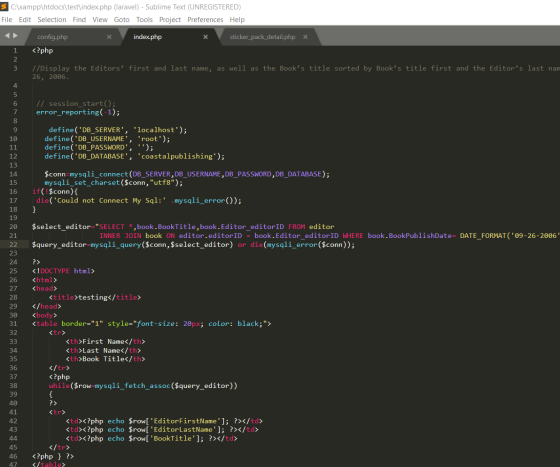
output of query

no result was found for 26-09-2006.
2)
<?php
//Display the Author’s first and last name, as well as their ID, and the Book title and number of pages for all of the books they have written that have more than the average number of pages for all of the books that have been written, listed by author’s first and last name along with the book title, and the book’s number of pages. I received a hint to use a subquery to accomplish this.
error_reporting(-1);
define('DB_SERVER', 'localhost');
define('DB_USERNAME', 'root');
define('DB_PASSWORD', '');
define('DB_DATABASE', 'coastalpublishing');
$conn=mysqli_connect(DB_SERVER,DB_USERNAME,DB_PASSWORD,DB_DATABASE);
mysqli_set_charset($conn,"utf8");
if(!$conn){
die('Could not Connect My Sql:' .mysqli_error());
}
$select_editor="SELECT
editor.*,book.BookTitle,book.Editor_editorID,book.BookNumberOfPages
FROM editor
INNER JOIN book ON editor.editorID =
book.Editor_editorID order by editor.EditorFirstName ASC ";
$query_editor=mysqli_query($conn,$select_editor) or
die(mysqli_error($conn));
?>
<!DOCTYPE html>
<html>
<head>
<title>testing</title>
</head>
<body>
<table border="1" style="font-size: 20px; color:
black;">
<tr>
<th>First
Name</th>
<th>Last
Name</th>
<th>Book
Title</th>
<th>Number Of
Pages</th>
</tr>
<?php
while($row=mysqli_fetch_assoc($query_editor))
{
?>
<tr>
<td><?php echo
$row['EditorFirstName']; ?></td>
<td><?php echo
$row['EditorLastName']; ?></td>
<td><?php echo
$row['BookTitle']; ?></td>
<td><?php echo
$row['BookNumberOfPages']; ?></td>
</tr>
<?php } ?>
</table>
</body>
</html>
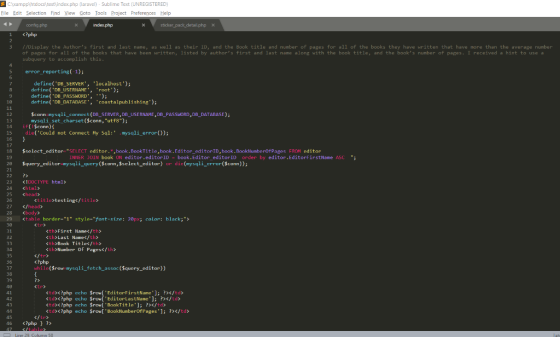
screenshot of code.
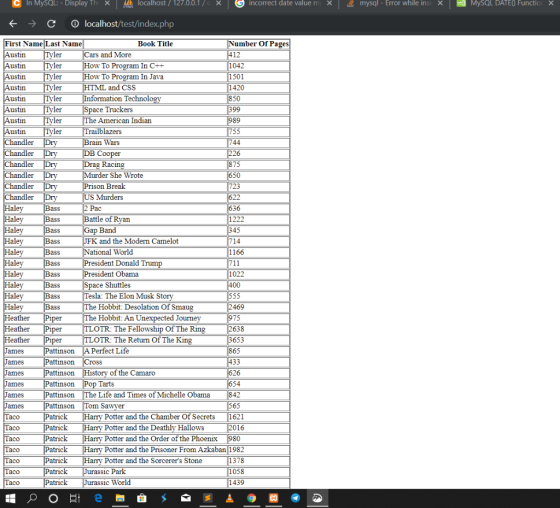
Output of the Query:-
3)
<?php
//(This is a tough one) Display the Author’s or Authors’ ID, first
and last name of the Author who has the most Books in the Coastal
Publishing database.
error_reporting(-1);
define('DB_SERVER', 'localhost');
define('DB_USERNAME', 'root');
define('DB_PASSWORD', '');
define('DB_DATABASE', 'coastalpublishing');
$conn=mysqli_connect(DB_SERVER,DB_USERNAME,DB_PASSWORD,DB_DATABASE);
mysqli_set_charset($conn,"utf8");
if(!$conn){
die('Could not Connect My Sql:' .mysqli_error());
}
$select_editor="SELECT author.*,book.Author_authorID as
Author_id FROM author
INNER JOIN book ON author.authorID =
book.Author_authorID WHERE book.Author_authorID=(select
max(Author_authorID) from book) group by author.AuthorFirstName
";
$query_editor=mysqli_query($conn,$select_editor) or
die(mysqli_error($conn));
?>
<!DOCTYPE html>
<html>
<head>
<title>testing</title>
</head>
<body>
<table border="1" style="font-size: 20px; color:
black;">
<tr>
<th>First
Name</th>
<th>Last
Name</th>
<th>Author
Id</th>
</tr>
<?php
while($row=mysqli_fetch_assoc($query_editor))
{
?>
<tr>
<td><?php echo
$row['AuthorFirstName']; ?></td>
<td><?php echo
$row['AuthorLastName']; ?></td>
<td><?php echo
$row['Author_id']; ?></td>
</tr>
<?php } ?>
</table>
</body>
</html>
Screenshot of code.
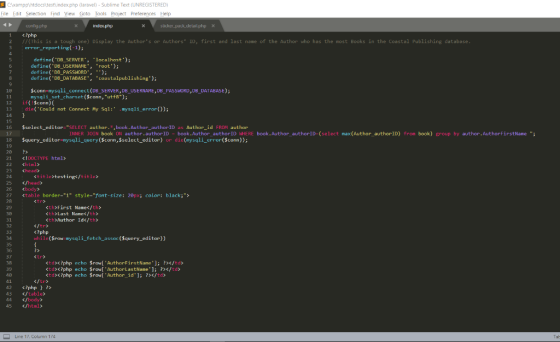
Output of the query:-

Add Answer to:
In MySQL:
- Display the Editors’ first and last name, as well as the
Book’s title...
Need MySql commands for Use a UNION statement. Display the address ID, address, and district from...
Need MySql commands for Use a UNION statement. Display the address ID, address, and district from the address table where the district is California or Alberta. Display the address ID, address, and district only from the address table where the address contains Jol. Display the language ID and name from the language table and the film ID from the film table. Display all languages whether they have an associated film or not. Order results by language ID in ascending order....
Write a query to display author ID, author first, last name, and the number of subjects...
 Write a query to display author ID, author first, last name, and
the number of subjects (book subject count) for authors who have
published books in more than one subject area (book subject).
CHECKOUT PATRON PK Pat ID FK1 Book Num FK2 Pat ID Check Out Date Check Due Date Check In Date Pat FName Pat LName Pat Type BOOK AUTHOR PK Au ID Book Title Book Year Book Cost Book Subject Au FName Au LName Au BirthYear FK1 Pat...
Write a query to display author ID, author first, last name, and
the number of subjects (book subject count) for authors who have
published books in more than one subject area (book subject).
CHECKOUT PATRON PK Pat ID FK1 Book Num FK2 Pat ID Check Out Date Check Due Date Check In Date Pat FName Pat LName Pat Type BOOK AUTHOR PK Au ID Book Title Book Year Book Cost Book Subject Au FName Au LName Au BirthYear FK1 Pat...
Draw a Design Class Diagram based on the following database requirements as provided by a book...
Draw a Design Class Diagram based on the following database requirements as provided by a book publisher A. For each author, the book publisher would like to keep track of the author’s ID number, name, and contact number. i. IC number is unique for each author ii. First Name iii. Last Name iv. email B. For each book, the book publisher would like to keep track of the book’s ISBN (International Standard Book Number) and name i. ISBN is unique...
Write just one SQL statement per question 1. Display Publisher ID, Publisher Name and Total Number...
Write just one SQL statement per question 1. Display Publisher ID, Publisher Name and Total Number of Books published by each publisher. 2. List Publisher ID, Publisher Name, Title and price of the highest priced book. 3. List Order ID, Customer ID, Order Date, and Number of Items in each order. Order the data by Customer ID in ascending (A – Z) order. 4. Display Title, Category and Profit for each book in the children and computer category. 5. Display...
Database Management.... Write the SQL command that would, for each author, list the last name, first...
Database Management.... Write the SQL command that would, for each author, list the last name, first name, and title and book type of all books written by her or him that we carry,
I need to write a SQL query that displays the first name and last name of...
I need to write a SQL query that displays the first name and last name of each author along with the number of books he or she has written. Capitalize the first and last names. AUTHOR table: AUTHORID, LNAME, FNAME BOOKAUTHOR table: ISBN, AUTHORID BOOKS table: ISBN, TITLE, PUBDATE, PUBID, COST, RETAIL, DISCOUNT, CATEGORY
This assignment consists of a series of SQL questions. For each question, you will need to...
 This assignment consists of a series of SQL questions. For each
question, you will need to include:
• SQL query.
• An explanation of the query. Please include explanations as a
comment AFTER your query, e.g., enclosed within a /* comments block
*/ ). See the first example in the SQL tutorial for a comment. You
don’t need to explain straightforward code in comments. Only the
parts that are interesting or different, so that we understand what
you did.
Question-1...
This assignment consists of a series of SQL questions. For each
question, you will need to include:
• SQL query.
• An explanation of the query. Please include explanations as a
comment AFTER your query, e.g., enclosed within a /* comments block
*/ ). See the first example in the SQL tutorial for a comment. You
don’t need to explain straightforward code in comments. Only the
parts that are interesting or different, so that we understand what
you did.
Question-1...
Write an SQL statement that will display the Employee ID, First name (only last 2 letters),...
Write an SQL statement that will display the Employee ID, First name (only last 2 letters), phone number (replace . by /) of all employees whose job Id has a word ‘REP’.
Given the following table structure, write the SQL code to display all the first and last...
 Given the following table structure, write the SQL code to display all the first and last names of the individuals that have a last name that begins with the letter 'M! CREATE TABLE Persons Personi int LastName varchar(80). FirstName varchar(80). Address varchar(125). State char(2) Given the following table structure, write the SQL code to display all the first and last names of the individuals that have a last name that does not contain the letter 'S: CREATE TABLE Persons PersonlDint,...
1,List the first and last name of the donators that donated in December 2009. 2. List...
 1,List the first and last name of the donators that donated in
December 2009.
2. List the ID's of the volunteers that have not worked.
3. List the ID, first name, and last name of any employees who
works in the Finance department.
4. List all the different prices suppliers have for 'Tasty Meat'
product.
5. Select the store ID and store phone number for all stores in
'St.Paul'.
6. List the member first and last name, address, city, zip...
1,List the first and last name of the donators that donated in
December 2009.
2. List the ID's of the volunteers that have not worked.
3. List the ID, first name, and last name of any employees who
works in the Finance department.
4. List all the different prices suppliers have for 'Tasty Meat'
product.
5. Select the store ID and store phone number for all stores in
'St.Paul'.
6. List the member first and last name, address, city, zip...
 Write a query to display author ID, author first, last name, and
the number of subjects (book subject count) for authors who have
published books in more than one subject area (book subject).
CHECKOUT PATRON PK Pat ID FK1 Book Num FK2 Pat ID Check Out Date Check Due Date Check In Date Pat FName Pat LName Pat Type BOOK AUTHOR PK Au ID Book Title Book Year Book Cost Book Subject Au FName Au LName Au BirthYear FK1 Pat...
Write a query to display author ID, author first, last name, and
the number of subjects (book subject count) for authors who have
published books in more than one subject area (book subject).
CHECKOUT PATRON PK Pat ID FK1 Book Num FK2 Pat ID Check Out Date Check Due Date Check In Date Pat FName Pat LName Pat Type BOOK AUTHOR PK Au ID Book Title Book Year Book Cost Book Subject Au FName Au LName Au BirthYear FK1 Pat...
 This assignment consists of a series of SQL questions. For each
question, you will need to include:
• SQL query.
• An explanation of the query. Please include explanations as a
comment AFTER your query, e.g., enclosed within a /* comments block
*/ ). See the first example in the SQL tutorial for a comment. You
don’t need to explain straightforward code in comments. Only the
parts that are interesting or different, so that we understand what
you did.
Question-1...
This assignment consists of a series of SQL questions. For each
question, you will need to include:
• SQL query.
• An explanation of the query. Please include explanations as a
comment AFTER your query, e.g., enclosed within a /* comments block
*/ ). See the first example in the SQL tutorial for a comment. You
don’t need to explain straightforward code in comments. Only the
parts that are interesting or different, so that we understand what
you did.
Question-1...
 Given the following table structure, write the SQL code to display all the first and last names of the individuals that have a last name that begins with the letter 'M! CREATE TABLE Persons Personi int LastName varchar(80). FirstName varchar(80). Address varchar(125). State char(2) Given the following table structure, write the SQL code to display all the first and last names of the individuals that have a last name that does not contain the letter 'S: CREATE TABLE Persons PersonlDint,...
 1,List the first and last name of the donators that donated in
December 2009.
2. List the ID's of the volunteers that have not worked.
3. List the ID, first name, and last name of any employees who
works in the Finance department.
4. List all the different prices suppliers have for 'Tasty Meat'
product.
5. Select the store ID and store phone number for all stores in
'St.Paul'.
6. List the member first and last name, address, city, zip...
1,List the first and last name of the donators that donated in
December 2009.
2. List the ID's of the volunteers that have not worked.
3. List the ID, first name, and last name of any employees who
works in the Finance department.
4. List all the different prices suppliers have for 'Tasty Meat'
product.
5. Select the store ID and store phone number for all stores in
'St.Paul'.
6. List the member first and last name, address, city, zip...
Most questions answered within 3 hours.
-
Where is the error in this code sequence?
String s1 = "Hello";
String s2 = "ello";...
asked 10 months ago -
Financial data for Joel de Paris, Inc., for last year
follow:
Joel de Paris, Inc.
Balance...
asked 10 months ago -
Consider this reaction:
Al2(SO4)3 (aq)+ BaCl3
(aq) Al2Cl6 (aq)- +
3BaSO4(s) . What is the...
asked 10 months ago -
Suppose that Savneet is considering increasing her
recent random sample from 20 car rentals to 40...
asked 10 months ago -
Trucks arrive at an unloading terminal at an average rate of 120
per hour.
Trucks arrive...
asked 10 months ago -
Why are methanol and ethanol completely soluble in water while
octanol is not very little soluble....
asked 10 months ago -
A facilities manager at a university reads in a research report
that the mean amount of...
asked 10 months ago -
When the CuSO4 is rehydrated by adding water to the anhydrous
compound, is this an endothermic...
asked 10 months ago -
A ray of sunlight is passing from diamond into crown glass; the
angle of incidence is...
asked 10 months ago -
A block of mass 0.249 kg is placed on top of a light, vertical
spring of...
asked 10 months ago -
how do the kidneys compensate in the presences of acidosis
a) trigger hyperventilate
b) reserve acid...
asked 10 months ago -
Question 501 pts
The rental rate of capital to the firm increases. Which of the
following...
asked 10 months ago