Develop a system flowchart and then write a menu-driven C++ program that uses user-defined functions arrays,...
Develop a system flowchart and then write a menu-driven C++ program that uses user-defined functions arrays, and a random number generator. Upon program execution, the screen will be cleared and the menu shown below will appear at the top of the screen and centered. The menu items are explained below. Help Smallest Quit H or h ( for Help ) option will invoke a function named help() which will display a help screen. The help screen(s) should guide the user how to interact with the program, type of data to be used, and what results would the program produce. Each help screen should remain on the monitor until the user strikes any key. Once the user completes reading the help() screens, striking any key will clear the screen and the menu is displayed again. The main() function will declare an array of 8 elements. The elements are of type float. The menu option S will ask the user for the actual number of elements for the array. The program must verify that the actual number of elements does not exceed 8 and is not a negative number or 0. Your code must check for these. S or s( for Smallest ) option will invoke a function named Smallest( ) which will prompt the user for the number of elements for the array to be examined using the function sizeOfArray( ) which will read and validate the desired array elements and returns it to the calling function. The program will then use the returned size of the array to fill the array using the random number generator functions shown at the end of this assignment. Your program will ask the user for the range of values for the elements of the array and uses these numbers in a random generator function to fill the array. Once the array is filled, the program will call the function findSmallest( ) which will find and return the smallest number in the array to the calling function. The program will then call the function frequency(), that will compute and return the frequency of occurrence of the smallest number. The program will then display the array elements, the smallest number, and its frequency of occurrence using the function display( ), in the format shown below. The output shown is for an array of five elements with an array identifier a. a[0] = xxxx.xx a[1] = xxxx.xx a[2] = xxxx.xx a[3] = xxxx.xx a[4] = xxxx.xx Smallest no. = xxxx.xx Frequency = xx
Note that for the array elements, two digits after the decimal point is required (i.e., 298.35) and the frequency of occurrence is of type integer.
The function prototypes to be used are as follows: void smallest(float s[], int size); where s is the original array declared in the main() function and size is the maximum array size specified (8 elements in our case). //gets the desired array size and returns it int sizeOfArray(void); //finds the smallest number in the array and returns it via the return statement.
float findSmallest(float s[], int myS); //where s is the specified array name and myS is the desired size of the array. //Finds the frequency of occurrence of the minimum number int frequency(float s[], float smallestNo, int myS); here, s is the desired source array, smallestNo is the smallest number found in the function findSmallest(), myS is the desired size of the array. The frequency of occurrence of the smallest number in the array is computed and returned via a return statement.
For the smallest number use x <= y when comparing two numbers. The function display() prototype is: void display(float s[], float smallestNo, int freq, int myS); where s is the desired array name, smallestNo is the smallest number in the array, freq is the frequency of occurrence of the smallest number, and myS is the desired size of the array.
The results should stay on the screen with the following prompt which will appear in the lower right corner of the screen: Strike any key to continue... Once the user has entered any key followed by the enter key, the screen will be cleared and the menu is displayed again. Q or q (for Quit) option will clear the screen and returns the control to the Visual Studio IDE
9a. Illegal inputs must be handled properly without terminating the program. 10. Adherence to the ANSI C++ required. 11. Do not use stdio.h and conio.h in this assignment and all other assignments. 12. Do not use any define in your program until the time that is required for class declaration header files. 13. No goto statements allowed in any program that you develop in this course.
Homework Answers
Hi,
The problem has been resolved. All the methods as you mentioned have been developed successfully. The result should be show in two decimal point. I haven't mentioned many thing in help method. So you have to modify the data written in that method according to you.
Please find the running code screenshot below for better understanding. the code will run to infinity until unless you give instruction to quit. Screenshots are divided according menu.
Screenshots:
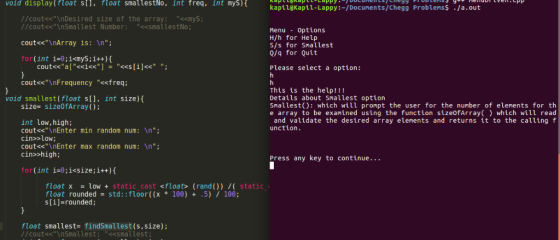
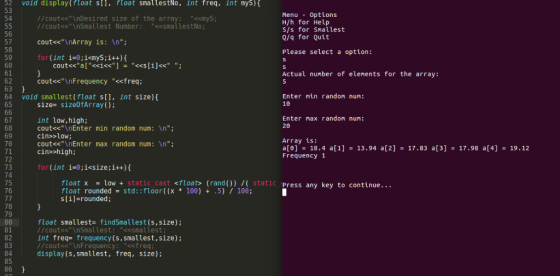
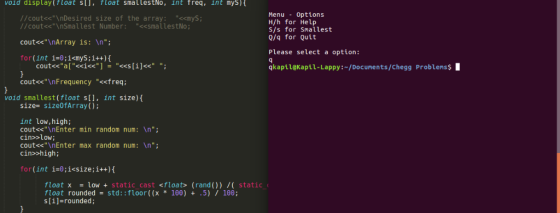
Code:
-------------------
#include <iostream>
#include <cmath>
#ifdef __cplusplus__
#include <cstdlib>
#else
#include <stdlib.h>
#endif
using namespace std;
void help(){
cout<<"\nThis is the help!!! \nDetails about
Smallest option\nSmallest(): which will prompt the user for the
number of elements for the array to be examined using the function
sizeOfArray( ) which will read and validate the desired array
elements and returns it to the calling function.";
}
float round (float x)
{
return floor(x + 0.5f);
}
int sizeOfArray(){
bool correct=false;
int size;
cout<<"\nActual number
of elements for the array:\n";
while(!correct){
cin
>> size;
if(size>0 && size<=8)
correct=true;
else
cout<<"\nActual number of elements must be
between 1-8!!! Please enter again\n";
}
return size;
}
float findSmallest(float s[], int myS){
float temp = s[0];
for(int i=0; i<myS; i++) {
if(temp>s[i]) {
temp=s[i];
}
}
return temp;
}
int frequency(float s[], float smallestNo, int myS){
int count = 0;
for (int i=0; i < myS; i++)
if (s[i] == smallestNo)
count++;
return count;
}
void display(float s[], float smallestNo, int freq, int myS){
//cout<<"\nDesired size of the array:
"<<myS;
//cout<<"\nSmallest Number:
"<<smallestNo;
cout<<"\nArray is: \n";
for(int i=0;i<myS;i++){
cout<<"a["<<i<<"]
= "<<s[i]<<" ";
}
cout<<"\nFrequency "<<freq;
}
void smallest(float s[], int size){
size= sizeOfArray();
int low,high;
cout<<"\nEnter min random num: \n";
cin>>low;
cout<<"\nEnter max random num: \n";
cin>>high;
for(int i=0;i<size;i++){
float x = low + static_cast
<float> (rand()) /( static_cast <float>
(RAND_MAX/(high-low)));
float rounded = std::floor((x *
100) + .5) / 100;
s[i]=rounded;
}
float smallest= findSmallest(s,size);
//cout<<"\nSmallest: "<<smallest;
int freq= frequency(s,smallest,size);
//cout<<"\nFrequency: "<<freq;
display(s,smallest, freq, size);
}
int main ()
{
char ch;
float arr[8];
int size=8;
do{
cout << "\n\nMenu - Options";
cout<<"\nH/h for Help \nS/s for Smallest \nQ/q
for Quit\n\n";
cout << "Please select a option: \n";
cin >> ch;
cout<<ch;
if(ch=='h' || ch=='H'){
help();
cout << "\n\n\n\nPress
any key to continue...\n";
cin >> ch;
if (system("CLS"))
system("clear");
}
else if(ch=='S' || ch=='s'){
smallest(arr, size);
cout << "\n\n\n\nPress
any key to continue...\n";
cin >> ch;
if (system("CLS"))
system("clear");
}
else if(ch=='Q' || ch=='q'){
return 0;
}
}while(true);
return 0;
}
--------------------
Code flow chart:
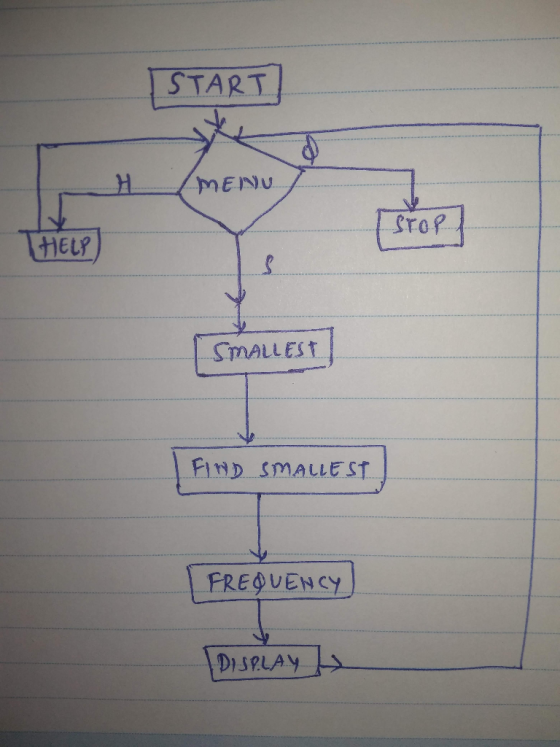
The problem has been resolved, I hope you will like the solution. If you have any question or query regarding this problem or other, please comment below and give the positive rating.
Thank You!! Happy Learning!! Keep Chegging!!
Add Answer to:
Develop a system flowchart and then write a menu-driven C++
program that uses user-defined functions arrays,...
Develop a flowchart and then write a menu-driven C++ program that uses several FUNCTIONS to solve...
Develop a flowchart and then write a menu-driven C++ program that uses several FUNCTIONS to solve the following program. -Use Microsoft Visual C++ .NET 2010 Professional compiler using default compiler settings. -Use Microsoft Visio 2013 for developing your flowchart. -Adherence to the ANSI C++ required -Do not use <stdio.h> and <conio.h>. -Do not use any #define in your program. -No goto statements allowed. Upon execution of the program, the program displays a menu as shown below and the user is prompted to make a selection from the menu....
Write a program that displays a menu on the screen. The menu will give the user...
Write a program that displays a menu on the screen. The menu will give the user four options - enter two integers, enter two decimal numbers (#.#), enter one integer and one decimal number, or quit. The inputs should be labelled a, b, c, or d, and you should enter in the letter to choose the appropriate option. Once the user selects the option, two numbers will be read in from the user. The numbers will be added together and...
Write a menu driven program to demonstrate the use of array and switch. It must be...
Write a menu driven program to demonstrate the use of array and switch. It must be written in C language . Here is the menu - Press 1 to add a number to the array. Press 2 to display the numbers entered in the array so far Press 3 to find the average of the numbers entered. Press 4 to exit. Option 1 - The user should be able to enter 20 numbers only. If all twenty numbers are entered...
Objectives: Integer arithmetic, Functions, menus. Write a C++ program that displays the following menu of choices....
Objectives: Integer arithmetic, Functions, menus. Write a C++ program that displays the following menu of choices. 1. Find the number of digits in an integer. 2. Find the nth digit in an integer. 3. Find the sum of all digits of an integer. 4. Is the integer a palindrome? 5. Quit Enter a choice: Page 1 of 4 For each of the choices (1, 3, 4), Read a positive integer number and call a function that processes the menu choice...
Using Java In this assignment we are working with arrays. You have to ask the user...
 Using Java
In this assignment we are working with arrays. You have to ask the user to enter the size of the integer array to be declared and then initialize this array randomly. Then use a menu to select from the following Modify the elements of the array. At any point in the program, if you select this option you are modifying the elements of the array randomly. Print the items in the array, one to a line with their...
Using Java
In this assignment we are working with arrays. You have to ask the user to enter the size of the integer array to be declared and then initialize this array randomly. Then use a menu to select from the following Modify the elements of the array. At any point in the program, if you select this option you are modifying the elements of the array randomly. Print the items in the array, one to a line with their...
Q2: Write a menu-driven C program using switch-case to calculate the following: 1. Area of circle...
Q2: Write a menu-driven C program using switch-case to calculate the following: 1. Area of circle 2. Area of square 3. Area of rectangle The program should use the following functions properly: void displayMenu() //a function that will display the menu options to the user int getChoice() //a function that will input the user choice and returns it float calculate(int choice) //a function that reads the required inputs based on the user choice, and returns the area of the shape...
Write a C program Design a program that uses an array to store 10 randomly generated...
Write a C program Design a program that uses an array to store 10 randomly generated integer numbers in the range from 1 to 50. The program should first generate random numbers and save these numbers into the array. It will then provide the following menu options to the user: Display 10 random numbers stored in the array Compute and display the largest number in the array Compute and display the average value of all numbers Exit The options 2...
‘C’ programming language question Write a MENU DRIVEN program to A) Count the number of vowels...
‘C’ programming language question Write a MENU DRIVEN program to A) Count the number of vowels in the string B) Count the number of consonants in the string C) Convert the string to uppercase D) Convert the string to lowercase E) Display the current string X) Exit the program The program should start with a user prompt to enter a string, and let them type it in. Then the menu would be displayed. User may enter option in small case...
Requesting help with the following C Program: DESIGN and IMPLEMENT a menu driven program that uses...
Requesting help with the following C Program: DESIGN and IMPLEMENT a menu driven program that uses the following menu and can perform all menu items: Enter a payroll record for one person Display all paycheck stubs Display total gross payroll from all pay records. Quit program The program will reuse the DATE struct from the previous assignment. You should also copy in the functions relating to a DATE. The program will create a PAYRECORD struct with the following fields: typedef struct...
 Using Java
In this assignment we are working with arrays. You have to ask the user to enter the size of the integer array to be declared and then initialize this array randomly. Then use a menu to select from the following Modify the elements of the array. At any point in the program, if you select this option you are modifying the elements of the array randomly. Print the items in the array, one to a line with their...
Using Java
In this assignment we are working with arrays. You have to ask the user to enter the size of the integer array to be declared and then initialize this array randomly. Then use a menu to select from the following Modify the elements of the array. At any point in the program, if you select this option you are modifying the elements of the array randomly. Print the items in the array, one to a line with their...
Most questions answered within 3 hours.
-
Where is the error in this code sequence?
String s1 = "Hello";
String s2 = "ello";...
asked 11 months ago -
Financial data for Joel de Paris, Inc., for last year
follow:
Joel de Paris, Inc.
Balance...
asked 11 months ago -
Consider this reaction:
Al2(SO4)3 (aq)+ BaCl3
(aq) Al2Cl6 (aq)- +
3BaSO4(s) . What is the...
asked 11 months ago -
Suppose that Savneet is considering increasing her
recent random sample from 20 car rentals to 40...
asked 11 months ago -
Trucks arrive at an unloading terminal at an average rate of 120
per hour.
Trucks arrive...
asked 11 months ago -
Why are methanol and ethanol completely soluble in water while
octanol is not very little soluble....
asked 11 months ago -
A facilities manager at a university reads in a research report
that the mean amount of...
asked 11 months ago -
When the CuSO4 is rehydrated by adding water to the anhydrous
compound, is this an endothermic...
asked 11 months ago -
A ray of sunlight is passing from diamond into crown glass; the
angle of incidence is...
asked 11 months ago -
A block of mass 0.249 kg is placed on top of a light, vertical
spring of...
asked 11 months ago -
how do the kidneys compensate in the presences of acidosis
a) trigger hyperventilate
b) reserve acid...
asked 11 months ago -
Question 501 pts
The rental rate of capital to the firm increases. Which of the
following...
asked 11 months ago