Use android studio to create a concert ticket mobile application. The app will calculate the total...
- Mobile Application Title: “Ticket Hub”
- Overview: Provide an app that will calculate the total cost of concert tickets for the user. The user will select the event name, enter the number of tickets, and find the cost via a button.
- Requirements:
- The app will include a single screen - create your own layout
- App must have a custom icon – use an icon of your choosing
- Apply a theme to the app screen
- Opening screen contains the following:
- Large title named Concert Ticket Hub using a TextView.
- Image using an ImageView
- Button control to calculate the cost (concert tickets are $59.99 each, regardless of the event)
- A Number Text Field control to allow the user to enter the number of tickets.
- A Spinner control that includes three events:
- Pop Music Festival
- Jazz Music Festival
- Country Music Festival.
- A TextView to display the total cost for the tickets
- When the calculate button is clicked, the total cost for the tickets is displayed
- Conditions/Instructions: Use a theme, a title, an image, a spinner prompt, a string array, a custom icon, and a hint property.
Homework Answers
Concert Ticket Mobile Application-
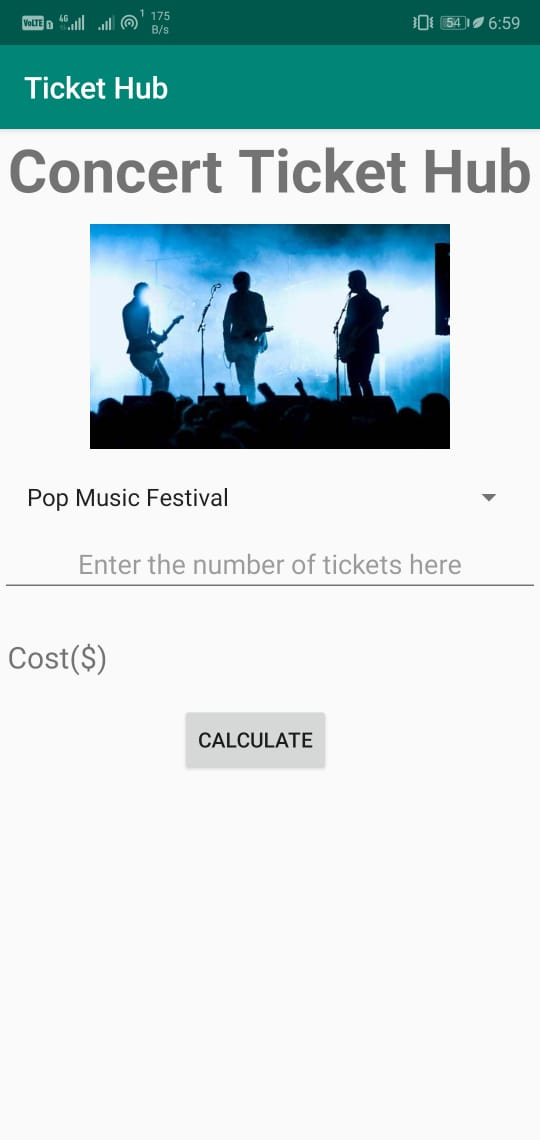
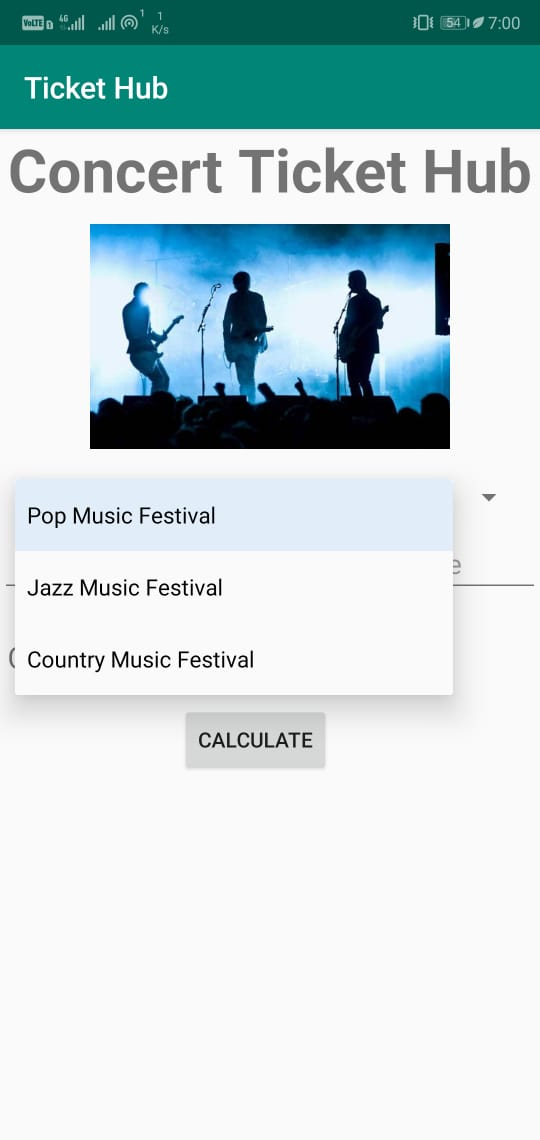
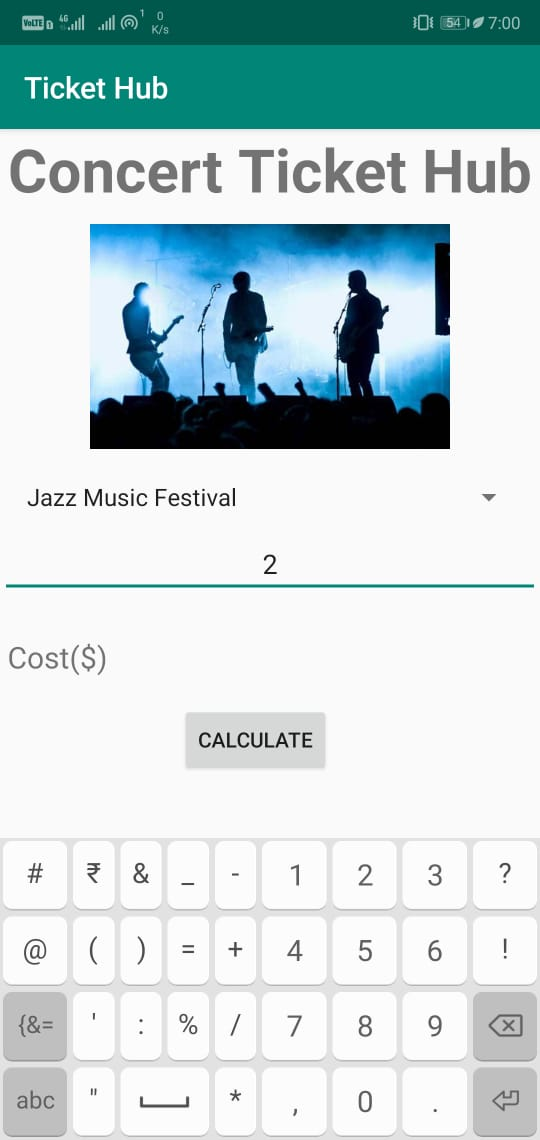
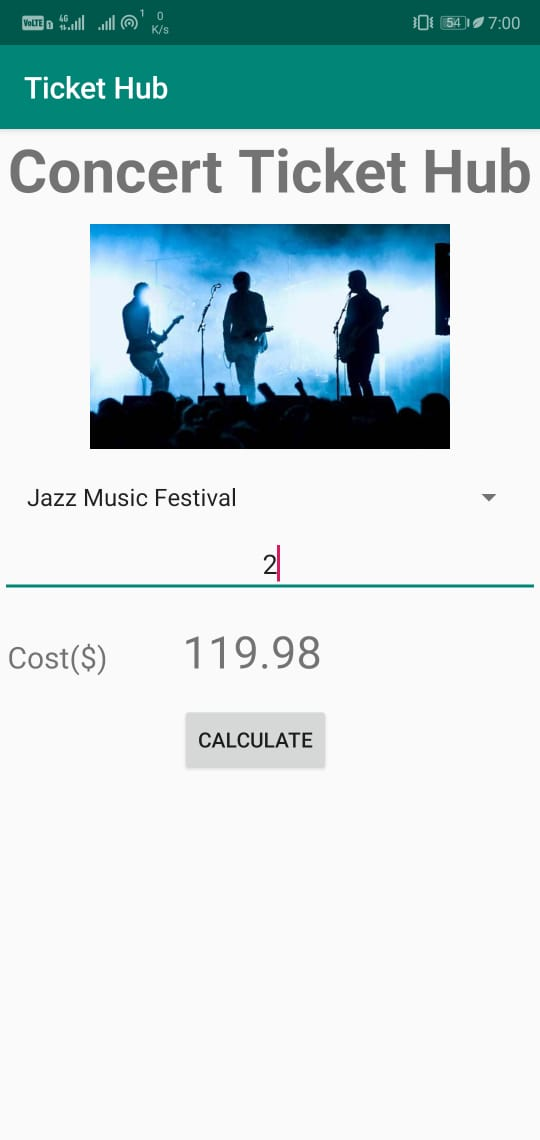
The android app is built using Java and XML. The MainActivity is designed as written in question. It has a title,image,spinner prompt, edit text with hint property. The user needs to select an event from Spinner drop down and enter the number of tickets required in the edit text. Then, on clicking the calculate button, total ticket cost appears on the screen.
Below is the java code as well as XLM code for the android project.
activity_main.xml-
<?xml version="1.0" encoding="utf-8"?>
<LinearLayout
    xmlns:android="http://schemas.android.com/apk/res/android"
    xmlns:app="http://schemas.android.com/apk/res-auto"
    xmlns:tools="http://schemas.android.com/tools"
    android:layout_width="match_parent"
    android:orientation="vertical"
    style="@style/AppTheme"
    android:layout_height="match_parent"
    tools:context=".MainActivity">

    <TextView
        android:layout_width="match_parent"
        android:layout_height="wrap_content"
        android:text="Concert Ticket Hub"
        android:textAlignment="center"
        android:textStyle="bold"
        android:textSize="40sp"
         />
    <ImageView
        android:layout_margin="10dp"
        android:layout_width="wrap_content"
        android:layout_height="150dp"
        android:src="@drawable/band"
        />
    <Spinner
        android:layout_margin="10dp"
        android:layout_width="match_parent"
        android:layout_height="wrap_content"
        android:id="@+id/spinner"
        >
    </Spinner>
    <EditText
        android:textAlignment="center"
        android:id="@+id/numberTickets"
        android:layout_width="match_parent"
        android:layout_height="wrap_content"
        android:hint="Enter the number of tickets here"
        android:inputType="number"
        />
    <LinearLayout
        android:layout_marginTop="10dp"
        android:padding="5dp"
        android:layout_width="match_parent"
        android:layout_height="wrap_content"
        android:orientation="horizontal"
        android:weightSum="3">
        <TextView
            android:layout_width="0dp"
            android:layout_weight="1"
            android:layout_height="wrap_content"
            android:text="Cost($)"
            android:textSize="20sp"
            />
        <TextView
        android:layout_weight="2"
        android:layout_width="0dp"
        android:layout_height="wrap_content"
        android:id="@+id/totalCost"
        android:textSize="30sp"
        />
    </LinearLayout>
    <Button
        android:layout_marginTop="10dp"
        android:layout_width="wrap_content"
        android:layout_height="wrap_content"
        android:id="@+id/calculate"
        android:text="Calculate"
        android:layout_marginLeft="120dp"
        />
</LinearLayout>
MainActivity.java-
package com.nitjsr.tickethub;

import android.os.Bundle;
import android.support.v7.app.AppCompatActivity;
import android.view.View;
import android.widget.AdapterView;
import android.widget.ArrayAdapter;
import android.widget.Button;
import android.widget.EditText;
import android.widget.Spinner;
import android.widget.TextView;
import android.widget.Toast;

import java.util.ArrayList;
import java.util.List;

//code for main actiivity
public class MainActivity extends AppCompatActivity implements AdapterView.OnItemSelectedListener {

    @Override
    protected void onCreate(Bundle savedInstanceState) {
        super.onCreate(savedInstanceState);
        setContentView(R.layout.activity_main);

        //initializing spinner, EditText to fetch number of tickets
        //and text view to display the total cost
        //also, initialized button to calculate total cost
        final Spinner spinner = (Spinner) findViewById(R.id.spinner);
        final EditText numberTickets = findViewById(R.id.numberTickets);
        final TextView totalCost = findViewById(R.id.totalCost);
        Button calculate=(Button)findViewById(R.id.calculate);

        //attaching listener to spinner
        spinner.setOnItemSelectedListener(this);

        // Spinner Drop down elements
        List<String> events = new ArrayList<String>();
        events.add("Pop Music Festival");
        events.add("Jazz Music Festival");
        events.add("Country Music Festival");

        // Creating adapter for spinner
        ArrayAdapter<String> dataAdapter = new ArrayAdapter<String>(this,
                android.R.layout.simple_spinner_item, events);

        // Drop down layout style - list view with radio button
        dataAdapter.setDropDownViewResource(android.R.layout.simple_spinner_dropdown_item);

        // attaching data adapter to spinner
        spinner.setAdapter(dataAdapter);

        //attaching listener to calculate button
        calculate.setOnClickListener(new View.OnClickListener() {
            @Override
            public void onClick(View v) {
                int noTickets = Integer.parseInt(numberTickets.getText().toString());
                double tCost = noTickets * 59.99;
                totalCost.setText(Double.toString(tCost));
            }
        });
    }

    //function of spinner called when item is selected from drop down
    public void onItemSelected(AdapterView<?> parent, View view, int position, long id) {
        // On selecting a spinner item
        String item = parent.getItemAtPosition(position).toString();

        // Showing selected spinner item
        Toast.makeText(parent.getContext(), "Selected: " + item, Toast.LENGTH_LONG).show();

    }

    //function not used in given context
    public void onNothingSelected(AdapterView<?> arg0) {
        // TODO Auto-generated method stub

    }
}
Attaching the code snippet in the form of images to better understand comments and indentation-
activity_main.xml-
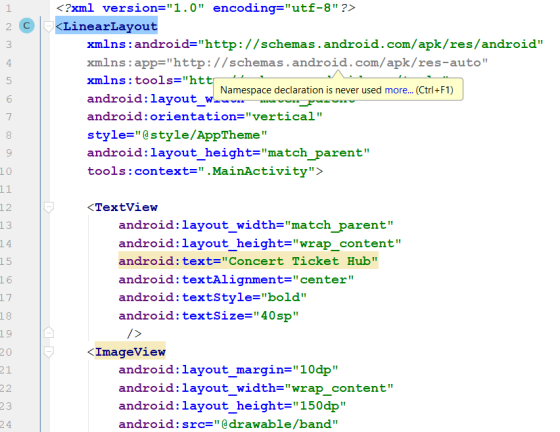
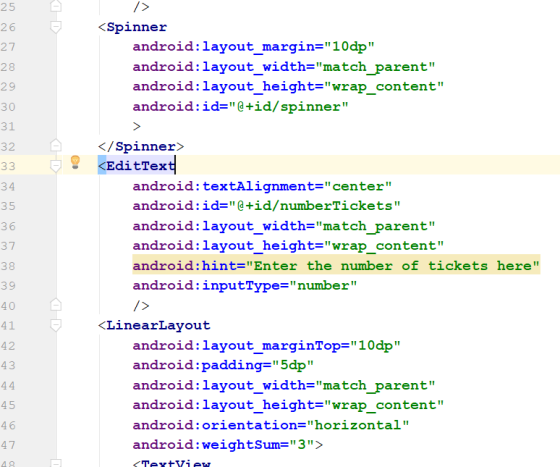
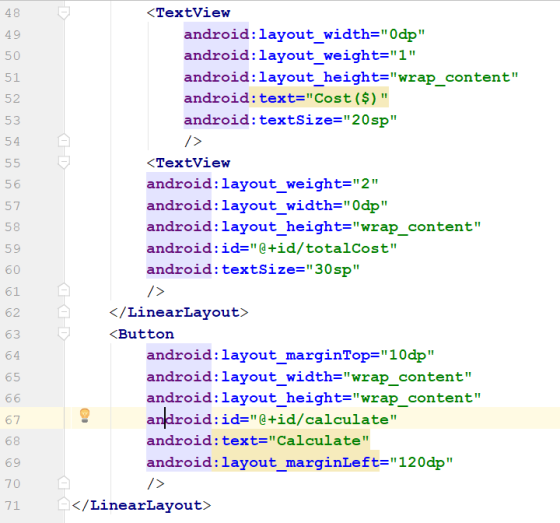
MainActivity.java-
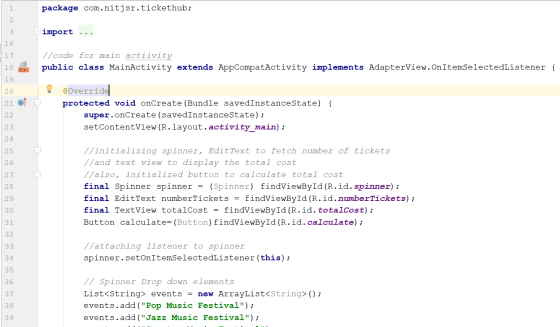
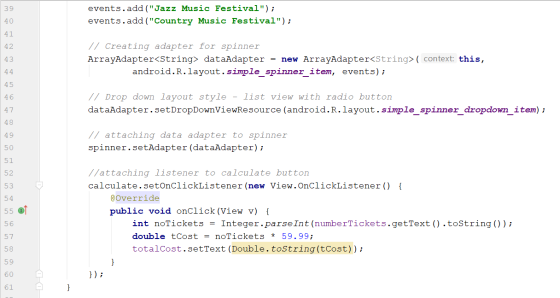
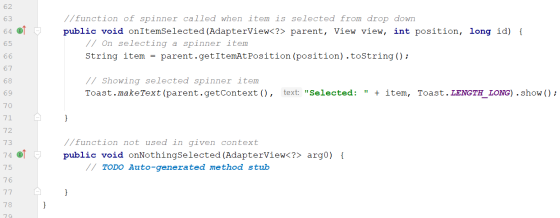
The output images/final screenshots of mobile app are attached below-
If this answer helps, please give an up-vote. Feel free to comment if there is any query.
Add Answer to:
Use
android studio to
create a concert ticket mobile application. The app will calculate
the total...
(Android Studio) Create a camera app that allows the user to upload a picture from their...
 (Android Studio)
Create a camera app that allows the user to upload a picture
from their phone camera gallery, see the picture via summary page,
and edit the picture as well. Clicking on "Insert picture here from
camera photo gallery" in the add page will allow the user to upload
a picture from their existing camera photo gallery on their phone.
The user can choose where to save the picture, starting with
Picture 1-5. Once they choose where to save...
(Android Studio)
Create a camera app that allows the user to upload a picture
from their phone camera gallery, see the picture via summary page,
and edit the picture as well. Clicking on "Insert picture here from
camera photo gallery" in the add page will allow the user to upload
a picture from their existing camera photo gallery on their phone.
The user can choose where to save the picture, starting with
Picture 1-5. Once they choose where to save...
Using Android Studios. Scenario: You recently started working as the mobile app developer for a University...
Using Android Studios. Scenario: You recently started working as the mobile app developer for a University and have been assigned to build a mobile app that calculates the students' grade. Your app should contain following screens: Screen 1 Labels for subject1, subject2, and subject3 Textboxes for subject1, subject2, and subject3 Labels for MaxGrade, MinGrade, and Avg.Grade Submit button Once user clicks submit button, you need to display letter grade in a label Screen 2 Screen that allows students to register...
If anyone here is a Java and Android Studio expert please I really need help fulfilling...
If anyone here is a Java and Android Studio expert please I really need help fulfilling the requirements needed to make a Rock Paper Scissors game. I mainly need Java code to complete it I will post what I have so far I don't have much time left please if anyone can help me I would really appreciate it. Here's what the app is supposed to do... The player should be able to select either Rock, Paper, or Scissors.The app...
eBay: Creating Customers on the Move The advent of mobile commerce (m-commerce) has begun to create...
eBay: Creating Customers on the Move The advent of mobile commerce (m-commerce) has begun to create significant changes in the way consumers make purchasing decisions. The introduction of online shopping first began to draw customers away from brick-and-mortar retailers, changing the location of where they made their purchases. The use of mobile devices has expanded the location of purchase decisions even further, so now consumers can make purchases from almost anywhere, so long as they have a mobile device with...
If you’re using Visual Studio Community 2015, as requested, the instructions below should be exact but...
If you’re using Visual Studio Community 2015, as requested, the instructions below should be exact but minor discrepancies may require you to adjust. If you are attempting this assignment using another version of Visual Studio, you can expect differences in the look, feel, and/or step-by-step instructions below and you’ll have to determine the equivalent actions or operations for your version on your own. INTRODUCTION: In this assignment, you will develop some of the logic for, and then work with, the...
New Perspectives on HTML5 and CSS3. Solve Chapter 13 Case Problem 3. mas_register.js "use strict"; /*...
 New Perspectives on HTML5 and CSS3. Solve Chapter 13 Case
Problem 3.
mas_register.js
"use strict";
/*
New Perspectives on HTML5, CSS3, and JavaScript 6th Edition
Tutorial 13
Case Problem 3
Filename: mas_register.js
Author:
Date:
Function List
=============
formTest()
Performs a validation test on the selection of the conference
session package and the conference discount number
calcCart()
Calculates the cost of the registration and saves data
in session storage
writeSessionValues()
Writes data values from session storage in to the
registration...
New Perspectives on HTML5 and CSS3. Solve Chapter 13 Case
Problem 3.
mas_register.js
"use strict";
/*
New Perspectives on HTML5, CSS3, and JavaScript 6th Edition
Tutorial 13
Case Problem 3
Filename: mas_register.js
Author:
Date:
Function List
=============
formTest()
Performs a validation test on the selection of the conference
session package and the conference discount number
calcCart()
Calculates the cost of the registration and saves data
in session storage
writeSessionValues()
Writes data values from session storage in to the
registration...
Please use own words. Thank you. CASE QUESTIONS AND DISCUSSION > Analyze and discuss the questions...
 Please use own words. Thank you.
CASE QUESTIONS AND DISCUSSION > Analyze and discuss the questions listed below in specific detail. A minimum of 4 pages is required; ensure that you answer all questions completely Case Questions Who are the main players (name and position)? What business (es) and industry or industries is the company in? What are the issues and problems facing the company? (Sort them by importance and urgency.) What are the characteristics of the environment in which...
Please use own words. Thank you.
CASE QUESTIONS AND DISCUSSION > Analyze and discuss the questions listed below in specific detail. A minimum of 4 pages is required; ensure that you answer all questions completely Case Questions Who are the main players (name and position)? What business (es) and industry or industries is the company in? What are the issues and problems facing the company? (Sort them by importance and urgency.) What are the characteristics of the environment in which...
 (Android Studio)
Create a camera app that allows the user to upload a picture
from their phone camera gallery, see the picture via summary page,
and edit the picture as well. Clicking on "Insert picture here from
camera photo gallery" in the add page will allow the user to upload
a picture from their existing camera photo gallery on their phone.
The user can choose where to save the picture, starting with
Picture 1-5. Once they choose where to save...
(Android Studio)
Create a camera app that allows the user to upload a picture
from their phone camera gallery, see the picture via summary page,
and edit the picture as well. Clicking on "Insert picture here from
camera photo gallery" in the add page will allow the user to upload
a picture from their existing camera photo gallery on their phone.
The user can choose where to save the picture, starting with
Picture 1-5. Once they choose where to save...
 New Perspectives on HTML5 and CSS3. Solve Chapter 13 Case
Problem 3.
mas_register.js
"use strict";
/*
New Perspectives on HTML5, CSS3, and JavaScript 6th Edition
Tutorial 13
Case Problem 3
Filename: mas_register.js
Author:
Date:
Function List
=============
formTest()
Performs a validation test on the selection of the conference
session package and the conference discount number
calcCart()
Calculates the cost of the registration and saves data
in session storage
writeSessionValues()
Writes data values from session storage in to the
registration...
New Perspectives on HTML5 and CSS3. Solve Chapter 13 Case
Problem 3.
mas_register.js
"use strict";
/*
New Perspectives on HTML5, CSS3, and JavaScript 6th Edition
Tutorial 13
Case Problem 3
Filename: mas_register.js
Author:
Date:
Function List
=============
formTest()
Performs a validation test on the selection of the conference
session package and the conference discount number
calcCart()
Calculates the cost of the registration and saves data
in session storage
writeSessionValues()
Writes data values from session storage in to the
registration...
 Please use own words. Thank you.
CASE QUESTIONS AND DISCUSSION > Analyze and discuss the questions listed below in specific detail. A minimum of 4 pages is required; ensure that you answer all questions completely Case Questions Who are the main players (name and position)? What business (es) and industry or industries is the company in? What are the issues and problems facing the company? (Sort them by importance and urgency.) What are the characteristics of the environment in which...
Please use own words. Thank you.
CASE QUESTIONS AND DISCUSSION > Analyze and discuss the questions listed below in specific detail. A minimum of 4 pages is required; ensure that you answer all questions completely Case Questions Who are the main players (name and position)? What business (es) and industry or industries is the company in? What are the issues and problems facing the company? (Sort them by importance and urgency.) What are the characteristics of the environment in which...
Most questions answered within 3 hours.
-
Where is the error in this code sequence?
String s1 = "Hello";
String s2 = "ello";...
asked 10 months ago -
Financial data for Joel de Paris, Inc., for last year
follow:
Joel de Paris, Inc.
Balance...
asked 10 months ago -
Consider this reaction:
Al2(SO4)3 (aq)+ BaCl3
(aq) Al2Cl6 (aq)- +
3BaSO4(s) . What is the...
asked 10 months ago -
Suppose that Savneet is considering increasing her
recent random sample from 20 car rentals to 40...
asked 10 months ago -
Trucks arrive at an unloading terminal at an average rate of 120
per hour.
Trucks arrive...
asked 10 months ago -
Why are methanol and ethanol completely soluble in water while
octanol is not very little soluble....
asked 10 months ago -
A facilities manager at a university reads in a research report
that the mean amount of...
asked 10 months ago -
When the CuSO4 is rehydrated by adding water to the anhydrous
compound, is this an endothermic...
asked 10 months ago -
A ray of sunlight is passing from diamond into crown glass; the
angle of incidence is...
asked 10 months ago -
A block of mass 0.249 kg is placed on top of a light, vertical
spring of...
asked 10 months ago -
how do the kidneys compensate in the presences of acidosis
a) trigger hyperventilate
b) reserve acid...
asked 10 months ago -
Question 501 pts
The rental rate of capital to the firm increases. Which of the
following...
asked 10 months ago