c++ program Create the "point" class as shown in the text with (private and public sections)...
c++ program
Create the "point" class as shown in the text with (private and public sections)
a. data
members are the one listed in the text book plus the new ones
below
Methods in the text: shift, rotate90, rotations_needed, distance, middle
b. Default "constructor" with two arguments for x and y coordinates
c. Add the following methods:
Translation: (x,y)
translated to (x’,y’) by adding x’ to x and y’ to y value
(x’,y’)
= (x+x’, y+y’) where x’ & y’ are int + or – or 0 values
Scaling: (x’,
y’) = (x’x, y’y) (multiply) where m > 1 makes
larger,
m
0.0 to 1.0 makes smaller
Rotation:
( d) = ( x cos d– y sin d, x sin d+ y cos d)
whered
is the degrees to rotate.
Shearing: (x’, y’) = (x+x’, y) to shear in the x direction
(x, y’+y) to shear in the y direction
Write a main program that will test the above implementation of ‘points’ class and that will convince me your points class is correct. Test all methods in the Points class and show results.
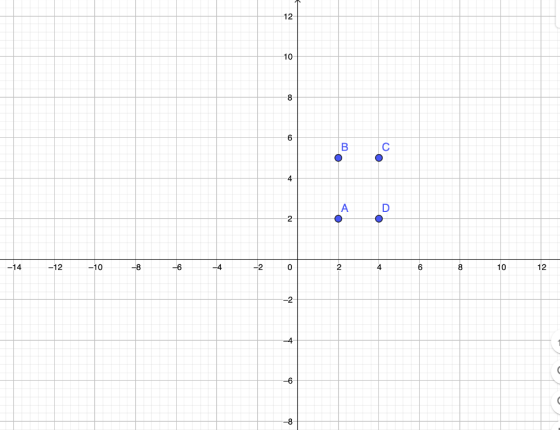
Also, set up a box with 4 points: (2,2) (2,5) (4,5) (4,2)
1. Print out the points for the box.
2. Print out the points for the box after Translating it x’=2 and y’=1 distance.
3. Continuing with new set of box
points,
print
out the box after scaling x by 2 and y by 0.5
4. Original box pts: print out the box
after rotating the box by 30 degrees then
print
again after rotation another 60 degrees.
(Note:
degrees may need to be converted to radians?)
5. Original box pts: print out the box
after
shearing
in the x direction 1.5
6. Original box pts:
print
out the box after shearing in the y direction 1.7
Print out and label each of the outputs above.
For each output of each box, also draw a picture of the new box (nice accurate boxes)
Homework Answers
Short Summary:
- Overridden the operator "<<" for Point class to print the co ordinates in (X, Y) format.
- Shown the boxes for every output.
Source Codes:
Point.cpp file
#include<iostream>
#include<cmath>
using namespace std;
/**
* Point class
*/
class Point{
public:
//Member variables to store co ordinates (x and y)
double X, Y;
/**
* Constructor
* Accepts co ordinates (x, y)
* And assings them to Member variables
*/
Point(double x, double y){
X = x;
Y = y;
}
/**
* Translation:
* (x,y) translated to (x’,y’) by adding x’ to x and y’ to y
value
(x’,y’) = (x+x’, y+y’) where x’ & y’ are int + or – or 0
values
*
*/
void Translation(double _x, double _y){
X += _x;
Y += _y;
}
/**
* Scaling:
* (x’, y’) = (x’x, y’y) (multiply) where m > 1 makes
larger,
m 0.0 to 1.0 makes smaller
*
*/
void Scaling(double _x, double _y){
X = (X * _x);
Y = (Y * _y);
}
/**
* Rotation: ( d) = ( x cos d– y sin d, x sin d+ y cos d)
where d is the degrees to rotate.
*
*/
void Rotation(double d){
//create temp variables to hold the new co ordinates
double rx=X, ry=Y;
//Calculate new co ordinates using the given formula
rx = (X * cos(d) - Y * sin(d));
ry = (X * sin(d) + Y * cos(d));
//Assign the new co ordinates back to Member variables
X = rx;
Y = ry;
}
/**
* ShearingX: in X direction
* (x+x’, y) to shear in the x direction
*
*/
void ShearingX(double _x){
X += _x;
}
/**
* ShearingY: in y direction
* (x, y’+y) to shear in the y direction
*
*/
void ShearingY(double _y){
Y += _y;
}
/**
* Overriding << operator
* Prints co ordinates in the format (X, Y)
*/
friend ostream& operator<<(ostream& out, const
Point& P){
return out << "(" << P.X << ", " << P.Y
<< ")";
}
};
Main.cpp file:
#include <iostream>
#include "Point.cpp"
using namespace std;
int main()
{
//set up a box with 4 points: (2,2) (2,5) (4,5) (4,2)
Point point1(2,2);
Point point2(2,5);
Point point3(4,5);
Point point4(4,2);
//1.Print out the points for the box.
cout << "Point 1: " << point1 << endl;
cout << "Point 2: " << point2 << endl;
cout << "Point 3: " << point3 << endl;
cout << "Point 4: " << point4 << endl;
//2. Print out the points for the box after Translating it x’=2 and
y’=1 distance.
// translate each point at x=2 and y=1
cout << "\nTranslating x = 2 , y = 1" << endl;
point1.Translation(2, 1);
point2.Translation(2, 1);
point3.Translation(2, 1);
point4.Translation(2, 1);
//Print out the points
cout << "Point 1: " << point1 << endl;
cout << "Point 2: " << point2 << endl;
cout << "Point 3: " << point3 << endl;
cout << "Point 4: " << point4 << endl;
//3.Continuing with new set of box points,
//print out the box after scaling x by 2 and y by 0.5
cout << "\nScaling x = 2 , y = .5" << endl;
point1.Scaling(2, .5);
point2.Scaling(2, .5);
point3.Scaling(2, .5);
point4.Scaling(2, .5);
//Print out the points
cout << "Point 1: " << point1 << endl;
cout << "Point 2: " << point2 << endl;
cout << "Point 3: " << point3 << endl;
cout << "Point 4: " << point4 << endl;
//4. Original box pts: print out the box after rotating the box by
30 degrees then
// print again after rotation another 60 degrees.
// (Note: degrees may need to be converted to radians?)
// rotate 30 degree PI/6
cout<<"\nRotate 30 degree" << endl;
point1.Rotation(22/(double)42);
point2.Rotation(22/(double)42);
point3.Rotation(22/(double)42);
point4.Rotation(22/(double)42);
//Print out the points
cout << "Point 1: " << point1 << endl;
cout << "Point 2: " << point2 << endl;
cout << "Point 3: " << point3 << endl;
cout << "Point 4: " << point4 << endl;
// rotate 60 degree PI/3
cout<<"\nRotate 60 degree" << endl;
point1.Rotation(22/(double)21);
point2.Rotation(22/(double)21);
point3.Rotation(22/(double)21);
point4.Rotation(22/(double)21);
//Print out the points
cout << "Point 1: " << point1 << endl;
cout << "Point 2: " << point2 << endl;
cout << "Point 3: " << point3 << endl;
cout << "Point 4: " << point4 << endl;
//5. Original box pts: print out the box after
// shearing in the x direction 1.5
cout<<"\nShearing x direction 1.5" << endl;
point1.ShearingX(1.5);
point2.ShearingX(1.5);
point3.ShearingX(1.5);
point4.ShearingX(1.5);
//Print out the points
cout << "Point 1: " << point1 << endl;
cout << "Point 2: " << point2 << endl;
cout << "Point 3: " << point3 << endl;
cout << "Point 4: " << point4 << endl;
//6. Original box pts:
// print out the box after shearing in the y direction 1.7
cout<<"\nShearing y direction 1.7" << endl;
point1.ShearingY(1.7);
point2.ShearingY(1.7);
point3.ShearingY(1.7);
point4.ShearingY(1.7);
//Print out the points
cout << "Point 1: " << point1 << endl;
cout << "Point 2: " << point2 << endl;
cout << "Point 3: " << point3 << endl;
cout << "Point 4: " << point4 << endl;
return 0;
}
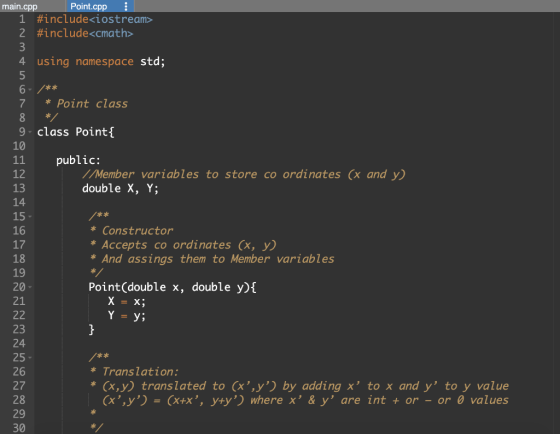
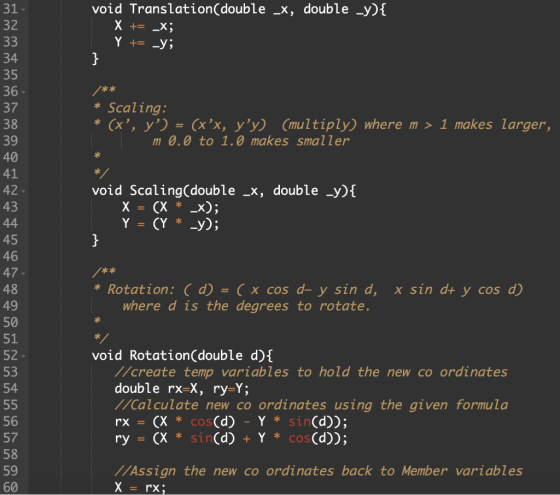
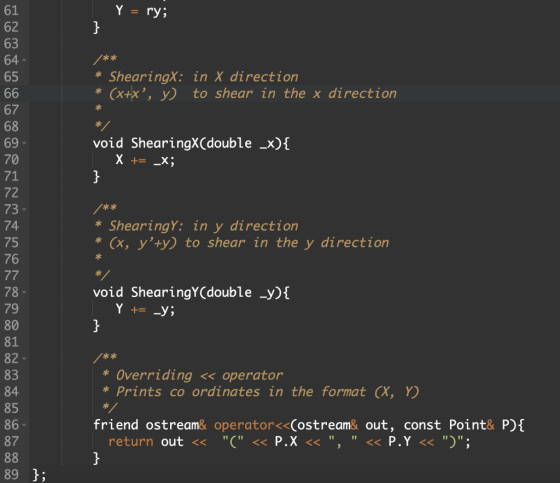
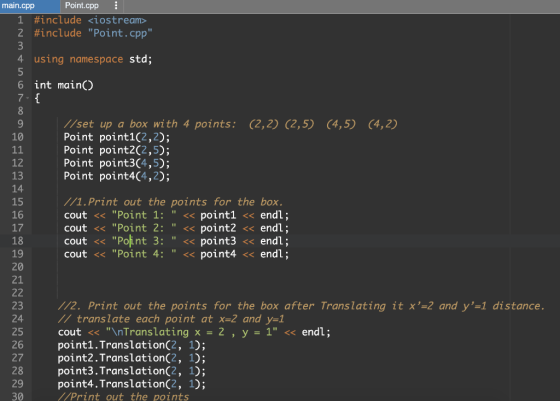
Refer the following screen shots for code indentations:
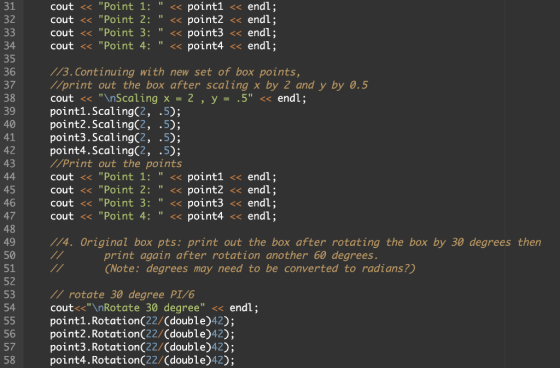
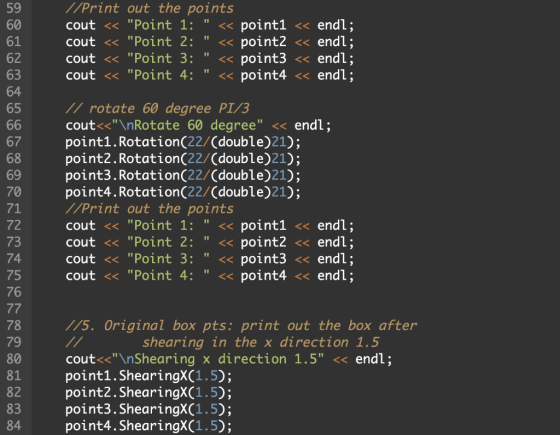
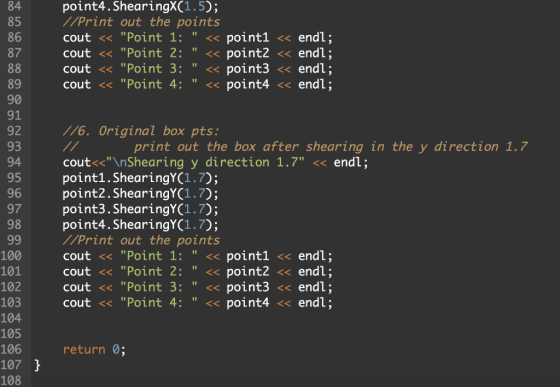
Sample Output:
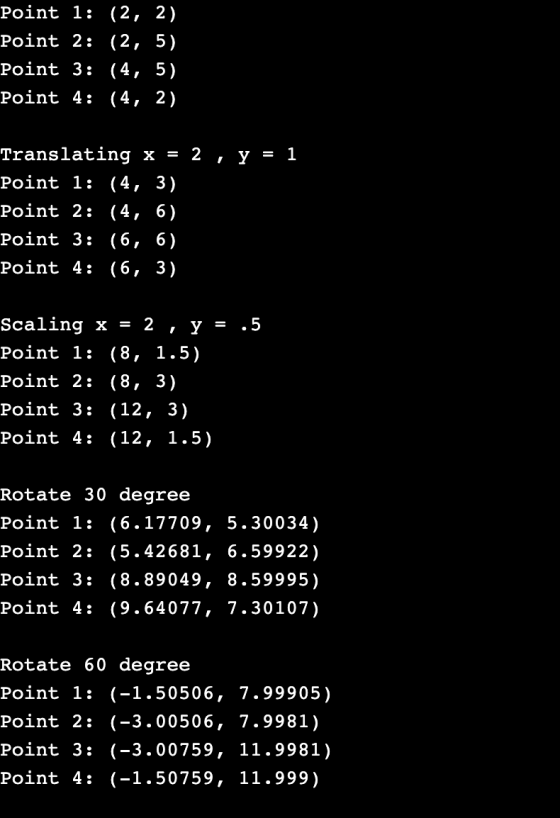
Boxes:
Point 1 - A : (2, 2)
Point 2 - B: (2, 5)
Point 3 - C: (4, 5)
Point 4 - D: (4, 2)
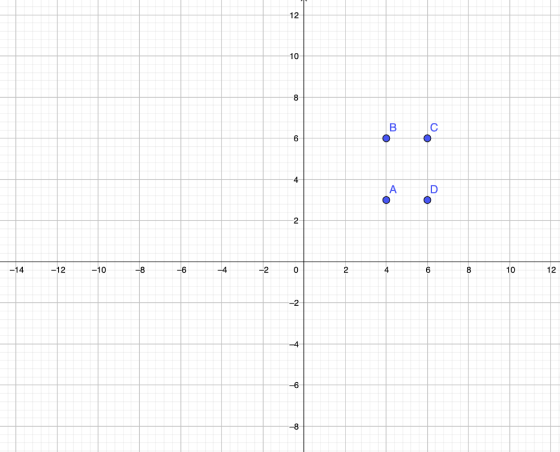
Translating x = 2 , y = 1
Point 1 - A: (4, 3)
Point 2 - B: (4, 6)
Point 3 - C: (6, 6)
Point 4 - D: (6, 3)
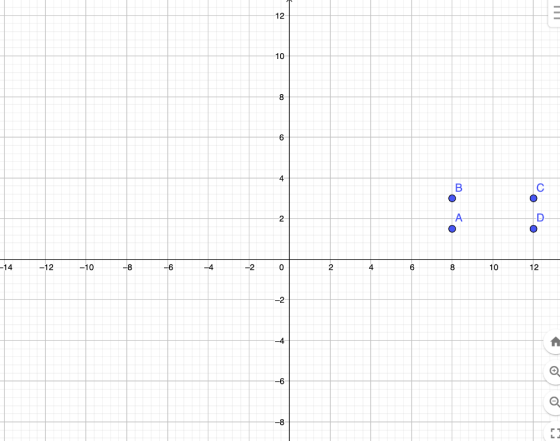
Scaling x = 2 , y = .5
Point 1 (A) : (8, 1.5)
Point 2 (B) : (8, 3)
Point 3 (C) : (12, 3)
Point 4 (D): (12, 1.5)
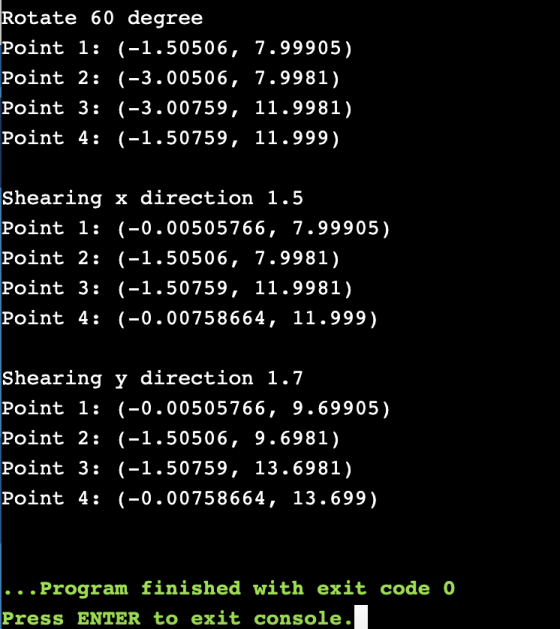
Rotate 30 degree
Point 1: (6.17709, 5.30034)
Point 2: (5.42681, 6.59922)
Point 3: (8.89049, 8.59995)
Point 4: (9.64077, 7.30107)
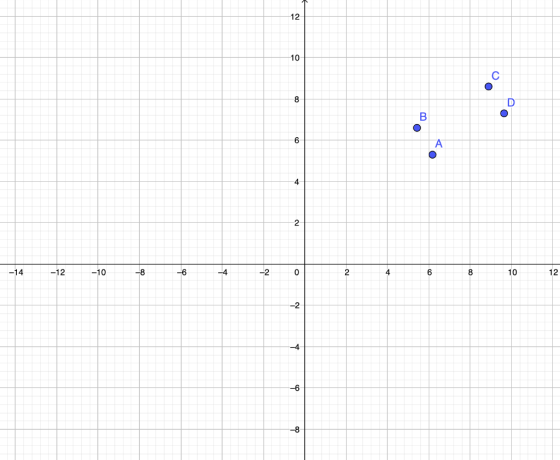
Rotate 60 degree
Point 1: (-1.50506, 7.99905)
Point 2: (-3.00506, 7.9981)
Point 3: (-3.00759, 11.9981)
Point 4: (-1.50759, 11.999)
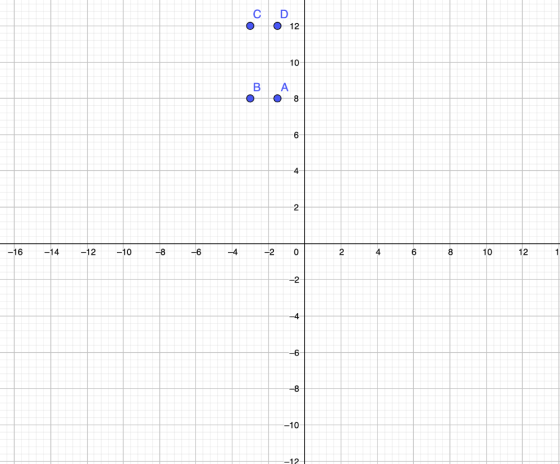
Shearing x direction 1.5
Point 1: (-0.00505766, 7.99905)
Point 2: (-1.50506, 7.9981)
Point 3: (-1.50759, 11.9981)
Point 4: (-0.00758664, 11.999)
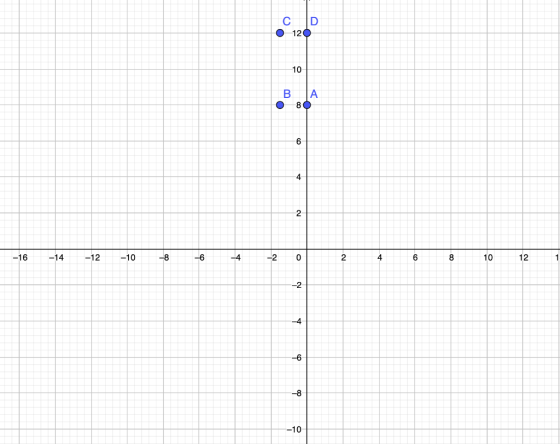
Shearing y direction 1.7
Point 1: (-0.00505766, 9.69905)
Point 2: (-1.50506, 9.6981)
Point 3: (-1.50759, 13.6981)
Point 4: (-0.00758664, 13.699)
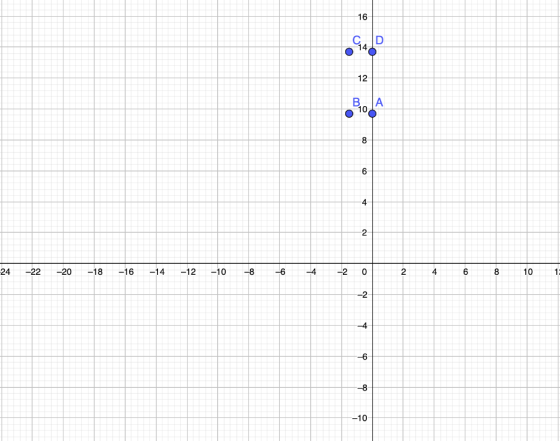
Feel free to rate the answer and comment your questions, if you have any.
Happy Studying!!!
Add Answer to:
c++ program
Create the "point" class as shown in the text with (private and
public sections)...
Java language (a) Create a class HexEditor with a constructor which creates a 5x10 text area...
 Java language
(a) Create a class HexEditor with a constructor which creates a
5x10 text area in a Frame. Also add a pull-down menu with a menu
item "Load". Copy the class as the answer to this part.
(b) Create another class TestHexEditor with a main() method
which creates an object anEditor of the class HexEditor and
displays the frame in part (a) using setVisible(true). Copy the
class as the answer to this part.
(c) Make changes to the class...
Java language
(a) Create a class HexEditor with a constructor which creates a
5x10 text area in a Frame. Also add a pull-down menu with a menu
item "Load". Copy the class as the answer to this part.
(b) Create another class TestHexEditor with a main() method
which creates an object anEditor of the class HexEditor and
displays the frame in part (a) using setVisible(true). Copy the
class as the answer to this part.
(c) Make changes to the class...
Hello! This is C++. Q3. Write a program Define a Super class named Point containing: An...
Hello! This is C++. Q3. Write a program Define a Super class named Point containing: An instance variable named x of type int. An instance variable named y of type int. Declare a method named toString() Returns a string representation of the point. Constructor that accepts values of all data members as arguments. Define a Sub class named Circle. A Circle object stores a radius (double) and inherit the (x, y) coordinates of its center from its super class Point....
Complete the following coding in java Create a class Circle that represents a round moving dot....
 Complete the following coding in java
Create a class Circle that represents a round moving dot. A circle object needs to contain double variables to store the: Current X location of the circle's center Current Y location of the circle's center Radius of the circle Direction of the circle's movement in radians Speed of the circle's movement . . The Circle class must contain a constructor Circle double x, double y, double radius) that initializes the circles center x, y...
Complete the following coding in java
Create a class Circle that represents a round moving dot. A circle object needs to contain double variables to store the: Current X location of the circle's center Current Y location of the circle's center Radius of the circle Direction of the circle's movement in radians Speed of the circle's movement . . The Circle class must contain a constructor Circle double x, double y, double radius) that initializes the circles center x, y...
In Java please! Problem You will be using the point class discussed in class to create...
 In Java please!
Problem You will be using the point class discussed in class to create a Rectangle class. You also need to have a driver class that tests your rectangle. Requirements You must implement the 3 classes in the class diagram below and use the same naming and data types. Following is a description of what each method does. Point Rectangle RectangleDriver - x: int - top Left: Point + main(args: String[) - y: int - width: int +...
In Java please!
Problem You will be using the point class discussed in class to create a Rectangle class. You also need to have a driver class that tests your rectangle. Requirements You must implement the 3 classes in the class diagram below and use the same naming and data types. Following is a description of what each method does. Point Rectangle RectangleDriver - x: int - top Left: Point + main(args: String[) - y: int - width: int +...
Question 1) Consider a class Point that models a 2-D point with x and y coordinates. Define the c...
 C++
Question 1) Consider a class Point that models a 2-D point with x and y coordinates. Define the class point that should have the following Private data members x and y (of type int), with default values of 0 A constant ID of type int A private static integer data member named numOfPoints This data member should be o Incremented whenever a new point object is created. o Decremented whenever a point object is destructed. A default constructor An...
C++
Question 1) Consider a class Point that models a 2-D point with x and y coordinates. Define the class point that should have the following Private data members x and y (of type int), with default values of 0 A constant ID of type int A private static integer data member named numOfPoints This data member should be o Incremented whenever a new point object is created. o Decremented whenever a point object is destructed. A default constructor An...
Write a C++ program for the instructions below. Please read the instructions carefully and make sure they are followed correctly. and please put comment with code! Problem:2 1. Class Student Create...
 Write a C++ program for the instructions below. Please
read the instructions carefully and make sure they are followed
correctly.
and please put comment with code!
Problem:2 1. Class Student Create a "Hello C++! I love CS52" Program 10 points Create a program that simply outputs the text Hello C++!I love CS52" when you run it. This can be done by using cout object in the main function. 2. Create a Class and an Object In the same file as...
Write a C++ program for the instructions below. Please
read the instructions carefully and make sure they are followed
correctly.
and please put comment with code!
Problem:2 1. Class Student Create a "Hello C++! I love CS52" Program 10 points Create a program that simply outputs the text Hello C++!I love CS52" when you run it. This can be done by using cout object in the main function. 2. Create a Class and an Object In the same file as...
Java Help 2. Task: Create a client for the Point class. Be very thorough with your...
Java Help 2. Task: Create a client for the Point class. Be very thorough with your testing (including invalid input) and have output similar to the sample output below: ---After declaration, constructors invoked--- Using toString(): First point is (0, 0) Second point is (7, 13) Third point is (7, 15) Second point (7, 13) lines up vertically with third point (7, 15) Second point (7, 13) doesn't line up horizontally with third point (7, 15) Enter the x-coordinate for first...
You are to write a class called Point – this will represent a geometric point in...
You are to write a class called Point – this will represent a geometric point in a Cartesian plane (but x and y should be ints). Point should have the following: Data: that hold the x-value and the y-value. They should be ints and must be private. Constructors: A default constructor that will set the values to (3, -5) A parameterized constructor that will receive 2 ints (x then y) and set the data to what is...
C++ Program To demonstrate ability to write sparse matrix operations. Write a C++ class to create...
C++ Program To demonstrate ability to write sparse matrix operations. Write a C++ class to create 2D sparse matrices, sum them, and transpose them. You don't have to use operator overloading in this program. Each matrix should be shown in sparse format (which shown only non-zero items). This program will be a command line-based program. Do not interact with user with a menu. Instead, user will use "command language" (aka command entry) as detailed below. Your program will keep at...
 Java language
(a) Create a class HexEditor with a constructor which creates a
5x10 text area in a Frame. Also add a pull-down menu with a menu
item "Load". Copy the class as the answer to this part.
(b) Create another class TestHexEditor with a main() method
which creates an object anEditor of the class HexEditor and
displays the frame in part (a) using setVisible(true). Copy the
class as the answer to this part.
(c) Make changes to the class...
Java language
(a) Create a class HexEditor with a constructor which creates a
5x10 text area in a Frame. Also add a pull-down menu with a menu
item "Load". Copy the class as the answer to this part.
(b) Create another class TestHexEditor with a main() method
which creates an object anEditor of the class HexEditor and
displays the frame in part (a) using setVisible(true). Copy the
class as the answer to this part.
(c) Make changes to the class...
 Complete the following coding in java
Create a class Circle that represents a round moving dot. A circle object needs to contain double variables to store the: Current X location of the circle's center Current Y location of the circle's center Radius of the circle Direction of the circle's movement in radians Speed of the circle's movement . . The Circle class must contain a constructor Circle double x, double y, double radius) that initializes the circles center x, y...
Complete the following coding in java
Create a class Circle that represents a round moving dot. A circle object needs to contain double variables to store the: Current X location of the circle's center Current Y location of the circle's center Radius of the circle Direction of the circle's movement in radians Speed of the circle's movement . . The Circle class must contain a constructor Circle double x, double y, double radius) that initializes the circles center x, y...
 In Java please!
Problem You will be using the point class discussed in class to create a Rectangle class. You also need to have a driver class that tests your rectangle. Requirements You must implement the 3 classes in the class diagram below and use the same naming and data types. Following is a description of what each method does. Point Rectangle RectangleDriver - x: int - top Left: Point + main(args: String[) - y: int - width: int +...
In Java please!
Problem You will be using the point class discussed in class to create a Rectangle class. You also need to have a driver class that tests your rectangle. Requirements You must implement the 3 classes in the class diagram below and use the same naming and data types. Following is a description of what each method does. Point Rectangle RectangleDriver - x: int - top Left: Point + main(args: String[) - y: int - width: int +...
 C++
Question 1) Consider a class Point that models a 2-D point with x and y coordinates. Define the class point that should have the following Private data members x and y (of type int), with default values of 0 A constant ID of type int A private static integer data member named numOfPoints This data member should be o Incremented whenever a new point object is created. o Decremented whenever a point object is destructed. A default constructor An...
C++
Question 1) Consider a class Point that models a 2-D point with x and y coordinates. Define the class point that should have the following Private data members x and y (of type int), with default values of 0 A constant ID of type int A private static integer data member named numOfPoints This data member should be o Incremented whenever a new point object is created. o Decremented whenever a point object is destructed. A default constructor An...
 Write a C++ program for the instructions below. Please
read the instructions carefully and make sure they are followed
correctly.
and please put comment with code!
Problem:2 1. Class Student Create a "Hello C++! I love CS52" Program 10 points Create a program that simply outputs the text Hello C++!I love CS52" when you run it. This can be done by using cout object in the main function. 2. Create a Class and an Object In the same file as...
Write a C++ program for the instructions below. Please
read the instructions carefully and make sure they are followed
correctly.
and please put comment with code!
Problem:2 1. Class Student Create a "Hello C++! I love CS52" Program 10 points Create a program that simply outputs the text Hello C++!I love CS52" when you run it. This can be done by using cout object in the main function. 2. Create a Class and an Object In the same file as...
Most questions answered within 3 hours.
-
Where is the error in this code sequence?
String s1 = "Hello";
String s2 = "ello";...
asked 10 months ago -
Financial data for Joel de Paris, Inc., for last year
follow:
Joel de Paris, Inc.
Balance...
asked 10 months ago -
Consider this reaction:
Al2(SO4)3 (aq)+ BaCl3
(aq) Al2Cl6 (aq)- +
3BaSO4(s) . What is the...
asked 10 months ago -
Suppose that Savneet is considering increasing her
recent random sample from 20 car rentals to 40...
asked 10 months ago -
Trucks arrive at an unloading terminal at an average rate of 120
per hour.
Trucks arrive...
asked 10 months ago -
Why are methanol and ethanol completely soluble in water while
octanol is not very little soluble....
asked 10 months ago -
A facilities manager at a university reads in a research report
that the mean amount of...
asked 10 months ago -
When the CuSO4 is rehydrated by adding water to the anhydrous
compound, is this an endothermic...
asked 10 months ago -
A ray of sunlight is passing from diamond into crown glass; the
angle of incidence is...
asked 10 months ago -
A block of mass 0.249 kg is placed on top of a light, vertical
spring of...
asked 10 months ago -
how do the kidneys compensate in the presences of acidosis
a) trigger hyperventilate
b) reserve acid...
asked 10 months ago -
Question 501 pts
The rental rate of capital to the firm increases. Which of the
following...
asked 10 months ago