package timing; import java.awt.event.*; import javax.swing.*; public class Timing implements ActionListener{ JButton button1; JLabel...
package timing;
import java.awt.event.*;
import javax.swing.*;
public class Timing implements ActionListener{
JButton button1;
JLabel label1;
public int minutes=3;//initial time
public int time=minutes*60;//total amount of
time in seconds only
public int seconds=time%60;
public String
defaulttimeset="0"+Integer.toString(minutes)+":0"+Integer.toString(seconds);
public static void main(String[]
args) {
Timing move=new
Timing();
move.go();
}
public void go(){
JFrame frame=new
JFrame();
frame.setBounds(50,50,400,400);
JPanel panel2=new
JPanel();
button1=new
JButton("Start Time");
panel2.add(button1);
button1.setBounds(30,50,150,170);
frame.getContentPane().add(button1);
button1.addActionListener(this);
label1=new
JLabel(defaulttimeset);
panel2.add(label1);
frame.getContentPane().add(panel2);
frame.setVisible(true);
frame.setDefaultCloseOperation(JFrame.EXIT_ON_CLOSE);
}
public void actionPerformed(ActionEvent
ev){
for (int
i=0;i<time;i++){
String mi,s;
if(seconds==0)
{
minutes--;
seconds=60;
}
seconds--;
mi="0"+Integer.toString(minutes);
if (seconds<10){
s="0"+Integer.toString(seconds);
}
else{
s=Integer.toString(seconds);
}
defaulttimeset=mi+":"+s;
label1.setText(defaulttimeset);
try{
Thread.sleep(1000);
}
catch(Exception ex){System.out.println("how is this a
countdown?");
}
}
}
}
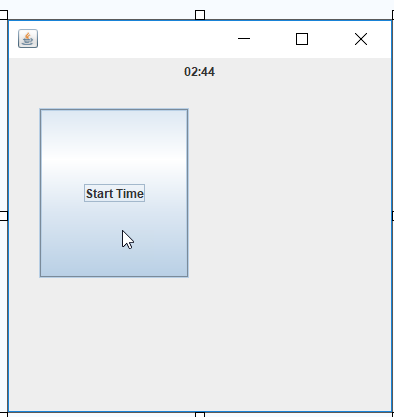
the code was supposed to change the text of label1 upon clicking the button but it didn't change. is there something wrong with the code?
Homework Answers
import java.awt.event.*;
import javax.swing.*;
public class Timing implements ActionListener{
JButton button1;
JLabel label1;
public int minutes=3;//initial time
public int time=minutes*60;//total amount of time in seconds
only
public int seconds=time%60;
public String
defaulttimeset="0"+Integer.toString(minutes)+":0"+Integer.toString(seconds);
public static void main(String[] args) {
Timing move=new Timing();
move.go();
}
public void go(){
JFrame frame=new JFrame();
frame.setBounds(50,50,400,400);
JPanel panel2=new JPanel();
button1=new JButton("Start Time");
panel2.add(button1);
button1.setBounds(30,50,150,170);
frame.getContentPane().add(button1);
button1.addActionListener(this);
label1=new JLabel(defaulttimeset);
panel2.add(label1);
frame.getContentPane().add(panel2);
frame.setVisible(true);
frame.setDefaultCloseOperation(JFrame.EXIT_ON_CLOSE);
}
public void actionPerformed(ActionEvent ev){
minutes=0;
minutes=3;//initial time
time=minutes*60;//total amount of time in seconds only
seconds=time%60;
new T(this).start();
}
}
class T extends Thread{
Timing t;
public T(Timing aTiming) {
t=aTiming;
}
public void run(){
for (int
i=0;i<t.time;i++){
String mi,s;
if(t.seconds==0)
{
t.minutes--;
t.seconds=60;
}
t.seconds--;
mi="0"+Integer.toString(t.minutes);
if (t.seconds<10){
s="0"+Integer.toString(t.seconds);
}
else{
s=Integer.toString(t.seconds);
}
t.defaulttimeset=mi+":"+s;
t.label1.setText(t.defaulttimeset);
try{
Thread.sleep(1);
}
catch(Exception ex){System.out.println("how is this a
countdown?");
}
}
}
}
Note: you need to use multi threading to update the time
Add Answer to:
package timing;
import java.awt.event.*;
import javax.swing.*;
public class Timing implements ActionListener{
JButton button1;
JLabel...
import java.awt.*; import javax.swing.*; import java.awt.event.*; import javax.swing.BorderFactory; import javax.swing.border.Border; public class Q1 extends JFrame {...
 import java.awt.*;
import javax.swing.*;
import java.awt.event.*;
import javax.swing.BorderFactory;
import javax.swing.border.Border;
public class Q1 extends JFrame {
public static void createAndShowGUI() {
JFrame frame = new
JFrame("Q1");
frame.setDefaultCloseOperation(JFrame.EXIT_ON_CLOSE);
Font courierFont = new
Font("Courier", Font.BOLD, 40);
Font arialFont = new Font("Arial",
Font.BOLD, 40);
Font sansFont = new
Font("Sans-serif", Font.BOLD, 20);
JLabel label = new JLabel("Enter a
word"); label.setFont(sansFont);
Font font1 = new Font("Sans-serif",
Font.BOLD, 40);
...
import java.awt.*;
import javax.swing.*;
import java.awt.event.*;
import javax.swing.BorderFactory;
import javax.swing.border.Border;
public class Q1 extends JFrame {
public static void createAndShowGUI() {
JFrame frame = new
JFrame("Q1");
frame.setDefaultCloseOperation(JFrame.EXIT_ON_CLOSE);
Font courierFont = new
Font("Courier", Font.BOLD, 40);
Font arialFont = new Font("Arial",
Font.BOLD, 40);
Font sansFont = new
Font("Sans-serif", Font.BOLD, 20);
JLabel label = new JLabel("Enter a
word"); label.setFont(sansFont);
Font font1 = new Font("Sans-serif",
Font.BOLD, 40);
...
import javax.swing.*; import java.awt.event.*; import java.awt.*; public class BookReview extends JFrame implements ActionListener { private JLabel...
import javax.swing.*; import java.awt.event.*; import java.awt.*; public class BookReview extends JFrame implements ActionListener { private JLabel titleLabel; private JTextField titleTxtFd; private JComboBox typeCmb; private ButtonGroup ratingGP; private JButton processBnt; private JButton endBnt; private JButton clearBnt; private JTextArea entriesTxtAr; private JRadioButton excellentRdBnt; private JRadioButton veryGoodRdBnt; private JRadioButton fairRdBnt; private JRadioButton poorRdBnt; private String ratingString; private final String EXCELLENT = "Excellent"; private final String VERYGOOD = "Very Good"; private final String FAIR = "Fair"; private final String POOR = "Poor"; String...
There 2 parts to complete: import javax.swing.*; import java.awt.event.*; import java.awt.*; public class Q4 extends JFrame...
There 2 parts to complete: import javax.swing.*; import java.awt.event.*; import java.awt.*; public class Q4 extends JFrame { private int xPos, yPos; public Q4() { JPanel drawPanel = new JPanel() { @Override public void paintComponent(Graphics g) { super.paintComponent(g); // paint parent's background //complete this: } }; drawPanel.addMouseListener(new MouseAdapter() { public void mouseClicked(MouseEvent evt) { //complete this :- set the xPos, yPos } }); setContentPane(drawPanel); setDefaultCloseOperation(JFrame.EXIT_ON_CLOSE); setTitle("Mouse-Click Demo"); setSize(400, 250); setVisible(true); } public static void main(String[] args) { SwingUtilities.invokeLater(new Runnable() {...
Simple java questions Q2.java: import java.awt.*; import javax.swing.*; import java.awt.event.*; public class Q2 extends JFrame { public static void createAndShowGUI() { JFrame frame = new JFrame(...
 Simple java questions
Q2.java:
import java.awt.*;
import javax.swing.*;
import java.awt.event.*;
public class Q2 extends JFrame {
public static void createAndShowGUI() {
JFrame frame = new JFrame("Lab");
frame.setDefaultCloseOperation(JFrame.EXIT_ON_CLOSE);
Font font = new Font("Sans-serif", Font.BOLD, 20);
JLabel label = new JLabel("Enter a word");
label.setFont(font);
JTextField textField = new JTextField(10);
textField.setFont(font);
JButton button = new JButton("Enter");
button.setFont(font);
Font font1 = new Font("Sans-serif", Font.BOLD, 30);
JCheckBox sansSerif = new JCheckBox("Sans-serif");
sansSerif.setFont(font1);
JCheckBox serif= new JCheckBox("Serif");
serif.setFont(font1);
Font font2 = new Font("Sans-serif", Font.ITALIC, 15);
JRadioButton...
Simple java questions
Q2.java:
import java.awt.*;
import javax.swing.*;
import java.awt.event.*;
public class Q2 extends JFrame {
public static void createAndShowGUI() {
JFrame frame = new JFrame("Lab");
frame.setDefaultCloseOperation(JFrame.EXIT_ON_CLOSE);
Font font = new Font("Sans-serif", Font.BOLD, 20);
JLabel label = new JLabel("Enter a word");
label.setFont(font);
JTextField textField = new JTextField(10);
textField.setFont(font);
JButton button = new JButton("Enter");
button.setFont(font);
Font font1 = new Font("Sans-serif", Font.BOLD, 30);
JCheckBox sansSerif = new JCheckBox("Sans-serif");
sansSerif.setFont(font1);
JCheckBox serif= new JCheckBox("Serif");
serif.setFont(font1);
Font font2 = new Font("Sans-serif", Font.ITALIC, 15);
JRadioButton...
Can you help me to link two frames in Java Swing and then if you click...
Can you help me to link two frames in Java Swing and then if you click "Proceed button" it will link to the Second Frame...Thank you :) First frame code: //First import javax.swing.*; import java.awt.event.*; import java.io.*; public class Sample extends JFrame implements ActionListener { JMenuBar mb; JMenu file; JMenuItem open; JTextArea ta; JButton proceed= new JButton("Proceed"); Sample() { open = new JMenuItem("Open File"); open.addActionListener(this); file = new JMenu("File"); file.add(open); mb = new JMenuBar(); mb.setBounds(0, 0, 400, 20); mb.add(file); ta...
This is the java GUI program. I want to add an icon to a button, but...
 This is the java GUI program.
I want to add an icon to a button, but it shows nothing.
Can you fix it for me please?
import java.awt.BorderLayout;
import java.awt.Container;
import javax.swing.ImageIcon;
import javax.swing.JButton;
import javax.swing.JFrame;
import javax.swing.JPanel;
class Icon extends JFrame{
public static
void main(String args[]){
Icon frame = new Icon("title");
frame.setVisible(true);
}
Icon(String title){
setTitle(title);
setBounds(100, 100, 300, 250);
setDefaultCloseOperation(JFrame.EXIT_ON_CLOSE);
JPanel p = new JPanel();
ImageIcon icon1 = new
ImageIcon("https://static.thenounproject.com/png/610387-200.png");
JButton button1 = new JButton(icon1);
p.add(button1);
Container contentPane...
This is the java GUI program.
I want to add an icon to a button, but it shows nothing.
Can you fix it for me please?
import java.awt.BorderLayout;
import java.awt.Container;
import javax.swing.ImageIcon;
import javax.swing.JButton;
import javax.swing.JFrame;
import javax.swing.JPanel;
class Icon extends JFrame{
public static
void main(String args[]){
Icon frame = new Icon("title");
frame.setVisible(true);
}
Icon(String title){
setTitle(title);
setBounds(100, 100, 300, 250);
setDefaultCloseOperation(JFrame.EXIT_ON_CLOSE);
JPanel p = new JPanel();
ImageIcon icon1 = new
ImageIcon("https://static.thenounproject.com/png/610387-200.png");
JButton button1 = new JButton(icon1);
p.add(button1);
Container contentPane...
I am getting this Error can you please fix my Java code. import java.awt.Dialog; import java.awt.Label;...
 I am getting this Error can you please fix my Java
code.
import java.awt.Dialog;
import java.awt.Label;
import java.awt.TextArea;
import java.awt.event.ActionEvent;
import java.awt.event.ActionListener;
import java.util.ArrayList;
import java.util.HashMap;
import java.util.List;
import java.util.Map.Entry;
import javax.swing.JButton;
import javax.swing.JFrame;
import javax.swing.JPanel;
public class Fall_2017 {
public TextArea courseInput;
public Label textAreaLabel;
public JButton addData;
public Dialog confirmDialog;
HashMap<Integer, ArrayList<String>> students;
public Fall_2017(){
courseInput = new TextArea(20, 40);
textAreaLabel = new Label("Student's data:");
addData = new JButton("Add...
I am getting this Error can you please fix my Java
code.
import java.awt.Dialog;
import java.awt.Label;
import java.awt.TextArea;
import java.awt.event.ActionEvent;
import java.awt.event.ActionListener;
import java.util.ArrayList;
import java.util.HashMap;
import java.util.List;
import java.util.Map.Entry;
import javax.swing.JButton;
import javax.swing.JFrame;
import javax.swing.JPanel;
public class Fall_2017 {
public TextArea courseInput;
public Label textAreaLabel;
public JButton addData;
public Dialog confirmDialog;
HashMap<Integer, ArrayList<String>> students;
public Fall_2017(){
courseInput = new TextArea(20, 40);
textAreaLabel = new Label("Student's data:");
addData = new JButton("Add...
Simple java GUI language translator. English to Spanish, French, or German import javax.swing.*; import java.awt.*; import...
Simple java GUI language translator. English to Spanish, French, or German import javax.swing.*; import java.awt.*; import java.awt.event.ActionEvent; import java.awt.event.ActionListener; public class translatorApp extends JFrame implements ActionListener { public static final int width = 500; public static final int height = 300; public static final int no_of_lines = 10; public static final int chars_per_line = 20; private JTextArea lan1; private JTextArea lan2; public static void main(String[] args){ translatorApp gui = new translatorApp();...
Can you please fix the error. package com.IST240Apps; import java.awt.*; import java.awt.event.*; import java.io.*; import javax.swing.*;...
Can you please fix the error. package com.IST240Apps; import java.awt.*; import java.awt.event.*; import java.io.*; import javax.swing.*; import java.net.*; public class LinkRotator extends JFrame implements Runnable, ActionListener { String[] pageTitle = new String[5]; URI[] pageLink = new URI[5]; int current = 0; Thread runner; JLabel siteLabel = new Jlabel(); public LinkRotator() { setDefaultCloseOperation(Jframe.EXIT_ON_CLOSE); setSize(300, 100); FlowLayout flo = new Flowlayout(); setLayout(flo); add(siteLabel); pageTitle = new String[] { "Oracle Java Site", "Server Side", "JavaWorld", "Google", "Yahoo", "Penn State" }; pageLink[0] = getUR1("http://www.oracle.com/technetwork/java");...
In Java Swing, in my ButtonHandler class, I need to have 2 different showDialog messages show...
In Java Swing, in my ButtonHandler class, I need to have 2 different showDialog messages show when my acceptbutton1 is pressed. One message is if the mouse HAS been dragged. One is if the mouse HAS NOT been dragged. /// I tried to make the Points class or the Mouse Dragged function return a boolean of true, so that I could construct an IF/THEN statement for the showDialog messages, but my boolean value was never accepted by ButtonHandler. *************************ButtonHandler class************************************...
 import java.awt.*;
import javax.swing.*;
import java.awt.event.*;
import javax.swing.BorderFactory;
import javax.swing.border.Border;
public class Q1 extends JFrame {
public static void createAndShowGUI() {
JFrame frame = new
JFrame("Q1");
frame.setDefaultCloseOperation(JFrame.EXIT_ON_CLOSE);
Font courierFont = new
Font("Courier", Font.BOLD, 40);
Font arialFont = new Font("Arial",
Font.BOLD, 40);
Font sansFont = new
Font("Sans-serif", Font.BOLD, 20);
JLabel label = new JLabel("Enter a
word"); label.setFont(sansFont);
Font font1 = new Font("Sans-serif",
Font.BOLD, 40);
...
import java.awt.*;
import javax.swing.*;
import java.awt.event.*;
import javax.swing.BorderFactory;
import javax.swing.border.Border;
public class Q1 extends JFrame {
public static void createAndShowGUI() {
JFrame frame = new
JFrame("Q1");
frame.setDefaultCloseOperation(JFrame.EXIT_ON_CLOSE);
Font courierFont = new
Font("Courier", Font.BOLD, 40);
Font arialFont = new Font("Arial",
Font.BOLD, 40);
Font sansFont = new
Font("Sans-serif", Font.BOLD, 20);
JLabel label = new JLabel("Enter a
word"); label.setFont(sansFont);
Font font1 = new Font("Sans-serif",
Font.BOLD, 40);
...
 Simple java questions
Q2.java:
import java.awt.*;
import javax.swing.*;
import java.awt.event.*;
public class Q2 extends JFrame {
public static void createAndShowGUI() {
JFrame frame = new JFrame("Lab");
frame.setDefaultCloseOperation(JFrame.EXIT_ON_CLOSE);
Font font = new Font("Sans-serif", Font.BOLD, 20);
JLabel label = new JLabel("Enter a word");
label.setFont(font);
JTextField textField = new JTextField(10);
textField.setFont(font);
JButton button = new JButton("Enter");
button.setFont(font);
Font font1 = new Font("Sans-serif", Font.BOLD, 30);
JCheckBox sansSerif = new JCheckBox("Sans-serif");
sansSerif.setFont(font1);
JCheckBox serif= new JCheckBox("Serif");
serif.setFont(font1);
Font font2 = new Font("Sans-serif", Font.ITALIC, 15);
JRadioButton...
Simple java questions
Q2.java:
import java.awt.*;
import javax.swing.*;
import java.awt.event.*;
public class Q2 extends JFrame {
public static void createAndShowGUI() {
JFrame frame = new JFrame("Lab");
frame.setDefaultCloseOperation(JFrame.EXIT_ON_CLOSE);
Font font = new Font("Sans-serif", Font.BOLD, 20);
JLabel label = new JLabel("Enter a word");
label.setFont(font);
JTextField textField = new JTextField(10);
textField.setFont(font);
JButton button = new JButton("Enter");
button.setFont(font);
Font font1 = new Font("Sans-serif", Font.BOLD, 30);
JCheckBox sansSerif = new JCheckBox("Sans-serif");
sansSerif.setFont(font1);
JCheckBox serif= new JCheckBox("Serif");
serif.setFont(font1);
Font font2 = new Font("Sans-serif", Font.ITALIC, 15);
JRadioButton...
 I am getting this Error can you please fix my Java
code.
import java.awt.Dialog;
import java.awt.Label;
import java.awt.TextArea;
import java.awt.event.ActionEvent;
import java.awt.event.ActionListener;
import java.util.ArrayList;
import java.util.HashMap;
import java.util.List;
import java.util.Map.Entry;
import javax.swing.JButton;
import javax.swing.JFrame;
import javax.swing.JPanel;
public class Fall_2017 {
public TextArea courseInput;
public Label textAreaLabel;
public JButton addData;
public Dialog confirmDialog;
HashMap<Integer, ArrayList<String>> students;
public Fall_2017(){
courseInput = new TextArea(20, 40);
textAreaLabel = new Label("Student's data:");
addData = new JButton("Add...
I am getting this Error can you please fix my Java
code.
import java.awt.Dialog;
import java.awt.Label;
import java.awt.TextArea;
import java.awt.event.ActionEvent;
import java.awt.event.ActionListener;
import java.util.ArrayList;
import java.util.HashMap;
import java.util.List;
import java.util.Map.Entry;
import javax.swing.JButton;
import javax.swing.JFrame;
import javax.swing.JPanel;
public class Fall_2017 {
public TextArea courseInput;
public Label textAreaLabel;
public JButton addData;
public Dialog confirmDialog;
HashMap<Integer, ArrayList<String>> students;
public Fall_2017(){
courseInput = new TextArea(20, 40);
textAreaLabel = new Label("Student's data:");
addData = new JButton("Add...
Most questions answered within 3 hours.
-
Where is the error in this code sequence?
String s1 = "Hello";
String s2 = "ello";...
asked 11 months ago -
Financial data for Joel de Paris, Inc., for last year
follow:
Joel de Paris, Inc.
Balance...
asked 11 months ago -
Consider this reaction:
Al2(SO4)3 (aq)+ BaCl3
(aq) Al2Cl6 (aq)- +
3BaSO4(s) . What is the...
asked 11 months ago -
Suppose that Savneet is considering increasing her
recent random sample from 20 car rentals to 40...
asked 11 months ago -
Trucks arrive at an unloading terminal at an average rate of 120
per hour.
Trucks arrive...
asked 11 months ago -
Why are methanol and ethanol completely soluble in water while
octanol is not very little soluble....
asked 11 months ago -
A facilities manager at a university reads in a research report
that the mean amount of...
asked 11 months ago -
When the CuSO4 is rehydrated by adding water to the anhydrous
compound, is this an endothermic...
asked 11 months ago -
A ray of sunlight is passing from diamond into crown glass; the
angle of incidence is...
asked 11 months ago -
A block of mass 0.249 kg is placed on top of a light, vertical
spring of...
asked 11 months ago -
how do the kidneys compensate in the presences of acidosis
a) trigger hyperventilate
b) reserve acid...
asked 11 months ago -
Question 501 pts
The rental rate of capital to the firm increases. Which of the
following...
asked 11 months ago