Hello, I needed help on the following In Java: Note that if you intend to append...
Hello, I needed help on the following
In Java:
Note that if you intend to append data to the end of a file, you need to create an instance of the "FileWriter" class rather than the "File" class:
FileWriter fwriter = new FileWriter("RunningList.txt", true);
PrintWriter outfile = new PrintWriter(fwriter);
Remember that PrintWriter objects can throw an exception, so make sure to amend your main method header with the clause "throws IOException".
(Cannot use try-catch, must include clause "throws IOException")
Write a program that asks the user to enter a filename that will store a list of names to invite to a party. Check to ensure that file doesn't exist; if it does, give the user an error message and ask them to re-run the program. Then ask the user how many names they'd like to add to the running list of names of party guests. Have them input that many names from the console, and write those to an external file. Then close the external file.
Then present the user with a menu:
- Add more guests (append to the file)
- Create new guest list (overwrite the file)
- Create new guest list (in a new file)
- Quit
If they select "add more guests", open the file in append mode, ask the user how many guests to add to the list, and then write those to the file.
If they select "create new guest list/overwrite", ask them how many names to add, and overwrite the existing file.
If they select "new guest list/new file", ask them for a new filename. Check that this file doesn't already exist; if it does, give the user an error and ask them for a new filename. Then ask how many names to add, and create/write to this new file.
Present this menu in a loop until the user elects to quit.
***GUEST LIST GENERATOR***
Enter a filename for the guest list: g.txt
How many guests do you want to add to the guest list? 2
Enter guest #1: abc
Enter guest #2: def
Enter:
        1: Add names to the guest list
        2: Create new guest list (overwrite old list)
        3: Create new guest list (new list)
        4: Quit
        Your choice: 1
Adding to the current list list...
How many guests do you want to add to the guest list? 2
Enter guest #1: ghi
Enter guest #2: jkl
Enter:
        1: Add names to the guest list
        2: Create new guest list (overwrite old list)
        3: Create new guest list (new list)
        4: Quit
        Your choice: 3
Creating new guest list...
Enter a new filename: h.txt
How many guests do you want to add to the guest list? 3
Enter guest #1: mno
Enter guest #2: pqr
Enter guest #3: stu
Enter:
        1: Add names to the guest list
        2: Create new guest list (overwrite old list)
        3: Create new guest list (new list)
        4: Quit
        Your choice: 4
Program ending.
---------------------------------------------------------
Thank you so much!
Homework Answers
PROGRAM:
import java.io.*;
import java.util.*;
class Test
{
public static void main(String[] args) throws
IOException
{
Scanner sc=new
Scanner(System.in);
String
filename="",guestname="",filename1="";
int n,i=0;
System.out.print("Enter a filename
for the guest list:");
filename=sc.nextLine();
//taking filename from user
FileWriter writer = new
FileWriter(filename);
BufferedWriter fwriter = new
BufferedWriter(writer);
System.out.print("How many guests
do you want to add to the guest list?");
n=sc.nextInt(); //reading number of guest
names
sc.nextLine();
for(i=0;i<n;i++)
{
System.out.print("Enter guest #"+(i+1)+":");
guestname=sc.nextLine(); //reading guest
names
fwriter.write(guestname); //writer names to
the file
fwriter.newLine();
}
fwriter.flush();
fwriter.close();
int ch=0,k=0;
while(true)
{
System.out.println("Enter:");
System.out.println("\t"+"1: Add names to the guest list");
System.out.println("\t"+"2: Create new guest list (overwrite old
list)");
System.out.println("\t"+"3: Create new guest list (new
list)");
System.out.println("\t"+"4: Quit");
System.out.print("\t"+"Your choice:");
ch=sc.nextInt();
switch(ch)
{
case
1: //logic for
appending guest names to the file
FileWriter fwriter1 = new
FileWriter(filename, true);
PrintWriter outfile = new
PrintWriter(fwriter1);
System.out.println("Adding to
the current list list...");
System.out.print("How many
guests do you want to add to the guest list?");
n=sc.nextInt();
sc.nextLine();
for(i=0;i<n;i++)
{
System.out.print("Enter guest #"+(i+1)+":");
guestname=sc.nextLine();
outfile.println(guestname);
}
outfile.close();
break;
case 2: //logic for
overwriting guestnames with new guestnames
FileOutputStream fout=new
FileOutputStream(filename);
PrintStream pout=new
PrintStream(fout);
System.out.print("How many
guests do you want to add to the guest list?");
n=sc.nextInt();
sc.nextLine();
for(i=0;i<n;i++)
{
System.out.print("Enter guest #"+(i+1)+":");
guestname=sc.nextLine();
pout.println(guestname);
}
pout.close();
break;
case
3: //logic for
creating new file and adding guests to that file
sc.nextLine();
System.out.print("Enter a
filename for the guest list:");
filename1=sc.nextLine();
while(filename1.equals(filename))
{
System.out.println("File name already exists:");
System.out.println("Enter another file name:");
filename1=sc.nextLine();
}
File f=new
File(filename1);
PrintStream fileStream = new
PrintStream(f);
System.out.print("How many
guests do you want to add to the guest list?");
n=sc.nextInt();
sc.nextLine();
for(i=0;i<n;i++)
{
System.out.print("Enter guest #"+(i+1)+":");
guestname=sc.nextLine();
fileStream.println(guestname);
}
fileStream.close();
break;
case 4: //quitting
from program
System.out.println("Program
ending:");
k=1;
break;
default:
System.out.println("Enter
valid option");
}
if(k==1)
{
break;
//terminating the program if k==1
}
}
}
}
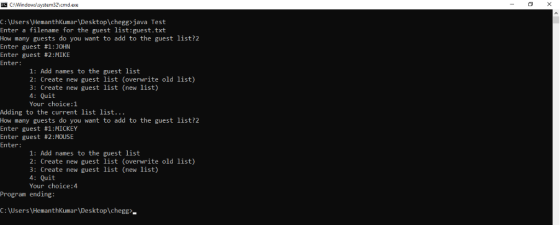
CONSOLE OUTPUT:
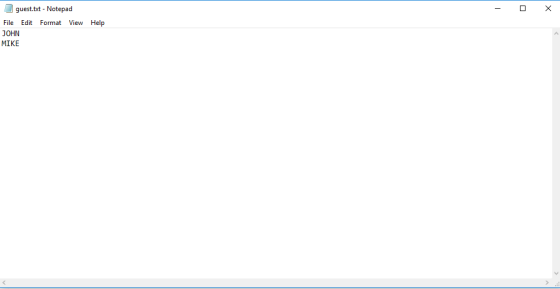
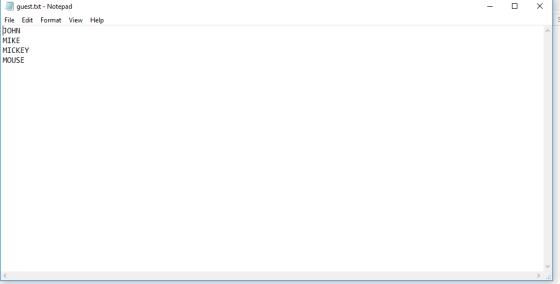
FILEOUTPUT:
Add Answer to:
Hello, I needed help on the following
In Java:
Note that if you intend to append...
(Java) Rewrite the following exercise below to read inputs from a file and write the output...
(Java) Rewrite the following exercise below to read inputs from a file and write the output of your program in a text file. Ask the user to enter the input filename. Use try-catch when reading the file. Ask the user to enter a text file name to write the output in it. You may use the try-with-resources syntax. An example to get an idea but you need to have your own design: try ( // Create input files Scanner input...
create a new Java application called "CheckString" (without the quotation marks) according to the following guidelines....
create a new Java application called "CheckString" (without the quotation marks) according to the following guidelines. ** Each method below, including main, should handle (catch) any Exceptions that are thrown. ** ** If an Exception is thrown and caught, print the Exception's message to the command line. ** Write a complete Java method called checkWord that takes a String parameter called word, returns nothing, and is declared to throw an Exception of type Exception. In the method, check if the...
How can I create Loops and Files on Java? • Create a program that reads a...
 How can I create Loops and Files on Java?
• Create a program that reads a list of names from a source file and writes those names to a CSV file. The source file name and target CSV file name should be requested from the user • The source file can have a variable number of names so your program should be dynamic enough to read as many names as needed • When writing your CSV file, the first row...
How can I create Loops and Files on Java?
• Create a program that reads a list of names from a source file and writes those names to a CSV file. The source file name and target CSV file name should be requested from the user • The source file can have a variable number of names so your program should be dynamic enough to read as many names as needed • When writing your CSV file, the first row...
Write a program in Java, Python and Lisp When the program first launches, there is a...
Write a program in Java, Python and Lisp When the program first launches, there is a menu which allows the user to select one of the following five options: 1.) Add a guest 2.) Add a room 3.) Add a booking 4.) View bookings 5.) Quit The functionality of these options is as follows: 1.) When users add a guest they provide a name which is stored in some manner of array or list. Guests are assigned a unique ID...
Create a java program that reads an input file named Friends.txt containing a list 4 names...
Create a java program that reads an input file named Friends.txt containing a list 4 names (create this file using Notepad) and builds an ArrayList with them. Use sout<tab> to display a menu asking the user what they want to do: 1. Add a new name 2. Change a name 3. Delete a name 4. Print the list or 5. Quit When the user selects Quit your app creates a new friends.txt output file. Use methods: main( ) shouldn’t do...
Hello! I'm posting this program that is partially completed if someone can help me out, I...
Hello! I'm posting this program that is partially completed if someone can help me out, I will give you a good rating! Thanks, // You are given a partially completed program that creates a list of employees, like employees' record. // Each record has this information: employee's name, supervisors's name, department of the employee, room number. // The struct 'employeeRecord' holds information of one employee. Department is enum type. // An array of structs called 'list' is made to hold...
making a file You are tasked with creating a text-based program for storing data on Hotel...
making a file You are tasked with creating a text-based program for storing data on Hotel Room Bookings - however, as this is a comparative languages course, you will be creating the same application in the following three programming languages: • Java, • Python, and • Lisp As you implement the application in each language you should keep notes on: - The features of the languages used, - Which features you found useful, and - Any issues or complications which...
Star Database Program. This is a more sophisticated assignment, it will take longer to do. Write...
Star Database Program. This is a more sophisticated assignment, it will take longer to do. Write a program which uses file IO, loops, and function calls. The following files are provided in pub: Assignment.cpp stars.dat solution_stars.dat solution.o when you log in the first time, make a directory for this project mkdir prog3 then copy down the files. (WARNING! This will overwrite any file in the directory named Assignment.cpp, so don't copy down Assignment.cpp if you have already done work): cp...
I JUST NEED HELP WITH DISPLAY PART! please help! thanks in advance // This function saves...
 I JUST NEED HELP WITH DISPLAY PART!
please help!
thanks in advance
// This function saves the array of structures to file. It is already implemented for you.
// You should understand how this code works so that you know how to use it for future assignments.
void save(char* fileName)
{
FILE* file;
int i;
file = fopen(fileName, "wb");
fwrite(&count, sizeof(count), 1, file);
for (i = 0; i < count; i++)
{
fwrite(list[i].name, sizeof(list[i].name), 1, file);
fwrite(list[i].class_standing, sizeof(list[i].class_standing), 1, file);...
I JUST NEED HELP WITH DISPLAY PART!
please help!
thanks in advance
// This function saves the array of structures to file. It is already implemented for you.
// You should understand how this code works so that you know how to use it for future assignments.
void save(char* fileName)
{
FILE* file;
int i;
file = fopen(fileName, "wb");
fwrite(&count, sizeof(count), 1, file);
for (i = 0; i < count; i++)
{
fwrite(list[i].name, sizeof(list[i].name), 1, file);
fwrite(list[i].class_standing, sizeof(list[i].class_standing), 1, file);...
write a python software with the following Input The name and phone number for a contact...
 write a python software with the following
Input The name and phone number for a contact Output The contents of the list after the contact has been added to the list. Processing • Welcome the user to the contact storage software. • Create 2 empty lists: one for names and one for phone numbers. Ask the user to enter the name and phone number of one new contact. Append the newly entered name to the nameList. Append the newly entered...
write a python software with the following
Input The name and phone number for a contact Output The contents of the list after the contact has been added to the list. Processing • Welcome the user to the contact storage software. • Create 2 empty lists: one for names and one for phone numbers. Ask the user to enter the name and phone number of one new contact. Append the newly entered name to the nameList. Append the newly entered...
 How can I create Loops and Files on Java?
• Create a program that reads a list of names from a source file and writes those names to a CSV file. The source file name and target CSV file name should be requested from the user • The source file can have a variable number of names so your program should be dynamic enough to read as many names as needed • When writing your CSV file, the first row...
How can I create Loops and Files on Java?
• Create a program that reads a list of names from a source file and writes those names to a CSV file. The source file name and target CSV file name should be requested from the user • The source file can have a variable number of names so your program should be dynamic enough to read as many names as needed • When writing your CSV file, the first row...
 I JUST NEED HELP WITH DISPLAY PART!
please help!
thanks in advance
// This function saves the array of structures to file. It is already implemented for you.
// You should understand how this code works so that you know how to use it for future assignments.
void save(char* fileName)
{
FILE* file;
int i;
file = fopen(fileName, "wb");
fwrite(&count, sizeof(count), 1, file);
for (i = 0; i < count; i++)
{
fwrite(list[i].name, sizeof(list[i].name), 1, file);
fwrite(list[i].class_standing, sizeof(list[i].class_standing), 1, file);...
I JUST NEED HELP WITH DISPLAY PART!
please help!
thanks in advance
// This function saves the array of structures to file. It is already implemented for you.
// You should understand how this code works so that you know how to use it for future assignments.
void save(char* fileName)
{
FILE* file;
int i;
file = fopen(fileName, "wb");
fwrite(&count, sizeof(count), 1, file);
for (i = 0; i < count; i++)
{
fwrite(list[i].name, sizeof(list[i].name), 1, file);
fwrite(list[i].class_standing, sizeof(list[i].class_standing), 1, file);...
 write a python software with the following
Input The name and phone number for a contact Output The contents of the list after the contact has been added to the list. Processing • Welcome the user to the contact storage software. • Create 2 empty lists: one for names and one for phone numbers. Ask the user to enter the name and phone number of one new contact. Append the newly entered name to the nameList. Append the newly entered...
write a python software with the following
Input The name and phone number for a contact Output The contents of the list after the contact has been added to the list. Processing • Welcome the user to the contact storage software. • Create 2 empty lists: one for names and one for phone numbers. Ask the user to enter the name and phone number of one new contact. Append the newly entered name to the nameList. Append the newly entered...
Most questions answered within 3 hours.
-
Where is the error in this code sequence?
String s1 = "Hello";
String s2 = "ello";...
asked 11 months ago -
Financial data for Joel de Paris, Inc., for last year
follow:
Joel de Paris, Inc.
Balance...
asked 11 months ago -
Consider this reaction:
Al2(SO4)3 (aq)+ BaCl3
(aq) Al2Cl6 (aq)- +
3BaSO4(s) . What is the...
asked 11 months ago -
Suppose that Savneet is considering increasing her
recent random sample from 20 car rentals to 40...
asked 11 months ago -
Trucks arrive at an unloading terminal at an average rate of 120
per hour.
Trucks arrive...
asked 11 months ago -
Why are methanol and ethanol completely soluble in water while
octanol is not very little soluble....
asked 11 months ago -
A facilities manager at a university reads in a research report
that the mean amount of...
asked 11 months ago -
When the CuSO4 is rehydrated by adding water to the anhydrous
compound, is this an endothermic...
asked 11 months ago -
A ray of sunlight is passing from diamond into crown glass; the
angle of incidence is...
asked 11 months ago -
A block of mass 0.249 kg is placed on top of a light, vertical
spring of...
asked 11 months ago -
how do the kidneys compensate in the presences of acidosis
a) trigger hyperventilate
b) reserve acid...
asked 11 months ago -
Question 501 pts
The rental rate of capital to the firm increases. Which of the
following...
asked 11 months ago