Explain how the use of Excel tools and applications of the data analysis tool can increase...
Explain how the use of Excel tools and applications of the data analysis tool can increase the effectiveness and efficiency of statistical calculations. Discuss which tools you find most useful and provide an example of how you applied the tools.
Homework Answers
Answer:-
Explain how the use of Excel tools and applications of the data analysis tool can increase the effectiveness and efficiency of statistical calculations.
- Store, Schedule, Email, Invoice & Send reminders to your contacts with just a few button clicks
- Control Staff Schedules, Time clock management, Hourly Costs, use drag and drop scheduling and time off for employees
- Automatically scrape & download data from the Internet such as stock data, search results or product data from many types of websites
- Automatically add, update, copy, & delete files and folders directly on your computer
- With just an address or two, Excel can look up, display time, distance & suggest routes with the help of Google Maps, and directly in Excel without opening up a browser
- Open up fill out, rename & save fillable pdf files with just a click of a single button.
- Using Send Keys Excel can login to websites, add & extract data and logout, and all at a timed interval or on a click
- Used as a powerful mail merge application (without requiring Word) so documents can be created, printed, emailed or saved as PDF, even with thousands of records.
- Create pop up menus on hover, slide out tabs & fade out messages to, vertical & horizontal tabs to provide a rich user environment
. Discuss which tools you find most useful and provide an example of how you applied the tools.
I use Excel for dozens of different things. It is a great tool
for simple or complex calculations, particularly ones which you
want to repeat. I use it instead of a calculator in many cases
because it is so easy to edit the inputs if I need to adjust them
and makes any errors obvious.
I use it to visualize data as well. Excel charts are not perfect,
but they are reasonably good at charting data and making trends and
correlations visually obvious.
I use it to deal with large quantities of data. Using pivot tables
to aggregate and filter data is very useful. Even simple things
like filtering and sorting can help find data within complex large
data sets.
“In today’s world of data MS Excel plays a crucial role. As a productivity tool that can also be used to improve communication, spreadsheets offer benefits to a diverse range of departments within a company. When used strategically and regularly, spreadsheets can abolish the need for expensive software for any department it serves.
Some of the most useful features of using spreadsheet is:
Very easy to use-Anyone with basic understanding of MS Excel can easily play around with the data
Visualization- Data can be seen in a better formats so that it can make better sense to the reader.
Presentations-When preparing a presentation for a meeting, a spreadsheet can help you organize your information. You can print spreadsheet tables, graphs and calculations to share with other attendees.
Figures can be tracked- In the spreadsheet you can create multiple columns, rows, graphs to track the data more effectively.
Formulas- Spreadsheets can quickly calculate percentages and totals of data compiled.
Data analysis functions can be done on spreadsheet via using power pivot, vlookup and other formulas.
There are various benefits of using the spreadsheet in any job role or even you can manage your house expenses very well in the spreadsheets.
You can create charts to track you expenses like electricity, water bill, house tax, groceries etc.
I use it for quick data manipulation. Using concatenation and other
string operators lets you programmatically do all sorts of things.
I often use it to construct sets of hyperlinks and other types of
text processing.
I use it for checklists and status reporting. I use it to take
notes. It is not the best in many areas, but I can't think if any
other application that I find more flexible, powerful and
useful.
Add Answer to:
Explain how the use of Excel tools and applications of the data
analysis tool can increase...
Explain how the What-If Analysis tools available in Excel tools are used to assist with solid...
Explain how the What-If Analysis tools available in Excel tools are used to assist with solid decision making. Give examples of how each of the What-If Analysis tools can be used practically.
Do four regression analyses using the Anscombe Quartet (1973) Data Analysis Tool in Excel Any Statistical...
 Do four regression analyses using the Anscombe Quartet (1973) Data Analysis Tool in Excel Any Statistical package Summarize the results and compare those using the original data. How would you run regression analysis differently? Remove some data, if necessary Linear or curvilinear (quadratic or cube)? Re-run regression analysis Summarize the results
Do four regression analyses using the Anscombe Quartet (1973) Data Analysis Tool in Excel Any Statistical package Summarize the results and compare those using the original data. How would...
Do four regression analyses using the Anscombe Quartet (1973) Data Analysis Tool in Excel Any Statistical package Summarize the results and compare those using the original data. How would you run regression analysis differently? Remove some data, if necessary Linear or curvilinear (quadratic or cube)? Re-run regression analysis Summarize the results
Do four regression analyses using the Anscombe Quartet (1973) Data Analysis Tool in Excel Any Statistical package Summarize the results and compare those using the original data. How would...
Do four regression analyses using the Anscombe Quartet (1973) Data Analysis Tool in Excel Any Statistical...
 Do four regression analyses using the Anscombe Quartet (1973) Data Analysis Tool in Excel Any Statistical package Summarize the results and compare those using the original data. How would you run regression analysis differently? Remove some data, if necessary Linear or curvilinear (quadratic or cube)? Re-run regression analysis Summarize the results
Instructions and Overview Systems Analysis and the SDLC are used in developing technology applications for use...
Instructions and Overview Systems Analysis and the SDLC are used in developing technology applications for use in a business-computing environment. Think about this process. Can it be used outside Information Systems? Provide an example of how you could apply the SDLC in, say, building a new house, purchasing a car, researching college degrees, etc. Discuss whether or not this process is helpful. Systems Analysis and the SDLC are used in developing technology applications for use in a business-computing environment. Think...
Use the appropriate excel data analysis tool from the tool pack as the basis to determine...
Use the appropriate excel data analysis tool from the tool pack as the basis to determine the standard error of the mean differences for the following before and after data. Input your answer to three decimal places Data set 1: 34, 26, 54, 12, 43,67, & 9 Data set 2: 32, 18, 60, 18, 35, 70, & 15
How can a simple tool such as Excel be used to conduct an analysis of different...
How can a simple tool such as Excel be used to conduct an analysis of different products/services?
Discuss how one of the two listed data analytics tools (explanatory and predictive analytics) can be...
Discuss how one of the two listed data analytics tools (explanatory and predictive analytics) can be applied in health care. Give a specific use example.
Discuss how one of the two listed data analytics tools in the readings (explanatory and predictive)...
Discuss how one of the two listed data analytics tools in the readings (explanatory and predictive) can be applied in health care. Give a specific use example.
Could you please give a description of quailty control tools that a health services organization or...
Could you please give a description of quailty control tools that a health services organization or one with which you are familiar uses for process analysis. Be specific and provide examples. Then, create your own example of this tool, and attach it to your discussion. Do not use real data. Describe the strengths and weaknesses of the tool for process analysis in health care administration, and explain why.
4. (25 pts) Kali Linux has many tools that you can used for various purposes. See...
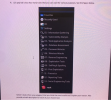 4. (25 pts) Kali Linux has many tools that you can used for various purposes. See the figure below. Favorites Recently Used All ** Settings Q 01 - Information Gathering 02 - Vulnerability Analysis 2003 - Web Application Analysis 04 - Database Assessment 05 - Password Attacks 806 - Wireless Attacks 07 - Reverse Engineering 08 - Exploitation Tools de 09 - Sniffing & Spoofing 10 - Post Exploitation , 11 - Forensics 12.- Reporting Tools 13 - Social Engineering...
 Do four regression analyses using the Anscombe Quartet (1973) Data Analysis Tool in Excel Any Statistical package Summarize the results and compare those using the original data. How would you run regression analysis differently? Remove some data, if necessary Linear or curvilinear (quadratic or cube)? Re-run regression analysis Summarize the results
Do four regression analyses using the Anscombe Quartet (1973) Data Analysis Tool in Excel Any Statistical package Summarize the results and compare those using the original data. How would...
Do four regression analyses using the Anscombe Quartet (1973) Data Analysis Tool in Excel Any Statistical package Summarize the results and compare those using the original data. How would you run regression analysis differently? Remove some data, if necessary Linear or curvilinear (quadratic or cube)? Re-run regression analysis Summarize the results
Do four regression analyses using the Anscombe Quartet (1973) Data Analysis Tool in Excel Any Statistical package Summarize the results and compare those using the original data. How would...
 Do four regression analyses using the Anscombe Quartet (1973) Data Analysis Tool in Excel Any Statistical package Summarize the results and compare those using the original data. How would you run regression analysis differently? Remove some data, if necessary Linear or curvilinear (quadratic or cube)? Re-run regression analysis Summarize the results
 4. (25 pts) Kali Linux has many tools that you can used for various purposes. See the figure below. Favorites Recently Used All ** Settings Q 01 - Information Gathering 02 - Vulnerability Analysis 2003 - Web Application Analysis 04 - Database Assessment 05 - Password Attacks 806 - Wireless Attacks 07 - Reverse Engineering 08 - Exploitation Tools de 09 - Sniffing & Spoofing 10 - Post Exploitation , 11 - Forensics 12.- Reporting Tools 13 - Social Engineering...
Most questions answered within 3 hours.
-
Where is the error in this code sequence?
String s1 = "Hello";
String s2 = "ello";...
asked 10 months ago -
Financial data for Joel de Paris, Inc., for last year
follow:
Joel de Paris, Inc.
Balance...
asked 10 months ago -
Consider this reaction:
Al2(SO4)3 (aq)+ BaCl3
(aq) Al2Cl6 (aq)- +
3BaSO4(s) . What is the...
asked 10 months ago -
Suppose that Savneet is considering increasing her
recent random sample from 20 car rentals to 40...
asked 10 months ago -
Trucks arrive at an unloading terminal at an average rate of 120
per hour.
Trucks arrive...
asked 10 months ago -
Why are methanol and ethanol completely soluble in water while
octanol is not very little soluble....
asked 10 months ago -
A facilities manager at a university reads in a research report
that the mean amount of...
asked 10 months ago -
When the CuSO4 is rehydrated by adding water to the anhydrous
compound, is this an endothermic...
asked 10 months ago -
A ray of sunlight is passing from diamond into crown glass; the
angle of incidence is...
asked 10 months ago -
A block of mass 0.249 kg is placed on top of a light, vertical
spring of...
asked 10 months ago -
how do the kidneys compensate in the presences of acidosis
a) trigger hyperventilate
b) reserve acid...
asked 10 months ago -
Question 501 pts
The rental rate of capital to the firm increases. Which of the
following...
asked 10 months ago