To do: Now add code to Pet and PetPlay to complete the comments in the code....
To do: Now add code to Pet and PetPlay to complete the comments in the code.
import java.util.ArrayList;
public class PetPlay
{
//-----------------------------------------------------------------
// Stores and modifies a list of pets
//-----------------------------------------------------------------
public static void main (String[] args)
{
// always make your array lists generic
ArrayList pets = new ArrayList();
pets.add(new Pet("dog", "Bella"));
pets.add(new Pet("cat","Blackie"));
pets.add(new Pet("bird", "Babs"));
pets.add(new Pet("dog", "Lassie"));
pets.add(new Pet("horse", "Sam"));
pets.add(new Pet("dog", "Blackie"));
pets.add(new Pet("turtle", "Joe"));
pets.add(new Pet("bird","Annie"));
pets.add(new Pet("bird", "Alex"));
pets.add(new Pet("bird", "Babs")); //I know she is there twice - we need her later
pets.add(new Pet("cat","Louie"));
pets.add(new Pet("snake","Jake"));
// You could use the following to print out all of the pets
//System.out.println (pets);
// since Java will call the toString() on each individual item if you do not
// but these puts the entire collection in [ ] and we do not want that
// It is better to do it explicitly yourself!!
System.out.println("The pets names are: ");
for (int i=0;i
System.out.print(pets.get(i).getName() + " ");
System.out.println();
//Let's add Quack the Duck at the second location (remember to start
//counting at zero)
pets.add(1,new Pet("duck","Quack"));
System.out.println("With Quack added:");
for (int i=0;i
System.out.print(pets.get(i).getName() + " ");
System.out.println();
//Remove Louie the cat. You might try this
Pet p = new Pet("cat", "Louis");
int location = pets.indexOf (p);
System.out.println("\nThe location of Louie is " + location);
System.out.println("This did not work!! See notes in code");
// It is looking for the object - not an object with the same values
//for the fields. Since they are not the same object, it is not
//found. Java returns a -1 for the location of unsuccessful searches.
System.out.println("Try again...");
for (int i=0;i
p = pets.get(i);
if (p.getName().equals("Louie") && p.getType().equals("cat"))
pets.remove(i);
}
System.out.println("\n Without Louie:");
for (int i=0;i
System.out.print(pets.get(i).getName() + " ");
System.out.println();
///////NOW YOU FINISH THESE!!!! FIND METHODS FOR THESE!!
//Find out the name of the third pet on the list (remember that we start counting at zero). Print it out
System.out.println ("\nThe third pet in the list now is " + pets.get(2));
// Add in the sugar glider named Pete as the fourth
//print out the pets names again
pets.add(3,new Pet("sugar glider","Pete"));
System.out.println("\nWith Pete added as the fourth pet we now have:");
for (int i=0;i
System.out.println(pets.get(i));
//print out how many pets there are now in the collection
System.out.println("\nThe number of pets is now "+ pets.size());
// find out the index for the location of Blackie the dog (see notes on line 88)
//find out the index for Babs the bird
//find out the index for Joe the turtle
// find the indexes for an instance. As we saw, there is no single method to compare the name and type.
// Loop through the array list. Use the method .equals to compare the entries like I did on line 62
// print out the index number if it is equal.
// NOTE: For Strings you cannot use == (this can only be used for primitive data types)
// for objects == checks to see if it is the same object ---not that the contents are the same
// find all of the pets whose first names start with the letter A.
// Print these. HINT!!! There is
// no single method for this. You will need to loop through the ArrayList getting
// each entry's name and checking to see if the string starts with an A.
// print out the list of all of the pet name but all of the letters need to be capitalized.
// clear out all the members of the ArrayList
pets.clear();
// print out the ArrayList now and the size now.*/
System.out.println("Size of list :"+pets.size());
}
}
public class Pet {
private String type;
private String name;
public Pet() {
}
public Pet(String t, String n) {
type = t;
name = n;
}
public String toString() {
return name + " is a " + type;
}
public String getType() {
return type;
}
public void setType(String type) {
this.type = type;
}
public String getName() {
return name;
}
public void setName(String name) {
this.name = name;
}
}
Homework Answers
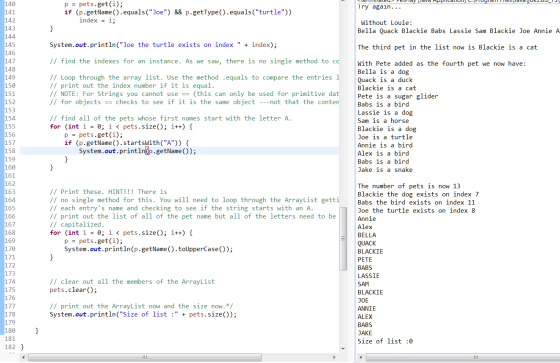
import java.util.ArrayList;

public class PetPlay

{

        // -----------------------------------------------------------------

        // Stores and modifies a list of pets

        // -----------------------------------------------------------------

        public static void main(String[] args)

        {

// always make your array lists generic

                ArrayList<Pet> pets = new ArrayList<>();

                pets.add(new Pet("dog", "Bella"));

                pets.add(new Pet("cat", "Blackie"));

                pets.add(new Pet("bird", "Babs"));

                pets.add(new Pet("dog", "Lassie"));

                pets.add(new Pet("horse", "Sam"));

                pets.add(new Pet("dog", "Blackie"));

                pets.add(new Pet("turtle", "Joe"));

                pets.add(new Pet("bird", "Annie"));

                pets.add(new Pet("bird", "Alex"));

                pets.add(new Pet("bird", "Babs")); // I know she is there twice - we need her later

                pets.add(new Pet("cat", "Louie"));

                pets.add(new Pet("snake", "Jake"));

// You could use the following to print out all of the pets

//System.out.println (pets);

// since Java will call the toString() on each individual item if you do not

// but these puts the entire collection in [ ] and we do not want that

// It is better to do it explicitly yourself!!

                System.out.println("The pets names are: ");

                for (int i = 0; i < pets.size(); i++)

                        System.out.print(pets.get(i).getName() + " ");

                System.out.println();

//Let's add Quack the Duck at the second location (remember to start
//counting at zero)

                pets.add(1, new Pet("duck", "Quack"));

                System.out.println("With Quack added:");

                for (int i = 0; i < pets.size(); i++)

                        System.out.print(pets.get(i).getName() + " ");

                System.out.println();

//Remove Louie the cat. You might try this
                Pet p = new Pet("cat", "Louis");

                int location = pets.indexOf(p);

                System.out.println("\nThe location of Louie is " + location);
                System.out.println("This did not work!! See notes in code");

                // It is looking for the object - not an object with the same values
                //for the fields. Since they are not the same object, it is not
                //found. Java returns a -1 for the location of unsuccessful searches.

                System.out.println("Try again...");

                for (int i = 0; i < pets.size(); i++) {
                        p = pets.get(i);
                        if (p.getName().equals("Louie") && p.getType().equals("cat"))
                                pets.remove(i);
                }

                System.out.println("\n Without Louie:");

                for (int i = 0; i < pets.size(); i++)
                        System.out.print(pets.get(i).getName() + " ");

                System.out.println();

                ///////NOW YOU FINISH THESE!!!! FIND METHODS FOR THESE!!

                //Find out the name of the third pet on the list (remember that we start counting at zero). Print it out
                System.out.println("\nThe third pet in the list now is " + pets.get(2));

                // Add in the sugar glider named Pete as the fourth
                //print out the pets names again
                pets.add(3, new Pet("sugar glider", "Pete"));

                System.out.println("\nWith Pete added as the fourth pet we now have:");
                for (int i = 0; i < pets.size(); i++)
                        System.out.println(pets.get(i));

                //print out how many pets there are now in the collection
                System.out.println("\nThe number of pets is now " + pets.size());

                // find out the index for the location of Blackie the dog (see notes on line 88)
                int index = -1;
                for (int i = 0; i < pets.size(); i++) {
                        p = pets.get(i);
                        if (p.getName().equals("Blackie") && p.getType().equals("dog"))
                                index = i;
                }

                System.out.println("Blackie the dog exists on index " + index);

                //find out the index for Babs the bird
                for (int i = 0; i < pets.size(); i++) {
                        p = pets.get(i);
                        if (p.getName().equals("Babs") && p.getType().equals("bird"))
                                index = i;
                }

                System.out.println("Babs the bird exists on index " + index);

                //find out the index for Joe the turtle
                for (int i = 0; i < pets.size(); i++) {
                        p = pets.get(i);
                        if (p.getName().equals("Joe") && p.getType().equals("turtle"))
                                index = i;
                }

                System.out.println("Joe the turtle exists on index " + index);

                // find the indexes for an instance. As we saw, there is no single method to compare the name and type.

                // Loop through the array list. Use the method .equals to compare the entries like I did on line 62
                // print out the index number if it is equal.
                // NOTE: For Strings you cannot use == (this can only be used for primitive data types)
                // for objects == checks to see if it is the same object ---not that the contents are the same

                // find all of the pets whose first names start with the letter A.
                for (int i = 0; i < pets.size(); i++) {
                        p = pets.get(i);
                        if (p.getName().startsWith("A")) {
                                System.out.println(p.getName());
                        }
                }


                // Print these. HINT!!! There is
                // no single method for this. You will need to loop through the ArrayList getting
                // each entry's name and checking to see if the string starts with an A.
                // print out the list of all of the pet name but all of the letters need to be
                // capitalized.
                for (int i = 0; i < pets.size(); i++) {
                        p = pets.get(i);
                        System.out.println(p.getName().toUpperCase());
                }


                // clear out all the members of the ArrayList
                pets.clear();

                // print out the ArrayList now and the size now.*/
                System.out.println("Size of list :" + pets.size());

        }

}
**************************************************

Thanks for your question. We try our best to help you with detailed answers, But in any case, if you need any modification or have a query/issue with respect to above answer, Please ask that in the comment section. We will surely try to address your query ASAP and resolve the issue.
Please consider providing a thumbs up to this question if it helps you. by Doing that, You will help other students, who are facing similar issue.
Add Answer to:
To do: Now add code to Pet and PetPlay to
complete the comments in the code....
What is wrong with this Code? Fix the code errors to run correctly without error. There...
What is wrong with this Code? Fix the code errors to run correctly without error. There are seven parts for one code, all are small code segments for one question. All the 'pets' need to 'speak', every sheet of code is connected. Four do need need any Debugging, three do have problems that need to be fixed. Does not need Debugging: public class Bird extends Pet { public Bird(String name) { super(name); } public void saySomething(){} } public class Cat...
This is the question about object-oriend programming(java) please show the detail comment and prefect code of...
This is the question about object-oriend programming(java) please show the detail comment and prefect code of each class, Thank you! This question contain 7 parts(questions) Question 1 Create a class a class Cat with the following UML diagram: (the "-" means private , "+" means public) +-----------------------------------+ | Cat | +-----------------------------------+ | - name: String | | - weight: double | +-----------------------------------+ | + Cat(String name, double weight) | | + getName(): String | | + getWeight(): double | |...
java programming how would i modify the code below to add a GUI (with a main menu with graphics and buttons, etc...) and include an option to print a list of all students added in a grid format and sh...
java programming how would i modify the code below to add a GUI (with a main menu with graphics and buttons, etc...) and include an option to print a list of all students added in a grid format and short by name, course, instructor, and location. ///main public static void main(String[] args) { Scanner in = new Scanner(System.in); ArrayList<Student>students = new ArrayList<>(); int choice; while(true) { displayMenu(); choice = in.nextInt(); switch(choice) { case 1: in.nextLine(); System.out.println("Enter Student Name"); String name...
LAB: Pet information (derived classes)
LAB: Pet information (derived classes)The base class Pet has private fields petName, and petAge. The derived class Dog extends the Pet class and includes a private field for dogBreed. Complete main() to:create a generic pet and print information using printInfo().create a Dog pet, use printInfo() to print information, and add a statement to print the dog's breed using the getBreed() method.Ex. If the input is:Dobby 2 Kreacher 3 German Schnauzerthe output is:Pet Information: Name: Dobby Age: 2 Pet Information: Name: Kreacher Age: 3 Breed: German SchnauzerPetInformation.javaimport java.util.Scanner; public class PetInformation { public static void main(String[] args) { Scanner scnr = new Scanner(System.in); Pet myPet = new Pet(); Dog myDog = new Dog(); String petName, dogName, dogBreed; int petAge, dogAge; petName = scnr.nextLine(); petAge = scnr.nextInt(); scnr.nextLine();...
Please make the following code modular. Therefore contained in a package with several classes and not...
Please make the following code modular. Therefore contained in a package with several classes and not just one. import java.util.*; public class Q { public static LinkedList<String> dogs = new LinkedList<String> (); public static LinkedList<String> cats = new LinkedList<String> (); public static LinkedList<String> animals = new LinkedList<String> (); public static void enqueueCats(){ System.out.println("Enter name"); Scanner sc=new Scanner(System.in); String name = sc.next(); cats.addLast(name); animals.addLast(name); } ...
Below are the Car class and Dealership class that I created In the previous lab import...
 Below are the Car class and Dealership class that I
created In the previous lab
import java.util.ArrayList;
class Car
{
private String make;
private String model;
private int year;
private double transmission;
private int seats;
private int maxSpeed;
private int wheels;
private String type;
public Car()
{
}
public Car(String make, String model, int year, double transmission, int seats, int maxSpeed, int wheels, String type) {
this.make = make;
this.model = model;
this.year = year;
this.transmission = transmission;
this.seats =...
Below are the Car class and Dealership class that I
created In the previous lab
import java.util.ArrayList;
class Car
{
private String make;
private String model;
private int year;
private double transmission;
private int seats;
private int maxSpeed;
private int wheels;
private String type;
public Car()
{
}
public Car(String make, String model, int year, double transmission, int seats, int maxSpeed, int wheels, String type) {
this.make = make;
this.model = model;
this.year = year;
this.transmission = transmission;
this.seats =...
This is the question: These are in Java format. Comments are required on these two Classes...
 This is the question:
These are in Java format.
Comments are required on these two Classes (Student.java
and StudentDemo.java) all over the coding:
Provide proper comments all over the
codings.
---------------------------------------------------------------------------------------------------------------
import java.io.*;
import java.util.*;
class Student {
private String name;
private double gradePointAverage;
public Student(String n , double a){
name = n;
gradePointAverage = a;
}
public String getName(){
return name;
}
public double getGradePointAverage(){
return gradePointAverage;
}
...
This is the question:
These are in Java format.
Comments are required on these two Classes (Student.java
and StudentDemo.java) all over the coding:
Provide proper comments all over the
codings.
---------------------------------------------------------------------------------------------------------------
import java.io.*;
import java.util.*;
class Student {
private String name;
private double gradePointAverage;
public Student(String n , double a){
name = n;
gradePointAverage = a;
}
public String getName(){
return name;
}
public double getGradePointAverage(){
return gradePointAverage;
}
...
please edit my java code perferably on jgrasp version 50.0 , wont complie correctly :( the...
please edit my java code perferably on jgrasp version 50.0 , wont complie correctly :( the program is supposed to read from my input file and do the following 1) print out the original data in the file without doing anything to it. 2) an ordered list of all students names (last names) alphabetically and the average GPA of all student togther . 3) freshman list in alphabeticalorder by last name with the average GPA of the freshmen...
Java:Netbeans-Use the LinkedList class to simulate a queue, and use the add method to simulate the...
Java:Netbeans-Use the LinkedList class to simulate a queue, and use the add method to simulate the enqueue, and the remove method to simulate the dequeue method for a Queue. Remember to use FIFO. Need help with 0. Add New Microchips pushMicroChip(), popMicroChip() and . To simulate this, you will create a menu option 0, which will generate 100 microchip long objects, and place them into a stack of microchips. Those microchip objects will be generated by using the System.nanotime() method. ...
Inheritance and Polymorphism (use Pet.java) You are given a class named Pet.java. Create two child classes...
Inheritance and Polymorphism (use Pet.java) You are given a class named Pet.java. Create two child classes named Cat.java and Dog.java. Cat.java should add attributes for color and breed. Dog.java should add attributes for breed and size (use String for small, medium, large). Add appropriate constructors, getter/setter methods and toString() methods. In a separate file named PetDriver.java, create a main. In the main, create an ArrayList of Pet. Add an instance of Cat and an instance of Dog to the ArrayList....
 Below are the Car class and Dealership class that I
created In the previous lab
import java.util.ArrayList;
class Car
{
private String make;
private String model;
private int year;
private double transmission;
private int seats;
private int maxSpeed;
private int wheels;
private String type;
public Car()
{
}
public Car(String make, String model, int year, double transmission, int seats, int maxSpeed, int wheels, String type) {
this.make = make;
this.model = model;
this.year = year;
this.transmission = transmission;
this.seats =...
Below are the Car class and Dealership class that I
created In the previous lab
import java.util.ArrayList;
class Car
{
private String make;
private String model;
private int year;
private double transmission;
private int seats;
private int maxSpeed;
private int wheels;
private String type;
public Car()
{
}
public Car(String make, String model, int year, double transmission, int seats, int maxSpeed, int wheels, String type) {
this.make = make;
this.model = model;
this.year = year;
this.transmission = transmission;
this.seats =...
 This is the question:
These are in Java format.
Comments are required on these two Classes (Student.java
and StudentDemo.java) all over the coding:
Provide proper comments all over the
codings.
---------------------------------------------------------------------------------------------------------------
import java.io.*;
import java.util.*;
class Student {
private String name;
private double gradePointAverage;
public Student(String n , double a){
name = n;
gradePointAverage = a;
}
public String getName(){
return name;
}
public double getGradePointAverage(){
return gradePointAverage;
}
...
This is the question:
These are in Java format.
Comments are required on these two Classes (Student.java
and StudentDemo.java) all over the coding:
Provide proper comments all over the
codings.
---------------------------------------------------------------------------------------------------------------
import java.io.*;
import java.util.*;
class Student {
private String name;
private double gradePointAverage;
public Student(String n , double a){
name = n;
gradePointAverage = a;
}
public String getName(){
return name;
}
public double getGradePointAverage(){
return gradePointAverage;
}
...
Most questions answered within 3 hours.
-
Where is the error in this code sequence?
String s1 = "Hello";
String s2 = "ello";...
asked 10 months ago -
Financial data for Joel de Paris, Inc., for last year
follow:
Joel de Paris, Inc.
Balance...
asked 10 months ago -
Consider this reaction:
Al2(SO4)3 (aq)+ BaCl3
(aq) Al2Cl6 (aq)- +
3BaSO4(s) . What is the...
asked 10 months ago -
Suppose that Savneet is considering increasing her
recent random sample from 20 car rentals to 40...
asked 10 months ago -
Trucks arrive at an unloading terminal at an average rate of 120
per hour.
Trucks arrive...
asked 10 months ago -
Why are methanol and ethanol completely soluble in water while
octanol is not very little soluble....
asked 10 months ago -
A facilities manager at a university reads in a research report
that the mean amount of...
asked 10 months ago -
When the CuSO4 is rehydrated by adding water to the anhydrous
compound, is this an endothermic...
asked 10 months ago -
A ray of sunlight is passing from diamond into crown glass; the
angle of incidence is...
asked 10 months ago -
A block of mass 0.249 kg is placed on top of a light, vertical
spring of...
asked 10 months ago -
how do the kidneys compensate in the presences of acidosis
a) trigger hyperventilate
b) reserve acid...
asked 10 months ago -
Question 501 pts
The rental rate of capital to the firm increases. Which of the
following...
asked 10 months ago