Given the list below, create an array of names & sort alphabetically using javascript getElementsByClassName method:...
Given the list below, create an array of names & sort alphabetically using javascript getElementsByClassName method:
<ul>
<li>Edward</li>
<li>Joseph</li>
<li>Alford</li>
<li>Ronaldo</li>
<li>Belinda</li>
</ul>
Homework Answers
<!DOCTYPE html>
<html>
<head>
<script>
function myFunction() {
var list, arrayNames, i, swap, shouldSwap ;
list = document.getElementsByClassName("names")[0];
arrayNames = list.getElementsByClassName("child");
swap = true;
while (swap) {
swap = false;
for (i = 0; i < (arrayNames.length - 1); i++) {
shouldSwap = false;
if (arrayNames[i].innerHTML.toLowerCase() >
arrayNames[i + 1].innerHTML.toLowerCase()) {
shouldSwap = true;
break;
}
}
if (shouldSwap) {
arrayNames[i].parentNode.insertBefore(arrayNames[i + 1],
arrayNames[i]);
swap = true;
}
}
document.getElementById("header").innerHTML = "Sorted List";
}
</script>
<body>
<p> Sort the names given in the list alphabetically using javascript getElementsByClassName method.</p>
<p id="header">List : </p>
<ul class="names">
<li class="child">Edward</li>
<li class="child">Joseph</li>
<li class="child">Alford</li>
<li class="child">Ronaldo</li>
<li class="child">Belinda</li>
</ul>
<button onclick="myFunction();">Sort Alphabetically</button>
</body>
</html>
Output:
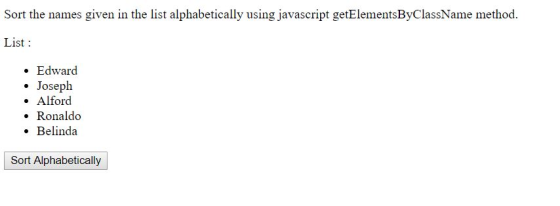
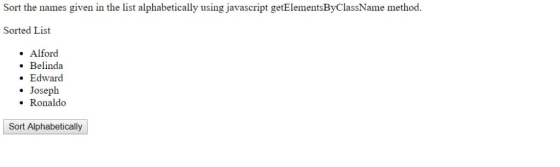
Add Answer to:
Given the list below, create an array of names &
sort alphabetically using javascript getElementsByClassName
method:...
Javascript question: Create an array with 4 elements in it. Make that array appear on the...
Javascript question: Create an array with 4 elements in it. Make that array appear on the screen in the form of a list by using innerHTML. Add a form that will allow users to add a new item to the array. After the user submits their item, it should appear on the page with the other array items.
Your task is to sort an array list of path names such as /home/me/cs1 /usr/share /var/log...
 Your task is to sort an array list of path names such as /home/me/cs1 /usr/share /var/log /usr/local/jdk1.6.0/jre/lib Sort by the path length, i.e. the number of slashes in the path name. Path names of the same length should be arranged in lexicographic order (i.e. by calling String.compareTo.) For example, the path names given above will be sorted as /usr/share /var/log /home/me/cs1 /usr/local/jdk1.6.0/jre/lib Complete the following file: PathSorter.java 1 2 import java.util.Arrays; import java.util.Comparator; public class PathSorter public String[] sort(String[] paths)...
Using Java Create an application that creates and displays a list of names using an array....
Using Java Create an application that creates and displays a list of names using an array. Then modify the application to create and use a list of numbers. Console for the names application Please enter a name or type “exit” to quit: Diane Please enter a name or type “exit” to quit: Joe Please enter a name or type “exit” to quit: Greta Please enter a name or type “exit” to quit: Henry Please enter a name or type “exit”...
How to do this code? HW13.11. Create an HTML list from a Python list The function...
 How to do this code?
HW13.11. Create an HTML list from a Python list The function below takes one parameter: a list, that contains only strings. Complete the function to create a unordered HTML list, as a string, and returns it. An empty list should return an empty HTML list with no list items. Do not add any extraneous whitespace to the HTML. For example, if given the list ["one", "two"], the function should return "<ul><li>one</li><li>two</li> </ul>". student.py IT TI...
How to do this code?
HW13.11. Create an HTML list from a Python list The function below takes one parameter: a list, that contains only strings. Complete the function to create a unordered HTML list, as a string, and returns it. An empty list should return an empty HTML list with no list items. Do not add any extraneous whitespace to the HTML. For example, if given the list ["one", "two"], the function should return "<ul><li>one</li><li>two</li> </ul>". student.py IT TI...
SortAndSearch.cpp – Objectives: Binary Search and Selection sort You are given a list of 20 names...
SortAndSearch.cpp – Objectives: Binary Search and Selection sort You are given a list of 20 names as follows: {"Collins, Bill", "Smith, Bart", "Michalski, Joe", "Griffin, Jim", "Sanchez, Manny", "Rubin, Sarah", "Taylor, Tyrone", "Johnson, Jill", "Allison, Jeff", "Moreno, Juan", "Wolfe, Bill", "Whitman, Jean", "Moretti, Bella", "Wu, Hong", "Patel, Renee", "Harrison, Rose", "Smith, Cathy", "Conroy, Pat", "Kelly, Sean", "Holland, Beth"}; Write a program to sort and display the names in alphabet order (use selection sort). The program prompts...
Create a new class called DemoSortingPerformacne Create a private method called getRandomNumberArray. It returns an array...
Create a new class called DemoSortingPerformacne Create a private method called getRandomNumberArray. It returns an array of Integer and has 2 parameters: arraySize of type int and numberOfDigits of type int. This method should create an array of the specified size that is filled with random numbers. Each random numbers should have the same number of digits as specified in the second parameter In your main method (or additional private methods) do the following: Execute selection sort on quick sort...
Qi. Create a java project Question that includes: • A bubble sort method to sort your...
 Qi. Create a java project Question that includes: • A bubble sort method to sort your arrays. Implement the below recursive binary search. • A java main class where you: o Create an array of characters that contains the letters of your first name followed by your last name, without spaces. o Call the sorting method to sort the array o Call binary search method to find the position of the first letter 'a' in your array. // Recursive Binary...
In this assignment, you sort a list of strings using mergesort and the compareToIgnoreCase method of...
In this assignment, you sort a list of strings using mergesort and the compareToIgnoreCase method of the String class. The strings are provided as arguments to your main method. In case you haven't yet learned to configure command-line arguments to main in your IDE, now is a good time to learn. Your program should sort the array of strings using mergesort, then print the strings one per line, in order from smallest ("a") to largest ("z"). The name of your...
use python Write a function that will sort a given list using merge sort. You must...
 use python Write a function that will sort a given list using merge sort. You must use the merge sort algorithm (but may be recursive or iterative). The function will take a list as an input and return a sorted version of the list (you may assume it will be a list of integers). The method signature must be merge_sort(lst).
PYTHON: Do not use the list sort method or sorted function. Given a list of numbers...
PYTHON: Do not use the list sort method or sorted function. Given a list of numbers in random order, write an algorithm that works in O(n2) to sort the list. Do not use the list sort method or sorted function. Please DO NOT USE list_sort method. the last answer did not work.
 Your task is to sort an array list of path names such as /home/me/cs1 /usr/share /var/log /usr/local/jdk1.6.0/jre/lib Sort by the path length, i.e. the number of slashes in the path name. Path names of the same length should be arranged in lexicographic order (i.e. by calling String.compareTo.) For example, the path names given above will be sorted as /usr/share /var/log /home/me/cs1 /usr/local/jdk1.6.0/jre/lib Complete the following file: PathSorter.java 1 2 import java.util.Arrays; import java.util.Comparator; public class PathSorter public String[] sort(String[] paths)...
 How to do this code?
HW13.11. Create an HTML list from a Python list The function below takes one parameter: a list, that contains only strings. Complete the function to create a unordered HTML list, as a string, and returns it. An empty list should return an empty HTML list with no list items. Do not add any extraneous whitespace to the HTML. For example, if given the list ["one", "two"], the function should return "<ul><li>one</li><li>two</li> </ul>". student.py IT TI...
How to do this code?
HW13.11. Create an HTML list from a Python list The function below takes one parameter: a list, that contains only strings. Complete the function to create a unordered HTML list, as a string, and returns it. An empty list should return an empty HTML list with no list items. Do not add any extraneous whitespace to the HTML. For example, if given the list ["one", "two"], the function should return "<ul><li>one</li><li>two</li> </ul>". student.py IT TI...
 Qi. Create a java project Question that includes: • A bubble sort method to sort your arrays. Implement the below recursive binary search. • A java main class where you: o Create an array of characters that contains the letters of your first name followed by your last name, without spaces. o Call the sorting method to sort the array o Call binary search method to find the position of the first letter 'a' in your array. // Recursive Binary...
 use python Write a function that will sort a given list using merge sort. You must use the merge sort algorithm (but may be recursive or iterative). The function will take a list as an input and return a sorted version of the list (you may assume it will be a list of integers). The method signature must be merge_sort(lst).
Most questions answered within 3 hours.
-
Where is the error in this code sequence?
String s1 = "Hello";
String s2 = "ello";...
asked 10 months ago -
Financial data for Joel de Paris, Inc., for last year
follow:
Joel de Paris, Inc.
Balance...
asked 10 months ago -
Consider this reaction:
Al2(SO4)3 (aq)+ BaCl3
(aq) Al2Cl6 (aq)- +
3BaSO4(s) . What is the...
asked 10 months ago -
Suppose that Savneet is considering increasing her
recent random sample from 20 car rentals to 40...
asked 10 months ago -
Trucks arrive at an unloading terminal at an average rate of 120
per hour.
Trucks arrive...
asked 10 months ago -
Why are methanol and ethanol completely soluble in water while
octanol is not very little soluble....
asked 10 months ago -
A facilities manager at a university reads in a research report
that the mean amount of...
asked 10 months ago -
When the CuSO4 is rehydrated by adding water to the anhydrous
compound, is this an endothermic...
asked 10 months ago -
A ray of sunlight is passing from diamond into crown glass; the
angle of incidence is...
asked 10 months ago -
A block of mass 0.249 kg is placed on top of a light, vertical
spring of...
asked 10 months ago -
how do the kidneys compensate in the presences of acidosis
a) trigger hyperventilate
b) reserve acid...
asked 10 months ago -
Question 501 pts
The rental rate of capital to the firm increases. Which of the
following...
asked 10 months ago