Spanish Vocabulary Helper For this assignment, we are going to work with adding and removing data...
Spanish Vocabulary Helper
- For this assignment, we are
going to work with adding and removing data from arrays, linear
search, and File I/O.
- In addition, you will learn to work with parallel arrays
- This program will assist an English-speaking user to build their vocabulary in Spanish
- This program will read a file containing a list of words in English and another containing the translation of those words in Spanish.
- The words and corresponding
translations should to be stored in two separate but parallel
arrays.
- In other words, the indices of the English words array will match the indices of the Spanish words array.
- Thus the word in English at index 0 in the first array, will match the translation at index 0, in the second array, and so on.
- You may assume that the user
will not store more than 1000 words and translations.
- Therefore, your arrays should be declared of length 1000.
- Create two new text files inside of your project folder in Eclipse:
- Name these text files english.txt and spanish.txt
- Copy and paste the following alphabetized list of English words into the english.txt file:
bear
black
blue
cat
cow
dog
fall
gray
green
purple
red
spring
summer
to be
to be able
to go
to love
winter
white
yellow
- Copy and paste the following list of Spanish translations of the above words into the spanish.txt file:
oso
negro
azul
gato
vaca
perro
otono
gris
verde
morado
rojo
primavera
verano
ser
poder
ir
amar
invierno
blanco
amarillo
- Read in the words from each file into two separate arrays, one array called arrayEnglish and one array called arraySpanish.
- Hint: you can use a variable to count how many values are in each file as you are reading in the data, and use this information to save the number of values currently stored in each array?
- Next, you will need to write a
menu-driven program to allow the user to complete 3 tasks:
- Add a new word and its translation (choice 1)
- Remove a word and its translation (choice 2)
- Display the Spanish translation of an English word (choice 3)
- Quit (choice 4)
- For the add menu
option, the program should do the following:
- Prompt the user for a word in English and its transation in Spanish, and a position in the arrays at which to insert these new words.
- Call the insert method twice to insert each word in the correct array
- Hint: don't forget to update the count of words
- For the remove menu
option, the program should do the following:
- Prompt the user for the a word to remove in English.
- Search for the position of this word inside arrayEnglish
- If the word is not in the array, it should provide an error message to the user (see sample output below)
- Otherwise, remove the word and its translation in Spanish
- Hint: don't forget to update the count
- For the search for a
translation menu option, the program should do the
following:
- Prompt the user for the a word to search in English.
- Search for the position of this word inside arrayEnglish
- If the word is not in the array, it should provide an error message to the user (see sample output below)
- Otherwise, display the word and its corresponding translation in Spanish
- For the exit menu
option, the program should do the following:
- Prompt the user to enter the name of a file in which to print the words
- End the program
- Note that you should also provide an error message if the user types an incorrect menu option (see sample output below) or if the array is full and no new values can be added (hint: you can make a check in your menu option 1 for this case)
- To begin, copy and paste the starter code into a file called Translator.java
- Make sure that you implement and call all of the methods whose signatures are specified below
- Note that you made add any additional methods that you like to complete the program
- When your program is working *identically* (including spacing and wording!) to the sample output, please upload Translations.java to Canvas.
Starter Code
/**
* @author
* @author
* CIS 36B
*/
import java.util.Scanner;
import java.io.File;
import java.io.IOException;
import java.io.PrintWriter;
public class Translator {
public static void main(String[] args) throws
IOException {
System.out.println("Welcome to the Spanish Vocabulary
Builder!");
String choice = "",
word1 = "", word2 = "";
int pos = -1;
}
}
/**
* Inserts a String element into an array
at a specified index
* @param array the list of String
values
* @param numElements the current number of
elements stored
* @indexToInsert the location in the array
to insert the new element
* @param newValue the new String value to
insert in the array
*/
public static void insert(String array[], int
numElements,
int indexToInsert, String newValue) {
}
/**
* Removes a String element from an array
at a specified index
* @param array the list of String
values
* @param numElements the current number of
elements stored
* @param indexToRemove where in the array
to remove the element
*/
public static void remove(String array[], int
numElements, int indexToRemove) {
}
/**
* Prints an arrays of Strings to the
console
* in the format #. word
* @param words the list of words in
English
* @param numElements the current number of
elements stored
*/
public static void printArrayConsole(String[]
words, int numElements) {
}
/**
* Prints two arrays of Strings to a
file
* in the format #. english word: spanish
word
* @param english the list of words in
English
* @param spanish the list of corresponding
translations in Spanish
* @param numElements the current number of
elements stored
* @param file the file name
*/
public static void printArraysFile(String[]
english, String[] spanish,
int numElements, String fileName) throws IOException {
}
/**
* Searches for a specified String in a
list
* @param array the array of Strings
* @param value the String to search for
* @param numElements the number of elements in
the list
* @return the index where value is located in
the array
*/
public static int linearSearch(String array[], String
value, int numElements) {
return -1;
}
}
Sample Output
Welcome to the Spanish Vocabulary Builder!
Below are the words in English:
0. bear
1. black
2. blue
3. cat
4. cow
5. dog
6. fall
7. gray
8. green
9. purple
10. red
11. spring
12. summer
13. to be
14. to be able
15. to go
16. to love
17. winter
18. white
19. yellow
Please select a menu option below (1-4):
1. Add a new word
2. Remove a word
3. View a word's translation
4. Quit
Enter your choice: 10
That menu option is invalid. Please try again.
Contents of corresponding output file:
0. bear: oso
1. black: negro
2. blue: azul
3. book: libro
4. cat: gato
5. cow: vaca
6. dog: perro
7. fall: otono
8. funny: chistoso
9. gray: gris
10. green: verde
11. purple: morado
12. red: rojo
13. spring: primavera
14. summer: verano
15. to be: ser
16. to go: ir
17. to love: amar
18. winter: invierno
19. white: blanco
20. yellow: amarillo
- Note that the user should be able to enter any file name of their choice. It does not have to be translations.txt.
What to Submit:
- Submit your completed Translator.java file (make sure both your names are on the file) to Canvas.
- If working with a partner: One
partner submits Translator.java. Both partners submit the pair
programming contract.
- 2.5 point deduction for missing contract
- Please use the default package or remove any package statements from the top of your files before submission (5 point deduction)
- Please do not submit your work as a zip file (5 point deduction)
Homework Answers
Hi, The class you gave has compile errors hence i could not use that. Please find full functionality below.
import java.io.File;
import java.io.IOException;
import java.io.PrintWriter;
import java.nio.file.Files;
import java.nio.file.Paths;
import java.util.Arrays;
import java.util.List;
import java.util.Scanner;

class Scratch {
    public static void main(String[] args) throws IOException {
        File englishFile = new File("pathtoenglishfile");
        File frenchFile = new File("pathtospanishfile");
        String arrayEnglish[] = new String[1000];
        String arraySpanish[] = new String[1000];
        List<String> strings = Files.readAllLines(englishFile.toPath());
        int lenEnglishArr, lenSpanishArr;
        for (lenEnglishArr = 0; lenEnglishArr < strings.size(); lenEnglishArr++) {
            arrayEnglish[lenEnglishArr] = strings.get(lenEnglishArr);
        }
        strings = Files.readAllLines(frenchFile.toPath());
        for (lenSpanishArr = 0; lenSpanishArr < strings.size(); lenSpanishArr++) {
            arraySpanish[lenSpanishArr] = strings.get(lenSpanishArr);
        }
        boolean loop = true;
        Scanner sc = new Scanner(System.in);
        do {
            System.out.println("Add a new word and its translation (choice 1)\n" +
                    "Remove a word and its translation (choice 2)\n" +
                    "Display the Spanish translation of an English word (choice 3)\n" +
                    "Quit (choice 4)");
            int choice = sc.nextInt();
            if (choice == 1) {
                System.out.println("Enter the english word");
                String english, french;
                english = sc.next();
                System.out.println("Enter french word translation");
                french = sc.next();
                arrayEnglish[lenEnglishArr++] = english;
                arraySpanish[lenSpanishArr++] = french;
            } else if (choice == 2) {
                for (int j = 0; j < lenEnglishArr; j++) {
                    System.out.println(arrayEnglish[lenEnglishArr] + " - " + arraySpanish + " - " + (lenEnglishArr + 1) + " to remove this translation");
                }
                int indexCh = sc.nextInt();
                for (int j = indexCh - 1; j < 999; j++) {
                    arrayEnglish[j] = arrayEnglish[j + 1];//moving words up
                    arraySpanish[j] = arraySpanish[j + 1];
                }
                lenSpanishArr--;
                lenEnglishArr--;
                arrayEnglish[indexCh - 1] = "";
                arraySpanish[indexCh - 1] = "";
            } else if (choice == 3) {
                System.out.println("Enter the english word");
                String word = sc.next();boolean found=false;
                for (int i = 0; i < lenEnglishArr; i++) {
                    if (arrayEnglish[i].equals(word)) {
                        System.out.println("Translation is " + arraySpanish[i]);
                        found=true;
                        break;
                    }
                }
                if(!found){
                    System.out.println("Not found");
                }
            } else if (choice == 4) {
                System.out.println("Print the name of the file to export words,wo extension");
                String str = sc.next();
//                File file = Paths.get("").toFile();
                System.out.println();
                PrintWriter pw = new PrintWriter(new File(System.getProperty("user.dir")+"/"+str+".txt"));
                String s="";
                for (int i = 0; i < lenEnglishArr; i++) {
                    s+=arrayEnglish[i]+"\n";
                }
                s+="\n\n";
                for (int i = 0; i < lenSpanishArr; i++) {
                    s += arraySpanish[i] + "\n";
                }
                pw.write(s);
                pw.flush();
                pw.close();
                break;
            }else{
                System.out.println("Choice incorrect try again:");
            }
        }while(loop);
    }
}
Sample out:
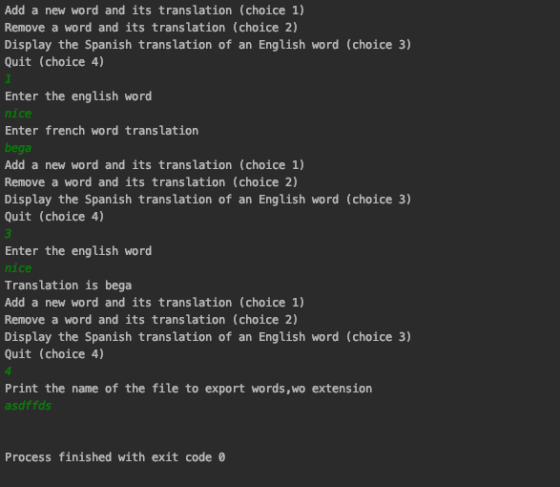
Sample out: New word is also added, simple not shown. Everything is working great.
Add a new word and its translation (choice 1), Remove a word and its translation (choice 2) Display the Spanish translation of an English word (choice 3) Quit (choice 4) Enter the english word nice Enter french word translation bega Add a new word and its translation (choice 1), Remove a word and its translation (choice 2), Display the Spanish translation of an English word (choice 3), Quit (choice 4) Enter the english word nice Translation is bega Add a new word and its translation (choice 1), Remove a word and its translation (choice 2), Display the Spanish translation of an English word (choice 3), Quit (choice 4) Print the name of the file to export words, wo extension asdffds Process finished with exit code 0
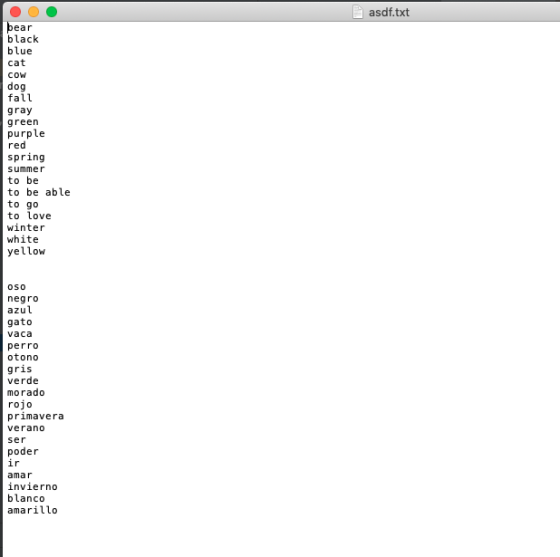
asdf.txt bear black blue cat COW dog fall gray green purple red spring summer to be to be able to go to love winter white yellow oso negro azul gato vaca perro otono gris verde morado rojo primavera verano ser poder amar invierno blanco amarillo
Add Answer to:
Spanish Vocabulary Helper
For this assignment, we are
going to work with adding and removing data...
Modification of original code so it can include 1) at least one array 2)*New English words...
Modification of original code so it can include 1) at least one array 2)*New English words that are written/saved to the .txt file(s) must be in alphabetical order* (e.g, Apple cannot be in a lower line than Orange). This is what I'm really struggling with as I don't know how to organize alphabetically only the english word translation without the spanish equivalent word also getting organized. The only idea I have right now is to recreate the code using two...
/* * Purpose: Test an implementation of an array-based list ADT. * To demonstrate the use...
/* * Purpose: Test an implementation of an array-based list ADT. * To demonstrate the use of "ListArrayBased" the project driver * class will populate the list, then invoke various operations * of "ListArrayBased". */ import java.util.Scanner; public class ListDriver { /* * main * * An array based list is populated with data that is stored * in a string array. User input is retrieved from that std in. * A text based...
Assignment #2: List - Array Implementation Review pages 6-7 in "From Java to C++" notes. Due...
Assignment #2: List - Array Implementation Review pages 6-7 in "From Java to C++" notes. Due Friday, February 9th, 2017 @ 11:59PM EST Directions Create a List object. Using the following definition (List.h file is also in the repository for your convenience) for a list, implement the member functions (methods) for the List class and store the implementation in a file called List.cpp. Use an array to implement the list. Write the client code (the main method and other non-class...
Trying to practice this assignment Argument list: the *yahoonews.txt Data file: yahoonews.txt Wr...
Trying to practice this assignment Argument list: the *yahoonews.txt Data file: yahoonews.txt Write a program named WordCount.java, in this program, implement two static methods as specified below: public static int countWord(Sting word, String str) this method counts the number of occurrence of the word in the String (str) public static int countWord(String word, File file) This method counts the number of occurrence of the word in the file. Ignore case in the word. Possible punctuation and symbals in the file...
In this lab, you will create a program to help travelers book flights and hotel stays that will b...
 In this lab, you will create a program to help travelers book flights and hotel stays that will behave like an online booking website. The description of the flights and hotel stays will be stored in two separate String arrays. In addition, two separate arrays of type double will be used to store the prices corresponding to each description. You will create the arrays and populate them with data at the beginning of your program. This is how the arrays...
I’m giving you code for a Class called GenericArray, which is an array that takes a...
I’m giving you code for a Class called GenericArray, which is an array that takes a generic object type. As usual this is a C# program, make a new console application, and for now you can stick all of this in one big file. And a program that will do some basic stuff with it Generic Array List What I want you to do today: Create methods for the GenericArray, Easy(ish): public void Append (T, value) { // this should...
For this lab you will write a Java program that plays a simple Guess The Word...
For this lab you will write a Java program that plays a simple Guess The Word game. The program will prompt the user to enter the name of a file containing a list of words. These words mustbe stored in an ArrayList, and the program will not know how many words are in the file before it starts putting them in the list. When all of the words have been read from the file, the program randomly chooses one word...
Need help coding this List. Lists are a lot like arrays, but you’ll be using get,...
Need help coding this List. Lists are a lot like arrays, but you’ll be using get, set, add, size and the like instead of the array index operators []. package list.exercises; import java.util.List; public class ListExercises { /** * Counts the number of characters in total across all strings in the supplied list; * in other words, the sum of the lengths of the all the strings. * @param l a non-null list of strings ...
The following code skeleton contains a number of uncompleted methods. With a partner, work to complete...
The following code skeleton contains a number of uncompleted methods. With a partner, work to complete the method implementations so that the main method runs correctly: /** * DESCRIPTION OF PROGRAM HERE * @author YOUR NAME HERE * @author PARTNER NAME HERE * @version DATE HERE * */ import java.util.Arrays; import java.util.Random; import java.util.Scanner; public class ArrayExercises { /** * Given a random number generator and a length, create a new array of that * length and fill it from...
Goal: design and implement a dictionary. implement your dictionary using AVL tree . Problem: Each entry...
Goal: design and implement a dictionary. implement your dictionary using AVL tree . Problem: Each entry in the dictionary is a pair: (word, meaning). Word is a one-word string, meaning can be a string of one or more words (it’s your choice of implementation, you can restrict the meaning to one-word strings). The dictionary is case-insensitive. It means “Book”, “BOOK”, “book” are all the same . Your dictionary application must provide its operations through the following menu (make sure that...
 In this lab, you will create a program to help travelers book flights and hotel stays that will behave like an online booking website. The description of the flights and hotel stays will be stored in two separate String arrays. In addition, two separate arrays of type double will be used to store the prices corresponding to each description. You will create the arrays and populate them with data at the beginning of your program. This is how the arrays...
Most questions answered within 3 hours.
-
Where is the error in this code sequence?
String s1 = "Hello";
String s2 = "ello";...
asked 10 months ago -
Financial data for Joel de Paris, Inc., for last year
follow:
Joel de Paris, Inc.
Balance...
asked 10 months ago -
Consider this reaction:
Al2(SO4)3 (aq)+ BaCl3
(aq) Al2Cl6 (aq)- +
3BaSO4(s) . What is the...
asked 10 months ago -
Suppose that Savneet is considering increasing her
recent random sample from 20 car rentals to 40...
asked 10 months ago -
Trucks arrive at an unloading terminal at an average rate of 120
per hour.
Trucks arrive...
asked 10 months ago -
Why are methanol and ethanol completely soluble in water while
octanol is not very little soluble....
asked 10 months ago -
A facilities manager at a university reads in a research report
that the mean amount of...
asked 10 months ago -
When the CuSO4 is rehydrated by adding water to the anhydrous
compound, is this an endothermic...
asked 10 months ago -
A ray of sunlight is passing from diamond into crown glass; the
angle of incidence is...
asked 10 months ago -
A block of mass 0.249 kg is placed on top of a light, vertical
spring of...
asked 10 months ago -
how do the kidneys compensate in the presences of acidosis
a) trigger hyperventilate
b) reserve acid...
asked 10 months ago -
Question 501 pts
The rental rate of capital to the firm increases. Which of the
following...
asked 10 months ago