Lab: User login system (python) Create a user login system. Your code should do the following:...
Lab: User login system (python)
Create a user login system. Your code should do the following:
1.Load your user database from “UD.txt” (USE THE EXACT FILE NAME, file is given in the folder)
2.Display “Login or create a new user? Select L to login, select C to create new user.”
3. If wrong selection is entered, take the user back to step 2.
4. If the user entered “L”, display “Please enter your user name and hit enter”
5. Check to see if the user is in UD.txt, if not, display “User not found” take the user back to 2
6. If the username is in UD.txt, then prompt user to enter password by displaying: “Enter password”
7. check to see if the user has the correct password, if yes, display “you are logged in”, else, display “wrong password” and take the user back to 2.
8. If the user entered C at step 2, prompt the user to create a new username by displaying “Please enter your first name, last name, and student ID, separated by a space”. The user name should be the First letter of the first name, the first two letters of the last name, and the first three numbers of the student ID. For example: if the user entered “Tom Waits 567890”, the user ID should be “twa567”.
9. Once username is generated, then prompted the user for password by displaying “Please enter password”
10. Prompt the user to reenter password “Please reenter password:”
11: Check to see if the two passwords are the same, if not, display: “Password did not match”, and go to step 10.
12. If two passwords match, save the new generated username and password into “UD.txt”, and display “User created.”
13 Take the user back to 2, and make sure the new username and password works.
Some sample codes:
sample_list=[]#create a sample list
for line in exampleline: # get each line from the file
if line[0:4] == 'USER': #ignore the the header line
continue # skip header line
line_list = line.split(',') #split the lines
Execution Example:
Login or create a new user? Select L to login, select C to create new user.
H #(user input, go back to setp 2)
Login or create a new user? Select L to login, select C to create new user.
L (user input)
Please enter your user name and hit enter
Zzz (user input)
User not found
Login or create a new user? Select L to login, select C to create new user.
L (user input)
Please enter your user name and hit enter
dcf987 (user input)
Enter password
Test22 (user input)
wrong password
Login or create a new user? Select L to login, select C to create new user.
L (user input)
Please enter your user name and hit enter
dcf987 (user input)
Enter password
BHYW4fw (user input)
you are logged in
Login or create a new user? Select L to login, select C to create new user.
C (user input)
Please enter your first name, last name, and student ID, separated by a space
Tom Waits 567890 (user input)
Please enter password
123456 (user input)
Please reenter password:
456789 (user input)
Please enter password
123456 (user input)
Please reenter password:
123456 (user input)
User created
UD.txt file
USERNAME,PASSWORD
sdd233,Pad231
dcf987, BHYW4fw
dgr803,Sb83d2d
mkr212,UNNHS322
lki065,dgw6234
ped332,9891ds
ytr876,dsid21kk
nmh223,3282jd3d2
Homework Answers
Code
exampleline = open("UD.txt", "r")
userName_list=[]#create a sample list
password_list=[]
for line in exampleline: # get each line from the file
if line[0:4] == 'USER': #ignore the the header lin e
continue # skip header line
line_list = line.split(',') #split the lines
userName_list.append(line_list[0])
password_list.append(line_list[1].rstrip())
while True:
print("Login or create a new user? Select L to login, select C to
create new user.")
choice=input()
if(choice=="L"):
print("Please enter your user name and hit enter")
username=input()
if(username in userName_list):
userNameindex=userName_list.index(username)
print("Enter password")
password=input()
if(password_list[userNameindex]==password):
print("you are logged in")
else:
print('Wrong password')
else:
print("User not found")
elif(choice=="C"):
print("Please enter your first name, last name, and student ID,
separated by a space")
firstName, lastName, id = input("").split()
username=firstName[0].lower()+lastName[:2].lower()+id[:3]
while True:
print("Please enter password")
password=input()
print("Please reenter password:")
rePassword=input()
if(password==rePassword):
break
userName_list.append(username)
password_list.append(password)
print('User Created')
output
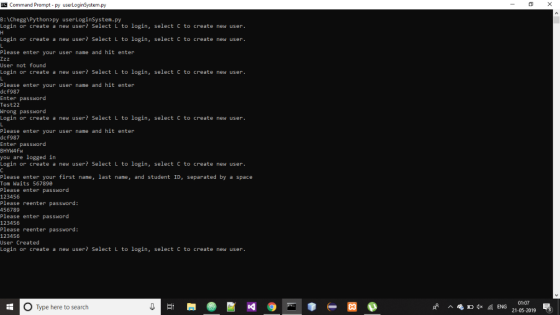
code snaps
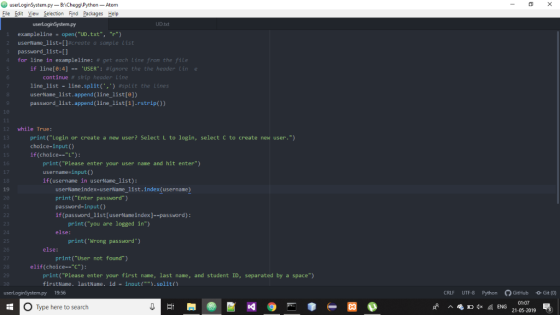
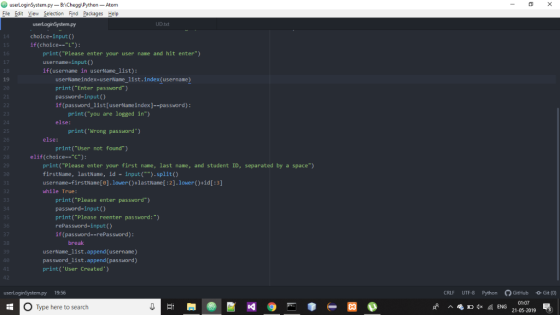
If you have any query regarding the code please ask me in the comment i am here for help you. Please do not direct thumbs down just ask if you have any query. And if you like my work then please appreciates with up vote. Thank You.
Add Answer to:
Lab: User login system (python)
Create a user login system. Your code should do the
following:...
Using Python INST-FS-IAD-PROD.INS LAB1 Lab: Create User Account 2. get-password() #promt the user and create password, check the password fits the requirement USE the EXACT file names! Create a user...
 Using Python
INST-FS-IAD-PROD.INS LAB1 Lab: Create User Account 2. get-password() #promt the user and create password, check the password fits the requirement USE the EXACT file names! Create a user login system. Your code should do the following: 3, create-user_name() #use this function to create the user name 1.Create your user database called "UD.txt", this should be in CSV format 4, write-file() #user this function to save the user name and password into "UD.txt" Deliverables: Sample: the data you saved...
Using Python
INST-FS-IAD-PROD.INS LAB1 Lab: Create User Account 2. get-password() #promt the user and create password, check the password fits the requirement USE the EXACT file names! Create a user login system. Your code should do the following: 3, create-user_name() #use this function to create the user name 1.Create your user database called "UD.txt", this should be in CSV format 4, write-file() #user this function to save the user name and password into "UD.txt" Deliverables: Sample: the data you saved...
in python 5.23 Login Create a program that prompts the user for a username and password....
 in python
5.23 Login Create a program that prompts the user for a username and password. The correct username should be python and the correct password should be csci 135. See below for example output. (Different messages depending on if user name or password are correct.) Only allow the user to make 3 attempts. Welcome to my secret program! Please enter your username: Trish Please enter your password: Duce Invalid username and password Please enter your username: Trish Please enter...
in python
5.23 Login Create a program that prompts the user for a username and password. The correct username should be python and the correct password should be csci 135. See below for example output. (Different messages depending on if user name or password are correct.) Only allow the user to make 3 attempts. Welcome to my secret program! Please enter your username: Trish Please enter your password: Duce Invalid username and password Please enter your username: Trish Please enter...
1. Create a program to verify a user name and password given by a user 2....
 1. Create a program to verify a user name and password given by a user 2. Create a text file named "correctData.txt" (You will NOT upload this file during submission). Place a username on line 1 in the txt file and a password on line 2 in the file. This will be used for testing. 3. Create the following functions and call them starting from main: • void login () - This function is responsible for displaying the prompts asking...
ATM MACHINE
Kindly help me In this assignment you will create a RMI based system that allows a user to do the following: 1) Create a bank account by supplying a user id and password. 2) Login using their id and password. 3) Quit the program. Main Manu of ATM service window *Separate remote methods will be created for all of these functionalities. ->To create account see output below Hi! Welcome to ATM Machine! Please select an option from the menu below: l -> Loginc -> Create New Account q -> Quit > c...
Create a class called Login which contains a HashMap as a private attribute. It should also...
 Create a class called Login which contains a HashMap as a private attribute. It should also have an instance method called loadCredentials which acccepts the two arrays. It will load the Hash Map with key/value pairs based on the two arrays above. The userNames should be the keys and the passwords the values. private static String[] userNameArray = {"John", "Steve", "Bonnie", "Kylie", "Logan", "Robert"); private static String) passwordArray = {"1111", "2222", "3333", "4444", "5555", "6666"}; Create a login method in...
Lab 4: Databased Admin Tool Continued Python Objective: In the previous lab, you developed an admin tool for username an...
Lab 4: Databased Admin Tool Continued Python Objective: In the previous lab, you developed an admin tool for username and password management. You accomplished the tasks with Dictionary or List. Here, use class to design your own data structure to accomplish a similar task. The UD.txt datafile: FIRST NAME, LAST NAME,USERNAME,PASSWORD Sam, DDal,sdd233,Pad231 Dave, Dcon,dcf987, BHYW4fw Dell, Grant,dgr803,Sb83d2d Mike, Kress,mkr212,UNNHS322 Lisa,Kate,lki065,dgw6234 Paul,Edward,ped332,9891ds Youyou,Tranten,ytr876,dsid21kk Nomi,Mhanken,nmh223,3282jd3d2 Write a program that imports the database from UD.txt, your program can search for users’ password....
LANGUAGE JAVASCRIPT, PHP Need help with PHP and ajax code. The user needs to login but,...
 LANGUAGE JAVASCRIPT, PHP
Need help with PHP and ajax code. The user needs to login but, I
keep getting an error that I coded "Wrong username and password!"
***PLEASE DONT GIVE ME A NEW CODE THAT IS NOWHERE NEAR
THE CODE I SUBMITTED***** PLEASE LOOK AT THE CODE AND SEE ANY
ISSUES
login.html
<!DOCTYPE html>
<html>
<head>
<title>login popup</title>
<script
src="https://ajax.googleapis.com/ajax/libs/jquery/3.5.1/jquery.min.js"></script>
<style type="text/css">
body {
background-color: white;
}
</style>
</head>
<body>
<center>
<h1 style="text-align: center;"> Login </h1>
<form>
Login
ID:...
LANGUAGE JAVASCRIPT, PHP
Need help with PHP and ajax code. The user needs to login but, I
keep getting an error that I coded "Wrong username and password!"
***PLEASE DONT GIVE ME A NEW CODE THAT IS NOWHERE NEAR
THE CODE I SUBMITTED***** PLEASE LOOK AT THE CODE AND SEE ANY
ISSUES
login.html
<!DOCTYPE html>
<html>
<head>
<title>login popup</title>
<script
src="https://ajax.googleapis.com/ajax/libs/jquery/3.5.1/jquery.min.js"></script>
<style type="text/css">
body {
background-color: white;
}
</style>
</head>
<body>
<center>
<h1 style="text-align: center;"> Login </h1>
<form>
Login
ID:...
Create a python script to manage a user list that can be modified and saved to...
Create a python script to manage a user list that can be modified and saved to a text file. Input text file consisting of pairs of usernames and passwords, separated by a colon (:) without any spaces User choice: (‘n’-new user account, ‘e’-edit existing user account, ‘d’- delete existing user account, ‘l’- list user accounts, ‘q’-quit) List of user accounts, error messages when appropriate Output text file consisting of pairs of username and passwords, separated by a colon (:) without...
Write a C++ program to allow an user to enter username and password, and then compare...
Write a C++ program to allow an user to enter username and password, and then compare the entered values with the values which stored in a file called login.txt. Display an message "Login successful" if the values are matched, otherwise display "Login fail!. This program allow the user to have three times of tries, if exceeded the number of times, display a message "Number of times is exceeded, please contact administrator (Assume, the stored username is "INTI-IU and password is...
Can anyone help me with rewriting my pseudocode? Below is the pseudocode, and after that is...
Can anyone help me with rewriting my pseudocode? Below is the pseudocode, and after that is the completed program. Pseudocode: DISPLAY Login information PROMPT for username/password output "Enter Username" input userName output "Enter password: " input password //If successful, display information pertaining to the specific user, as well as prompt for logout IF User type 'quit' Exit Program VALIDATE User Credentials IF NOT Validated Check number of Invalid Attempts IF user attempts equal three THEN DISPLAY error message...
 Using Python
INST-FS-IAD-PROD.INS LAB1 Lab: Create User Account 2. get-password() #promt the user and create password, check the password fits the requirement USE the EXACT file names! Create a user login system. Your code should do the following: 3, create-user_name() #use this function to create the user name 1.Create your user database called "UD.txt", this should be in CSV format 4, write-file() #user this function to save the user name and password into "UD.txt" Deliverables: Sample: the data you saved...
Using Python
INST-FS-IAD-PROD.INS LAB1 Lab: Create User Account 2. get-password() #promt the user and create password, check the password fits the requirement USE the EXACT file names! Create a user login system. Your code should do the following: 3, create-user_name() #use this function to create the user name 1.Create your user database called "UD.txt", this should be in CSV format 4, write-file() #user this function to save the user name and password into "UD.txt" Deliverables: Sample: the data you saved...
 in python
5.23 Login Create a program that prompts the user for a username and password. The correct username should be python and the correct password should be csci 135. See below for example output. (Different messages depending on if user name or password are correct.) Only allow the user to make 3 attempts. Welcome to my secret program! Please enter your username: Trish Please enter your password: Duce Invalid username and password Please enter your username: Trish Please enter...
in python
5.23 Login Create a program that prompts the user for a username and password. The correct username should be python and the correct password should be csci 135. See below for example output. (Different messages depending on if user name or password are correct.) Only allow the user to make 3 attempts. Welcome to my secret program! Please enter your username: Trish Please enter your password: Duce Invalid username and password Please enter your username: Trish Please enter...
 1. Create a program to verify a user name and password given by a user 2. Create a text file named "correctData.txt" (You will NOT upload this file during submission). Place a username on line 1 in the txt file and a password on line 2 in the file. This will be used for testing. 3. Create the following functions and call them starting from main: • void login () - This function is responsible for displaying the prompts asking...
 Create a class called Login which contains a HashMap as a private attribute. It should also have an instance method called loadCredentials which acccepts the two arrays. It will load the Hash Map with key/value pairs based on the two arrays above. The userNames should be the keys and the passwords the values. private static String[] userNameArray = {"John", "Steve", "Bonnie", "Kylie", "Logan", "Robert"); private static String) passwordArray = {"1111", "2222", "3333", "4444", "5555", "6666"}; Create a login method in...
 LANGUAGE JAVASCRIPT, PHP
Need help with PHP and ajax code. The user needs to login but, I
keep getting an error that I coded "Wrong username and password!"
***PLEASE DONT GIVE ME A NEW CODE THAT IS NOWHERE NEAR
THE CODE I SUBMITTED***** PLEASE LOOK AT THE CODE AND SEE ANY
ISSUES
login.html
<!DOCTYPE html>
<html>
<head>
<title>login popup</title>
<script
src="https://ajax.googleapis.com/ajax/libs/jquery/3.5.1/jquery.min.js"></script>
<style type="text/css">
body {
background-color: white;
}
</style>
</head>
<body>
<center>
<h1 style="text-align: center;"> Login </h1>
<form>
Login
ID:...
LANGUAGE JAVASCRIPT, PHP
Need help with PHP and ajax code. The user needs to login but, I
keep getting an error that I coded "Wrong username and password!"
***PLEASE DONT GIVE ME A NEW CODE THAT IS NOWHERE NEAR
THE CODE I SUBMITTED***** PLEASE LOOK AT THE CODE AND SEE ANY
ISSUES
login.html
<!DOCTYPE html>
<html>
<head>
<title>login popup</title>
<script
src="https://ajax.googleapis.com/ajax/libs/jquery/3.5.1/jquery.min.js"></script>
<style type="text/css">
body {
background-color: white;
}
</style>
</head>
<body>
<center>
<h1 style="text-align: center;"> Login </h1>
<form>
Login
ID:...
Most questions answered within 3 hours.
-
Where is the error in this code sequence?
String s1 = "Hello";
String s2 = "ello";...
asked 11 months ago -
Financial data for Joel de Paris, Inc., for last year
follow:
Joel de Paris, Inc.
Balance...
asked 11 months ago -
Consider this reaction:
Al2(SO4)3 (aq)+ BaCl3
(aq) Al2Cl6 (aq)- +
3BaSO4(s) . What is the...
asked 11 months ago -
Suppose that Savneet is considering increasing her
recent random sample from 20 car rentals to 40...
asked 11 months ago -
Trucks arrive at an unloading terminal at an average rate of 120
per hour.
Trucks arrive...
asked 11 months ago -
Why are methanol and ethanol completely soluble in water while
octanol is not very little soluble....
asked 11 months ago -
A facilities manager at a university reads in a research report
that the mean amount of...
asked 11 months ago -
When the CuSO4 is rehydrated by adding water to the anhydrous
compound, is this an endothermic...
asked 11 months ago -
A ray of sunlight is passing from diamond into crown glass; the
angle of incidence is...
asked 11 months ago -
A block of mass 0.249 kg is placed on top of a light, vertical
spring of...
asked 11 months ago -
how do the kidneys compensate in the presences of acidosis
a) trigger hyperventilate
b) reserve acid...
asked 11 months ago -
Question 501 pts
The rental rate of capital to the firm increases. Which of the
following...
asked 11 months ago