1. Objective This challenge lab will enable you to apply, in a practical scenario, the topics...
1. Objective This challenge lab will enable you to apply, in a practical scenario, the topics we have introduced in the class so far: input/output including files, variables, conditionals and loops.
2. Learning outcomes After completing this assignment, you will be able to: • Analyze problems and express a solution algorithm using pseudocode. • Implement a pseudocode algorithm in a high-level language, including the correct use of arithmetic and logical expression and simple input/output operations. • Use the syntax and semantics of a high-level language to represent: basic variable, assignment and arithmetic operations and basic control structures (if-then, for-loop, while-loop).
3. Your Challenge – A Secure, Personal Banking App You have been hired by CS 1301 and CS 1101 instruction team to create a program that enables a user to do online banking transactions, called minerBank.
3.1. Verifying credentials Your first task is to verify credentials for each user by asking the user for their username and PIN as follows: Enter username: Enter PIN: You will verify the user credentials by reading the information of each user from the file users.txt (included for this assignment). This file will have on each row the following user information: username, pin, checking account balance, savings account balance. University of Texas at El Paso - Department of Computer Science CS1101: Introduction to Computer Science Lab Spring 2019 Comprehensive Lab 1 2 For example, the file users.txt may have the row provide below with information about Alice. This row indicates that user name is alice, her password is 1234, her checking account balance is $500 and her savings account balance is $400. alice 1234 500 400 You will verify that the username and PIN entered by the user in 3.1. matches the username and PIN obtained from the users file. A user only has 3 opportunities to enter the correct password, otherwise the program will exit with the following message: Your username or passwords is not correct.
3.2. Display menu If the user provides valid credentials, minerBank will have a simple menu at the beginning: 1. Check Balance 2. Withdraw Money 3. Deposit Money 4. Transfer Money 5. Exit Welcome to minerBank! Enter the menu option you want (1 to 5):
3.3. Option 1. Check balance. This option will further ask the user to choose between checking account and savings account. Select one of the following options: 1. Checking Account 2. Savings Account Your program will display the balance for the corresponding account.
3.4. Option 2. Withdraw money. This option will: a. Ask the user to choose between checking account and savings account (refer to 3.3). b. Ask the user the amount of money they would like to withdraw from the selected account. The user is not allowed to withdraw more than $200 or more than what their current balance is. c. Subtract the amount from the corresponding account. University of Texas at El Paso - Department of Computer Science CS1101: Introduction to Computer Science Lab Spring 2019 Comprehensive Lab 1 3 d. Print the final balance from the corresponding account.
3.5. Option 3. Deposit money. This option will: a. Ask the user to which account they would like to make a deposit (checking or savings, refer to 3.3). b. Ask the user the amount of money they would like deposit, no more than $1200 is allowed. c. Print the final balance from the corresponding account.
3.6. Option 4. Transfer money. This option will: a. Ask the user from which account they would like to withdraw from (checking or savings, refer to 3.3). b. Ask the user the amount of money they would like to transfer where no more than $200 or more than what their current balance has is allowed. c. Transfer from the selected account to the other. d. Print the final balance of both accounts.
3.7. Option 5. Exit This option will print a goodbye message created by you. Notes: • Assume that usernames provided in the file users are unique. • The final balances for a user’s account will not be recorded in the file, just displayed in the screen.
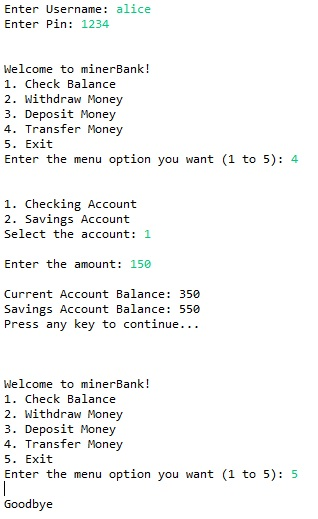
4. Testing Case Assume Alice wants to transfer 150 from her checking to her savings account. Her information in the file is as follows: alice 1234 500 400
Step 1. Alice will enter the username alice followed by 1234.
Step 2. Alice will input option 4 for transferring money, followed by the option 1 for checking account. Alice will be prompted to input the transfer amount. Alice will input 150. Input the transfer amount:150 University of Texas at El Paso - Department of Computer Science CS1101: Introduction to Computer Science Lab Spring 2019 Comprehensive Lab 1 4 The final balance of your checking account is: $350 The final balance of the savings account is $550
Step 8. Alice is presented with the main menu, where she types option 5 (Exit). The good bye message is printed and the program ends. Bonus: Think about a bonus feature you could include that will allow you to practice using input/output operations, a sequence of steps, conditionals or loops, and testing cases. You should include the code of your bonus feature and explain this feature during the demo to the instruction team. Possible bonus features will be discussed during the labs, think about how to make your code more robust, or add additional features such as calculating a fee for using the app.
The user.txt file contains:
john 3456 100 234
diego 9012 1000 300
alice 1234 500 400
ana 9078 145 450
joe 8887 0 90
maria 2221 9000 0
Homework Answers
Hello,
Here is the complete java program. Place the user.txt file under main folder of your project.
Accounts.java
// Class to hold the Account details of each user
public class Accounts {
String userName;
int pin;
int currentBal;
int savingsBal;
Accounts(String user, int pin, int currBal, int
savBal)
{
userName = user;
this.pin = pin;
currentBal = currBal;
savingsBal = savBal;
}
}
minerBank.java
import java.io.*;
import java.util.Scanner;
public class minerBank {
Accounts[] accounts = new Accounts[100];
Accounts activeAccount;
static public Scanner in;
final public static int CURRENT = 1, SAVINGS =
2;
// Constructor to load all the data from the text
file
minerBank() throws IOException
{
String path = new
File("user.txt").getAbsolutePath();
File file = new File(path);
BufferedReader reader = new
BufferedReader(new FileReader(file));
String str;
int i=0;
// Split and store all the values
in Accounts class
while ((str = reader.readLine()) !=
null)
{
String details[]
= str.split(" ");
accounts[i++] =
new Accounts(details[0], Integer.parseInt(details[1]),
Integer.parseInt(details[2]), Integer.parseInt(details[3]));
}
reader.close();
in = new Scanner(System.in);
}
// Method checks whether the given login credentials
are valid
boolean validateCredentials(String userName, int
pin)
{
for(int i=0; i<accounts.length;
i++)
{
if(accounts[i]
== null)
break;
if(userName.equals(accounts[i].userName) == true &&
accounts[i].pin == pin)
{
activeAccount = accounts[i];
return true;
}
}
return false;
}
// Get Account type from the user, whether current
account or savings account
int getAccountType()
{
int option = 0;
while(option != CURRENT &&
option != SAVINGS)
{
System.out.println("\n\n1. Checking Account\n"
+ "2. Savings
Account");
System.out.print("Select the account: ");
option =
in.nextInt();
in.nextLine();
if(option !=
CURRENT && option != SAVINGS)
{
System.out.println("\nInvalid Option. Please try
again.");
}
}
return option;
}
// Get the valid amount
int getAmount(int limit, String errMsg)
{
int amount;
while(true)
{
System.out.print("\nEnter the amount: ");
amount =
in.nextInt();
in.nextLine();
// Validation of
valid amount
if(amount >
limit)
System.out.println("\n" + errMsg + " Please try
again.");
else if(amount
<= 0)
System.out.println("\nInvalid amount. Please try
again.");
else
break;
}
return amount;
}
// Display available balance
void displayBalance()
{
switch(getAccountType())
{
case CURRENT:
System.out.println("\nChecking Account Balance: " +
activeAccount.currentBal);
break;
case SAVINGS:
System.out.println("\nSavings Account Balance: " +
activeAccount.savingsBal);
break;
}
System.out.println("Press any key
to continue...");
in.nextLine();
}
// Method to withdraw money
void withdrawMoney()
{
int balance = 0;
int type = getAccountType();
int amount = getAmount(200,
"Withdraw more than $200 is not allowed.");
// Amount deduction
if(type == CURRENT &&
amount <= activeAccount.currentBal)
{
activeAccount.currentBal -= amount;
balance =
activeAccount.currentBal;
}
else if(type == SAVINGS &&
amount <= activeAccount.savingsBal)
{
activeAccount.savingsBal -= amount;
balance =
activeAccount.savingsBal;
}
if(balance == 0)
System.out.println("Insufficient balance. Withdraw
unsuccessful.");
else
System.out.println("Available Balance: " + balance);
System.out.println("Press any key
to continue...");
in.nextLine();
}
// Method to handle deposit of money
void depositMoney()
{
int balance = 0;
int type = getAccountType();
int amount = getAmount(1200,
"Deposit more than $1200 is not allowed.");
// Amount addition
if(type == CURRENT)
{
activeAccount.currentBal += amount;
balance =
activeAccount.currentBal;
}
else if(type == SAVINGS)
{
activeAccount.savingsBal += amount;
balance =
activeAccount.savingsBal;
}
System.out.println("Available
Balance: " + balance
+ "Press any key to continue...");
in.nextLine();
}
// Method to transfer amount to another account
void transferMoney()
{
int balance1 = 0, balance2 =
0;
int type = getAccountType();
int amount = getAmount(200,
"Transfer more than $200 is not allowed.");
// Amount deductions and
additions
if(type == CURRENT &&
(activeAccount.currentBal - amount) >= 0)
{
balance1 =
activeAccount.currentBal = activeAccount.currentBal - amount;
balance2 =
activeAccount.savingsBal = activeAccount.savingsBal + amount;
}
else if(type == SAVINGS &&
activeAccount.savingsBal - amount >= 0)
{
balance1 =
activeAccount.currentBal = activeAccount.currentBal + amount;
balance2 =
activeAccount.savingsBal = activeAccount.savingsBal - amount;
}
if(balance1 == 0 &&
balance2 == 0)
System.out.println("\nInsufficient balance. Transfer
unsuccessful.");
else
System.out.println("Current Account Balance: " + balance1
+ "\nSavings Account Balance:
" + balance2);
System.out.println("Press any key
to continue...");
in.nextLine();
}
public static void main(String[] args) {
minerBank bank;
int option = 0;
// Display message if unable to
load data
try {
bank = new
minerBank();
} catch (IOException e) {
System.out.println("Unable to load user data");
return;
}
// Get credentials
System.out.print("Enter Username:
");
String userName =
in.nextLine();
System.out.print("Enter Pin:
");
int pin = in.nextInt();
in.nextLine();
// Validate given credentials
if(bank.validateCredentials(userName, pin) == false)
{
System.out.println("Invalid user credentials");
in.nextLine();
in.close();
return;
}
// Run the program until exited by
user
while(option != 5)
{
System.out.println("\n\nWelcome to minerBank!");
System.out.println("1. Check Balance\n"
+ "2. Withdraw Money\n"
+ "3. Deposit Money\n"
+ "4. Transfer Money\n"
+ "5. Exit" );
System.out.print("Enter the menu option you want (1 to 5):
");
option =
in.nextInt();
in.nextLine();
switch(option)
{
case 1:
bank.displayBalance();
break;
case 2:
bank.withdrawMoney();
break;
case 3:
bank.depositMoney();
break;
case 4:
bank.transferMoney();
break;
case 5:
System.out.println("\nGoodbye");
in.close();
break;
default:
System.out.println("\nInvalid Option. Please try
again.\n"
+ "Press
any key to continue...");
in.nextLine();
}
}
}
}
Output:
Add Answer to:
1. Objective This challenge lab will enable you to apply, in a
practical scenario, the topics...
Please do not copy other solution from the site as they never fully implement all the...
Please do not copy other solution from the site as they never fully implement all the listed guidelines below. Please write a shell script called atm.bash similar to the ones used in ATM machines. Essentially your script is to handle a person's savings and checking accounts and should handle the following services: Transfer from savings account to checking account Transfer from checking account to savings account Cash withdrawal from either account Balance statements for both the...
In this assignment, you will implement a simple version of Computer Lab administration system in C++....
 In this assignment, you will implement a simple version of
Computer Lab administration system in C++. Your program will
monitor computers in 4 computer labs and will allow users to log in
and log out. Each computer lab has different number of
computers.
•Lab 1 has 10 computers
•Lab 2 has 6 computers
•Lab 3 has 3 computers
•Lab 4 has 12 computers
Here is an example state of the system:
Lab Array
Some of the computers are free (no...
In this assignment, you will implement a simple version of
Computer Lab administration system in C++. Your program will
monitor computers in 4 computer labs and will allow users to log in
and log out. Each computer lab has different number of
computers.
•Lab 1 has 10 computers
•Lab 2 has 6 computers
•Lab 3 has 3 computers
•Lab 4 has 12 computers
Here is an example state of the system:
Lab Array
Some of the computers are free (no...
1- TigerOne Bank is a local bank that intends to install a new automated teller machine...
1- TigerOne Bank is a local bank that intends to install a new automated teller machine (ATM) to allow its customers to perform basic financial transactions. Using the ATM machine users should be able to view their account balance, withdraw cash and deposit funds. The bank wants you to develop the software application that will be installed on the new ATM machines. The following are the requirements for the application: Users are uniquely identified by an account number and...
Need some help with this C++ code. Please screenshot the code if possible. Purpose: Demonstrate the...
Need some help with this C++ code. Please screenshot the code if possible. Purpose: Demonstrate the ability to create and manipulate classes, data members, and member functions. This assignment also aims at creating a C++ project to handle multiple files (one header file and two .cpp files) at the same time. Remember to follow documentation and variable name guidelines. Create a C++ project to implement a simplified banking system. Your bank is small, so it can have a maximum of...
Purpose: Demonstrate the ability to create and manipulate classes, data members, and member functions. This assignment...
Purpose: Demonstrate the ability to create and manipulate classes, data members, and member functions. This assignment also aims at creating a C++ project to handle multiple files (one header file and two .cpp files) at the same time. Remember to follow documentation and variable name guidelines. Create a C++ project to implement a simplified banking system. Your bank is small, so it can have a maximum of 100 accounts. Use an array of pointers to objects for this. However, your...
NOTE: LANGUAGE IS PYTHON CS160 Computer Science Lab 17 Objectives Work with dictionaries Work with functions...
NOTE: LANGUAGE IS PYTHON CS160 Computer Science Lab 17 Objectives Work with dictionaries Work with functions Work with files Overview This lab will have you store the birthdays for a group of people. This program will store the information with the focus on the date of the month and not on the individual. The point of this program is to be able to see who has a birthday on a given day or to create a table of birthdays, in...
NOTE: LANGUAGE IS PYTHON CS160 Computer Science Lab 17 Objectives Work with dictionaries Work with functions...
NOTE: LANGUAGE IS PYTHON CS160 Computer Science Lab 17 Objectives Work with dictionaries Work with functions Work with files Overview This lab will have you store the birthdays for a group of people. This program will store the information with the focus on the date of the month and not on the individual. The point of this program is to be able to see who has a birthday on a given day or to create a table of birthdays, in...
Create an Inheritance hierarchy that a bank may use to represent customer's bank accounts (Checking and...
Create an Inheritance hierarchy that a bank may use to represent customer's bank accounts (Checking and Savings), this includes a GUI user interface that allows user to login, and deposit or withdraw, and application to display the transaction and final balance. All the bank customers can: - Create a new account - Deposit (Credit) money into their account and/or withdraw (debit) money from their account. - Application should expect user to login to their account using login/password Create necessary classes...
LAB1 PART 1 FOR THE DATA TYPE CLASS: If you do not have UML of class...
LAB1 PART 1 FOR THE DATA TYPE CLASS: If you do not have UML of class Account_yourLastName, you should do that first Basesd on the UML, provide the code of data type class Account_yourLastName to hold the information of an account with account number (String), name (String), balance (double), with no-argument constructor, parameter constructor Also, define some methods to handle the tasks: open account, check current balance, deposit, withdraw, and print monthly statement. At the end of each task we...
 In this assignment, you will implement a simple version of
Computer Lab administration system in C++. Your program will
monitor computers in 4 computer labs and will allow users to log in
and log out. Each computer lab has different number of
computers.
•Lab 1 has 10 computers
•Lab 2 has 6 computers
•Lab 3 has 3 computers
•Lab 4 has 12 computers
Here is an example state of the system:
Lab Array
Some of the computers are free (no...
In this assignment, you will implement a simple version of
Computer Lab administration system in C++. Your program will
monitor computers in 4 computer labs and will allow users to log in
and log out. Each computer lab has different number of
computers.
•Lab 1 has 10 computers
•Lab 2 has 6 computers
•Lab 3 has 3 computers
•Lab 4 has 12 computers
Here is an example state of the system:
Lab Array
Some of the computers are free (no...
Most questions answered within 3 hours.
-
Where is the error in this code sequence?
String s1 = "Hello";
String s2 = "ello";...
asked 10 months ago -
Financial data for Joel de Paris, Inc., for last year
follow:
Joel de Paris, Inc.
Balance...
asked 10 months ago -
Consider this reaction:
Al2(SO4)3 (aq)+ BaCl3
(aq) Al2Cl6 (aq)- +
3BaSO4(s) . What is the...
asked 10 months ago -
Suppose that Savneet is considering increasing her
recent random sample from 20 car rentals to 40...
asked 10 months ago -
Trucks arrive at an unloading terminal at an average rate of 120
per hour.
Trucks arrive...
asked 10 months ago -
Why are methanol and ethanol completely soluble in water while
octanol is not very little soluble....
asked 10 months ago -
A facilities manager at a university reads in a research report
that the mean amount of...
asked 10 months ago -
When the CuSO4 is rehydrated by adding water to the anhydrous
compound, is this an endothermic...
asked 10 months ago -
A ray of sunlight is passing from diamond into crown glass; the
angle of incidence is...
asked 10 months ago -
A block of mass 0.249 kg is placed on top of a light, vertical
spring of...
asked 10 months ago -
how do the kidneys compensate in the presences of acidosis
a) trigger hyperventilate
b) reserve acid...
asked 10 months ago -
Question 501 pts
The rental rate of capital to the firm increases. Which of the
following...
asked 10 months ago