I got this programming its used to highlight text, but i couldn't remove highlight again from...
I got this programming its used to highlight text, but i couldn't remove highlight again from the text. i need someone to write me code that removes text highlight here is my code
import java.awt.*;
import java.awt.event.*;
import java.util.Map;
import java.util.HashMap;
import javax.swing.*;
import javax.swing.text.*;
public class TextHighlight {
private JTextArea textarea;
private JComboBox colorbox;
private JTextField top;
private String[] colorOptions = { "GRAY", "YELLOW",
"RED", "CYAN", "ORANGE", "PINK" };
private Highlighter.HighlightPainter
grayPainter;
private Highlighter.HighlightPainter
yellowPainter;
private Highlighter.HighlightPainter redPainter;
private Highlighter.HighlightPainter
cyanPainter;
private Highlighter.HighlightPainter
orangePainter;
private Highlighter.HighlightPainter
pinkPainter;
private int firstUpdateIndex;
private int counter;
private Map<Integer, Highlighter.Highlight> highlights;
public TextHighlight() {
grayPainter = new
DefaultHighlighter.DefaultHighlightPainter(Color.GRAY);
yellowPainter = new
DefaultHighlighter.DefaultHighlightPainter(Color.YELLOW);
redPainter = new
DefaultHighlighter.DefaultHighlightPainter(Color.RED);
cyanPainter = new
DefaultHighlighter.DefaultHighlightPainter(Color.CYAN);
orangePainter = new
DefaultHighlighter.DefaultHighlightPainter(Color.ORANGE);
pinkPainter = new
DefaultHighlighter.DefaultHighlightPainter(Color.PINK);
firstUpdateIndex = -1;
counter = 0;
}
private void createAndDisplayGUI() {
final JFrame frame = new
JFrame("Text HIGHLIGHT");
frame.setDefaultCloseOperation(JFrame.DISPOSE_ON_CLOSE);
JPanel contentPane = new
JPanel();
contentPane.setBorder(BorderFactory.createTitledBorder(BorderFactory.createEmptyBorder(50,
50, 50, 50),
"Highlighter JTextArea"));
textarea = new JTextArea(15,
20);
JScrollPane scrollPane = new
JScrollPane(textarea);
contentPane.add(scrollPane);
JButton button = new
JButton("ADD HIGHLIGHT TO THE TEXT");
button.addActionListener(new
ActionListener() {
public void
actionPerformed(ActionEvent ae) {
String text = null;
text = textarea.getSelectedText();
if (text != null && text.length() >
0) {
int startIndex =
textarea.getText().indexOf(text);
int endIndex = startIndex +
text.length();
Highlighter highlighter =
textarea.getHighlighter();
int selection =
JOptionPane.showConfirmDialog(frame, getOptionPanel(), "Highlight
Color : ",
JOptionPane.OK_CANCEL_OPTION,
JOptionPane.PLAIN_MESSAGE);
if (selection ==
JOptionPane.OK_OPTION) {
String
color = (String) colorbox.getSelectedItem();
try
{
if (color == colorOptions[0]) {
System.out.println("Color
Selected : " + color);
highlighter.addHighlight(startIndex, endIndex, grayPainter);
} else if (color == colorOptions[1]) {
System.out.println("Color
Selected : " + color);
highlighter.addHighlight(startIndex, endIndex,
yellowPainter);
} else if (color == colorOptions[2]) {
System.out.println("Color
Selected : " + color);
highlighter.addHighlight(startIndex, endIndex, redPainter);
} else if (color == colorOptions[3]) {
System.out.println("Color
Selected : " + color);
highlighter.addHighlight(startIndex, endIndex, cyanPainter);
} else if (color == colorOptions[4]) {
System.out.println("Color
Selected : " + color);
highlighter.addHighlight(startIndex, endIndex,
orangePainter);
} else if (color == colorOptions[5]) {
System.out.println("Color
Selected : " + color);
highlighter.addHighlight(startIndex, endIndex, pinkPainter);
}
Highlighter.Highlight[] highlightIndex =
highlighter.getHighlights();
} catch
(BadLocationException ble) {
ble.printStackTrace();
}
} else if (selection ==
JOptionPane.CANCEL_OPTION) {
System.out.println("CANCEL BUTTON PRESSED.");
} else if (selection ==
JOptionPane.CLOSED_OPTION) {
System.out.println("Textchart Closed");
}
}
}
});
frame.add(contentPane,
BorderLayout.CENTER);
frame.add(button,
BorderLayout.PAGE_END);
frame.pack();
frame.setLocationByPlatform(true);
frame.setVisible(true);
}
private JPanel getOptionPanel() {
JPanel panel = new JPanel();
panel.setBorder(BorderFactory.createTitledBorder(BorderFactory.createLineBorder(Color.DARK_GRAY,
5),
" COLOR OPTIONS "));
panel.setLayout(new GridLayout(5,
5, 20, 20));
JLabel colourLabel = new
JLabel("Select COLOR : ");
colorbox = new
JComboBox(colorOptions);
panel.add(colourLabel);
panel.add(colorbox);
return panel;
}
public static void main(String... args) {
SwingUtilities.invokeLater(new
Runnable() {
public void
run() {
new TextHighlight().createAndDisplayGUI();
}
});
}
}
Homework Answers
Below is the solution:
Add the one drop down menu in the item in the highlight selection color REMOVE HIGHLIGHT to remove the hightlight of the text.
below is the code to remove the highlight of the text:
import java.awt.*;
import java.awt.event.*;
import java.util.Map;
import javax.swing.*;
import javax.swing.text.*;
public class TextHighlight {
private JTextArea textarea;
private JComboBox colorbox;
private JTextField top;
private String[] colorOptions = { "GRAY", "YELLOW",
"RED", "CYAN", "ORANGE", "PINK", "REMOVE HIGHLIGHT" };
private Highlighter.HighlightPainter
grayPainter;
private Highlighter.HighlightPainter
yellowPainter;
private Highlighter.HighlightPainter redPainter;
private Highlighter.HighlightPainter
cyanPainter;
private Highlighter.HighlightPainter
orangePainter;
private Highlighter.HighlightPainter
pinkPainter;
private int firstUpdateIndex;
private int counter;
private Map<Integer, Highlighter.Highlight> highlights;
public TextHighlight() {
grayPainter = new
DefaultHighlighter.DefaultHighlightPainter(Color.GRAY);
yellowPainter = new
DefaultHighlighter.DefaultHighlightPainter(Color.YELLOW);
redPainter = new
DefaultHighlighter.DefaultHighlightPainter(Color.RED);
cyanPainter = new
DefaultHighlighter.DefaultHighlightPainter(Color.CYAN);
orangePainter = new
DefaultHighlighter.DefaultHighlightPainter(Color.ORANGE);
pinkPainter = new
DefaultHighlighter.DefaultHighlightPainter(Color.PINK);
firstUpdateIndex = -1;
counter = 0;
}
private void createAndDisplayGUI() {
final JFrame frame = new
JFrame("Text HIGHLIGHT");
frame.setDefaultCloseOperation(JFrame.DISPOSE_ON_CLOSE);
JPanel contentPane = new
JPanel();
contentPane.setBorder(BorderFactory.createTitledBorder(BorderFactory.createEmptyBorder(50,
50, 50, 50),
"Highlighter JTextArea"));
textarea = new JTextArea(15,
20);
JScrollPane scrollPane = new
JScrollPane(textarea);
contentPane.add(scrollPane);
JButton button = new
JButton("ADD HIGHLIGHT TO THE TEXT");
button.addActionListener(new
ActionListener() {
public void
actionPerformed(ActionEvent ae) {
String text = null;
text = textarea.getSelectedText();
if (text != null && text.length() >
0) {
int startIndex =
textarea.getText().indexOf(text);
int endIndex = startIndex +
text.length();
Highlighter highlighter =
textarea.getHighlighter();
int selection =
JOptionPane.showConfirmDialog(frame, getOptionPanel(), "Highlight
Color : ",
JOptionPane.OK_CANCEL_OPTION,
JOptionPane.PLAIN_MESSAGE);
if (selection ==
JOptionPane.OK_OPTION) {
String
color = (String) colorbox.getSelectedItem();
try
{
if (color == colorOptions[0]) {
System.out.println("Color
Selected : " + color);
highlighter.addHighlight(startIndex, endIndex, grayPainter);
} else if (color == colorOptions[1]) {
System.out.println("Color
Selected : " + color);
highlighter.addHighlight(startIndex, endIndex,
yellowPainter);
} else if (color == colorOptions[2]) {
System.out.println("Color
Selected : " + color);
highlighter.addHighlight(startIndex, endIndex, redPainter);
} else if (color == colorOptions[3]) {
System.out.println("Color
Selected : " + color);
highlighter.addHighlight(startIndex, endIndex, cyanPainter);
} else if (color == colorOptions[4]) {
System.out.println("Color
Selected : " + color);
highlighter.addHighlight(startIndex, endIndex,
orangePainter);
} else if (color == colorOptions[5]) {
System.out.println("Color
Selected : " + color);
highlighter.addHighlight(startIndex, endIndex, pinkPainter);
} else if (color == colorOptions[6]) { // select
the remove highlight of the text
System.out.println("Color
Selected : " + color);
highlighter.removeAllHighlights(); // remove the highlght
}
Highlighter.Highlight[] highlightIndex =
highlighter.getHighlights();
} catch
(BadLocationException ble) {
ble.printStackTrace();
}
} else if (selection ==
JOptionPane.CANCEL_OPTION) {
System.out.println("CANCEL BUTTON PRESSED.");
} else if (selection ==
JOptionPane.CLOSED_OPTION) {
System.out.println("Textchart Closed");
}
}
}
});
frame.add(contentPane,
BorderLayout.CENTER);
frame.add(button,
BorderLayout.PAGE_END);
frame.pack();
frame.setLocationByPlatform(true);
frame.setVisible(true);
}
private JPanel getOptionPanel() {
JPanel panel = new JPanel();
panel.setBorder(BorderFactory.createTitledBorder(BorderFactory.createLineBorder(Color.DARK_GRAY,
5),
" COLOR OPTIONS "));
panel.setLayout(new GridLayout(5,
5, 20, 20));
JLabel colourLabel = new
JLabel("Select COLOR : ");
colorbox = new
JComboBox(colorOptions);
panel.add(colourLabel);
panel.add(colorbox);
return panel;
}
public static void main(String... args) {
SwingUtilities.invokeLater(new
Runnable() {
public void
run() {
new TextHighlight().createAndDisplayGUI();
}
});
}
}
sample output:
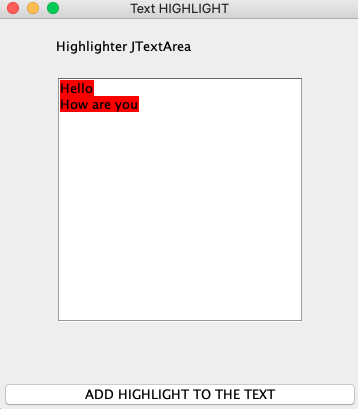
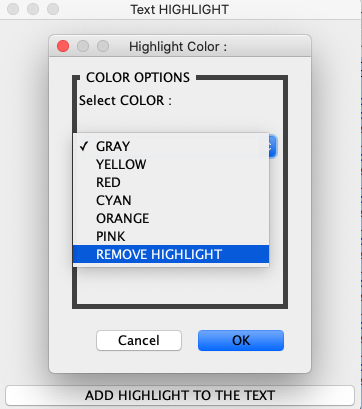
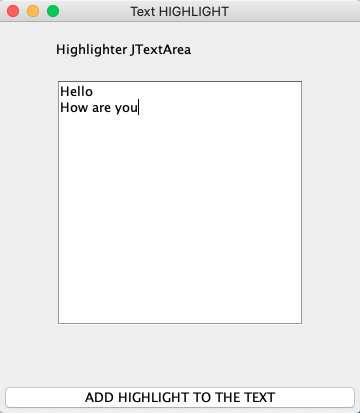
Add Answer to:
I got this programming its used to highlight text, but i
couldn't remove highlight again from...
Simple java GUI language translator. English to Spanish, French, or German import javax.swing.*; import java.awt.*; import...
Simple java GUI language translator. English to Spanish, French, or German import javax.swing.*; import java.awt.*; import java.awt.event.ActionEvent; import java.awt.event.ActionListener; public class translatorApp extends JFrame implements ActionListener { public static final int width = 500; public static final int height = 300; public static final int no_of_lines = 10; public static final int chars_per_line = 20; private JTextArea lan1; private JTextArea lan2; public static void main(String[] args){ translatorApp gui = new translatorApp();...
Lab Assignment : In this lab, you are going to implement QueueADT interface that defines a...
Lab Assignment : In this lab, you are going to implement QueueADT interface that defines a queue. Then you are going to use the queue to store animals. 1. Write a LinkedQueue class that implements the QueueADT.java interface using links. 2. Textbook implementation uses a count variable to keep track of the elements in the queue. Don't use variable count in your implementation (points will be deducted if you use instance variable count). You may use a local integer variable...
I am getting this Error can you please fix my Java code. import java.awt.Dialog; import java.awt.Label;...
 I am getting this Error can you please fix my Java
code.
import java.awt.Dialog;
import java.awt.Label;
import java.awt.TextArea;
import java.awt.event.ActionEvent;
import java.awt.event.ActionListener;
import java.util.ArrayList;
import java.util.HashMap;
import java.util.List;
import java.util.Map.Entry;
import javax.swing.JButton;
import javax.swing.JFrame;
import javax.swing.JPanel;
public class Fall_2017 {
public TextArea courseInput;
public Label textAreaLabel;
public JButton addData;
public Dialog confirmDialog;
HashMap<Integer, ArrayList<String>> students;
public Fall_2017(){
courseInput = new TextArea(20, 40);
textAreaLabel = new Label("Student's data:");
addData = new JButton("Add...
I am getting this Error can you please fix my Java
code.
import java.awt.Dialog;
import java.awt.Label;
import java.awt.TextArea;
import java.awt.event.ActionEvent;
import java.awt.event.ActionListener;
import java.util.ArrayList;
import java.util.HashMap;
import java.util.List;
import java.util.Map.Entry;
import javax.swing.JButton;
import javax.swing.JFrame;
import javax.swing.JPanel;
public class Fall_2017 {
public TextArea courseInput;
public Label textAreaLabel;
public JButton addData;
public Dialog confirmDialog;
HashMap<Integer, ArrayList<String>> students;
public Fall_2017(){
courseInput = new TextArea(20, 40);
textAreaLabel = new Label("Student's data:");
addData = new JButton("Add...
Convert the following GUI application into an Applet. Do not delete any part of the GUI...
Convert the following GUI application into an Applet. Do not delete any part of the GUI program, just comment out the part of the program not required. Another Java code is required // Java code: import java.awt.*; import java.awt.event.*; import javax.swing.*; public class PizzaShopping extends JFrame { JCheckBox ckb[]; JLabel jlb1; JRadioButton radio[], radio1[]; static String[] pizzaToppings = "Tomato,Green peppper,Black olives,Mushrooms,Extra cheese,Pepproni,Sausage" .split(","); static String[] pizzaSizes = "Small: $6.50, Medium: $8.50, Large: $10".split(","); static String[] pizzatypes = "Thin Crust, Mediam...
I need help with the get quote sql that is all Build a rate quote GUI....
 I need help with the get quote sql that is
all
Build a rate quote GUI. The system will first allow us to select
a customer (assume they are already in the DB), an employee giving
the quote, and then select part(s) and/or motorcycles. You system
should also include the shipping information in the quote. After
all of the items have been selected for the rate quote, we should
give the user a “bottom line” total that includes shipping (we...
I need help with the get quote sql that is
all
Build a rate quote GUI. The system will first allow us to select
a customer (assume they are already in the DB), an employee giving
the quote, and then select part(s) and/or motorcycles. You system
should also include the shipping information in the quote. After
all of the items have been selected for the rate quote, we should
give the user a “bottom line” total that includes shipping (we...
CodebreakerUi.java Add member variables of type: Color colorSelected; Updated method initComponents() where it is instantiating the...
CodebreakerUi.java Add member variables of type: Color colorSelected; Updated method initComponents() where it is instantiating the RoundButtons for the 1D array on the JPanel displaying the codebreaker’s colors; it should add the following Add action listener ColorListener to each round button Updated method initComponents() where it is instantiating the RoundButtons for the 2D array on the JPanel for the codebreaker’s attempt; it should add the following Add client property “row” to each RoundButton set to the current iteration of the...
With the Code below, how would i add a "Back" Button to the bottom of the...
With the Code below, how would i add a "Back" Button to the bottom of the history page so that it takes me back to the main function and continues to work? import java.awt.BorderLayout; import java.awt.Color; import java.awt.Dimension; import java.awt.GridLayout; import java.awt.event.ActionEvent; import java.awt.event.ActionListener; import java.io.File; import java.io.FileNotFoundException; import java.io.FileWriter; import java.io.IOException; import java.util.ArrayList; import java.util.List; import java.util.Scanner; import javax.swing.BoxLayout; import javax.swing.JButton; import javax.swing.JFrame; import javax.swing.JLabel; import javax.swing.JPanel; import javax.swing.JScrollPane; import javax.swing.JTextField; public class RecipeFinder { public static void main(String[]...
(How do I remove the STATIC ArrayList from the public class Accounts, and move it to...
(How do I remove the STATIC ArrayList from the public class Accounts, and move it to the MAIN?) import java.util.ArrayList; import java.util.Scanner; public class Accounts { static ArrayList<String> accounts = new ArrayList<>(); static Scanner scanner = new Scanner(System.in); public static void main(String[] args) { Scanner scanner = new Scanner(System.in); int option = 0; do { System.out.println("0->quit\n1->add\n2->overwirte\n3->remove\n4->display"); System.out.println("Enter your option"); option = scanner.nextInt(); if (option == 0) { break; } else if (option == 1) { add(); } else...
I have currently a functional Java progam with a gui. Its a simple table of contacts...
 I have currently a functional Java progam with a gui. Its a
simple table of contacts with 3 buttons: add, remove, and edit.
Right now the buttons are in the program but they do not work yet.
I need the buttons to actually be able to add, remove, or edit
things on the table. Thanks so much.
Here is the working code so far:
//PersonTableModel.java
import java.util.List;
import javax.swing.table.AbstractTableModel;
public class PersonTableModel extends AbstractTableModel
{
private static final int...
I have currently a functional Java progam with a gui. Its a
simple table of contacts with 3 buttons: add, remove, and edit.
Right now the buttons are in the program but they do not work yet.
I need the buttons to actually be able to add, remove, or edit
things on the table. Thanks so much.
Here is the working code so far:
//PersonTableModel.java
import java.util.List;
import javax.swing.table.AbstractTableModel;
public class PersonTableModel extends AbstractTableModel
{
private static final int...
I want to make the JText area scrollable.. but my result doesn't work in that way....
I want to make the JText area scrollable.. but my result doesn't work in that way. help me plz. package m5; import javax.swing.*; import java.awt.*; import java.awt.event.*; import java.util.*; public class TextAnalyzer extends JFrame implements ActionListener { //Initializes component variables for the frame //For text typing area JLabel type = new JLabel("Type sentences in the box below.", JLabel.CENTER); JTextArea txt = new JTextArea(10, 10); JPanel txt1 = new JPanel(); //For Statistic data...
 I am getting this Error can you please fix my Java
code.
import java.awt.Dialog;
import java.awt.Label;
import java.awt.TextArea;
import java.awt.event.ActionEvent;
import java.awt.event.ActionListener;
import java.util.ArrayList;
import java.util.HashMap;
import java.util.List;
import java.util.Map.Entry;
import javax.swing.JButton;
import javax.swing.JFrame;
import javax.swing.JPanel;
public class Fall_2017 {
public TextArea courseInput;
public Label textAreaLabel;
public JButton addData;
public Dialog confirmDialog;
HashMap<Integer, ArrayList<String>> students;
public Fall_2017(){
courseInput = new TextArea(20, 40);
textAreaLabel = new Label("Student's data:");
addData = new JButton("Add...
I am getting this Error can you please fix my Java
code.
import java.awt.Dialog;
import java.awt.Label;
import java.awt.TextArea;
import java.awt.event.ActionEvent;
import java.awt.event.ActionListener;
import java.util.ArrayList;
import java.util.HashMap;
import java.util.List;
import java.util.Map.Entry;
import javax.swing.JButton;
import javax.swing.JFrame;
import javax.swing.JPanel;
public class Fall_2017 {
public TextArea courseInput;
public Label textAreaLabel;
public JButton addData;
public Dialog confirmDialog;
HashMap<Integer, ArrayList<String>> students;
public Fall_2017(){
courseInput = new TextArea(20, 40);
textAreaLabel = new Label("Student's data:");
addData = new JButton("Add...
 I need help with the get quote sql that is
all
Build a rate quote GUI. The system will first allow us to select
a customer (assume they are already in the DB), an employee giving
the quote, and then select part(s) and/or motorcycles. You system
should also include the shipping information in the quote. After
all of the items have been selected for the rate quote, we should
give the user a “bottom line” total that includes shipping (we...
I need help with the get quote sql that is
all
Build a rate quote GUI. The system will first allow us to select
a customer (assume they are already in the DB), an employee giving
the quote, and then select part(s) and/or motorcycles. You system
should also include the shipping information in the quote. After
all of the items have been selected for the rate quote, we should
give the user a “bottom line” total that includes shipping (we...
 I have currently a functional Java progam with a gui. Its a
simple table of contacts with 3 buttons: add, remove, and edit.
Right now the buttons are in the program but they do not work yet.
I need the buttons to actually be able to add, remove, or edit
things on the table. Thanks so much.
Here is the working code so far:
//PersonTableModel.java
import java.util.List;
import javax.swing.table.AbstractTableModel;
public class PersonTableModel extends AbstractTableModel
{
private static final int...
I have currently a functional Java progam with a gui. Its a
simple table of contacts with 3 buttons: add, remove, and edit.
Right now the buttons are in the program but they do not work yet.
I need the buttons to actually be able to add, remove, or edit
things on the table. Thanks so much.
Here is the working code so far:
//PersonTableModel.java
import java.util.List;
import javax.swing.table.AbstractTableModel;
public class PersonTableModel extends AbstractTableModel
{
private static final int...
Most questions answered within 3 hours.
-
Where is the error in this code sequence?
String s1 = "Hello";
String s2 = "ello";...
asked 11 months ago -
Financial data for Joel de Paris, Inc., for last year
follow:
Joel de Paris, Inc.
Balance...
asked 11 months ago -
Consider this reaction:
Al2(SO4)3 (aq)+ BaCl3
(aq) Al2Cl6 (aq)- +
3BaSO4(s) . What is the...
asked 11 months ago -
Suppose that Savneet is considering increasing her
recent random sample from 20 car rentals to 40...
asked 11 months ago -
Trucks arrive at an unloading terminal at an average rate of 120
per hour.
Trucks arrive...
asked 11 months ago -
Why are methanol and ethanol completely soluble in water while
octanol is not very little soluble....
asked 11 months ago -
A facilities manager at a university reads in a research report
that the mean amount of...
asked 11 months ago -
When the CuSO4 is rehydrated by adding water to the anhydrous
compound, is this an endothermic...
asked 11 months ago -
A ray of sunlight is passing from diamond into crown glass; the
angle of incidence is...
asked 11 months ago -
A block of mass 0.249 kg is placed on top of a light, vertical
spring of...
asked 11 months ago -
how do the kidneys compensate in the presences of acidosis
a) trigger hyperventilate
b) reserve acid...
asked 11 months ago -
Question 501 pts
The rental rate of capital to the firm increases. Which of the
following...
asked 11 months ago