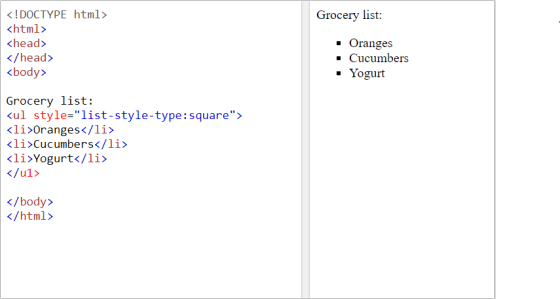
Grocery list: <ul style="list-style-type:square" <li>Oranges</li> <li>Cucumbers</li> <li>Yogurt</li> </u1> Expected HTML CODE Grocery list: Oranges Cucumbers Yogurt
Grocery list:
<ul style="list-style-type:square"
<li>Oranges</li>
<li>Cucumbers</li>
<li>Yogurt</li>
</u1>
Expected HTML CODE
Grocery list:
- Oranges
- Cucumbers
- Yogurt
Homework Answers
Grocery list:
<ul style="list-style-type:square">
<li>Oranges</li>
<li>Cucumbers</li>
<li>Yogurt</li>
</u1>

Note: You missed ending > on bolded code above
Add Answer to:
Grocery list:
<ul style="list-style-type:square"
<li>Oranges</li>
<li>Cucumbers</li>
<li>Yogurt</li>
</u1>
Expected HTML CODE
Grocery list:
Oranges
Cucumbers
Yogurt
How to do this code? HW13.11. Create an HTML list from a Python list The function...
 How to do this code?
HW13.11. Create an HTML list from a Python list The function below takes one parameter: a list, that contains only strings. Complete the function to create a unordered HTML list, as a string, and returns it. An empty list should return an empty HTML list with no list items. Do not add any extraneous whitespace to the HTML. For example, if given the list ["one", "two"], the function should return "<ul><li>one</li><li>two</li> </ul>". student.py IT TI...
How to do this code?
HW13.11. Create an HTML list from a Python list The function below takes one parameter: a list, that contains only strings. Complete the function to create a unordered HTML list, as a string, and returns it. An empty list should return an empty HTML list with no list items. Do not add any extraneous whitespace to the HTML. For example, if given the list ["one", "two"], the function should return "<ul><li>one</li><li>two</li> </ul>". student.py IT TI...
Use a style sheet to define the following rules and implement the given HTML code. Please...
Use a style sheet to define the following rules and implement the given HTML code. Please put your style information within the same file as the HTML code. Rules: • Hyperlinks using the nodec class should display no decoration. • Hyperlinks should display text in white with a green background color when the mouse pointer is held over the link. (use the hover pseudo-class) • Unordered lists not nested within any other lists should be displayed in blue text and...
div <h3 class-"fancy"> Hi </h3> cul> <li>Location 1 </li>cli> Location 2</li</ul p id-greeting"> Hello </p> p>...
 div <h3 class-"fancy"> Hi </h3> cul> <li>Location 1 </li>cli> Location 2</li</ul p id-greeting"> Hello </p> p> Welcome to <span> Pizza City </span>lp> <div id- "food" class-"fancy"> Here is our menu <h3> Pizzas </h3> <ul> <li>Pepperoni </li><li> Cheese </li/ul> <h3> Sandwiches </h3> ul> li>Philly/libclis Italian</lis <luls /div> </div> Write the javascript code (one line of code) to achieve the following for the HTML above. The HTML will not be modified. Write the javascript code (1 line) to change the background color...
In oython 3. HTML supports ordered and unordered lists. An ordered list is defined using element ol and each item of th...
 In oython
3. HTML supports ordered and unordered lists. An ordered list is defined using element ol and each item of the list is defined using element li. An unordered list is defined using element ul and each item of the list is defined using element li as well. For example, the unordered list in file w3c html is described using HTML code ul> <li>Web for All</li> <li>Web on Everything</li> </ul- Develop class ListCollector as a subclass of HTML Parser...
In oython
3. HTML supports ordered and unordered lists. An ordered list is defined using element ol and each item of the list is defined using element li. An unordered list is defined using element ul and each item of the list is defined using element li as well. For example, the unordered list in file w3c html is described using HTML code ul> <li>Web for All</li> <li>Web on Everything</li> </ul- Develop class ListCollector as a subclass of HTML Parser...
below is an html code, Modify the design to implement the following pattern. “Sticky Footer”. <!DOCTYPE...
below is an html code, Modify the design to implement the following pattern. “Sticky Footer”. <!DOCTYPE html> <html lang="en"> <head> <meta name="viewport" content="width=device-width, initial-scale=1"> <title>Responsive Menu Lab</title> <style type="text/css"> div { border: 1px solid blue; margin: 5px; } #container { width: 98%; margin: auto; } #main { padding: 10px; } #menu { list-style: none; padding-left: 2px; } #menu li { display: inline-block; width: 70px; } #menu li a { display: block; text-decoration: none; } </style> </head>...
Look at the HTML code below then list the line numbers of just those HTML tags...
Look at the HTML code below then list the line numbers of just those HTML tags that are required to create a web page: <!DOCTYPE html> <html> <head> <link rel="stylesheet" href="MyStyle.css"> </head> <body> <nav> <a href="GroceryHome.html">Home</a> | <a href="Products.html">Products</a> | <a href="AboutUs.html">About Us</a> | <a href="Contact.html">Contact</a> </nav> <header> <h1> My Contact Page</h1> </header> <article> Thank you for your interest in our grocery store. We offer delivery or call-ahead pickup services. Please provide your contact information, and indicate your family's food...
Hello Ive been tryting to add the CDN of jquery to my html code and I...
Hello Ive been tryting to add the CDN of jquery to my html code and I keep getting an error Need help with this : Navigate to www.code.jquery.com in your Chrome browser. On this page, you'll find different stable versions of jQuery. Select uncompressed for jQuery Core 3.3.1. Copy the <script> tag that is given to you. In store_hours.html, paste that tag directly above your body's closing tag. This is the jQuery CDN. After you paste this code into...
In this problem, you will create a selectable “To Do” List. To add a task to...
 In this problem, you will create a selectable “To Do” List. To
add a task to this list, the user clicks the Add Task button and
enters a description of the task. To delete a task from the list,
the user selects the task and then clicks the Delete Task
button.
Open the HTML and JavaScript files provided as start-up files
(index.html from within todo_list_Q.zip file). Then,
review the HTML in this file. Note, within the div element, there
is...
In this problem, you will create a selectable “To Do” List. To
add a task to this list, the user clicks the Add Task button and
enters a description of the task. To delete a task from the list,
the user selects the task and then clicks the Delete Task
button.
Open the HTML and JavaScript files provided as start-up files
(index.html from within todo_list_Q.zip file). Then,
review the HTML in this file. Note, within the div element, there
is...
1 (25 pts.). The following HTML document (with gaps) is initially rendered as shown in the...
 1 (25 pts.). The following HTML document (with gaps) is initially rendered as shown in the first screenshot below. When the anchor JavaScript is clicked, a link is followed to the header JavaScript lower in the page, and the rendering is as shown in the next screen shot. If, on the other hand, the anchor PHP is clicked, a link is followed to the header PHP still lower in the page, and the rendering is as shown in the last...
Modify an application that lets users add tasks to a list so the tasks can also...
Modify an application that lets users add tasks to a list so the tasks can also be deleted when they’re completed. 1. In the HTML file, enclose the text for each of the three existing list items in a <p> element. Then, Add buttons like the ones shown above preceding the <p> elements. No ids or names are required for these buttons, but they should be assigned to the class named “delete”. 2. In the JavaScript file, modify the event...
 How to do this code?
HW13.11. Create an HTML list from a Python list The function below takes one parameter: a list, that contains only strings. Complete the function to create a unordered HTML list, as a string, and returns it. An empty list should return an empty HTML list with no list items. Do not add any extraneous whitespace to the HTML. For example, if given the list ["one", "two"], the function should return "<ul><li>one</li><li>two</li> </ul>". student.py IT TI...
How to do this code?
HW13.11. Create an HTML list from a Python list The function below takes one parameter: a list, that contains only strings. Complete the function to create a unordered HTML list, as a string, and returns it. An empty list should return an empty HTML list with no list items. Do not add any extraneous whitespace to the HTML. For example, if given the list ["one", "two"], the function should return "<ul><li>one</li><li>two</li> </ul>". student.py IT TI...
 div <h3 class-"fancy"> Hi </h3> cul> <li>Location 1 </li>cli> Location 2</li</ul p id-greeting"> Hello </p> p> Welcome to <span> Pizza City </span>lp> <div id- "food" class-"fancy"> Here is our menu <h3> Pizzas </h3> <ul> <li>Pepperoni </li><li> Cheese </li/ul> <h3> Sandwiches </h3> ul> li>Philly/libclis Italian</lis <luls /div> </div> Write the javascript code (one line of code) to achieve the following for the HTML above. The HTML will not be modified. Write the javascript code (1 line) to change the background color...
 In oython
3. HTML supports ordered and unordered lists. An ordered list is defined using element ol and each item of the list is defined using element li. An unordered list is defined using element ul and each item of the list is defined using element li as well. For example, the unordered list in file w3c html is described using HTML code ul> <li>Web for All</li> <li>Web on Everything</li> </ul- Develop class ListCollector as a subclass of HTML Parser...
In oython
3. HTML supports ordered and unordered lists. An ordered list is defined using element ol and each item of the list is defined using element li. An unordered list is defined using element ul and each item of the list is defined using element li as well. For example, the unordered list in file w3c html is described using HTML code ul> <li>Web for All</li> <li>Web on Everything</li> </ul- Develop class ListCollector as a subclass of HTML Parser...
 In this problem, you will create a selectable “To Do” List. To
add a task to this list, the user clicks the Add Task button and
enters a description of the task. To delete a task from the list,
the user selects the task and then clicks the Delete Task
button.
Open the HTML and JavaScript files provided as start-up files
(index.html from within todo_list_Q.zip file). Then,
review the HTML in this file. Note, within the div element, there
is...
In this problem, you will create a selectable “To Do” List. To
add a task to this list, the user clicks the Add Task button and
enters a description of the task. To delete a task from the list,
the user selects the task and then clicks the Delete Task
button.
Open the HTML and JavaScript files provided as start-up files
(index.html from within todo_list_Q.zip file). Then,
review the HTML in this file. Note, within the div element, there
is...
 1 (25 pts.). The following HTML document (with gaps) is initially rendered as shown in the first screenshot below. When the anchor JavaScript is clicked, a link is followed to the header JavaScript lower in the page, and the rendering is as shown in the next screen shot. If, on the other hand, the anchor PHP is clicked, a link is followed to the header PHP still lower in the page, and the rendering is as shown in the last...
Most questions answered within 3 hours.
-
Where is the error in this code sequence?
String s1 = "Hello";
String s2 = "ello";...
asked 10 months ago -
Financial data for Joel de Paris, Inc., for last year
follow:
Joel de Paris, Inc.
Balance...
asked 10 months ago -
Consider this reaction:
Al2(SO4)3 (aq)+ BaCl3
(aq) Al2Cl6 (aq)- +
3BaSO4(s) . What is the...
asked 10 months ago -
Suppose that Savneet is considering increasing her
recent random sample from 20 car rentals to 40...
asked 10 months ago -
Trucks arrive at an unloading terminal at an average rate of 120
per hour.
Trucks arrive...
asked 10 months ago -
Why are methanol and ethanol completely soluble in water while
octanol is not very little soluble....
asked 10 months ago -
A facilities manager at a university reads in a research report
that the mean amount of...
asked 10 months ago -
When the CuSO4 is rehydrated by adding water to the anhydrous
compound, is this an endothermic...
asked 10 months ago -
A ray of sunlight is passing from diamond into crown glass; the
angle of incidence is...
asked 10 months ago -
A block of mass 0.249 kg is placed on top of a light, vertical
spring of...
asked 10 months ago -
how do the kidneys compensate in the presences of acidosis
a) trigger hyperventilate
b) reserve acid...
asked 10 months ago -
Question 501 pts
The rental rate of capital to the firm increases. Which of the
following...
asked 10 months ago