20.1 LAB*: Warm up: Online shopping cart (Part 1) in C++ Please: The answers are already...
20.1 LAB*: Warm up: Online shopping cart (Part 1)
in C++ Please: The answers are already on chegg are not working.
(1) Create three files to submit:
- ItemToPurchase.h - Class declaration
- ItemToPurchase.cpp - Class definition
- main.cpp - main() function
Build the ItemToPurchase class with the following specifications:
- Default constructor
- Public class functions (mutators & accessors)
- SetName() & GetName() (2 pts)
- SetPrice() & GetPrice() (2 pts)
- SetQuantity() & GetQuantity() (2 pts)
- Private data members
- string itemName - Initialized in default constructor to "none"
- int itemPrice - Initialized in default constructor to 0
- int itemQuantity - Initialized in default constructor to 0
(2) In main(), prompt the user for two items and create two
objects of the ItemToPurchase class. Before prompting for the
second item, call cin.ignore() to allow the user
to input a new string. (2 pts)
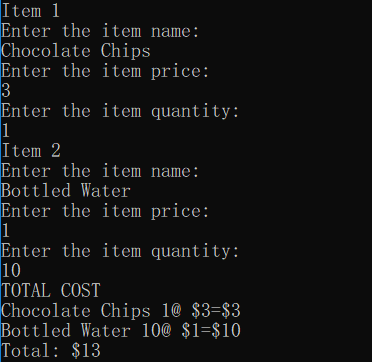
Ex:
Item 1
Enter the item name:
Chocolate Chips
Enter the item price:
3
Enter the item quantity:
1

Item 2
Enter the item name:
Bottled Water
Enter the item price:
1
Enter the item quantity:
10
(3) Add the costs of the two items together and output the total
cost. (2 pts)
Ex:
TOTAL COST
Chocolate Chips 1 @ $3 = $3
Bottled Water 10 @ $1 = $10

Total: $13
#include
using namespace std;
#include "ItemToPurchase.h"
int main() {
/* Type your code here */
return 0;
}
Homework Answers
/*Test program that prompts user to enter the name of the item,
item price and item quantity
and then find the total amount , display the results to console
window.*/
//ItemToPurchase.cpp
#include<iostream>
//include the header file ItemToPurchase.h
#include "ItemToPurchase.h"
using namespace std;
//start of main function
int main()
{
//declare variables
string itemName;
int itemPrice;
int itemQuantity;
const int count=2;
ItemToPurchase items[count];
/*Read name, price and quantity from user*/
for(int index=0;index<count;index++)
{
cout<<"Item
"<<(index+1)<<endl;
cout<<"Enter the item
name:"<<endl;
getline(cin,itemName);
cout<<"Enter the item
price:"<<endl;
cin>>itemPrice;
cout<<"Enter the item
quantity:"<<endl;
cin>>itemQuantity;
//clear the input buffer before
reading next input
fflush(stdin);
//create an object of item
items[index]=ItemToPurchase();
items[index].SetName(itemName);
items[index].SetPrice(itemPrice);
items[index].SetQuantity(itemQuantity);
}
int total=0;
int amount=0;
cout<<"TOTAL COST"<<endl;
for(int index=0;index<count;index++)
{
amount=items[index].GetQuantity()*items[index].GetPrice();
cout<<items[index].GetName()<<"
"<<items[index].GetQuantity()<<"@
$"<<items[index].GetPrice()
<<"=$"<<amount<<endl;
//add amount to total
variable
total=total+amount;
}
//prin total
cout<<"Total: $"<<total<<endl;
system("pause");
return 0;
}
------------------------------------------------------------------------------------------------------------------
//ItemToPurchase.h
#ifndef ITEM_PURCHASE_H
#define ITEM_PURCHASE_H
#include<iostream>
#include<string>
using namespace std;
class ItemToPurchase
{
private:
//instance variables
string itemName;
int itemPrice;
int itemQuantity;
//public methods
public:
ItemToPurchase();
//Setter methods
void SetName(string);
void SetPrice(int);
void SetQuantity(int);
//Getter methods
string GetName();
int GetPrice();
int GetQuantity();
}; //end of the class
#endif ITEM_PURCHASE_H
------------------------------------------------------------------------------------------------------------------
//ItemToPurchase.cpp
//Implemenation file for ItemToPurchase header
file
#include<iostream>
#include "ItemToPurchase.h"
using namespace std;
ItemToPurchase::ItemToPurchase()
{
itemName="none";
itemPrice=0;
itemQuantity=0;
}
//Setter methods
void ItemToPurchase::SetName(string name)
{
itemName=name;
}
void ItemToPurchase::SetPrice(int price)
{
itemPrice=price;
}
void ItemToPurchase::SetQuantity(int quantity)
{
itemQuantity=quantity;
}
//Getter methods
string ItemToPurchase::GetName()
{
return itemName;
}
int ItemToPurchase::GetPrice()
{
return itemPrice;
}
int ItemToPurchase::GetQuantity()
{
return itemQuantity;
}
------------------------------------------------------------------------------------------------------------------
Sample Output:
Add Answer to:
20.1 LAB*: Warm up: Online shopping cart (Part 1)
in C++ Please: The answers are already...
Warm up: Online shopping cart (Part 1)
8.6 LAB*: Warm up: Online shopping cart (Part 1)(1) Create two files to submit:ItemToPurchase.java - Class definitionShoppingCartPrinter.java - Contains main() methodBuild the ItemToPurchase class with the following specifications:Private fieldsString itemName - Initialized in default constructor to "none"int itemPrice - Initialized in default constructor to 0int itemQuantity - Initialized in default constructor to 0Default constructorPublic member methods (mutators & accessors)setName() & getName() (2 pts)setPrice() & getPrice() (2 pts)setQuantity() & getQuantity() (2 pts)(2) In main(), prompt the user for two items and create...
4.18 Ch 7 Program: Online shopping cart (continued) (C++) This program extends the earlier "Online shopping...
4.18 Ch 7 Program: Online shopping cart (continued) (C++) This program extends the earlier "Online shopping cart" program. (solution from previous lab assignment is provided in Canvas). (1) Extend the ItemToPurchase class per the following specifications: Parameterized constructor to assign item name, item description, item price, and item quantity (default values of 0). (1 pt) Public member functions SetDescription() mutator & GetDescription() accessor (2 pts) PrintItemCost() - Outputs the item name followed by the quantity, price, and subtotal PrintItemDescription() -...
Please use C Programming language (Not C++) 7.6 LAB*: Warm up: Online shopping cart (Part 1)...
 Please use C Programming language (Not C++)
7.6 LAB*: Warm up: Online shopping cart (Part 1) (1) Create three files to submit: • Item ToPurchase.h - Struct definition and related function declarations • Item ToPurchase.c-Related function definitions • main.c-main function Build the ItemToPurchase struct with the following specifications: • Data members (3 pts) • char itemName • int itemPrice • int itemQuantity • Related functions • MakeltemBlank0 (2 pts) Has a pointer to an item To Purchase parameter. Sets item's...
Please use C Programming language (Not C++)
7.6 LAB*: Warm up: Online shopping cart (Part 1) (1) Create three files to submit: • Item ToPurchase.h - Struct definition and related function declarations • Item ToPurchase.c-Related function definitions • main.c-main function Build the ItemToPurchase struct with the following specifications: • Data members (3 pts) • char itemName • int itemPrice • int itemQuantity • Related functions • MakeltemBlank0 (2 pts) Has a pointer to an item To Purchase parameter. Sets item's...
This program extends the earlier "Online shopping cart" program. (Consider first saving your earlier program).
Ch 7 Program: Online shopping cart (continued) (Java)This program extends the earlier "Online shopping cart" program. (Consider first saving your earlier program).(1) Extend the ItemToPurchase class per the following specifications:Private fieldsstring itemDescription - Initialized in default constructor to "none"Parameterized constructor to assign item name, item description, item price, and item quantity (default values of 0). (1 pt)Public member methodssetDescription() mutator & getDescription() accessor (2 pts)printItemCost() - Outputs the item name followed by the quantity, price, and subtotalprintItemDescription() - Outputs the...
11.11 LAB: Warm up: Online shopping cart (1) Build the ItemToPurchase class with the following specifications:...
11.11 LAB: Warm up: Online shopping cart (1) Build the ItemToPurchase class with the following specifications: Attributes (6 pts) item_name (string) item_price (float) item_quantity (int) Default constructor (2 pt) Initializes item's name = "none", item's price = 0, item's quantity = 0 Method print_item_cost() Ex. of print_item_cost() output: Bottled Water 10 @ $1 = $10 (2) In the main section of your code, prompt the user for two items and create two objects of the ItemToPurchase class. (4 pts) Ex:...
I need help with this assignment, can someone HELP ? This is the assignment: Online shopping...
I need help with this assignment, can someone HELP ? This is the assignment: Online shopping cart (continued) (C++) This program extends the earlier "Online shopping cart" program. (Consider first saving your earlier program). (1) Extend the ItemToPurchase class per the following specifications: Parameterized constructor to assign item name, item description, item price, and item quantity (default values of 0). (1 pt) Public member functions SetDescription() mutator & GetDescription() accessor (2 pts) PrintItemCost() - Outputs the item name followed by...
Need three seperate files. ShoppingCartManager.java ShoppingCart.java ItemsToPurchase.java These are from part 1 what do you mean...
 Need three seperate files. ShoppingCartManager.java
ShoppingCart.java
ItemsToPurchase.java
These are from part 1
what do you mean by deep study
7.25 LAB*: Program: Online shopping cart (Part 2) Note: Creating multiple Scanner objects for the same input stream yields unexpected behavior. Thus, good practice is to use a single Scanner object for reading input from System.in. That Scanner object can be passed as an argument to any methods that read input This program extends the earlier Online shopping cart program (Consider...
Need three seperate files. ShoppingCartManager.java
ShoppingCart.java
ItemsToPurchase.java
These are from part 1
what do you mean by deep study
7.25 LAB*: Program: Online shopping cart (Part 2) Note: Creating multiple Scanner objects for the same input stream yields unexpected behavior. Thus, good practice is to use a single Scanner object for reading input from System.in. That Scanner object can be passed as an argument to any methods that read input This program extends the earlier Online shopping cart program (Consider...
CODES: main.cpp #include <iostream> #include <string> #include "ShoppingCart.h" using namespace std; char PrintMenu() { char answer;...
CODES: main.cpp #include <iostream> #include <string> #include "ShoppingCart.h" using namespace std; char PrintMenu() { char answer; cout << "MENU" << endl; cout << "a - Add item to cart" << endl; cout << "d - Remove item from cart" << endl; cout << "c - Change item quantity" << endl; cout << "i - Output items' descriptions" << endl; cout << "o - Output shopping cart" << endl; cout << "q - Quit" << endl << endl; while (true) {...
I need a shoppingcartmanager.java that contains a main method for this code in java Itemtopurchase.java public...
I need a shoppingcartmanager.java that contains a main method for this code in java Itemtopurchase.java public class ItemToPurchase { // instance variables private String itemName; private String itemDescription; private int itemPrice; private int itemQuantity; // default constructor public ItemToPurchase() { this.itemName = "none"; this.itemDescription = "none"; this.itemPrice = 0; this.itemQuantity = 0; } public ItemToPurchase(String itemName, int itemPrice, int itemQuantity,String itemDescription) { ...
8.7 LAB*: Program: Online shopping cart (Part 2)
8.7 LAB*: Program: Online shopping cart (Part 2)Note: Creating multiple Scanner objects for the same input stream yields unexpected behavior. Thus, good practice is to use a single Scanner object for reading input from System.in. That Scanner object can be passed as an argument to any methods that read input.This program extends the earlier "Online shopping cart" program. (Consider first saving your earlier program).(1) Extend the ItemToPurchase class per the following specifications:Private fieldsstring itemDescription - Initialized in default constructor to "none"Parameterized...
 Please use C Programming language (Not C++)
7.6 LAB*: Warm up: Online shopping cart (Part 1) (1) Create three files to submit: • Item ToPurchase.h - Struct definition and related function declarations • Item ToPurchase.c-Related function definitions • main.c-main function Build the ItemToPurchase struct with the following specifications: • Data members (3 pts) • char itemName • int itemPrice • int itemQuantity • Related functions • MakeltemBlank0 (2 pts) Has a pointer to an item To Purchase parameter. Sets item's...
Please use C Programming language (Not C++)
7.6 LAB*: Warm up: Online shopping cart (Part 1) (1) Create three files to submit: • Item ToPurchase.h - Struct definition and related function declarations • Item ToPurchase.c-Related function definitions • main.c-main function Build the ItemToPurchase struct with the following specifications: • Data members (3 pts) • char itemName • int itemPrice • int itemQuantity • Related functions • MakeltemBlank0 (2 pts) Has a pointer to an item To Purchase parameter. Sets item's...
 Need three seperate files. ShoppingCartManager.java
ShoppingCart.java
ItemsToPurchase.java
These are from part 1
what do you mean by deep study
7.25 LAB*: Program: Online shopping cart (Part 2) Note: Creating multiple Scanner objects for the same input stream yields unexpected behavior. Thus, good practice is to use a single Scanner object for reading input from System.in. That Scanner object can be passed as an argument to any methods that read input This program extends the earlier Online shopping cart program (Consider...
Need three seperate files. ShoppingCartManager.java
ShoppingCart.java
ItemsToPurchase.java
These are from part 1
what do you mean by deep study
7.25 LAB*: Program: Online shopping cart (Part 2) Note: Creating multiple Scanner objects for the same input stream yields unexpected behavior. Thus, good practice is to use a single Scanner object for reading input from System.in. That Scanner object can be passed as an argument to any methods that read input This program extends the earlier Online shopping cart program (Consider...
Most questions answered within 3 hours.
-
Where is the error in this code sequence?
String s1 = "Hello";
String s2 = "ello";...
asked 11 months ago -
Financial data for Joel de Paris, Inc., for last year
follow:
Joel de Paris, Inc.
Balance...
asked 11 months ago -
Consider this reaction:
Al2(SO4)3 (aq)+ BaCl3
(aq) Al2Cl6 (aq)- +
3BaSO4(s) . What is the...
asked 11 months ago -
Suppose that Savneet is considering increasing her
recent random sample from 20 car rentals to 40...
asked 11 months ago -
Trucks arrive at an unloading terminal at an average rate of 120
per hour.
Trucks arrive...
asked 11 months ago -
Why are methanol and ethanol completely soluble in water while
octanol is not very little soluble....
asked 11 months ago -
A facilities manager at a university reads in a research report
that the mean amount of...
asked 11 months ago -
When the CuSO4 is rehydrated by adding water to the anhydrous
compound, is this an endothermic...
asked 11 months ago -
A ray of sunlight is passing from diamond into crown glass; the
angle of incidence is...
asked 11 months ago -
A block of mass 0.249 kg is placed on top of a light, vertical
spring of...
asked 11 months ago -
how do the kidneys compensate in the presences of acidosis
a) trigger hyperventilate
b) reserve acid...
asked 11 months ago -
Question 501 pts
The rental rate of capital to the firm increases. Which of the
following...
asked 11 months ago