You've been hired by Rugged Robots to complete a C++ console application that controls a robotic...
You've been hired by Rugged Robots to complete a C++ console application that controls a robotic floor vacuum. Wayne State software engineers have already developed the following three files: File Description Lab20-01-Key.cpp This is the user application. RuggedRobotLibrary.h This is the library header file. It contains constant declarations and function prototypes. It is included by the other two files. RuggedRobotLibrary.cpp This is the library file. It contains functions that may be used in any user application. This is considered an application programmer interface (API). Download these three files into the same folder. Then create or update a development tool project that includes all three files. All coding is complete except for moving the robot. This is accomplished by calling function moveRobot which has the following prototype: void moveRobot(char floor[ROW_SIZE][COL_SIZE], int stats[], char move); Where: ● The floor is represented as a two-dimensional array using the following characters: Character Meaning R The current location of the robot. x A dirty portion of the floor (it needs vacuuming!). . A clean portion of floor. Here is a sample 2x3 floor: . R x x x x ● A one-dimensional array is used to store robot statistics including: Current robot row Current robot column Current number of total robot moves Current number of "good" robot moves – robot moved to a dirty spot. Current number of "okay" robot moves – robot moved to a clean spot. Current number of "bad" robot moves – robot tried to move off the floor. Current game score – percentage calculated using formula: (good moves – bad moves) / total moves * 100 ● A move is in one of four directions from your perspective (not from the robot's perspective) including: UP RIGHT DOWN LEFT An attempt is made to move the robot one spot in the direction you specify. There are only four possible calls to moveRobot: moveRobot(floor, stats, UP); moveRobot(floor, stats, RIGHT); moveRobot(floor, stats, DOWN); moveRobot(floor, stats, LEFT); Here is a sample call to function moveRobot to move the robot one spot to the right: moveRobot(floor, stats, RIGHT); moveRobot first checks if the move is possible and then moves the robot one spot to the right. After each move attempt, moveRobot shows the current floor and statistics: Move 1 from [0, 0] RIGHT: GOOD . R x x x x x x x x x x x x x Robot stats: moves - 1, good - 1, okay - 0, bad - 0, score - 100%: Code the following two scenarios. Before you code each scenario, edit the following global constants in file RuggedRobotLibrary.h to control the size of the floor: ROW_SIZE COL_SIZE If you run the application and it stops prematurely, you may have 3x3 floor scenario Insert a code snippet at the appropriate spot in function main (file Lab20-01-Key.cpp, line 45). The code snippet includes calls to moveRobot to clean a 3x3 floor. Try to use a minimum number of calls (three is possible) and try to get a final score of 100%. [just your code snippet here]* If possible, format your code like this: Font “Courier New” Font size “9”s Bold [your program output here]** 5x4 floor scenario Insert a code snippet at the appropriate spot in function main (file Lab20-01-Key.cpp, line 45). The code snippet includes calls to moveRobot to clean a 5x4 floor. Try to use a minimum number of calls (three is possible) and try to get a final score of 100%. Here are the three files: 1. Lab20-01-Key.cpp //========================================================== // // Title: // Course: CSC 1101 // Lab Number: // Author: // Date: // Description: // // //========================================================== #include // For several general-purpose functions #include // For file handling #include // For formatted output #include // For cin, cout, and system #include // For string data type #include "RuggedRobotLibrary.h" // For programmer-defined library using namespace std; // So "std::cout" may be abbreviated to "cout" //========================================================== // main //========================================================== int main() { // Declare variables char floor[ROW_SIZE][COL_SIZE]; int stats[STATS_SIZE]; // Show application header cout << "Welcome to Rugged Robots" << endl; cout << "------------------------" << endl << endl; // Set real-number formatting cout << fixed << setprecision(0); // Initialize game printFloorKey(); initFloor(floor); initStats(stats); printFloor(floor, stats); // Robot moves // your code snippet here ... // Show application close cout << "\nEnd of Rugged Robots" << endl; } 2. RuggedRobotLibrary.h //========================================================== // // Title: Rugged Robots Library Header // Description: // This C++ header file is paired with file // RuggedRobotsLibrary.cpp, and may be included in any C++ // application. // //========================================================== #ifndef PROGRAMMER_LIBRARY_H #define PROGRAMMER_LIBRARY_H #include // For several general-purpose functions #include // For file handling #include // For formatted output #include // For cin, cout, and system #include // For string data type using namespace std; // So "std::cout" may be abbreviated to "cout" //========================================================== // Global constants //========================================================== // Edit these constants to control the game const int ROW_SIZE = 2; const int COL_SIZE = 2; const bool PRINT_AFTER_MOVE = true; // No need to edit the following constants const char ROBOT = 'R'; const char DIRTY = 'x'; const char CLEAN = '.'; const char UP = 'U'; const char RIGHT = 'R'; const char DOWN = 'D'; const char LEFT = 'L'; const int STATS_SIZE = 7; const int ROBOT_ROW = 0; const int ROBOT_COLUMN = 1; const int MOVES = 2; const int GOOD_MOVE = 3; const int OKAY_MOVE = 4; const int BAD_MOVE = 5; const int SCORE = 6; //========================================================== // Function prototypes //========================================================== double currentScore(int stats[]); void initFloor(char floor[ROW_SIZE][COL_SIZE]); void initStats(int stats[]); void moveRobot(char floor[ROW_SIZE][COL_SIZE], int stats[], char move); void printFloor(char floor[ROW_SIZE][COL_SIZE], int stats[]); void printFloorKey(); void printStats(int stats[]); void updateRobot(char floor[ROW_SIZE][COL_SIZE], int stats[], int stat, int row, int col, int newRow, int newCol); #endif PROGRAMMER_LIBRARY_H 3. RuggedRobotLibrary.cpp //========================================================== // // Title: Rugged Robots Library // Description: // This C++ library contains functions to control robots. // //========================================================== #include // For several general-purpose functions #include // For file handling #include // For formatted output #include // For cin, cout, and system #include // For string data type #include "RuggedRobotLibrary.h" // For programmer-defined library using namespace std; //========================================================== // currentScore //========================================================== double currentScore(int stats[]) { if (stats[MOVES] == 0) return 0; else return (stats[GOOD_MOVE] - stats[BAD_MOVE]) / (double) stats[MOVES] * 100; } //========================================================== // initFloor //========================================================== void initFloor(char floor[ROW_SIZE][COL_SIZE]) { for (int i = 0; i < ROW_SIZE; i++) for (int j = 0; j < COL_SIZE; j++) if (i == 0 && j == 0) floor[i][j] = ROBOT; else floor[i][j] = DIRTY; } //========================================================== // initStats //========================================================== void initStats(int stats[]) { for (int i = 0; i < STATS_SIZE; i++) stats[i] = 0; } //========================================================== // moveRobot //========================================================== void moveRobot(char floor[ROW_SIZE][COL_SIZE], int stats[], char move) { // Declare variables int row = stats[ROBOT_ROW];| int col = stats[ROBOT_COLUMN]; // Show move stats[MOVES] = stats[MOVES] + 1; cout << "\nMove " << stats[MOVES] << " from [" << row << ", " << col << "] "; // Process move switch (move) { case UP: cout << "UP: "; if (row == 0) updateRobot(floor, stats, BAD_MOVE, row, col, row, col); else if (floor[row - 1][col] == CLEAN) updateRobot(floor, stats, OKAY_MOVE, row, col, row - 1, col); else updateRobot(floor, stats, GOOD_MOVE, row, col, row - 1, col); break; case RIGHT: cout << "RIGHT: "; if (col == COL_SIZE) updateRobot(floor, stats, BAD_MOVE, row, col, row, col); else if (floor[row][col + 1] == CLEAN) updateRobot(floor, stats, OKAY_MOVE, row, col, row, col + 1); else updateRobot(floor, stats, GOOD_MOVE, row, col, row, col + 1); break; case DOWN: cout << "DOWN: "; if (row == ROW_SIZE) updateRobot(floor, stats, BAD_MOVE, row, col, row, col); else if (floor[row + 1][col] == CLEAN) updateRobot(floor, stats, OKAY_MOVE, row, col, row + 1, col); else updateRobot(floor, stats, GOOD_MOVE, row, col, row + 1, col); break; case LEFT: cout << "LEFT: "; if (col == 0) updateRobot(floor, stats, BAD_MOVE, row, col, row, col); else if (floor[row][col - 1] == CLEAN) updateRobot(floor, stats, OKAY_MOVE, row, col, row, col - 1); else updateRobot(floor, stats, GOOD_MOVE, row, col, row, col - 1); break; default: cout << "(In moveRobot) '" << move << "' is an unknown move." << endl; } } //========================================================== // printFloor //========================================================== void printFloor(char floor[ROW_SIZE][COL_SIZE], int stats[]) { for (int i = 0; i < ROW_SIZE; i++) { for (int j = 0; j < COL_SIZE; j++) cout << " " << floor[i][j] << " "; cout << endl; } printStats(stats); } //========================================================== // printFloorKey //========================================================== void printFloorKey() { cout << "Floor key" << endl; cout << ROBOT << " - robot" << endl; cout << DIRTY << " - dirty part of floor" << endl; cout << CLEAN << " - clean part of floor" << endl << endl; } //========================================================== // printStats //========================================================== void printStats(int stats[]) { cout << "\nRobot stats: " << "moves - " << stats[MOVES] << ", good - " << stats[GOOD_MOVE] << ", okay - " << stats[OKAY_MOVE] << ", bad - " << stats[BAD_MOVE] << ", score - " << currentScore(stats) << "%" << endl; cout << "\n-------------------------------------" << endl; } //========================================================== // updateRobot //========================================================== void updateRobot(char floor[ROW_SIZE][COL_SIZE], int stats[], int stat, int row, int col, int newRow, int newCol) { stats[stat] = stats[stat] + 1; if (stat == BAD_MOVE) cout << "BAD" << endl << endl; else { floor[row][col] = CLEAN; floor[newRow][newCol] = ROBOT; stats[ROBOT_ROW] = newRow; stats[ROBOT_COLUMN] = newCol; if (stat == OKAY_MOVE) cout << "OKAY" << endl << endl; else cout << "GOOD" << endl << endl; } if (PRINT_AFTER_MOVE) printFloor(floor, stats); }
Homework Answers
The question is about making 3 function calls in each scenario to the code provided.

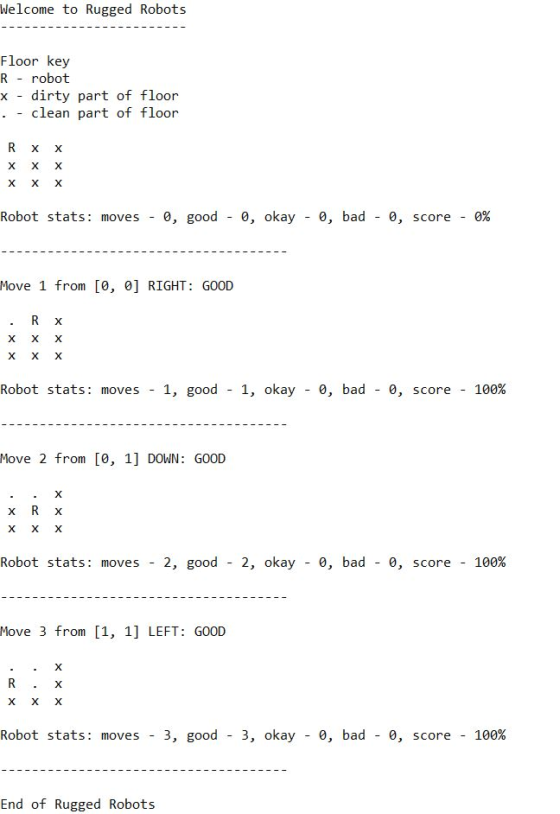
3x3 floor scenario
moveRobot(floor, stats, 'R');
moveRobot(floor, stats, 'D');
moveRobot(floor, stats, 'L');
3x3 Output
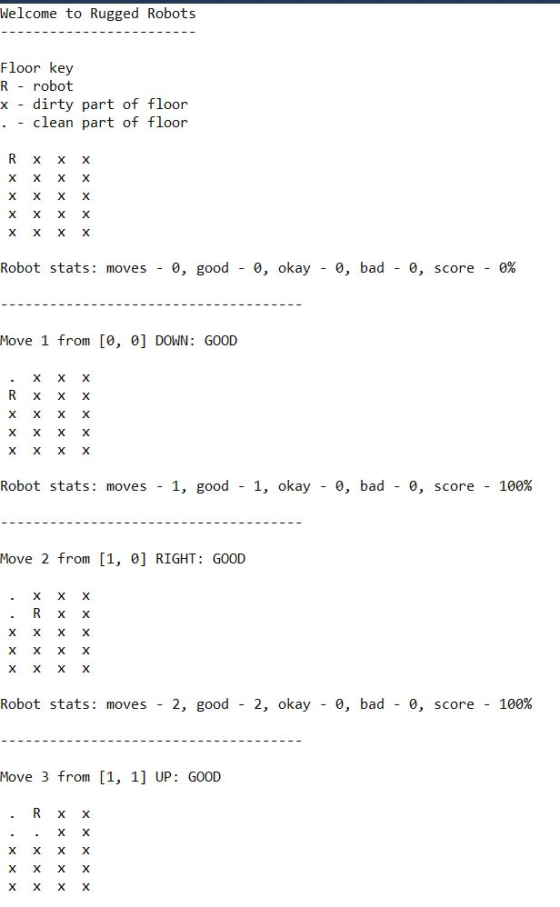
5x4 floor scenario
moveRobot(floor, stats, 'D');
moveRobot(floor, stats, 'R');
moveRobot(floor, stats, 'U');
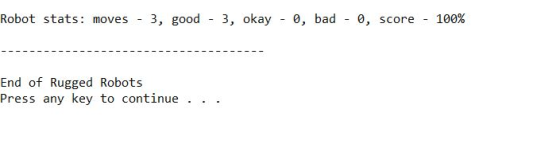
5x4 floor scenario output
Add Answer to:
You've been hired by Rugged Robots to complete a C++ console
application that controls a robotic...
This program is in C++ which reserves flight seats. It uses a file imported to get...
This program is in C++ which reserves flight seats. It uses a file imported to get the seat chart called "chartIn.txt" which looks like this 1 A B C D E F 2 A B C D E F It continues until row 10. Sorry unable to provide the chartIn.txt file. I am having issues with function displaySeats, it displays then but when it comes to 10 the row looks like this 1 0 A B C D E ,...
Program is in C++, program is called airplane reservation. It is suppose to display a screen...
Program is in C++, program is called airplane reservation. It is suppose to display a screen of seating chart in the format 1 A B C D E F through 10. I had a hard time giving the seats a letter value. It displays a correct screen but when I reserve a new seat the string seats[][] doesn't update to having a X for that seat. Also there is a file for the struct called systemUser.txt it has 4 users...
how to randomly generate moves until the whole board is filled?. If the board size is...
how to randomly generate moves until the whole board is filled?. If the board size is c*r, you can only call the random function rand() c*r times (excluding the random function rand() that have been used in the provided code). Below is the code I need to convert. It is manual right now (user inputs numbers until whole board filled). I also have a piece of algorithmn below..but am unsure of how I can use it in the code: //Algorithm...
Similar to the Yahtzee project you completed earlier, in order to really understand the artificial intelligence...
Similar to the Yahtzee project you completed earlier, in order to really understand the artificial intelligence and how to improve it; you must first have a good grasp on the game, its concepts, and its rules. For your first assignment, download the linked file below. This is a .cpp file of the game Tic-Tac-Toe. Tic-Tac-Toe Unzip the file, and run the game. Play a few games and begin to analyze the artificial intelligence that is currently programmed. Then, review the...
Can somebody help me with this coding the program allow 2 players play tic Tac Toe....
Can somebody help me with this coding the program allow 2 players play tic Tac Toe. however, mine does not take a turn. after player 1 input the tow and column the program eliminated. I want this program run until find a winner. also can somebody add function 1 player vs computer mode as well? Thanks! >>>>>>>>>>>>>Main program >>>>>>>>>>>>>>>>>>>>>>> #include "myheader.h" int main() { const int NUM_ROWS = 3; const int NUM_COLS = 3; // Variables bool again; bool won;...
Write the following function: const int MIN_SIZE = 2; const int MAX_SIZE = 8; const int...
Write the following function: const int MIN_SIZE = 2; const int MAX_SIZE = 8; const int UNKNOWN = 0; const int RED = 1; const int BLUE = 2; const char UNKNOWN_LETTER = '-'; const char RED_LETTER = 'X'; const char BLUE_LETTER = 'O'; const string UNKNOWN_STRING = "unknown"; const string RED_STRING = "X"; const string BLUE_STRING = "O"; /** * Requires: size <= MAX_SIZE and size is a positive even integer, * 0 <= row && row < size....
In C++ please! *Do not use any other library functions(like strlen) than the one posted(<cstddef>) in the code below!* /** CS 150 C-Strings Follow the instructions on your handout to complete t...
 In C++ please!
*Do not use any other library functions(like strlen) than the
one posted(<cstddef>) in the code below!*
/**
CS 150 C-Strings
Follow the instructions on your handout to complete the
requested function. You may not use ANY library functions
or include any headers, except for <cstddef> for
size_t.
*/
#include <cstddef> // size_t for sizes and indexes
///////////////// WRITE YOUR FUNCTION BELOW THIS LINE
///////////////////////
///////////////// WRITE YOUR FUNCTION ABOVE THIS LINE
///////////////////////
// These are OK after...
In C++ please!
*Do not use any other library functions(like strlen) than the
one posted(<cstddef>) in the code below!*
/**
CS 150 C-Strings
Follow the instructions on your handout to complete the
requested function. You may not use ANY library functions
or include any headers, except for <cstddef> for
size_t.
*/
#include <cstddef> // size_t for sizes and indexes
///////////////// WRITE YOUR FUNCTION BELOW THIS LINE
///////////////////////
///////////////// WRITE YOUR FUNCTION ABOVE THIS LINE
///////////////////////
// These are OK after...
This is an advanced version of the game tic tac toe, where the player has to...
This is an advanced version of the game tic tac toe, where the player has to get five in a row to win. The board is a 30 x 20. Add three more functions that will check for a win vertically, diagonally, and backwards diagonally. Add an AI that will play against the player, with random moves. Bound check each move to make sure it is in the array. Use this starter code to complete the assignment in C++. Write...
Hello, I am trying to write this program and have received a "Segmentation Fault" error but...
Hello, I am trying to write this program and have received a "Segmentation Fault" error but cannot seem to figure out where. I haven't been able to find it and have been looking for quite a while. The goal is to basically create a version of Conway's Game of Life. I am able to generate a table if the input values for rows and columns are equal, but if they are not I receive a segmentation fault and cannot continue...
Please help!! I am supposed to write a program in C++ about student & grades. Needs...
Please help!! I am supposed to write a program in C++ about student & grades. Needs to have two functions that sorts students letter grade, and another one to sort Students name in your student’s record project. Remember, to add necessary parameters and declaration in main to call each function properly. Order of functions call are as follow Read Data Find Total Find average Find letter grade Call display function Call sort letter grade function Call display function Call sort...
 In C++ please!
*Do not use any other library functions(like strlen) than the
one posted(<cstddef>) in the code below!*
/**
CS 150 C-Strings
Follow the instructions on your handout to complete the
requested function. You may not use ANY library functions
or include any headers, except for <cstddef> for
size_t.
*/
#include <cstddef> // size_t for sizes and indexes
///////////////// WRITE YOUR FUNCTION BELOW THIS LINE
///////////////////////
///////////////// WRITE YOUR FUNCTION ABOVE THIS LINE
///////////////////////
// These are OK after...
In C++ please!
*Do not use any other library functions(like strlen) than the
one posted(<cstddef>) in the code below!*
/**
CS 150 C-Strings
Follow the instructions on your handout to complete the
requested function. You may not use ANY library functions
or include any headers, except for <cstddef> for
size_t.
*/
#include <cstddef> // size_t for sizes and indexes
///////////////// WRITE YOUR FUNCTION BELOW THIS LINE
///////////////////////
///////////////// WRITE YOUR FUNCTION ABOVE THIS LINE
///////////////////////
// These are OK after...
Most questions answered within 3 hours.
-
Where is the error in this code sequence?
String s1 = "Hello";
String s2 = "ello";...
asked 11 months ago -
Financial data for Joel de Paris, Inc., for last year
follow:
Joel de Paris, Inc.
Balance...
asked 11 months ago -
Consider this reaction:
Al2(SO4)3 (aq)+ BaCl3
(aq) Al2Cl6 (aq)- +
3BaSO4(s) . What is the...
asked 11 months ago -
Suppose that Savneet is considering increasing her
recent random sample from 20 car rentals to 40...
asked 11 months ago -
Trucks arrive at an unloading terminal at an average rate of 120
per hour.
Trucks arrive...
asked 11 months ago -
Why are methanol and ethanol completely soluble in water while
octanol is not very little soluble....
asked 11 months ago -
A facilities manager at a university reads in a research report
that the mean amount of...
asked 11 months ago -
When the CuSO4 is rehydrated by adding water to the anhydrous
compound, is this an endothermic...
asked 11 months ago -
A ray of sunlight is passing from diamond into crown glass; the
angle of incidence is...
asked 11 months ago -
A block of mass 0.249 kg is placed on top of a light, vertical
spring of...
asked 11 months ago -
how do the kidneys compensate in the presences of acidosis
a) trigger hyperventilate
b) reserve acid...
asked 11 months ago -
Question 501 pts
The rental rate of capital to the firm increases. Which of the
following...
asked 11 months ago