Language Java Step 1: Design a class called Student. The Student class should contain the following...
Language Java
Step 1:
Design a class called Student.
The Student class should contain the following data:
firstName
lastName
studentID
totalCredits
gpa
Your class should implement the “sets” and “gets” for the class. Include methods: equals, compareTo, toString. Change the toString method (from class) to put each member variable on a new line.
Step 2:
Write a driver program to test that Student works correctly. Test
is with 3 students as given in class.
Step 3:
Write a “registration” program that will store up to students (for
now) in an array roster of Student objects.
After the user has entered the information for the 5 students, use
the InsertionSort code written in class, and posted on Blackboard,
to sort the array roster.
Step 4:
Write a method called storeRosterthat will save the data
in the array roster to a text file Roster1.txt.
Step 5:
Write a method called loadRoster that will read the data
in Roster1.txt into an array roster. (Note: this data will
already be sorted!)
Step 6:
Add a “menu” to your main that will let the user:
loadRoster
add and delete students,
keeping the names sorted
storeRoster
Note: We would normally store the names into the same text file
at the end, but to make sure all the changes worked, please make a
second text file, Roster2.txt to save the data.
Step 7:
Extend the Student class to include an ArrayList of course numbers,
example CUS1116, Math 1021, etc.
What I have so far:
public class Student implements Comparable {

    private String firstName;
    private String lastName;
    private String studentId;
    private int totalCredits;
    private double gpa;

   public Student() {
        this.firstName = "";
        this.lastName = "";
        this.studentId = "";
        this.totalCredits = 0;
        this.gpa = 0;
    }

    public Student(String firstName, String lastName, String studentId, int totalCredits, double gpa) {
        this.firstName = firstName;
        this.lastName = lastName;
        this.studentId = studentId;
        this.totalCredits = totalCredits;
        this.gpa = gpa;
    }

    public String getFirstName() {
        return firstName;
    }

    public void setFirstName(String firstName) {
        this.firstName = firstName;
    }

    public String getLastName() {
        return lastName;
    }

    public void setLastName(String lastName) {
        this.lastName = lastName;
    }

   public String getStudentId() {
        return studentId;
    }

    public void setStudentId(String studentId) {
        this.studentId = studentId;
    }

    public int getTotalCredits() {
        return totalCredits;
    }

    public void setTotalCredits(int totalCredits) {
        this.totalCredits = totalCredits;
    }

    public double getGpa() {
        return gpa;
    }

    public void setGpa(double gpa) {
        this.gpa = gpa;
    }

    @Override
    public boolean equals(Object o) {
       if (o == null || !(o instanceof Student)) return false;
        Student aStudent = (Student) o;
        return aStudent.getFirstName().equals(getFirstName()) &&
                aStudent.getLastName().equals(getLastName()) &&
                aStudent.getStudentId().equals(getStudentId());
    }


    @Override
    public String toString() {
        return
                "First name: " + firstName +
                        "\nLast Name: " + lastName +
                        "\nStudent Id: " + studentId +
                        "\nTotal credits: " + totalCredits +
                        "\ngpa:" + gpa;

    }

    @Override
    public int compareTo(Student student) {
        if (getFirstName().compareTo(student.getFirstName()) == 0) {
            if (getLastName().compareTo(student.getLastName()) == 0) {
                return getStudentId().compareTo(student.getStudentId());

            } else {
                return getLastName().compareTo(student.getLastName());
            }
        } else {
            return getFirstName().compareTo(student.getFirstName());
        }
    }
}

===========================================================================

import java.io.File;

import java.io.FileNotFoundException;

import java.io.FileWriter;

import java.io.IOException;

import java.util.Arrays;

import java.util.Scanner;


public class Registration {


    public static void main(String[] args) {


        // Below code is for Step 2

        Student students[] = new Student[3];

        students[0] = new Student("John", "Doe", "123-45", 40, 4.6);

        students[1] = new Student("John", "Smith", "124-45", 50, 4.7);

        students[2] = new Student("Alan", "Donald", "127-65", 30, 2.7);


        // printing the students

        for (Student student : students) {

            System.out.println(student);

        }


        Arrays.sort(students);

        //insertionSort(students);

        System.out.println("====================");

        System.out.println("Sorting the students");

        System.out.println("====================");


        // printing the students again

        for (Student student : students) {

            System.out.println(student);

        }


        // Step 3


        Student fiveStudents[] = {new Student(), new Student(), new Student(), new Student(), new Student()};

        Scanner scanner = new Scanner(System.in);

        for (int i = 0; i < fiveStudents.length; i++) {

            System.out.println("Student " + (i + 1));

            System.out.print("Enter First Name: ");

            fiveStudents[i].setFirstName(scanner.nextLine());

            System.out.print("Enter Last Name: ");

            fiveStudents[i].setLastName(scanner.nextLine());

            System.out.print("Enter Student ID: ");

            fiveStudents[i].setStudentId(scanner.nextLine());

            System.out.print("Enter total credits (whole number) : ");

            fiveStudents[i].setTotalCredits(scanner.nextInt());

            System.out.print("Enter GPA score: ");

            fiveStudents[i].setGpa(scanner.nextDouble());

            scanner.nextLine();

        }


        insertionSort(fiveStudents);


        // printing the students entered by the user

        for (Student student : fiveStudents) {

            System.out.println(student);

        }


        storeRoster(fiveStudents);

        loadRoster();


    }


    // Step 5

    public static Student[] loadRoster() {


        Student students[] = new Student[5];

        int index = 0;

        String fileName = "Roster1.txt";

        try {

            Scanner fileReader = new Scanner(new File(fileName));

            while (fileReader.hasNextLine()) {

                String tokens[] = fileReader.nextLine().split("\\s+");

                if (tokens.length == 5) {


                    int credits = Integer.parseInt(tokens[3]);

                    double gpa = Double.parseDouble(tokens[4]);


                    students[index++] = new Student(tokens[0], tokens[1], tokens[2], credits, gpa);

                }

            }

        } catch (FileNotFoundException e) {

            System.out.println("Error: Unable to read/open file: " + fileName);

        }


        // printing the students after reading from the file

        System.out.println("=================================================");

        System.out.println("printing the students after reading from the file");

        System.out.println("=================================================");

        for (Student student : students) {

            System.out.println(student);

        }

        return students;

    }


    // Part Step 4

    public static void storeRoster(Student[] students) {

        String fileName = "Roster1.txt";

        try {

            FileWriter writer = new FileWriter(new File(fileName));

            for (Student student : students) {

                writer.write(student.getFirstName() + " ");

                writer.write(student.getLastName() + " ");

                writer.write(student.getStudentId() + " ");

                writer.write(student.getTotalCredits() + " ");

                writer.write(student.getGpa() + "\r\n");

                writer.flush();

            }

            writer.close();

            System.out.println(fileName + " updated successfully");

        } catch (IOException e) {

            System.out.println("Error: Unable to write/open file: " + fileName);

        }

    }


    public static void insertionSort(Student[] students) {


        int n = students.length;

        for (int i = 1; i < n; i++) {

            Student key = students[i];

            int j = i - 1;

            while (j >= 0 && students[j].compareTo(key) > 0) {

                students[j + 1] = students[j];

                j = j - 1;

            }

            students[j + 1] = key;

        }

    }

}
==========================================================================Homework Answers
Student.java
import java.util.ArrayList;
public class Student {
private String firstName, lastName, studentId;
private int totalCredits;
private ArrayList<String> courseNumbers;
private double gpa;
public Student()
{
this.firstName = this.lastName = this.studentId = "";
this.courseNumbers = new ArrayList<>();
this.totalCredits = 0;
this.gpa = 0.0;
}
public Student(String firstName, String lastName, String
studentId, int totalCredits,
ArrayList<String> courseNumbers, double gpa) {
this.firstName = firstName;
this.lastName = lastName;
this.studentId = studentId;
this.totalCredits = totalCredits;
this.courseNumbers = courseNumbers;
this.gpa = gpa;
}
public String getFirstName() {
return firstName;
}
public String getLastName() {
return lastName;
}
public String getStudentId() {
return studentId;
}
public int getTotalCredits() {
return totalCredits;
}
public ArrayList<String> getCourseNumbers() {
return courseNumbers;
}
public double getGpa() {
return gpa;
}
@Override
public String toString()
{
String res = "Student Id: " + this.studentId + "\n"
+ "Name: " + this.firstName + " " + this.lastName + "\n"
+ "Courses: ";
for(String c : this.courseNumbers)
{
res += c + "\n";
}
res += "Total Credits: " + this.totalCredits + "\n"
+ "GPA: " + String.format("%.2f", this.gpa);
return res;
}
}
Registration.java
import java.io.File;
import java.io.FileNotFoundException;
import java.io.FileWriter;
import java.io.IOException;
import java.io.PrintWriter;
import java.util.ArrayList;
import java.util.Scanner;
public class Registration {
private ArrayList<Student> students;
public Registration()
{
this.students = new ArrayList<>();
}
public void loadRoster(String filename)
{
Scanner fileReader;
int count = 0;
try
{
fileReader = new Scanner(new File(filename));
while(fileReader.hasNextLine())
{
String line = fileReader.nextLine().trim();
String[] data = line.split(",");
String firstName = data[0];
String lastName = data[1];
String studentId = data[2];
int totalCredits = Integer.parseInt(data[3]);
String[] courseData = data[4].split(";");
ArrayList<String> courses = new ArrayList<>();
for(String c : courseData)
{
courses.add(c);
}
double gpa = Double.parseDouble(data[5]);
this.students.add(new Student(firstName, lastName, studentId,
totalCredits, courses, gpa));
count++;
}
fileReader.close();
System.out.println("\n" + count + " student data were loaded
successfully!\n");
}catch(FileNotFoundException fnfe){
System.out.println(filename + " couldn't be found!");
System.exit(0);
}
}
public void addStudent()
{
Scanner sc = new Scanner(System.in);
System.out.print("\nEnter first name: ");
String fName = sc.nextLine().trim();
System.out.print("Enter last name: ");
String lName = sc.nextLine().trim();
System.out.print("Enter student Id: ");
String studId = sc.nextLine().trim();
System.out.print("Number of courses: ");
int nCourses = Integer.parseInt(sc.nextLine().trim());
ArrayList<String> courses = new ArrayList<>();
for(int i = 0; i < nCourses; i++)
{
System.out.print("Course #" + (i + 1) + ": ");
courses.add(sc.nextLine().trim());
}
System.out.print("Enter total credits: ");
int totalCredits = Integer.parseInt(sc.nextLine().trim());
System.out.print("Enter GPA: ");
double gpa = Double.parseDouble(sc.nextLine().trim());
this.students.add(new Student(fName, lName, studId, totalCredits,
courses, gpa));
System.out.println("\n" + fName + " " + lName + " was successfully
added to the roster.\n");
}
public void deleteStudent()
{
Scanner sc = new Scanner(System.in);
System.out.print("\nEnter the student Id to delete: ");
String studentId = sc.nextLine().trim();
// search for the student id
boolean found = false;
int index = -1;
for(int i = 0; i < this.students.size(); i++)
{
if(this.students.get(i).getStudentId().equalsIgnoreCase(studentId))
{
found = true;
index = i;
break;
}
}
if(!found)
System.out.println("\nNo student record with Id " + studentId + "
were found!\n");
else
{
String name = this.students.get(index).getFirstName() + " " +
this.students.get(index).getLastName();
this.students.remove(index);
System.out.println(name + " was successfully deleted from the
roster!\n");
}
}
public void sortRoster()
{
int len = this.students.size();
for(int i = 1; i < len; ++i)
{
Student key = this.students.get(i);
int j = i - 1;
while(j >= 0 && this.students.get(j).getGpa() >
key.getGpa())
{
this.students.set(j + 1, this.students.get(j));
j = j - 1;
}
this.students.set(j + 1, key);
}
System.out.println("\nRoster was successfully sorted by
GPA!");
viewRoster();
}
public void viewRoster()
{
if(this.students.isEmpty())
System.out.println("\nThe roaster is empty!\n");
else
{
System.out.println("\nROSTER:\n-------");
int count = 0;
System.out.printf("%-15s %-20s %-50s %-20s %-10s\n", "Student Id",
"Name", "Courses", "Total Credits", "GPA");
for(Student st : this.students)
{
String co = "";
++count;
for(int i = 0; i < st.getCourseNumbers().size(); i++)
{
if(i == st.getCourseNumbers().size() - 1)
co += st.getCourseNumbers().get(i);
else
co += st.getCourseNumbers().get(i) + ", ";
}
System.out.printf("%-15s %-20s %-50s %-20d %-10.2f\n",
st.getStudentId()
, st.getFirstName() + " " + st.getLastName(), co,
st.getTotalCredits(), st.getGpa());
}
System.out.println("Roster strength: " + count + "\n");
}
}
public void storeRoster(String filename)
{
FileWriter fw;
PrintWriter pw;
try {
fw = new FileWriter(new File(filename));
pw = new PrintWriter(fw);
for(Student st : this.students)
{
pw.write(st.getFirstName() + "," + st.getLastName() + "," +
st.getStudentId() + ","
+ st.getTotalCredits() + ",");
for(int i = 0; i < st.getCourseNumbers().size(); i++)
{
if(i == st.getCourseNumbers().size() - 1)
pw.write(st.getCourseNumbers().get(i) + ",");
else
pw.write(st.getCourseNumbers().get(i) + ";");
}
pw.write(String.format("%.2f", st.getGpa()) +
System.lineSeparator());
}
pw.flush();
fw.close();
pw.close();
System.out.println("\nRoster has been successfully written to " +
filename + ".\n");
} catch (IOException ex) {
System.out.println("\nError in writing roster to " + filename +
"!\n");
System.exit(0);
}
}
}
RegistrationMainApp.java (Main class)
import java.util.Scanner;
/*
IN THE INPUT FILE (Roster1.txt), the data fields must be separated
by comma(,)
AND for the Course Numbers, they should be separated by
semi-colon(;)
*/
public class RegistrationMainApp {
private static final String IN_FILE = "Roster1.txt";
private static final String OUT_FILE = "Roster2.txt";
public static void main(String[] args)
{
Scanner sc = new Scanner(System.in);
Registration reg = new Registration();
int choice;
do
{
displayMenu();
choice = Integer.parseInt(sc.nextLine().trim());
switch(choice)
{
case 1:
{
reg.loadRoster(IN_FILE);
break;
}
case 2:
{
reg.addStudent();
break;
}
case 3:
{
reg.deleteStudent();
break;
}
case 4:
{
reg.sortRoster();
break;
}
case 5:
{
reg.viewRoster();
break;
}
case 6:
{
reg.storeRoster(OUT_FILE);
break;
}
case 0:
{
System.out.println("\nThanks for visiting us.\nHave a nice day,
Goodbye!\n");
System.exit(0);
}
default:
System.out.println("\nInvalid selection.\n");
}
}while(choice != 0);
}
private static void displayMenu()
{
System.out.print("STUDENT REGISTRATION SYSTEM - Choose from
below:\n"
+ "1. Load Roster\n"
+ "2. Add Student\n"
+ "3. Delete Student\n"
+ "4. Sort Roster\n"
+ "5. View Roster\n"
+ "6. Store Roster to File\n"
+ "0. Exit\n"
+ "Your selection >> ");
}
}
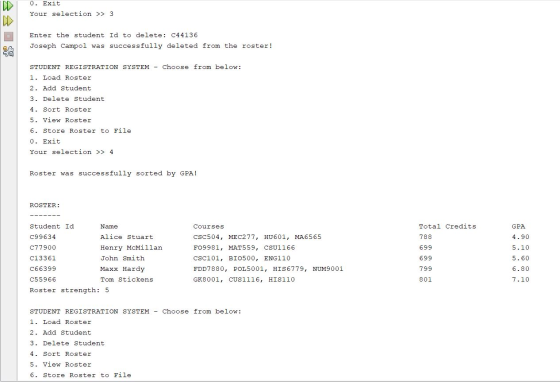
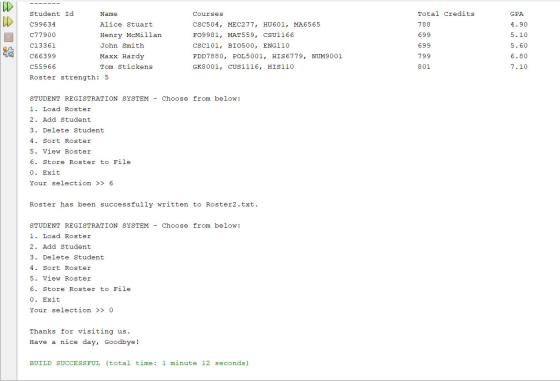
***************************************************************** SCREENSHOT **********************************************************
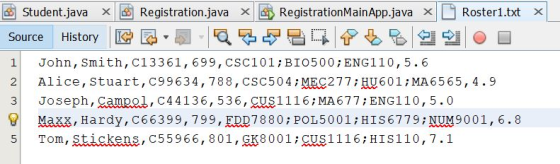
INPUT FILE (Roster1.txt)
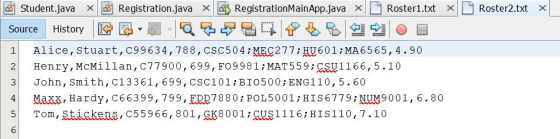
OUTPUT FILE (Roster2.txt)
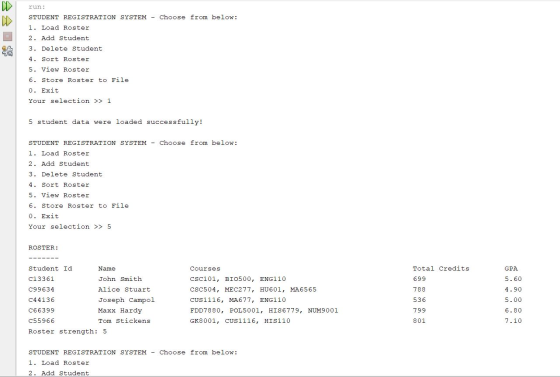
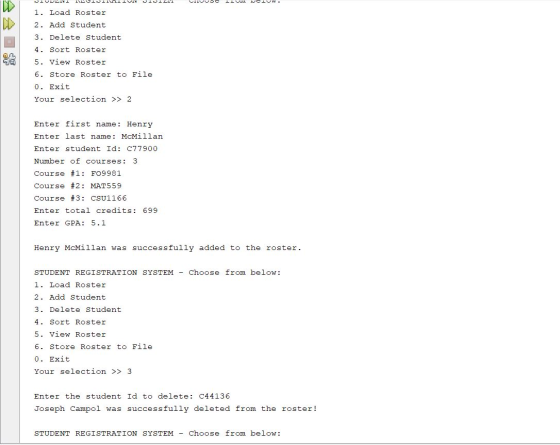
CONSOLE OUTPUT
Add Answer to:
Language Java
Step 1:
Design a class called Student.
The Student class should contain the following...
Registration Language Java Step 1: Design a class called Student. The Student class should contain the...
Registration Language Java Step 1: Design a class called Student. The Student class should contain the following data: firstName lastName studentID totalCredits gpa Your class should implement the “sets” and “gets” for the class. Include methods: equals, compareTo, toString. Change the toString method (from class) to put each member variable on a new line. Step 2: Write a driver program to test that Student works correctly. Test is with 3 students as given in class. Step 3: Write a “registration”...
FOR JAVA: Summary: Create a program that adds students to the class list (see below). The...
FOR JAVA: Summary: Create a program that adds students to the class list (see below). The solution should be named Roster402_v2.java. Allow the user to control the number of students added to the roster. Ask if the user would like to see their new roster to confirm additions. If yes, then display contents of the file, if no, end the program. ------------------------------------------------------------------------------------- List of student names and IDs for class (this will be your separate text file): Jones, Jim,45 Hicks,...
Hello, How can I make the program print out "Invalid data!!" and nothing else if the...
Hello, How can I make the program print out "Invalid data!!" and nothing else if the file has a grade that is not an A, B, C, D, E, or F or a percentage below zero? I need this done by tomorrow if possible please. The program should sort a file containing data about students like this for five columns: one for last name, one for first name, one for student ID, one for student grade percentage, one for student...
8.26 Encapsulate the Name class. Modify the existing code shown below to make its fields private,...
 8.26
Encapsulate the Name class. Modify the existing code shown below
to make its fields private, and add appropriate accessor methods to
the class named getFirstName, getMiddleInitial, and
getLastName.
code:
class Name {
private String firstName;
private String middleNames;
private String lastName;
//Constructor method
public Name(String firstName, String middleNames, String
lastName)
{
this.firstName = firstName;
this.middleNames = middleNames;
this.lastName = lastName;
}
//Accessor for firstName
public String getFirstName()
{
return firstName;
}
//Accessor for middleNames
public String getMiddlesNames()...
8.26
Encapsulate the Name class. Modify the existing code shown below
to make its fields private, and add appropriate accessor methods to
the class named getFirstName, getMiddleInitial, and
getLastName.
code:
class Name {
private String firstName;
private String middleNames;
private String lastName;
//Constructor method
public Name(String firstName, String middleNames, String
lastName)
{
this.firstName = firstName;
this.middleNames = middleNames;
this.lastName = lastName;
}
//Accessor for firstName
public String getFirstName()
{
return firstName;
}
//Accessor for middleNames
public String getMiddlesNames()...
JAVA PROGRAMMING In this final review lab from our intro course, use the Name class you...
JAVA PROGRAMMING In this final review lab from our intro course, use the Name class you created in the previous lab. In this lab, create a Student class with the following class variable: Student name: Name (Note: Name is a datatype) Student Id: String Create the getter and setter methods. In addition to these methods, create a toString() method, which overrides the object class toString() method. This override method prints the current value of any of this class object. Complete...
What is wrong with this Code? Fix the code errors to run correctly without error. There...
What is wrong with this Code? Fix the code errors to run correctly without error. There are four parts for one code, all are small code segments for one question. public class StudentTest { public static void main(String[] args){ // Part Time Student Test Student ft1 = new PartTimeStudent("George", "Bush", "123-12-5678", 1, 2 ); System.out.println(ft1); Student ft2 = new PartTimeStudent("Abraham", "Lincoln", "001-90-5323", 6, 22 ); System.out.println(ft2); // Full Time Student Test Student pt1 = new FullTimeStudent("Nikola", "Tesla", "442-00-0998", 8, 26...
Please provide the full code...the skeleton is down below: Note: Each file must contain an int...
Please provide the full code...the skeleton is down below: Note: Each file must contain an int at the beginning, stating the number of records in the file. Afterwards, the number of records in the file will follow. Each record that follows will consist of a last name (String), and a gpa (double). However, to test the error handling of your program, the number of records will not always match the int value. All possible combinations should be tested. 1.) Prompt...
Introduction In this lab, you will be working with three classes: Person, Student, and Roster. Person...
Introduction In this lab, you will be working with three classes: Person, Student, and Roster. Person and Student represent individuals with a first and last name as String class variables, and Student has an additional int class variable that represents a ID number. The Roster class represents a group of people that are objects of either the Person or Student class. It contains an ArrayList. The Person class has been completed for you with class variables, a constructor, and a...
I need code in java The Student class: CODE IN JAVA: Student.java file: public class Student...
 I need code in java
The Student class:
CODE IN JAVA:
Student.java file:
public class Student {
private String name;
private double gpa;
private int idNumber;
public Student() {
this.name = "";
this.gpa = 0;
this.idNumber = 0;
}
public Student(String name, double gpa, int
idNumber) {
this.name = name;
this.gpa = gpa;
this.idNumber = idNumber;
}
public Student(Student s)...
I need code in java
The Student class:
CODE IN JAVA:
Student.java file:
public class Student {
private String name;
private double gpa;
private int idNumber;
public Student() {
this.name = "";
this.gpa = 0;
this.idNumber = 0;
}
public Student(String name, double gpa, int
idNumber) {
this.name = name;
this.gpa = gpa;
this.idNumber = idNumber;
}
public Student(Student s)...
I have a little problem about my code. when i'm working on "toString method" in "Course"...
I have a little problem about my code. when i'm working on "toString method" in "Course" class, it always say there is a mistake, but i can not fix it: Student class: public class Student { private String firstName; private String lastName; private String id; private boolean tuitionPaid; public Student(String firstName, String lastName, String id, boolean tuitionPaid) { this.firstName=firstName; this.lastName=lastName; this.id=id; this.tuitionPaid=tuitionPaid; } ...
 8.26
Encapsulate the Name class. Modify the existing code shown below
to make its fields private, and add appropriate accessor methods to
the class named getFirstName, getMiddleInitial, and
getLastName.
code:
class Name {
private String firstName;
private String middleNames;
private String lastName;
//Constructor method
public Name(String firstName, String middleNames, String
lastName)
{
this.firstName = firstName;
this.middleNames = middleNames;
this.lastName = lastName;
}
//Accessor for firstName
public String getFirstName()
{
return firstName;
}
//Accessor for middleNames
public String getMiddlesNames()...
8.26
Encapsulate the Name class. Modify the existing code shown below
to make its fields private, and add appropriate accessor methods to
the class named getFirstName, getMiddleInitial, and
getLastName.
code:
class Name {
private String firstName;
private String middleNames;
private String lastName;
//Constructor method
public Name(String firstName, String middleNames, String
lastName)
{
this.firstName = firstName;
this.middleNames = middleNames;
this.lastName = lastName;
}
//Accessor for firstName
public String getFirstName()
{
return firstName;
}
//Accessor for middleNames
public String getMiddlesNames()...
 I need code in java
The Student class:
CODE IN JAVA:
Student.java file:
public class Student {
private String name;
private double gpa;
private int idNumber;
public Student() {
this.name = "";
this.gpa = 0;
this.idNumber = 0;
}
public Student(String name, double gpa, int
idNumber) {
this.name = name;
this.gpa = gpa;
this.idNumber = idNumber;
}
public Student(Student s)...
I need code in java
The Student class:
CODE IN JAVA:
Student.java file:
public class Student {
private String name;
private double gpa;
private int idNumber;
public Student() {
this.name = "";
this.gpa = 0;
this.idNumber = 0;
}
public Student(String name, double gpa, int
idNumber) {
this.name = name;
this.gpa = gpa;
this.idNumber = idNumber;
}
public Student(Student s)...
Most questions answered within 3 hours.
-
Where is the error in this code sequence?
String s1 = "Hello";
String s2 = "ello";...
asked 11 months ago -
Financial data for Joel de Paris, Inc., for last year
follow:
Joel de Paris, Inc.
Balance...
asked 11 months ago -
Consider this reaction:
Al2(SO4)3 (aq)+ BaCl3
(aq) Al2Cl6 (aq)- +
3BaSO4(s) . What is the...
asked 11 months ago -
Suppose that Savneet is considering increasing her
recent random sample from 20 car rentals to 40...
asked 11 months ago -
Trucks arrive at an unloading terminal at an average rate of 120
per hour.
Trucks arrive...
asked 11 months ago -
Why are methanol and ethanol completely soluble in water while
octanol is not very little soluble....
asked 11 months ago -
A facilities manager at a university reads in a research report
that the mean amount of...
asked 11 months ago -
When the CuSO4 is rehydrated by adding water to the anhydrous
compound, is this an endothermic...
asked 11 months ago -
A ray of sunlight is passing from diamond into crown glass; the
angle of incidence is...
asked 11 months ago -
A block of mass 0.249 kg is placed on top of a light, vertical
spring of...
asked 11 months ago -
how do the kidneys compensate in the presences of acidosis
a) trigger hyperventilate
b) reserve acid...
asked 11 months ago -
Question 501 pts
The rental rate of capital to the firm increases. Which of the
following...
asked 11 months ago