Tip Calculator App & Order Using NetBeans create a new JavaFX project with two classes TipCalculator...
Tip Calculator App & Order
- Using NetBeans create a new JavaFX project with two classes TipCalculator (the JavaFX class) and Order
- Create the Tip Calculator as follows:
- Start with an Order class with two instance variables, item a String and price a double; include two constructors, a no-parameter constructor that passes default values empty String and zero (0) to the second constructor which then calls the set methods for item and price; the set method for price validates that price is greater than zero (0); include get methods for both instance variables; there is no need for a toString() method
- Instantiate ten objects from the Order class in the start() method of the JavaFX application from which two ObservableList objects should be instantiated: (a) an ObservableList of Strings populated from the get method for the “item” field; and (b) an ObservableList of Doubles (use the wrapper class as the sub type to instantiate) populated from the get method for the “price” field
- The JavaFX form will consist of (a) a ListView of Strings from the ObservableList of “items”; (b) a Slider that represents tip percentage as an int between 15% and 25% (show the current value of the “tip percent” slider in a matching Label); (c) a Button that is clicked to calculate the “total bill”; and (d) a “result” Label
- Include an event handler method for the Button that calculates the “total bill” as follows: the “price” field from the ObservableList that matches the selected “item” from the ListView (the user may purchase only one item at a time) times sales tax (8.625%) plus the tip which is the matching “price” from the ObservableList times the percentage from the Slider; display with text labels in the “result” Label the selected “item”, its matching “price”, the sales tax, the amount of the “tip” and the “total bill”
- Use a combination of layout objects, as well as font and color formatting to create a pleasing, professional looking form window
- Provide full documentation using the Javadoc standard and based upon the downloaded sample files for the unit
Homework Answers
import javafx.application.Application;
import javafx.geometry.Pos;
import javafx.scene.Scene;
import javafx.scene.control.*;
import javafx.collections.*;
import javafx.scene.layout.*;
import javafx.event.*;
import javafx.stage.Stage;
// Allows the user to enter a meal amount and select a tip
rate.
public class Tips extends Application {
private TextField tfMeal = new
TextField();
private TextField tfTip = new TextField();
private TextField tfTotal = new
TextField();
private ComboBox cbTips;
private ObservableList<String> tip_rates
=
FXCollections.observableArrayList (
"0.05", "0.10",
"0.15", "0.18",
"0.20", "0.22",
"0.25", "0.30");
@Override
// Override the start method in the Application
class
public void start(Stage primaryStage) {
VBox pane = new VBox(5);
tfMeal.setPrefColumnCount(10);
tfTip.setPrefColumnCount(5);
tfTotal.setPrefColumnCount(10);
// Compmo box for tip rates
cbTips = new
ComboBox(tip_rates);
cbTips.setVisibleRowCount(4);
cbTips.setValue(tip_rates.get(4));
pane.getChildren().addAll(new Label("Amount: "), tfMeal, new Label("Tip rates: "), cbTips);
HBox hBox = new
HBox(5);
Button btCalculate = new
Button("Calculate Tip");
hBox.setAlignment(Pos.CENTER);
hBox.getChildren().addAll(btCalculate, new Label("Tip: "), tfTip,
new Label("Total: "), tfTotal);
// tip and total are
display only fields
tfTip.setEditable(false);
tfTotal.setEditable(false);
BorderPane borderPane
= new BorderPane();
borderPane.setCenter(pane);
borderPane.setBottom(hBox);
BorderPane.setAlignment(hBox, Pos.TOP_CENTER);
// Create a scene and
place it in the stage
Scene scene = new
Scene(borderPane, 375, 150);
primaryStage.setTitle("Tip calculator"); // Set the stage
title
primaryStage.setScene(scene); // Place the scene in the stage
primaryStage.show(); //
Display the stage
btCalculate.setOnAction(new EventHandler<ActionEvent>() {
public void handle(ActionEvent e) {
// this statement gets the tip rate
double tiprt =
Double.parseDouble(cbTips.getValue().toString());
double tfMealVal =
Double.parseDouble(tfMeal.getText().toString());
double rslt = tfMealVal*tiprt;
double totalAmnt = rslt+tfMealVal;
tfTip.setText(Double.toString(rslt));
tfTotal.setText(Double.toString(totalAmnt));
}
});
}
public static void main(String[] args)
{
launch(args);
}
}
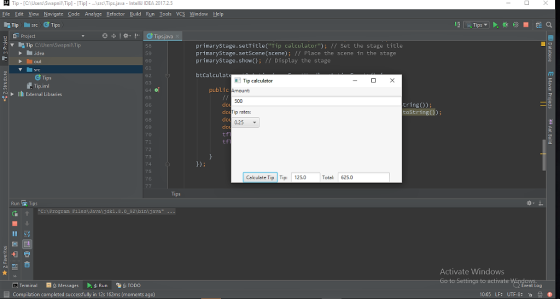
Add Answer to:
Tip Calculator App & Order
Using NetBeans create a new JavaFX project with
two classes TipCalculator...
Start a new project in NetBeans that defines a class Person with the following: Instance variables...
Start a new project in NetBeans that defines a class Person with the following: Instance variables firstName (type String), middleInitial (type char) and lastName (type String) (1) A no-parameter constructor with a call to the this constructor; and (2) a constructor with String, char, String parameters (assign the parameters directly to the instance variables in this constructor--see info regarding the elimination of set methods below) Accessor (get) methods for all three instance variables (no set methods are required which makes...
Deliverable A zipped NetBeans project with 2 classes app ZipCode Address Classes Suggestion: Use Netbeans to...
 Deliverable
A zipped NetBeans project with 2 classes
app
ZipCode
Address
Classes
Suggestion:
Use Netbeans to copy your last lab (Lab 03) to a new
project called Lab04.
Close Lab03.
Work on the new Lab04 project then.
The Address Class
Attributes
int number
String name
String type
ZipCode zip
String state
Constructors
one constructor with no input parameters
since it doesn't receive any input values, you need to use the
default values below:
number - 0
name - "N/A"
type...
Deliverable
A zipped NetBeans project with 2 classes
app
ZipCode
Address
Classes
Suggestion:
Use Netbeans to copy your last lab (Lab 03) to a new
project called Lab04.
Close Lab03.
Work on the new Lab04 project then.
The Address Class
Attributes
int number
String name
String type
ZipCode zip
String state
Constructors
one constructor with no input parameters
since it doesn't receive any input values, you need to use the
default values below:
number - 0
name - "N/A"
type...
Java Project Create a NetBeans project for this activity. Test Stem / Question Choices 1: Create...
Java Project Create a NetBeans project for this activity. Test Stem / Question Choices 1: Create a new class with attributes name and address. Both data type will be String. Create a constructor and assign the parameters to the attributes. Now override the toString() method. Is this possible? A: Yes. B: No. C: In some cases where the attributes are only strings. D: Yes, as long as you explicitly extends Object class. 2: Create a class with the main method...
AA. Final Project - Improved JavaFX GUI Personal Lending Library Description: In this project we will...
 AA. Final Project - Improved JavaFX GUI Personal Lending Library Description: In this project we will improve our personal lending library tool by (1) adding the ability to delete items from the library, (2) creating a graphical user interface that shows the contents of the library and allows the user to add, delete, check out, or check in an item. (3) using a file to store the library contents so that they persist between program executions, and (4) removing the...
MasterMind in Java Activity MasterMind project Create a new Java Application project named MasterMind allowing Netbeans...
 MasterMind in Java
Activity
MasterMind project
Create a new Java Application project named MasterMind
allowing Netbeans IDE to create the main class called
MasterMind.java
MasterMind class
Method main() should:
Call static method System.out.println() and result in
displaying “Welcome to MasterMind!”
Call static method JOptionPane.showMessageDialog(arg1, arg2)
and result in displaying a message dialog displaying “Let’s Play
MasterMind!”
Instantiate an instance of class Game()
constants
Create package
Constants class
Create class Constants
Create constants by declaring them as “public static final”:
public...
MasterMind in Java
Activity
MasterMind project
Create a new Java Application project named MasterMind
allowing Netbeans IDE to create the main class called
MasterMind.java
MasterMind class
Method main() should:
Call static method System.out.println() and result in
displaying “Welcome to MasterMind!”
Call static method JOptionPane.showMessageDialog(arg1, arg2)
and result in displaying a message dialog displaying “Let’s Play
MasterMind!”
Instantiate an instance of class Game()
constants
Create package
Constants class
Create class Constants
Create constants by declaring them as “public static final”:
public...
signature 1. Create a new NetBeans Java project. The name of the project has to be...
 signature 1. Create a new NetBeans Java project. The name of the project has to be the first part of the name you write on the test sheet. The name of the package has to be testo You can chose a name for the Main class. (2p) 2. Create a new class named Address in the test Two package. This class has the following attributes: city: String-the name of the city zip: int - the ZIP code of the city...
Java file Name Dog Classes and Methods Create a constructor that incorporates the type, breed, and...
Java file Name Dog Classes and Methods Create a constructor that incorporates the type, breed, and name variables (do not include topTrick). Note: The type refers to what the breed typically does; for example, a corgi would be a “cattle herding dog.” A Shiba Inu would be a “hunting dog.” Create the setTopTrick() mutator method Dog is parent class Corgi and Driver are subclasses Complete the Corgi class: Using the UML Class diagram, declare the instance variables. Create the two...
Write a Gui programming by using JavaFx menus, stage and screen concepts to the RetailItem class,...
 Write a Gui programming by using JavaFx menus, stage and screen
concepts to the RetailItem class,
Write a class named Retailltem that holds data about an item in a retail store. The class should have the following fields description: The description field is a String object that holds a brief description of the item . unitsOnHand: The unitsOnHand field is an int variable that holds the number of units currently in inventory Price: The price field is a double that...
Write a Gui programming by using JavaFx menus, stage and screen
concepts to the RetailItem class,
Write a class named Retailltem that holds data about an item in a retail store. The class should have the following fields description: The description field is a String object that holds a brief description of the item . unitsOnHand: The unitsOnHand field is an int variable that holds the number of units currently in inventory Price: The price field is a double that...
Project 9-2: Account Balance Calculator Create an application that calculates and displays the starting and ending...
Project 9-2: Account Balance Calculator Create an application that calculates and displays the starting and ending monthly balances for a checking account and a savings account. --->Console Welcome to the Account application Starting Balances Checking: $1,000.00 Savings: $1,000.00 Enter the transactions for the month Withdrawal or deposit? (w/d): w Checking or savings? (c/s): c Amount?: 500 Continue? (y/n): y Withdrawal or deposit? (w/d): d Checking or savings? (c/s): s Amount?: 200 Continue? (y/n): n Monthly Payments and Fees Checking fee: $1.00 Savings...
JAVA :The following are descriptions of classes that you will create. Think of these as service...
JAVA :The following are descriptions of classes that you will create. Think of these as service providers. They provide a service to who ever want to use them. You will also write a TestClass with a main() method that fully exercises the classes that you create. To exercise a class, make some instances of the class, and call the methods of the class using these objects. Paste in the output from the test program that demonstrates your classes’ functionality. Testing...
 Deliverable
A zipped NetBeans project with 2 classes
app
ZipCode
Address
Classes
Suggestion:
Use Netbeans to copy your last lab (Lab 03) to a new
project called Lab04.
Close Lab03.
Work on the new Lab04 project then.
The Address Class
Attributes
int number
String name
String type
ZipCode zip
String state
Constructors
one constructor with no input parameters
since it doesn't receive any input values, you need to use the
default values below:
number - 0
name - "N/A"
type...
Deliverable
A zipped NetBeans project with 2 classes
app
ZipCode
Address
Classes
Suggestion:
Use Netbeans to copy your last lab (Lab 03) to a new
project called Lab04.
Close Lab03.
Work on the new Lab04 project then.
The Address Class
Attributes
int number
String name
String type
ZipCode zip
String state
Constructors
one constructor with no input parameters
since it doesn't receive any input values, you need to use the
default values below:
number - 0
name - "N/A"
type...
 AA. Final Project - Improved JavaFX GUI Personal Lending Library Description: In this project we will improve our personal lending library tool by (1) adding the ability to delete items from the library, (2) creating a graphical user interface that shows the contents of the library and allows the user to add, delete, check out, or check in an item. (3) using a file to store the library contents so that they persist between program executions, and (4) removing the...
 MasterMind in Java
Activity
MasterMind project
Create a new Java Application project named MasterMind
allowing Netbeans IDE to create the main class called
MasterMind.java
MasterMind class
Method main() should:
Call static method System.out.println() and result in
displaying “Welcome to MasterMind!”
Call static method JOptionPane.showMessageDialog(arg1, arg2)
and result in displaying a message dialog displaying “Let’s Play
MasterMind!”
Instantiate an instance of class Game()
constants
Create package
Constants class
Create class Constants
Create constants by declaring them as “public static final”:
public...
MasterMind in Java
Activity
MasterMind project
Create a new Java Application project named MasterMind
allowing Netbeans IDE to create the main class called
MasterMind.java
MasterMind class
Method main() should:
Call static method System.out.println() and result in
displaying “Welcome to MasterMind!”
Call static method JOptionPane.showMessageDialog(arg1, arg2)
and result in displaying a message dialog displaying “Let’s Play
MasterMind!”
Instantiate an instance of class Game()
constants
Create package
Constants class
Create class Constants
Create constants by declaring them as “public static final”:
public...
 signature 1. Create a new NetBeans Java project. The name of the project has to be the first part of the name you write on the test sheet. The name of the package has to be testo You can chose a name for the Main class. (2p) 2. Create a new class named Address in the test Two package. This class has the following attributes: city: String-the name of the city zip: int - the ZIP code of the city...
 Write a Gui programming by using JavaFx menus, stage and screen
concepts to the RetailItem class,
Write a class named Retailltem that holds data about an item in a retail store. The class should have the following fields description: The description field is a String object that holds a brief description of the item . unitsOnHand: The unitsOnHand field is an int variable that holds the number of units currently in inventory Price: The price field is a double that...
Write a Gui programming by using JavaFx menus, stage and screen
concepts to the RetailItem class,
Write a class named Retailltem that holds data about an item in a retail store. The class should have the following fields description: The description field is a String object that holds a brief description of the item . unitsOnHand: The unitsOnHand field is an int variable that holds the number of units currently in inventory Price: The price field is a double that...
Most questions answered within 3 hours.
-
Where is the error in this code sequence?
String s1 = "Hello";
String s2 = "ello";...
asked 11 months ago -
Financial data for Joel de Paris, Inc., for last year
follow:
Joel de Paris, Inc.
Balance...
asked 11 months ago -
Consider this reaction:
Al2(SO4)3 (aq)+ BaCl3
(aq) Al2Cl6 (aq)- +
3BaSO4(s) . What is the...
asked 11 months ago -
Suppose that Savneet is considering increasing her
recent random sample from 20 car rentals to 40...
asked 11 months ago -
Trucks arrive at an unloading terminal at an average rate of 120
per hour.
Trucks arrive...
asked 11 months ago -
Why are methanol and ethanol completely soluble in water while
octanol is not very little soluble....
asked 11 months ago -
A facilities manager at a university reads in a research report
that the mean amount of...
asked 11 months ago -
When the CuSO4 is rehydrated by adding water to the anhydrous
compound, is this an endothermic...
asked 11 months ago -
A ray of sunlight is passing from diamond into crown glass; the
angle of incidence is...
asked 11 months ago -
A block of mass 0.249 kg is placed on top of a light, vertical
spring of...
asked 11 months ago -
how do the kidneys compensate in the presences of acidosis
a) trigger hyperventilate
b) reserve acid...
asked 11 months ago -
Question 501 pts
The rental rate of capital to the firm increases. Which of the
following...
asked 11 months ago