Task #3 Working with Strings 1. Use the charAt method to get the first character in...
Task #3 Working with Strings 1. Use the charAt method to get the first character in firstName and store it in a variable called firstInitial. 2. Print out the user’s first initial. 3. Use the toUpperCase method to change the fullName to upper and store it back into the fullName variable. 4. Add a line that prints out tha value of fullName and how many characters are in the string stored in fullName
java
Homework Answers
Solution Overview:
This task can be performed by using the following functions:
1. string.charAt(index) : This function returns
the character at the specified index in a string.
For example to extract the first char from string s and store it in
temp variable, the following statement has to be written:
char temp = s.charAt(0);
2. string.toUpperCase(): This function converts
all the lower case alphabetical characters in the string into upper
case alphabetical characters.
For example to convert string temp into uppercase and store it back
to temp, we write the following statement:
temp = temp.toUpperCase();
3. string.length(): This function finds the
number of characters in the string. This function also counts
spaces in between the string.
For example, to find the number of characters in string temp and
store it into an integer size, we write the following
statement:
int size = temp.length()
Code:
import java.util.*;
class Main
{
public static void main(String[] args)
{
//Creating an object of scanner class to accept input from the user
Scanner sc = new Scanner(System.in);
//String firstName and fullName will contain the name user enters
String firstName,fullName;
System.out.print("Enter the first name of the user: ");
firstName = sc.nextLine();
//Using sc.nextLine() function to accept the full name of user along with space in between
System.out.print("Enter the first name of the user: ");
fullName = sc.nextLine();
//using charAt() function to extract the first character in the user's name. This will be the first Initial of the user's full name.
char firstInitial = firstName.charAt(0);
//Printing the first Initial to the user
System.out.println("User's First Initial: "+firstInitial);
//Convertinig fullName to uppercase using toUpperCase() function and storing it in fullName again
fullName = fullName.toUpperCase();
//Printing the fullName in upper case
System.out.println("User's Name in UpperCase: "+fullName);
//Using length() function to find the length of the string and storing it in variable size.
int size = fullName.length();
//Printing the size to the user.
System.out.println("Size of User's Name is: "+size);
//closing the scanner
sc.close();
}
}
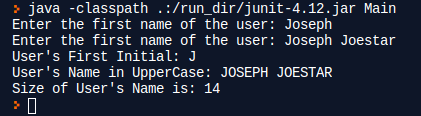
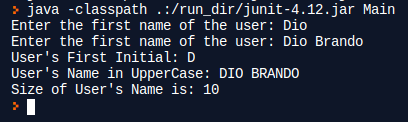
Sample Output:
Add Answer to:
Task #3 Working with Strings 1. Use the charAt method to get the
first character in...
Exercise 1 • Examine ShoppingCart.java. – Perform the following: – Use the indexOf method to get...
Exercise 1 • Examine ShoppingCart.java. – Perform the following: – Use the indexOf method to get the index for the space character (" ") within custName. Assign it to spaceIdx. – Use the substring method and spaceIdx to get the first name portion of custName. Assign it to firstName and print firstName. public class ShoppingCart { public static void main (String[] args){ String custName = "Steve Smith"; String firstName; int spaceIdx; // Get the...
USING JAVA Consider the following methods: StringBuilder has a method append(). If we run: StringBuilder s...
USING JAVA Consider the following methods: StringBuilder has a method append(). If we run: StringBuilder s = new StringBuilder(); s.append("abc"); The text in the StringBuilder is now "abc" Character has static methods toUpperCase() and to LowerCase(), which convert characters to upper or lower case. If we run Character x = Character.toUpperCase('c');, x is 'C'. Character also has a static isAlphabetic() method, which returns true if a character is an alphabetic character, otherwise returns false. You will also need String's charAt()...
TASK Your task is to build a palindrome from an input string. A palindrome is a...
TASK Your task is to build a palindrome from an input string. A palindrome is a word that reads the same backward or forward. Your code will take the first 5 characters of the user input, and create a 9- character palindrome from it. Words shorter than 5 characters will result in a runtime error when you run your code. This is acceptable for this exercise – we will cover input validation in a later class. Some examples of input...
Part 2: Processing Strings (Individual work) Processing user-entered data to follow a specific format is a...
Part 2: Processing Strings (Individual work) Processing user-entered data to follow a specific format is a common task. Often this involves using string functions to manipulate a set of input strings. Create a MATLAB script named namephone.m and place these lines of code at the beginning: name = input('Enter your first and last name: ','s'); phone = input('Enter your area code and phone number: ','s'); Tasks Here are useful string functions: length, strcat, strtrim, lower, upper, strcmp, findstr, strrep As you work...
In C++ Task 3: Use the stack and queue to simulate receiving and transforming data We are creating a system that will co...
 In C++
Task 3: Use the stack and queue to simulate receiving and transforming data We are creating a system that will convert strings sent over a serial bus one character at a time. The conversion will be from big to little endian or from little to big endian. To simplify this, each character will be considered a word. Little endian will have the lowest address first. Big endian will have the biggest address first. For example (for this lab),...
In C++
Task 3: Use the stack and queue to simulate receiving and transforming data We are creating a system that will convert strings sent over a serial bus one character at a time. The conversion will be from big to little endian or from little to big endian. To simplify this, each character will be considered a word. Little endian will have the lowest address first. Big endian will have the biggest address first. For example (for this lab),...
containsSubSequence takes two Strings as input and returns a boolean: Returns true if the first input...
containsSubSequence takes two Strings as input and returns a boolean: Returns true if the first input string contains all the characters of the second input string, in order, but not necessarily consecutively. > HW2.containsSubSequence("abracadabra", "abcd") true > HW2.containsSubSequence("abracadabra", "abdc") false you must not use either break or continue in your code. You are allowed to use the following methods from the Java API: class String length charAt class StringBuilder length charAt append toString class Character any method I write something...
Use Python and need execution output Will give upvote! First Script - Working with Strings This...
Use Python and need execution output Will give upvote! First Script - Working with Strings This script contains four parts. String Type Tests Ask the user for a string (test with "ABC123"). Use method isupper to test the string, print the result. Use method isdigit to test the string, print the result. Use method isalpha to test the string, print the result. Escape Characters within a string Use newline escape characters within a line of haiku Assign the text "Type,...
JAVA STRINGS AND CHARACTERS - USE SIMPLE CODING 1. Write a program that takes a string...
JAVA STRINGS AND CHARACTERS - USE SIMPLE CODING 1. Write a program that takes a string of someone's full name and prints it out last name first. You may use the available string manipulation methods. Example: "George Washington" "Washington, George" 2. Write a program that will take a string of someone's full name, and break it into separate strings of first name and last name, as well as capitalize the first letter of each. Example: "joseph smith", "Joseph" "Smith"
JAVA PROGRAMMING In this final review lab from our intro course, use the Name class you...
JAVA PROGRAMMING In this final review lab from our intro course, use the Name class you created in the previous lab. In this lab, create a Student class with the following class variable: Student name: Name (Note: Name is a datatype) Student Id: String Create the getter and setter methods. In addition to these methods, create a toString() method, which overrides the object class toString() method. This override method prints the current value of any of this class object. Complete...
Java Homework Problems: 4. • Examine AddImport.java. – Perform the following: – Replace the fully qualified...
Java Homework Problems: 4. • Examine AddImport.java. – Perform the following: – Replace the fully qualified name to access the Jlabel component with an import statement. – To import classes from the util package, replace multiple import statements with a single import statement. /* * To change this license header, choose License Headers in Project Properties. * To change this template file, choose Tools | Templates * and open the template in the editor. */ import java.util.Calendar; import java.util.Date; public...
 In C++
Task 3: Use the stack and queue to simulate receiving and transforming data We are creating a system that will convert strings sent over a serial bus one character at a time. The conversion will be from big to little endian or from little to big endian. To simplify this, each character will be considered a word. Little endian will have the lowest address first. Big endian will have the biggest address first. For example (for this lab),...
In C++
Task 3: Use the stack and queue to simulate receiving and transforming data We are creating a system that will convert strings sent over a serial bus one character at a time. The conversion will be from big to little endian or from little to big endian. To simplify this, each character will be considered a word. Little endian will have the lowest address first. Big endian will have the biggest address first. For example (for this lab),...
Most questions answered within 3 hours.
-
Where is the error in this code sequence?
String s1 = "Hello";
String s2 = "ello";...
asked 10 months ago -
Financial data for Joel de Paris, Inc., for last year
follow:
Joel de Paris, Inc.
Balance...
asked 10 months ago -
Consider this reaction:
Al2(SO4)3 (aq)+ BaCl3
(aq) Al2Cl6 (aq)- +
3BaSO4(s) . What is the...
asked 10 months ago -
Suppose that Savneet is considering increasing her
recent random sample from 20 car rentals to 40...
asked 10 months ago -
Trucks arrive at an unloading terminal at an average rate of 120
per hour.
Trucks arrive...
asked 10 months ago -
Why are methanol and ethanol completely soluble in water while
octanol is not very little soluble....
asked 10 months ago -
A facilities manager at a university reads in a research report
that the mean amount of...
asked 10 months ago -
When the CuSO4 is rehydrated by adding water to the anhydrous
compound, is this an endothermic...
asked 10 months ago -
A ray of sunlight is passing from diamond into crown glass; the
angle of incidence is...
asked 10 months ago -
A block of mass 0.249 kg is placed on top of a light, vertical
spring of...
asked 10 months ago -
how do the kidneys compensate in the presences of acidosis
a) trigger hyperventilate
b) reserve acid...
asked 10 months ago -
Question 501 pts
The rental rate of capital to the firm increases. Which of the
following...
asked 10 months ago