1) Using the Quadratic class you have already developed, make it Comparable. A Quadratic is bigger...
1) Using the Quadratic class you have already developed, make it Comparable. A Quadratic is bigger than another Quadratic if it opens faster.
2) Write a driver for Quadratic.java. In the driver program create a few objects and compare them . then create a list of those objects and sort them.
import java.util.*;
import java.lang.*;
class Quadratic{
private double a,b,c; // Determines/declares the class variables to store the coefficients
Quadratic(){ // Determine/declare the default constructor
a=0.0;
b=0.0;
c=0.0;
}
Quadratic(double a, double b, double c){ // Parametrized constructor
this.a=a;
this.b=b;
this.c=c;
}
public void setCoefs(double a, double b, double c){ // Mutator method
this.a=a;
this.b=b;
this.c=c;
}
public double getA(){
return a;
}
public double getB(){
return
b;
}
public double getC(){
return
c;
}
public double getDisc(){ // Determine discriminant
return
(b*b)-(4*a*c);
}
public void natureOfRoots(){ // Method that prints nature of roots
if(getDisc()<0.0)
System.out.println("complex roots.");
else if(getDisc()==0.0)
System.out.println("real and equal roots.");
else
System.out.println("real roots.");
}
public double getDeriv(double x){ // Method that gets the value of first order derivative at a point
return
(2*a*x)+b; // Differentiating ax^2+bx+c gives us 2ax+b
}
public String toString(){ // Method that converts the object of this class to string for printing
String s;
if(a==1.0)
s="x^2";
else
s=a+"x^2";
if(b<0.0)
s=s+b+"x";
else
if(b==1.0)
s=s+"+x";
else
s=s+"+"+b+"x";
if(c<0.0)
s=s+c;
else
s=s+"+"+c;
return s;
}
public void printRoots(){ // Method that prints roots
if(getDisc()<0.0)
{
System.out.println("The roots are
imaginary!");
return;
}
double
qua1=(-b+Math.sqrt(getDisc()))/(2*a);
double
qua2=(-b-Math.sqrt(getDisc()))/(2*a);
System.out.println("The roots are "
+ qua1 + " & " + qua2 + ".");
}
}
class TestQuadratic{ // Test the class
public static void main(String args[]){
Quadratic quad1=new Quadratic(1, -2, 1); // Creating object of the Quadratic class
System.out.print("The Equation is: " + quad1 + " which has "); // Print the equation
quad1.natureOfRoots(); // Print the nature of
roots
quad1.printRoots(); // Print the
roots
//
quad.setCoefs(1,3,2); // Chang the coefficients using
mutator method
Quadratic quad2 =
new Quadratic(1, 3, 2); // Creating the second object of the
Quadratic class
System.out.print("\nThe Equation (Second Quadratic) after changing the coefficients is: " + quad2 + " which has "); // Print the equation
quad2.natureOfRoots(); // Print the nature of the
roots
quad2.printRoots(); // Print the
roots... again
}
}
Homework Answers
////////////////////// Quadratic.java
public class Quadratic implements Comparable<Quadratic>{
private double a,b,c; // Determines/declares the class variables to store the coefficients
Quadratic(){ // Determine/declare the default constructor
a=0.0;
b=0.0;
c=0.0;
}
Quadratic(double a, double b, double c){ // Parametrized constructor
this.a=a;
this.b=b;
this.c=c;
}
public void setCoefs(double a, double b, double c){ // Mutator method
this.a=a;
this.b=b;
this.c=c;
}
public double getA(){
return a;
}
public double getB(){
return b;
}
public double getC(){
return c;
}
public double getDisc(){ // Determine discriminant
return (b*b)-(4*a*c);
}
public void natureOfRoots(){ // Method that prints nature of roots
if(getDisc()<0.0)
System.out.println("complex roots.");
else if(getDisc()==0.0)
System.out.println("real and equal roots.");
else
System.out.println("real roots.");
}
public double getDeriv(double x){ // Method that gets the value of first order derivative at a point
return (2*a*x)+b; // Differentiating ax^2+bx+c gives us
2ax+b
}
public String toString(){ // Method that converts the object of this class to string for printing
String s;
if(a==1.0)
s="x^2";
else
s=a+"x^2";
if(b<0.0)
s=s+b+"x";
else if(b==1.0)
s=s+"+x";
else
s=s+"+"+b+"x";
if(c<0.0)
s=s+c;
else
s=s+"+"+c;
return s;
}
public void printRoots(){ // Method that prints roots
if(getDisc()<0.0)
{
System.out.println("The roots are imaginary!");
return;
}
double qua1=(-b+Math.sqrt(getDisc()))/(2*a);
double qua2=(-b-Math.sqrt(getDisc()))/(2*a);
System.out.println("The roots are " + qua1 + " & " + qua2 +
".");
}
@Override
public int compareTo(Quadratic o) {
int ret=0;
double a1=a,b1=b,c1=c;
double a2=o.getA(),b2=o.getB(),c2=o.getC();
// first check a1>a2 if equal
// then b1>b2 if equal
// then c>c2 if equal retun 0
if(a1<a2){
ret=1;
}
else{
if(a1>a2){
ret=-1;
}else{
if(b1<b2){
ret=1;
}
else{
if(b1>b2){
ret=-1;
}
else{
if(c1<c2){ret=1;}
if(c1>c2){ret=-1;}
}
}
}
}
return(ret);
}
}
/////////////////////////// TestQuadratic.java
public class TestQuadratic {
public static void main(String args[]){
Quadratic quad1=new Quadratic(1, -2, 1); // Creating object of the Quadratic class
System.out.print("The Equation is: " + quad1 + " which has "); // Print the equation
quad1.natureOfRoots(); // Print the nature of roots
quad1.printRoots(); // Print the roots
// quad.setCoefs(1,3,2); // Chang the coefficients using mutator
method
Quadratic quad2 = new Quadratic(1, 3, 2); // Creating the second
object of the Quadratic class
System.out.print("\nThe Equation (Second Quadratic) after changing the coefficients is: " + quad2 + " which has "); // Print the equation
quad2.natureOfRoots(); // Print the nature of the roots
quad2.printRoots(); // Print the roots... again
// Creating the test object of the Quadratic class
Quadratic testquad1 = new Quadratic(1.2, 3.8, 2);
Quadratic testquad2 = new Quadratic(2.4, 7.6, 4);
Quadratic testquad3 = new Quadratic(6, 4, 11);
Quadratic testquad4 = new Quadratic(3, 3.1, 5);
Quadratic testquad5 = new Quadratic(6, 11, -2);
Quadratic testquad6 = new Quadratic(1, 4, 2);
Quadratic testquad7 = new Quadratic(3, 13, 5);
Quadratic testquad8 = new Quadratic(2, 8, 4);
// print each Quadratic
System.out.print("\nTestQuad1 : "+testquad1);
System.out.print("\nTestQuad2 : "+testquad2);
System.out.print("\nTestQuad3 : "+testquad3);
System.out.print("\nTestQuad4 : "+testquad4);
System.out.print("\nTestQuad5 : "+testquad5);
System.out.print("\nTestQuad6 : "+testquad6);
System.out.print("\nTestQuad7 : "+testquad7);
System.out.print("\nTestQuad8 : "+testquad8);
System.out.println();
System.out.println();
// testing
if(testquad1.compareTo(testquad2)>0){System.out.println("TestQuad1
> TestQuad2");}
if(testquad1.compareTo(testquad2)<0){System.out.println("TestQuad1
< TestQuad2");}
if(testquad1.compareTo(testquad2)==0){System.out.println("TestQuad1
== TestQuad2");}
if(testquad2.compareTo(testquad3)>0){System.out.println("TestQuad2
> TestQuad3");}
if(testquad2.compareTo(testquad3)<0){System.out.println("TestQuad2
< TestQuad3");}
if(testquad2.compareTo(testquad3)==0){System.out.println("TestQuad2
== TestQuad3");}
if(testquad4.compareTo(testquad5)>0){System.out.println("TestQuad4
> TestQuad5");}
if(testquad4.compareTo(testquad5)<0){System.out.println("TestQuad4
< TestQuad5");}
if(testquad4.compareTo(testquad5)==0){System.out.println("TestQuad4
== TestQuad5");}
if(testquad6.compareTo(testquad8)>0){System.out.println("TestQuad6
> TestQuad8");}
if(testquad6.compareTo(testquad8)<0){System.out.println("TestQuad6
< TestQuad8");}
if(testquad6.compareTo(testquad8)==0){System.out.println("TestQuad6
== TestQuad8");}
if(testquad5.compareTo(testquad7)>0){System.out.println("TestQuad5
> TestQuad7");}
if(testquad5.compareTo(testquad7)<0){System.out.println("TestQuad5
< TestQuad7");}
if(testquad5.compareTo(testquad7)==0){System.out.println("TestQuad5
== TestQuad7");}
if(testquad3.compareTo(testquad4)>0){System.out.println("TestQuad3
> TestQuad4");}
if(testquad3.compareTo(testquad4)<0){System.out.println("TestQuad3
< TestQuad4");}
if(testquad3.compareTo(testquad4)==0){System.out.println("TestQuad3
== TestQuad4");}
if(testquad1.compareTo(testquad8)>0){System.out.println("TestQuad1
> TestQuad8");}
if(testquad1.compareTo(testquad8)<0){System.out.println("TestQuad1
< TestQuad8");}
if(testquad1.compareTo(testquad8)==0){System.out.println("TestQuad1
== TestQuad8");}
if(testquad8.compareTo(testquad3)>0){System.out.println("TestQuad8
> TestQuad3");}
if(testquad8.compareTo(testquad3)<0){System.out.println("TestQuad8
< TestQuad3");}
if(testquad8.compareTo(testquad3)==0){System.out.println("TestQuad8
== TestQuad3");}
if(testquad5.compareTo(testquad4)>0){System.out.println("TestQuad5
> TestQuad4");}
if(testquad5.compareTo(testquad4)<0){System.out.println("TestQuad5
< TestQuad4");}
if(testquad5.compareTo(testquad4)==0){System.out.println("TestQuad5
== TestQuad4");}
if(testquad6.compareTo(testquad2)>0){System.out.println("TestQuad6
> TestQuad2");}
if(testquad6.compareTo(testquad2)<0){System.out.println("TestQuad6
< TestQuad2");}
if(testquad6.compareTo(testquad2)==0){System.out.println("TestQuad6
== TestQuad2");}
if(testquad3.compareTo(testquad7)>0){System.out.println("TestQuad3
> TestQuad7");}
if(testquad3.compareTo(testquad7)<0){System.out.println("TestQuad3
< TestQuad7");}
if(testquad3.compareTo(testquad7)==0){System.out.println("TestQuad3
== TestQuad7");}
// Quadratic array
Quadratic [] qLst=new Quadratic[8];
qLst[0]=testquad1;
qLst[1]=testquad2;
qLst[2]=testquad3;
qLst[3]=testquad4;
qLst[4]=testquad5;
qLst[5]=testquad6;
qLst[6]=testquad7;
qLst[7]=testquad8;
Quadratic tmp;
// sorting Quadratic
for(int i=0;i<7;i++){
for(int j=0;j<7-i;j++){
if(qLst[j].compareTo(qLst[j+1])>0){
tmp=qLst[j];
qLst[j]=qLst[j+1];
qLst[j+1]=tmp;
}
}
}
System.out.println("\n\nSorted Quadratic ---- \n");
// print each Quadratic after sorting
for(int i=0;i<8;i++){
System.out.print("\n"+(i+1)+") : "+qLst[i]);
}
System.out.println();
}
}
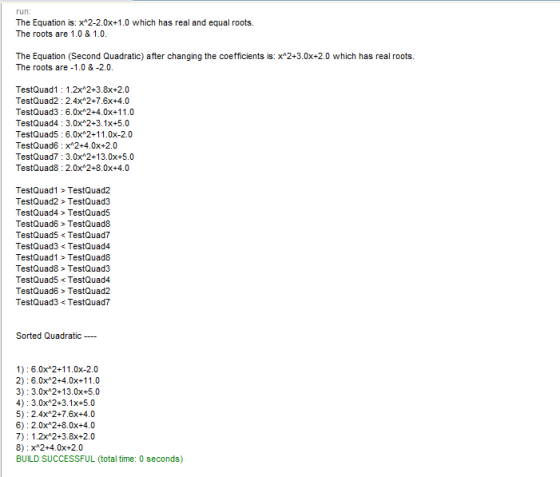
Add Answer to:
1) Using the Quadratic class you have already developed, make it
Comparable. A Quadratic is bigger...
Modify the Triangle class (from previous code, will post under this) to throw an exception in...
Modify the Triangle class (from previous code, will post under this) to throw an exception in the constructor and set routines if the triangle is not valid (i.e., does not satisfy the triangle inequality). Modify the main routine to prompt the user for the sides of the triangle and to catch the exception and re-prompt the user for valid triangle sides. In addition, for any valid triangle supply a method to compute and display the area of the triangle using...
the answer must be in java. thank you Question 2 [8 points] Consider the class Class...
 the answer must be in java. thank you
Question 2 [8 points] Consider the class Class A below: class Class A implements Serializable{ int a; static int b; transient int c; String s; // Constructor public Class A (int a, int b, int c, Strings){ this.a = a; this.b = b; this.c = c; this.s = s; Complete the class Test to test the serialization and deserialization of the objects of class Class A. State the possible variable values following...
the answer must be in java. thank you
Question 2 [8 points] Consider the class Class A below: class Class A implements Serializable{ int a; static int b; transient int c; String s; // Constructor public Class A (int a, int b, int c, Strings){ this.a = a; this.b = b; this.c = c; this.s = s; Complete the class Test to test the serialization and deserialization of the objects of class Class A. State the possible variable values following...
can someone explain to me what does the dot mean ? and what would be the...
can someone explain to me what does the dot mean ? and what would be the output and explain it? import java.io.*; public class Green { private int a; private int b; public Green(int aa,int bb) { a=aa; b=bb; } public void equals(Green c) { this.a=c.a;this.b=c.b;} public void fn(Green c) { this.a=3*c.b-c.a; this.b=2*c.a-this.b;} public void gg() { this.b=this.b-1; this.a=this.b-2; } public static void main(String args[]) { Green x=new Green(2,2); Green y=new Green(2,1); Green z=new Green(1,4); int xx=1,yy=2,zz=3; x.fn(y); z.gg(); System.out.println("...
Why are obj1 and obj2 printing the same areas? I'm trying to learn about Comparable interface....
Why are obj1 and obj2 printing the same areas? I'm trying to learn about Comparable interface. Couldn't figure it out. the compare to method should print 0, 1, or -1 import java.util.*; public class RectangleMain { public static void main(String [] args) throws CloneNotSupportedException { /*ComparableRectangleAlsoCloneable obj1 = new ComparableRectangleAlsoCloneable(4, 5); ComparableRectangleAlsoCloneable obj2 = (ComparableRectangleAlsoCloneable)obj1.clone(); System.out.println(obj1.toString()); System.out.println(obj1 == obj2); //false System.out.println(obj2.toString());*/ Scanner...
Java Programming Question. I am writing a code to calculate the roots of the quadratic equation...
Java Programming Question. I am writing a code to calculate the roots of the quadratic equation based on the values of the coefficients A, B, and C. I am supposed to enter 5 values for each coefficient, and the output should be five different answers (see example) using a for loop and if else statements. However, when I run my code, I am only able to enter one value for each coefficient and the output is one answer repeated five...
Using your Dog class from earlier this week, complete the following: Create a new class called...
Using your Dog class from earlier this week, complete the following: Create a new class called DogKennel with the following: Instance field(s) - array of Dogs + any others you may want Contructor - default (no parameters) - will make a DogKennel with no dogs in it Methods: public void addDog(Dog d) - which adds a dog to the array public int currentNumDogs() - returns number of dogs currently in kennel public double averageAge() - which returns the average age...
Given the following class: class Q2 { private int a; private int b; private int c;...
 Given the following class: class Q2 { private int a; private int b; private int c; public void setA(int a){this.a = a; } public void setB(int b){this.b = b;} public void setc(int c){this.c = c;} public int geta(){return a; } public int gets(){return b;} public int getc(){return c;} public int m1(int a, int b){ return a + b; public boolean m2 (int x, int y){ return m1(x, y) + x + y < 10; What is the output of the...
I'm getting a few errors still under RecipeBox. Would you be able to see what's wrong?...
I'm getting a few errors still under RecipeBox. Would you be able to see what's wrong? Thanks ------------ package recipecollection; import java.util.ArrayList; public class SteppingStone5_RecipeTest { public static void main(String[] args) { ArrayList<String> recipeIngredients = new ArrayList<>(); recipeIngredients.add("Peanut butter"); recipeIngredients.add("Jelly"); recipeIngredients.add("Bread"); SteppingStone5_Recipe recipe1 = new SteppingStone5_Recipe("Peanut butter & jelly sandwich", 2, recipeIngredients, 300, 10.0); System.out.println("RECIPE 1"); recipe1.printRecipe(); System.out.println(); recipe1.setRecipeName("Turkey sandwich"); recipe1.setServings(5); recipe1.setTotalRecipeCalories(500); System.out.println(); System.out.println("RECIPE 1 (Modified)"); recipe1.printRecipe(); System.out.println(); System.out.println("RECIPE 2"); SteppingStone5_Recipe recipe2 = SteppingStone5_Recipe.createNewRecipe(); recipe2.printRecipe(); } } ///////////////// package recipecollection;...
Objective Extend the class GeometicShapes to include a Triangle class.. Background Reading ZyBooks Chapter 10 Task...
Objective Extend the class GeometicShapes to include a Triangle class.. Background Reading ZyBooks Chapter 10 Task Create the following fields and methods for a Triangle class that extends the provided GeometricShapes class public class GeometricShapes { private String color = "red"; private boolean filled; private java.util.Date dateCreated; public GeometricShapes() { dateCreated = new java.util.Date(); } public GeometricShapes(String color, boolean filled) { dateCreated = new java.util.Date(); this.color = color; this.filled = filled; } public void setColor (String color)...
NOTE: Use the Account class codes in the section below these questions. Modify the main method...
NOTE: Use the Account class codes in the section below these questions. Modify the main method in the CheckingAccountDemo class: Take out all previous code. Declare an object array with 10 accounts. Create a for loop to ask user to input each account’s information (name, account number, and initial balance) from keyboard and then initialize for each account object. Create a while loop to allow one to work on depositing and withdrawing operations on any account till one want to...
 the answer must be in java. thank you
Question 2 [8 points] Consider the class Class A below: class Class A implements Serializable{ int a; static int b; transient int c; String s; // Constructor public Class A (int a, int b, int c, Strings){ this.a = a; this.b = b; this.c = c; this.s = s; Complete the class Test to test the serialization and deserialization of the objects of class Class A. State the possible variable values following...
the answer must be in java. thank you
Question 2 [8 points] Consider the class Class A below: class Class A implements Serializable{ int a; static int b; transient int c; String s; // Constructor public Class A (int a, int b, int c, Strings){ this.a = a; this.b = b; this.c = c; this.s = s; Complete the class Test to test the serialization and deserialization of the objects of class Class A. State the possible variable values following...
 Given the following class: class Q2 { private int a; private int b; private int c; public void setA(int a){this.a = a; } public void setB(int b){this.b = b;} public void setc(int c){this.c = c;} public int geta(){return a; } public int gets(){return b;} public int getc(){return c;} public int m1(int a, int b){ return a + b; public boolean m2 (int x, int y){ return m1(x, y) + x + y < 10; What is the output of the...
Most questions answered within 3 hours.
-
Where is the error in this code sequence?
String s1 = "Hello";
String s2 = "ello";...
asked 10 months ago -
Financial data for Joel de Paris, Inc., for last year
follow:
Joel de Paris, Inc.
Balance...
asked 10 months ago -
Consider this reaction:
Al2(SO4)3 (aq)+ BaCl3
(aq) Al2Cl6 (aq)- +
3BaSO4(s) . What is the...
asked 10 months ago -
Suppose that Savneet is considering increasing her
recent random sample from 20 car rentals to 40...
asked 10 months ago -
Trucks arrive at an unloading terminal at an average rate of 120
per hour.
Trucks arrive...
asked 10 months ago -
Why are methanol and ethanol completely soluble in water while
octanol is not very little soluble....
asked 10 months ago -
A facilities manager at a university reads in a research report
that the mean amount of...
asked 10 months ago -
When the CuSO4 is rehydrated by adding water to the anhydrous
compound, is this an endothermic...
asked 10 months ago -
A ray of sunlight is passing from diamond into crown glass; the
angle of incidence is...
asked 10 months ago -
A block of mass 0.249 kg is placed on top of a light, vertical
spring of...
asked 10 months ago -
how do the kidneys compensate in the presences of acidosis
a) trigger hyperventilate
b) reserve acid...
asked 10 months ago -
Question 501 pts
The rental rate of capital to the firm increases. Which of the
following...
asked 10 months ago