Write a C module called readCSV.c which has the following function signature: void read_csv(const char* csvFileName)....
Write a C module called readCSV.c which has the following function signature: void read_csv(const char* csvFileName). readCSV will be called by other modules.
The job of the function is to read the csv file and print all the contents of the file to the screen one line at a time. Make sure the code is in two files ( a .h file and a .c file) the readCSV.h file will have the declaration and the readCSV.c file will have the implementation of the function.
Homework Answers
readCSV.h
#ifndef __readCSV_H_INCLUDED__ // if readCSV.h hasn't been
included yet...
#define __readCSV_H_INCLUDED__ // #define this so the compiler
knows it has been included
// included dependencies
#include <stdio.h>
#include <stdlib.h>
void read_csv(const char* csvFileName);
#endif
/*
The line number 1 and 2 (and last line #endif) is used to avoid conflict when the same header file is called more than once in a program.This technique is called ---Include Guard---
Since it is a small program it doesn't make much difference but
it is a good practice.
This works by skipping over the entire header if it was already
included. __readCSV_H_INCLUDED__ is #defined the first time
readCSV.h is included -- and if readCSV.h is included a second
time, the compiler will skip over the header because the #ifndef
check will fail.
Always guard your headers. Always always always.
*/
------------------------------------------------------------------------
------------------------------------------------------------------------
readCSV.c
#include "readCSV.h"
void read_csv(const char* csvFileName){
FILE *fptr;
char str[60];
fptr = fopen(csvFileName, "r");
if (fptr == NULL){
printf("Cannot open file \n");
exit(0);
}
while ( fgets (str, 60, fptr)!=NULL ){
/* writing content to stdout */
puts(str);
}
fclose(fptr);
}
------------------------------------------------------------------------
------------------------------------------------------------------------
main.c
#include <stdio.h>
#include <stdlib.h>
#include "readCSV.h"
int main(){
const char* fileName = "input.csv";
read_csv(fileName);
return 0;
}
------------------------------------------------------------------------
------------------------------------------------------------------------
input.csv
1 232 , 3123 , sam 6758 ??// / +++
2 232 , 3123 , sam 6758 ??// / +++
3 232 , 3123 , sam 6758 ??// / +++
4 232 , 3123 , sam 6758 ??// / +++
5 232 , 3123 , sam 6758 ??// / +++
------------------------------------------------------------------------
------------------------------------------------------------------------
*NOTE:
- You have to link the object file readCSV.c with the main file as seen in the screen shot.
- All the files are in same directory.
- My operating system is ubuntu 18 (linux).
Command Prompt:
$ gcc main.c readCSV.c -o main
$ ./main
------------------------------------------------------------------------
------------------------------------------------------------------------
Screnshot:
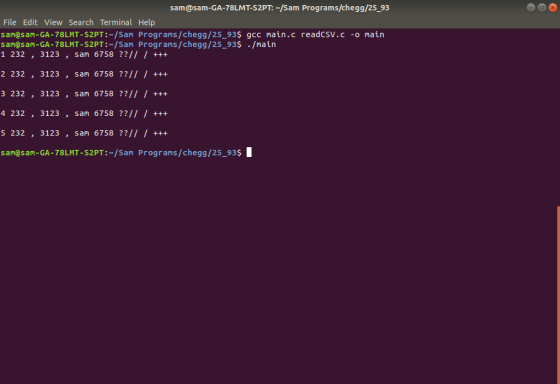
------------------------------------------------------------------------
------------------------------------------------------------------------
Add Answer to:
Write a C module called readCSV.c which has the
following function signature: void read_csv(const char*
csvFileName)....
Most questions answered within 3 hours.
-
Where is the error in this code sequence?
String s1 = "Hello";
String s2 = "ello";...
asked 11 months ago -
Financial data for Joel de Paris, Inc., for last year
follow:
Joel de Paris, Inc.
Balance...
asked 11 months ago -
Consider this reaction:
Al2(SO4)3 (aq)+ BaCl3
(aq) Al2Cl6 (aq)- +
3BaSO4(s) . What is the...
asked 11 months ago -
Suppose that Savneet is considering increasing her
recent random sample from 20 car rentals to 40...
asked 11 months ago -
Trucks arrive at an unloading terminal at an average rate of 120
per hour.
Trucks arrive...
asked 11 months ago -
Why are methanol and ethanol completely soluble in water while
octanol is not very little soluble....
asked 11 months ago -
A facilities manager at a university reads in a research report
that the mean amount of...
asked 11 months ago -
When the CuSO4 is rehydrated by adding water to the anhydrous
compound, is this an endothermic...
asked 11 months ago -
A ray of sunlight is passing from diamond into crown glass; the
angle of incidence is...
asked 11 months ago -
A block of mass 0.249 kg is placed on top of a light, vertical
spring of...
asked 11 months ago -
how do the kidneys compensate in the presences of acidosis
a) trigger hyperventilate
b) reserve acid...
asked 11 months ago -
Question 501 pts
The rental rate of capital to the firm increases. Which of the
following...
asked 11 months ago