Visual Basic Programming
Step 1-2 not important, it's just file naming.
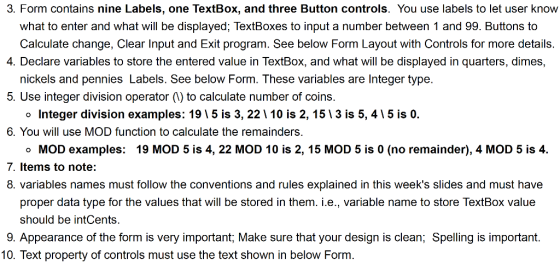


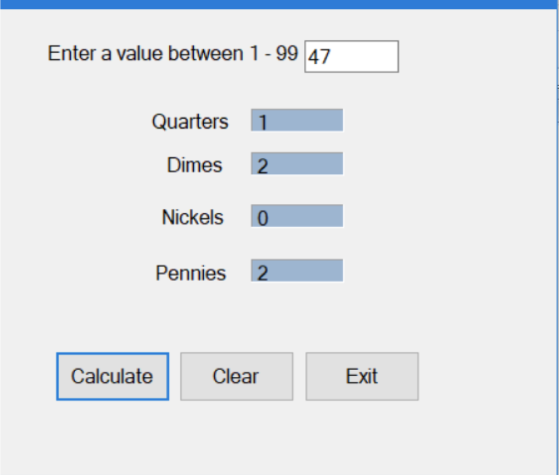
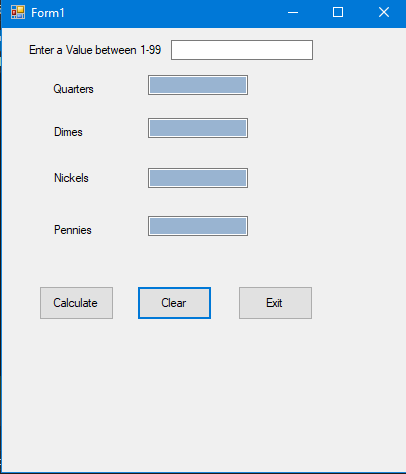
11. Clear Input button, clears TextBox and Labels that display the output. 12. Exit button, closes the Form. 13. You will write the code for the three buttons. 14. Avoid double-clicking on TextBox and Label Controls to create unnecessary code. 15. Run the program, enter values in the TextBox then click Calculate button, you should see the break down of the entered number in Quarters, dimes, nickels and pennies in their corresponding labels. See below screenshot for complete program 16. To save the project, from File, select Save All
Enter a value between 1-99 Quarters Dimes Nickels Pennies Calculate Clear Exit
Enter a value between 1-99 47 Quarters Dimes Nickels 0 Pennies Calculate Clear Exit
Homework Answers
Don't forget to give rating if you like the code.
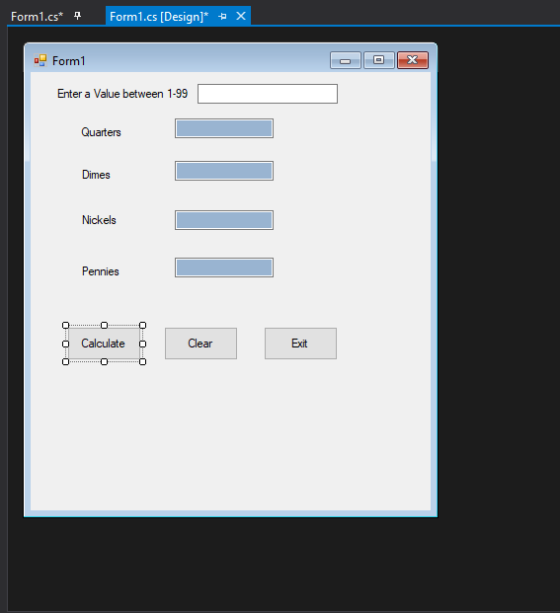
Form design Screenshot:
Program:
using System;
using System.Collections.Generic;
using System.ComponentModel;
using System.Data;
using System.Drawing;
using System.Linq;
using System.Text;
using System.Threading.Tasks;
using System.Windows.Forms;
namespace ChangeCalculator
{
public partial class Form1 : Form
{
public Form1()
{
InitializeComponent();
}
private void button1_Click(object
sender, EventArgs e)
{
//declaring variables for quarters, dimes, nickels and
pennies
int quarters, dimes, nickels, pennies,leftover;
//converting text to integer
leftover = Convert.ToInt32(textBox1.Text);
//code to calculate Quarters
quarters = leftover / 25;
leftover = leftover Mod 25;
//displaying number of quarters in a textbox
tquarters.Text = quarters.ToString();
//code to calculate dimes
dimes = leftover / 10;
leftover = leftover Mod 10;
//displaying number of dimes in a textbox
tdimes.Text = dimes.ToString();
//code to calculate nickels
nickels = leftover / 5;
leftover = leftover Mod 5;
//displaying number of nickels in a textbox
tnickels.Text = nickels.ToString();
//code to calculate pennies
pennies = leftover;
//displaying number of pennies in a textbox
tpennies.Text = pennies.ToString();
}
//code for clear Button(clears all
fields on button click)
private void clear_btn(object sender, EventArgs e)
{
textBox1.Clear();
tquarters.Clear();
tdimes.Clear();
tnickels.Clear();
tpennies.Clear();
}
//code for exit button(Exits the
entire form)
private void exit_btn(object sender, EventArgs e)
{
this.Close();
}
}
}
Output:
Screenshot of output
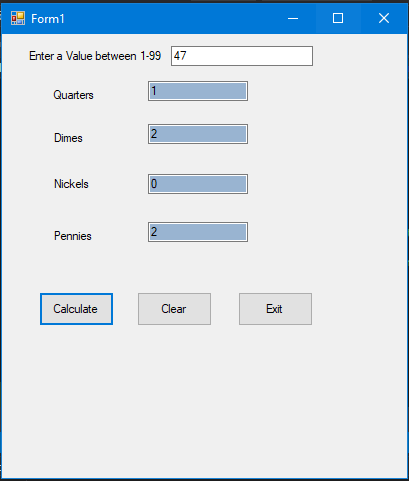
Screenshot for clear button:
Add Answer to:
Visual Basic Programming Step 1-2 not important, it's just file naming.
Visual Basic Programming Step 1-2 not important, it's just file naming. 3. Form contains nine Labels,...
 Visual Basic Programming
Step 1-2 not important, it's just file naming.
3. Form contains nine Labels, one TextBox, and three Button controls. You use labels to let user know what to enter and what will be displayed; TextBoxes to input a number between 1 and 99. Buttons to Calculate change. Clear Input and Exit program. See below Form Layout with Controls for more details 4. Declare variables to store the entered value in TextBox, and what will be displayed in...
Visual Basic Programming
Step 1-2 not important, it's just file naming.
3. Form contains nine Labels, one TextBox, and three Button controls. You use labels to let user know what to enter and what will be displayed; TextBoxes to input a number between 1 and 99. Buttons to Calculate change. Clear Input and Exit program. See below Form Layout with Controls for more details 4. Declare variables to store the entered value in TextBox, and what will be displayed in...
it c++ coding. please write on atom software. 1. Write a program that converts dollars into coins a. Request a dolla...
 it c++ coding. please write on atom software.
1. Write a program that converts dollars into coins a. Request a dollar amount as an integer: $5.34 is input as 534 b. Use a constant variable to represent each coin as a fixed value: const int NICKEL 5; c. Use division and the mod function to calculate the number of each coin. Change Calculator Enter dollar amount (as an integer): $534 The equivalent in coins: 21 Quarters 0 Dimes 1 Nickels...
it c++ coding. please write on atom software.
1. Write a program that converts dollars into coins a. Request a dollar amount as an integer: $5.34 is input as 534 b. Use a constant variable to represent each coin as a fixed value: const int NICKEL 5; c. Use division and the mod function to calculate the number of each coin. Change Calculator Enter dollar amount (as an integer): $534 The equivalent in coins: 21 Quarters 0 Dimes 1 Nickels...
Write a C program that calculates exact change. In order to receive full credit, please remember...
Write a C program that calculates exact change. In order to receive full credit, please remember that only int arithmetic is exact, so you’ll need to break up your double into two ints, the one before the decimal point and the one after the decimal point. Another point worth mentioning is that the % operator gives the remainder. In other words, when working with int values, 9 / 5 = 1 whereas 9 % 5 = 4. Keep this in...
Step One This is the Measurable interface we saw in class; you will need to provide...
 Step One This is the Measurable interface we saw in class; you will need to provide this class; this is it in its entirety (this is literally all you have to do for this step): public interface Measurable double getMeasure(); Step Two This is the Comparable interface that is a part of the standard Java library: public interface Comparable int compareTo (Object otherObject); Finish this class to represent a PiggyBank. A PiggyBank holds quarters, dimes, nickels, and pennies. You will...
An Introduction to Programming Using Visual Basic Tenth Edition Chapter 3 Programming Project 3 What is...
 An Introduction to Programming Using Visual Basic Tenth
Edition
Chapter 3 Programming Project 3
What is the solution to this project?
Change X Amount of change: 93 Determine Composition of Change Quarters: 3 Dimes: 1 Nickels: 1 Cents: 3 FIGURE 3.63 Possible outcome of Programming Project 3. own in Fig. 3.62. 3. Change Write a program to make change for an amount of money from 0 through 99 cents input by the user. The output of the program should show...
An Introduction to Programming Using Visual Basic Tenth
Edition
Chapter 3 Programming Project 3
What is the solution to this project?
Change X Amount of change: 93 Determine Composition of Change Quarters: 3 Dimes: 1 Nickels: 1 Cents: 3 FIGURE 3.63 Possible outcome of Programming Project 3. own in Fig. 3.62. 3. Change Write a program to make change for an amount of money from 0 through 99 cents input by the user. The output of the program should show...
Develop the Change Calculator application In this exercise, you’ll create an application that displays the minimum...
Develop the Change Calculator application In this exercise, you’ll create an application that displays the minimum number of quarters, dimes, nickels, and pennies that make up the number of cents specified by the user. Without the use of a JavaScript Library (for coins). 1. Open the HTML and JavaScript files below: 2. In the JavaScript file, note that three functions are supplied. The $ function. The start of a calculateChange function. And an onload event handler that attaches the calculateChange...
Project 2 Description Create a Visual C# project that when an employee's biweekly sales amount is...
Project 2 Description Create a Visual C# project that when an employee's biweekly sales amount is entered and the Calculate button is pressed, the gross pay, deductions, and net pay will be displayed. Each employee will receive a base pay of $1200 plus a sales commission of 8% of sales. Once the net pay has been calculated, display the budget amount for each category listed below based on the percentages given. base pay = $1200; use a named...
Programming Language is Java Lab 1: Programming Exercises Input/Process/Output 1) Run the Numbers. Write a program...
Programming Language is Java Lab 1: Programming Exercises Input/Process/Output 1) Run the Numbers. Write a program with two input values. The program should display the sum, difference, quotient, product, and average of the two numbers. 2) Jake’s Problem. Jake has a car with an 8-gallon fuel tank. Jake fills his tank with gas and drives 60 miles to a friend’s house. When he gets to his friend’s house, he has 6 gallons left in his fuel tank. Write a program...
Your program must meet the following specifications: 1. At program start, assume a stock of 10 nickels, 10 dimes, 10...
 Your program must meet the following specifications: 1. At program start, assume a stock of 10 nickels, 10 dimes, 10 quarters, and 10 pennies. 2. Repeatedly prompt the user for a price in the form xX.xx, where X denotes a digit, or to enter q' to quit 3. When a price is entered a. If the price entered is negative, print an error message and start over requesting either a new price or to quit (indicated by entering a 'q)...
Use visual studios language C++ to creat Form1 and Designer Form for question below 3. Form...
Use visual studios language C++ to creat Form1 and Designer Form for question below 3. Form has three textboxes, two for input and one for output. Form also has five buttons, marked, ‘+’, ‘-’, ‘*’, ‘/’, ‘C’ respectively. User enters integers into the two textboxes, and clicks one of the four buttons (+, - , *, /). The third textbox shows the result of the corresponding operation. For example, if user entered 10 into the first textbox and 2 into...
 Visual Basic Programming
Step 1-2 not important, it's just file naming.
3. Form contains nine Labels, one TextBox, and three Button controls. You use labels to let user know what to enter and what will be displayed; TextBoxes to input a number between 1 and 99. Buttons to Calculate change. Clear Input and Exit program. See below Form Layout with Controls for more details 4. Declare variables to store the entered value in TextBox, and what will be displayed in...
Visual Basic Programming
Step 1-2 not important, it's just file naming.
3. Form contains nine Labels, one TextBox, and three Button controls. You use labels to let user know what to enter and what will be displayed; TextBoxes to input a number between 1 and 99. Buttons to Calculate change. Clear Input and Exit program. See below Form Layout with Controls for more details 4. Declare variables to store the entered value in TextBox, and what will be displayed in...
 it c++ coding. please write on atom software.
1. Write a program that converts dollars into coins a. Request a dollar amount as an integer: $5.34 is input as 534 b. Use a constant variable to represent each coin as a fixed value: const int NICKEL 5; c. Use division and the mod function to calculate the number of each coin. Change Calculator Enter dollar amount (as an integer): $534 The equivalent in coins: 21 Quarters 0 Dimes 1 Nickels...
it c++ coding. please write on atom software.
1. Write a program that converts dollars into coins a. Request a dollar amount as an integer: $5.34 is input as 534 b. Use a constant variable to represent each coin as a fixed value: const int NICKEL 5; c. Use division and the mod function to calculate the number of each coin. Change Calculator Enter dollar amount (as an integer): $534 The equivalent in coins: 21 Quarters 0 Dimes 1 Nickels...
 Step One This is the Measurable interface we saw in class; you will need to provide this class; this is it in its entirety (this is literally all you have to do for this step): public interface Measurable double getMeasure(); Step Two This is the Comparable interface that is a part of the standard Java library: public interface Comparable int compareTo (Object otherObject); Finish this class to represent a PiggyBank. A PiggyBank holds quarters, dimes, nickels, and pennies. You will...
 An Introduction to Programming Using Visual Basic Tenth
Edition
Chapter 3 Programming Project 3
What is the solution to this project?
Change X Amount of change: 93 Determine Composition of Change Quarters: 3 Dimes: 1 Nickels: 1 Cents: 3 FIGURE 3.63 Possible outcome of Programming Project 3. own in Fig. 3.62. 3. Change Write a program to make change for an amount of money from 0 through 99 cents input by the user. The output of the program should show...
An Introduction to Programming Using Visual Basic Tenth
Edition
Chapter 3 Programming Project 3
What is the solution to this project?
Change X Amount of change: 93 Determine Composition of Change Quarters: 3 Dimes: 1 Nickels: 1 Cents: 3 FIGURE 3.63 Possible outcome of Programming Project 3. own in Fig. 3.62. 3. Change Write a program to make change for an amount of money from 0 through 99 cents input by the user. The output of the program should show...
 Your program must meet the following specifications: 1. At program start, assume a stock of 10 nickels, 10 dimes, 10 quarters, and 10 pennies. 2. Repeatedly prompt the user for a price in the form xX.xx, where X denotes a digit, or to enter q' to quit 3. When a price is entered a. If the price entered is negative, print an error message and start over requesting either a new price or to quit (indicated by entering a 'q)...
Most questions answered within 3 hours.
-
Where is the error in this code sequence?
String s1 = "Hello";
String s2 = "ello";...
asked 11 months ago -
Financial data for Joel de Paris, Inc., for last year
follow:
Joel de Paris, Inc.
Balance...
asked 11 months ago -
Consider this reaction:
Al2(SO4)3 (aq)+ BaCl3
(aq) Al2Cl6 (aq)- +
3BaSO4(s) . What is the...
asked 11 months ago -
Suppose that Savneet is considering increasing her
recent random sample from 20 car rentals to 40...
asked 11 months ago -
Trucks arrive at an unloading terminal at an average rate of 120
per hour.
Trucks arrive...
asked 11 months ago -
Why are methanol and ethanol completely soluble in water while
octanol is not very little soluble....
asked 11 months ago -
A facilities manager at a university reads in a research report
that the mean amount of...
asked 11 months ago -
When the CuSO4 is rehydrated by adding water to the anhydrous
compound, is this an endothermic...
asked 11 months ago -
A ray of sunlight is passing from diamond into crown glass; the
angle of incidence is...
asked 11 months ago -
A block of mass 0.249 kg is placed on top of a light, vertical
spring of...
asked 11 months ago -
how do the kidneys compensate in the presences of acidosis
a) trigger hyperventilate
b) reserve acid...
asked 11 months ago -
Question 501 pts
The rental rate of capital to the firm increases. Which of the
following...
asked 11 months ago