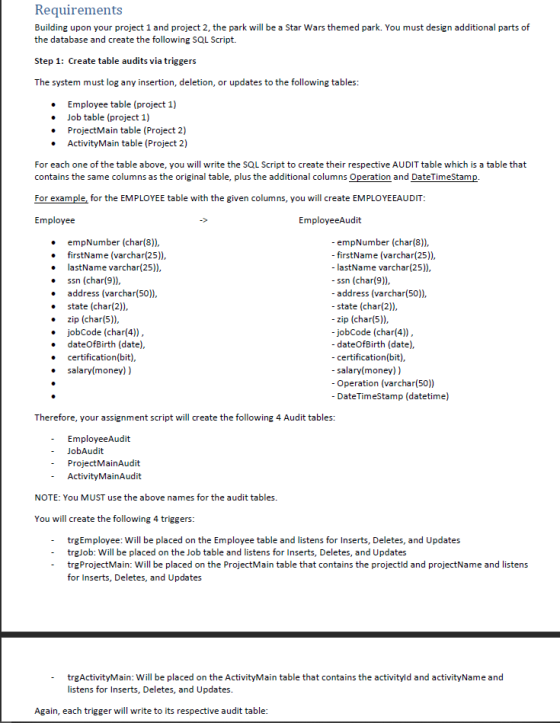
trgActivityMain: Will be placed on the ActivityMain table that contains the activityld and activityName and listens for Inserts, - Deletes, and Updates Again, each trigger will write to its respective audit table trgProjectMain will write to ProjectMainAudit trgActivityMain will write to ActivityMainAudit trg Employee will write to EmployeeAudit trgJob will write to JobAudit Again, the columns which will be written to the audit tables will be all the original columns plus "Operation" and DateTimeStamp The trigger will support the Insert, Delete and Update operation as follows: If a record is inserted in the original table, then the audit table will contain the original values plus "INSERTED into the operation column with the datetime stamp For the Delete operation, it will contain "DELETED" in the operation column plus the datetimestamp. For the Update operation, it will contain 2 records in the audit table, one for the old values (Operation will have DELETED) and one for the new values (Operation will have INSERTED) . . Step 2: DBA Exercise: Create System Catalog Scripts For Step2 and Step 3, make sure you review the Database Health Monitoring Doument Using the System Catalog Views (known as Object Catalog Views in SQLServer) relational-database ob catalog-vi create the SQL Scripts for the following views: 1. vw TableNolndexes: User tables with no Indexes 2. vw ProjectldTables: All the tables which contain the column "projectld" 3. vw_Last7Obj: All the objects that have been modified in the last 7 days 4. vw_ProjectProcs: The SQL logic from the stored procedures which have "Project in their name Step 3: DBA Troubleshooting Create the following Stored Procedures to assist in performing a database administrator tasks. Sp ActiveConnections Return all the active connections for a given database name Parameters: @databasename varchar(250) Hint: Use sys.sysprocesses. You should do some grouping to a count of the connections Output: DatabaseName NumberOfConnections LoginName aroque COP4703 Sp_LogFileStatus
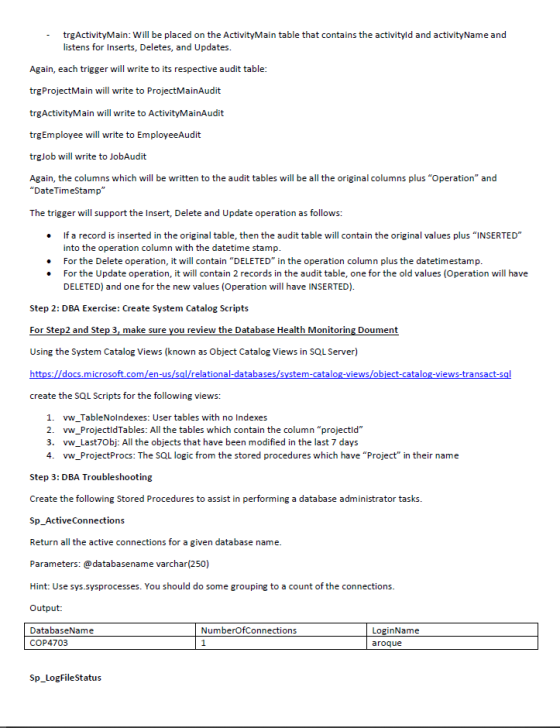
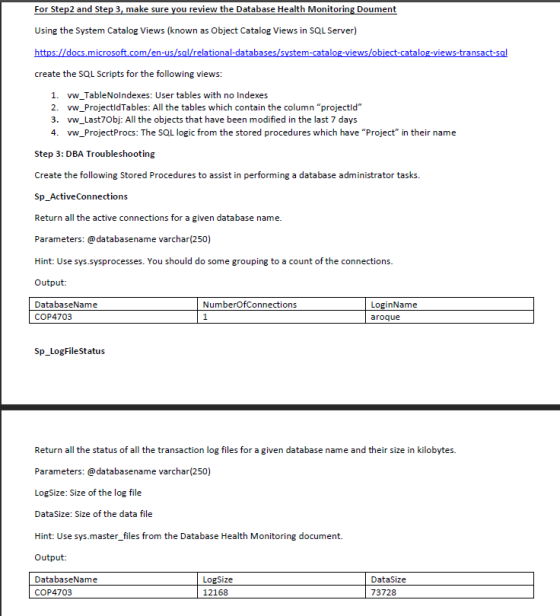
For Step2 and Step 3, make sure you review the Database Health Monitoring Doument Using the System Catalog Views (known as Object Catalog Views in SQL Server) l/relational-databases ie catalog-views create the SQL Scripts for the following views: 1. vw TableNolndexes: User tables with no Indexes 2. vw ProjectldTables: All the tables which contain the column "projectld" 3. vw_Last7Obj: All the objects that have been modified in the last 7 days 4. vw_ProjectProcs: The SQL logic from the stored procedures which have "Project in their name Step 3: DBA Troubleshooting Create the following Stored Procedures to assist in performing a database administrator tasks. Sp ActiveConnections Return all the active connections for a given database name. Parameters: @databasename varchar(250) Hint: Use sys.sysprocesses. You should do some grouping to a count of the connections. Output: DatabaseName NumberOfConnections LoginName aroque COP4703 Sp_LogFileStatus Return all the status of all the transaction log files for a given database name and their size in kilobytes. Parameters: @databasename LogSize: Size of the log file DataSize: Size of the data file Hint: Use sys.master files from the Database Health Monitoring document. Output: DatabaseName varchar(250) LogSize 12168 DataSize COP4703 73728
Homework Answers
SELECT *
INTO EmployeeAudit
FROM Employee
WHERE 0 = 1;
ALTER TABLE EmployeeAudit
  ADD Operation varchar(50),
  DateTimeStamp datetime;
GO

SELECT *
INTO JobAudit
FROM Job
WHERE 0 = 1;
ALTER TABLE JobAudit
  ADD Operation varchar(50),
  DateTimeStamp datetime;
GO

SELECT *
INTO ProjectMainAudit
FROM ProjectMain
WHERE 0 = 1;
ALTER TABLE ProjectMainAudit
  ADD Operation varchar(50),
  DateTimeStamp datetime;
GO

SELECT *
INTO ActivityMainAudit
FROM ActivityMain
WHERE 0 = 1;
ALTER TABLE ActivityMainAudit
  ADD Operation varchar(50),
  DateTimeStamp datetime;
GO


CREATE TRIGGER trgEmployee
ON Employee
FOR INSERT, UPDATE, DELETE
AS
BEGIN
  if exists(SELECT * FROM inserted)
BEGIN
  INSERT INTO EmployeeAudit (
    empNumber,
    firstName,
    lastName,
    ssn,
    address,
    state,
    zip,
    jobCode,
    dateOfBirth,
    certification,
    salary,
    Operation,
    DateTimeStamp
    )
  SELECT empNumber, firstName, lastName, ssn, address, state, zip, jobCode, dateOfBirth, certification, salary, 'INSERTED', CURRENT_TIMESTAMP
  FROM inserted
END

  if exists(SELECT * FROM deleted)
BEGIN
  INSERT INTO EmployeeAudit (
    empNumber,
    firstName,
    lastName,
    ssn,
    address,
    state,
    zip,
    jobCode,
    dateOfBirth,
    certification,
    salary,
    Operation,
    DateTimeStamp
    )
  SELECT empNumber, firstName, lastName, ssn, address, state, zip, jobCode, dateOfBirth, certification, salary, 'DELETED', CURRENT_TIMESTAMP
  FROM deleted
END

  if(UPDATE(empNumber) OR UPDATE(firstName) OR UPDATE(lastName) OR UPDATE(ssn) OR UPDATE(address) OR UPDATE(state) OR UPDATE(zip) OR UPDATE(jobCode) OR UPDATE(dateOfBirth) OR UPDATE(certification) OR UPDATE(salary))
BEGIN
  INSERT INTO EmployeeAudit (
    empNumber,
    firstName,
    lastName,
    ssn,
    address,
    state,
    zip,
    jobCode,
    dateOfBirth,
    certification,
    salary,
    Operation,
    DateTimeStamp
    )
  SELECT empNumber, firstName, lastName, ssn, address, state, zip, jobCode, dateOfBirth, certification, salary, 'DELETED', CURRENT_TIMESTAMP
  FROM deleted
  SELECT empNumber, firstName, lastName, ssn, address, state, zip, jobCode, dateOfBirth, certification, salary, 'INSERTED', CURRENT_TIMESTAMP
  FROM inserted
END
END;
GO


CREATE TRIGGER trgJob
ON Job
FOR INSERT, UPDATE, DELETE
AS
BEGIN
  if exists(SELECT * FROM inserted)
BEGIN
  INSERT INTO JobAudit (
    jobCode,
    jobDesc,
    Operation,
    DateTimeStamp
    )
  SELECT jobCode, jobDesc, 'INSERTED', CURRENT_TIMESTAMP
  FROM inserted
END

  if exists(SELECT * FROM deleted)
BEGIN
  INSERT INTO JobAudit (
    jobCode,
    jobDesc,
    Operation,
    DateTimeStamp
    )
  SELECT jobCode, jobDesc, 'DELETED', CURRENT_TIMESTAMP
  FROM deleted

  if(UPDATE(jobCode) OR UPDATE(jobDesc))
BEGIN
  INSERT INTO JobAudit (
    jobCode,
    jobDesc,
    Operation,
    DateTimeStamp
    )
  SELECT jobCode, jobDesc, 'DELETED', CURRENT_TIMESTAMP
  FROM deleted
  SELECT jobCode, jobDesc, 'INSERTED', CURRENT_TIMESTAMP
  FROM inserted
END
END;
GO


CREATE TRIGGER trgProjectMain
ON ProjectMain
FOR INSERT, UPDATE, DELETE
AS
BEGIN
  if exists(SELECT * FROM inserted)
BEGIN
  INSERT INTO ProjectMainAudit (
    projectId,
    projectName,
    firmFedID,
    fundedbudget,
    projectStartDate,
    projectStatus,
    projectTypeCode,
    projectedEndDate,
    projectManager,
    Operation,
    DateTimeStamp
    )
  SELECT projectId, projectName, firmFedID, fundedbudget, projectStartDate, projectStatus, projectTypeCode, projectedEndDate, projectManager, 'INSERTED', CURRENT_TIMESTAMP
  FROM inserted
END

if exists(SELECT * FROM deleted)
BEGIN
  INSERT INTO ProjectMainAudit (
    projectId,
    projectName,
    firmFedID,
    fundedbudget,
    projectStartDate,
    projectStatus,
    projectTypeCode,
    projectedEndDate,
    projectManager,
    Operation,
    DateTimeStamp
    )
  SELECT projectId, projectName, firmFedID, fundedbudget, projectStartDate, projectStatus, projectTypeCode, projectedEndDate, projectManager, 'DELETED', CURRENT_TIMESTAMP
  FROM deleted
END
END;
GO


CREATE TRIGGER trgActivityMain
ON ActivityMain FOR INSERT, DELETE, UPDATE
AS
BEGIN
  if exists(SELECT * FROM inserted)
BEGIN
  INSERT INTO ActivityMainAudit (
    activityId,
    activityName,
    projectId,
    costToDate,
    activityStatus,
    startDate,
    endDate,
    Operation,
    DateTimeStamp
    )
  SELECT activityId, activityName, projectId, costToDate, activityStatus, startDate, endDate, 'INSERTED', CURRENT_TIMESTAMP
  FROM inserted
END

  if exists(SELECT * FROM deleted)
BEGIN
  INSERT INTO ActivityMainAudit (
    activityId,
    activityName,
    projectId,
    costToDate,
    activityStatus,
    startDate,
    endDate,
    Operation,
    DateTimeStamp
    )
  SELECT activityId, activityName, projectId, costToDate, activityStatus, startDate, endDate, 'DELETED', CURRENT_TIMESTAMP
  FROM deleted
END
END;
GO


CREATE VIEW vw_TableNoIndexes
AS
SELECT name, create_date
FROM sys.objects
WHERE (type = 'U') AND (object_id NOT IN( SELECT object_id FROM sys.indexes));
GO


CREATE VIEW vw_ProjectIdTables
AS
SELECT DISTINCT SO.name AS object_name
FROM sys.objects SO INNER JOIN sys.columns SC ON SO.object_id=SC.object_id
WHERE SC.name LIKE '%projectid%';
GO


CREATE VIEW vw_Last7Obj
AS
SELECT name AS object_name, modify_date
FROM sys.objects
WHERE modify_date > GETDATE() - 7;
GO


CREATE VIEW vw_ProjectProcs
AS
SELECT name AS proc_name, SM.definition, create_date
FROM sys.objects SO INNER JOIN sys.sql_modules SM ON SM.object_id = SO.object_id
WHERE SM.definition LIKE '%project%';
GO


CREATE PROCEDURE Sp_ActiveConnections
@databasename varchar(250)
AS
SELECT  db_name(dbid) DatabaseName, count(spid) NumberOfConnections, LoginName
FROM sys.sysprocesses
WHERE db_name(dbid)=@databasename
GROUP BY db_name(dbid), LoginName;
GO

EXEC Sp_ActiveConnections 'Rose_Z2969824'
GO

CREATE PROCEDURE Sp_LogFileStatus
@databasename varchar(250)
AS
SELECT  db_name(database_id) DatabaseName, sum(size*iif(type_desc='LOG', 1, 0)) LogSize, sum(size) TotalSize
FROM sys.master_files
WHERE (db_name(database_id)=@databasename)
GROUP BY db_name(database_id);
GO

EXEC Sp_LogFileStatus 'Rose_Z2969824'
GO
Add Answer to:
- - Requirements Building upon your project 1 and project 2, the park will be a Star Wars themed ...
Step 1: Create table audits via triggers The system must log any insertion, deletion, or updates...
Step 1: Create table audits via triggers The system must log any insertion, deletion, or updates to the following tables: • Employee table (project 1) create table Employee ( empNumber char(8) not null, firstName varchar(25) null, lastName varchar(25) null, ssn char(9) null, address varchar(50) null, state char(2) null, zip char(5) null, jobCode char(4) null, dateOfBirth date null, certification bit null, salary money null, constraint PK_EMP PRIMARY KEY(empNumber), constraint EMP_STATECHECK CHECK(state in ('CA','FL')) ) GO • Job table (project 1) create...
You will create the following 4 triggers: - trgEmployee: Will be placed on the Employee table...
You will create the following 4 triggers: - trgEmployee: Will be placed on the Employee table and listens for Inserts, Deletes, and Updates - trgJob: Will be placed on the Job table and listens for Inserts, Deletes, and Updates - trgProject: Will be placed on the Project table that contains the projectId and projectName. - trgActivity: Will be placed on the Activity table that contains the activityId and activityName. Again, each trigger will write to its respective audit table: trgProject...
Step 1: Design and create the tables You must create additional tables to hold Project and...
Step 1: Design and create the tables You must create additional tables to hold Project and Activity Data. A project represents the construction of a facility with a limited scope of work and financial funding. A Project can be composed of many activities which indicate the different phases in the construction cycle. Example Project Name: Bobba Fett’s Bounty Chase Ride An activity represents the work that must be done to complete the project. Example Activity Name: For Example activity name...
Help In Database: Next comes the data entry: Make up data for your database, or find...
Help In Database: Next comes the data entry: Make up data for your database, or find real data. You can enter the data with INSERT statements, but it is much easier to use PhpAdmin. It has a form where you can type the data directly. Alternatively, you can use PhpAdmin to import CSV data (comma-separated values), which you can export from Excel. Include at least 3 rows in each of the entity relations, and as many rows as you need...
Question 2 (60 points): You need the Sales OrdersExample database to complete this project. To install...
 Question 2 (60 points): You need the Sales OrdersExample database to complete this project. To install the database, first, download Data code 1 and run it, then download Data code 2 and run (provided on D2L). Now answer the following questions. 2.1: (20 Points) Use the customers' table inside of the salesordersexample database, and write a query statement to show records from the CustFirstName, CustLastName, and CustCity columns 2.2: (20 Points) Use the employees' table inside of the salesordersexample database,...
Q.5] Answer the following questions based on the company database (based on the homework assignment 2) y dat...
 Q.5] Answer the following questions based on the company database (based on the homework assignment 2) y database (based on the homework assignment 2) 3 IPage 1. For each department whose average employee salary is more than $30,000, write a SQL statement to retrieve the department name and the number of employees working for that department 2. Write a SQL statement to retrieve first name, last name, and address of each employee who lives in Houston, TX. 3. Write a...
DROP TABLE EMPLOYEE; DROP TABLE JOB; DROP TABLE EMP; DROP TABLE EMP_1; DROP TABLE EMP_2; CREATE...
 DROP TABLE EMPLOYEE;
DROP TABLE JOB;
DROP TABLE EMP;
DROP TABLE EMP_1;
DROP TABLE EMP_2;
CREATE TABLE JOB(JOB_CODE CHAR (3) PRIMARY KEY, JOB_DESCRIPTION
VARCHAR (20) NOT NULL,JOB_CHG_HOUR NUMBER (5,2) NOT
NULL,JOB_LAST_UPDATE DATE NOT NULL);
INSERT INTO JOB
VALUES('500','Programmer','35.75','20-Nov-2017');
INSERT INTO JOB VALUES('501','System
Analyst','96.75','20-Nov-2017');
INSERT INTO JOB VALUES('502','Database
Designer','125.00','24-Mar-2018');
CREATE TABLE EMPLOYEE(EMP_NUM CHAR (3) PRIMARY KEY,EMP_LNAME
VARCHAR (15) NOT NULL,EMP_FNAME VARCHAR (15) NOT NULL, EMP_INITIAL
CHAR (1),EMP_HIREDATE DATE NOT NULL,JOB_CODE CHAR (3), EMP_YEARS
NUMBER (2),FOREIGN KEY (JOB_CODE) REFERENCES JOB (JOB_CODE));
INSERT...
DROP TABLE EMPLOYEE;
DROP TABLE JOB;
DROP TABLE EMP;
DROP TABLE EMP_1;
DROP TABLE EMP_2;
CREATE TABLE JOB(JOB_CODE CHAR (3) PRIMARY KEY, JOB_DESCRIPTION
VARCHAR (20) NOT NULL,JOB_CHG_HOUR NUMBER (5,2) NOT
NULL,JOB_LAST_UPDATE DATE NOT NULL);
INSERT INTO JOB
VALUES('500','Programmer','35.75','20-Nov-2017');
INSERT INTO JOB VALUES('501','System
Analyst','96.75','20-Nov-2017');
INSERT INTO JOB VALUES('502','Database
Designer','125.00','24-Mar-2018');
CREATE TABLE EMPLOYEE(EMP_NUM CHAR (3) PRIMARY KEY,EMP_LNAME
VARCHAR (15) NOT NULL,EMP_FNAME VARCHAR (15) NOT NULL, EMP_INITIAL
CHAR (1),EMP_HIREDATE DATE NOT NULL,JOB_CODE CHAR (3), EMP_YEARS
NUMBER (2),FOREIGN KEY (JOB_CODE) REFERENCES JOB (JOB_CODE));
INSERT...
database and sql problme THE QUESTIONS 3, 4,5 and 6 REFER TO THE RELATIONAL TABLES LISTED...
 database and sql problme
THE QUESTIONS 3, 4,5 and 6 REFER TO THE RELATIONAL TABLES LISTED BELOW CREATE TABLE Department ( DECIMAL(5) VARCHAR(30) CHAR(5) DATE NOT NULL NOT NULL NOT NULL * Department number /*Department name * Department manager number */ /Manager start date DNumber DName Manager MSDate CONSTRAINT Department_PK PRIMARY KEY(DNumber) CONSTRAINT Department_CK UNIQUE(DName) CREATE TABLE DeptLocation DECIMAL(5) VARCHAR(50) NOT NULL NOT NULL DNumber * Department number */ * Department location */ Address CONSTRAINT DeptLocation_PK PRIMARY KEY(DNumber, Address) CONSTRAINT...
database and sql problme
THE QUESTIONS 3, 4,5 and 6 REFER TO THE RELATIONAL TABLES LISTED BELOW CREATE TABLE Department ( DECIMAL(5) VARCHAR(30) CHAR(5) DATE NOT NULL NOT NULL NOT NULL * Department number /*Department name * Department manager number */ /Manager start date DNumber DName Manager MSDate CONSTRAINT Department_PK PRIMARY KEY(DNumber) CONSTRAINT Department_CK UNIQUE(DName) CREATE TABLE DeptLocation DECIMAL(5) VARCHAR(50) NOT NULL NOT NULL DNumber * Department number */ * Department location */ Address CONSTRAINT DeptLocation_PK PRIMARY KEY(DNumber, Address) CONSTRAINT...
For this set of Review Questions, we will create and use a database for the Wedgewood...
For this set of Review Questions, we will create and use a database for the Wedgewood Pacific Corporation (WPC) that is similar to the Microsoft Access database we created and used in Chapters 1 and 2. Founded in 1957 in Seattle, Washington, WPC has grown into an internationally recognized organization. The company is located in two buildings. One building houses the Administration, Accounting, Finance, and Human Resources departments, and the second houses the Production, Marketing, and Information Systems departments. The...
I need help with the following SQL query for a company database (script given below). The...
I need help with the following SQL query for a company database (script given below). The name of the Department. The number of employees working in that department. The number of different projects controlled by this department. The name of the project controlled by this department that has the maximum number of employees of the company working on it. The number of the above project. The cumulative sum of the number of employees of the company working on the projects...
 Question 2 (60 points): You need the Sales OrdersExample database to complete this project. To install the database, first, download Data code 1 and run it, then download Data code 2 and run (provided on D2L). Now answer the following questions. 2.1: (20 Points) Use the customers' table inside of the salesordersexample database, and write a query statement to show records from the CustFirstName, CustLastName, and CustCity columns 2.2: (20 Points) Use the employees' table inside of the salesordersexample database,...
 Q.5] Answer the following questions based on the company database (based on the homework assignment 2) y database (based on the homework assignment 2) 3 IPage 1. For each department whose average employee salary is more than $30,000, write a SQL statement to retrieve the department name and the number of employees working for that department 2. Write a SQL statement to retrieve first name, last name, and address of each employee who lives in Houston, TX. 3. Write a...
 DROP TABLE EMPLOYEE;
DROP TABLE JOB;
DROP TABLE EMP;
DROP TABLE EMP_1;
DROP TABLE EMP_2;
CREATE TABLE JOB(JOB_CODE CHAR (3) PRIMARY KEY, JOB_DESCRIPTION
VARCHAR (20) NOT NULL,JOB_CHG_HOUR NUMBER (5,2) NOT
NULL,JOB_LAST_UPDATE DATE NOT NULL);
INSERT INTO JOB
VALUES('500','Programmer','35.75','20-Nov-2017');
INSERT INTO JOB VALUES('501','System
Analyst','96.75','20-Nov-2017');
INSERT INTO JOB VALUES('502','Database
Designer','125.00','24-Mar-2018');
CREATE TABLE EMPLOYEE(EMP_NUM CHAR (3) PRIMARY KEY,EMP_LNAME
VARCHAR (15) NOT NULL,EMP_FNAME VARCHAR (15) NOT NULL, EMP_INITIAL
CHAR (1),EMP_HIREDATE DATE NOT NULL,JOB_CODE CHAR (3), EMP_YEARS
NUMBER (2),FOREIGN KEY (JOB_CODE) REFERENCES JOB (JOB_CODE));
INSERT...
DROP TABLE EMPLOYEE;
DROP TABLE JOB;
DROP TABLE EMP;
DROP TABLE EMP_1;
DROP TABLE EMP_2;
CREATE TABLE JOB(JOB_CODE CHAR (3) PRIMARY KEY, JOB_DESCRIPTION
VARCHAR (20) NOT NULL,JOB_CHG_HOUR NUMBER (5,2) NOT
NULL,JOB_LAST_UPDATE DATE NOT NULL);
INSERT INTO JOB
VALUES('500','Programmer','35.75','20-Nov-2017');
INSERT INTO JOB VALUES('501','System
Analyst','96.75','20-Nov-2017');
INSERT INTO JOB VALUES('502','Database
Designer','125.00','24-Mar-2018');
CREATE TABLE EMPLOYEE(EMP_NUM CHAR (3) PRIMARY KEY,EMP_LNAME
VARCHAR (15) NOT NULL,EMP_FNAME VARCHAR (15) NOT NULL, EMP_INITIAL
CHAR (1),EMP_HIREDATE DATE NOT NULL,JOB_CODE CHAR (3), EMP_YEARS
NUMBER (2),FOREIGN KEY (JOB_CODE) REFERENCES JOB (JOB_CODE));
INSERT...
 database and sql problme
THE QUESTIONS 3, 4,5 and 6 REFER TO THE RELATIONAL TABLES LISTED BELOW CREATE TABLE Department ( DECIMAL(5) VARCHAR(30) CHAR(5) DATE NOT NULL NOT NULL NOT NULL * Department number /*Department name * Department manager number */ /Manager start date DNumber DName Manager MSDate CONSTRAINT Department_PK PRIMARY KEY(DNumber) CONSTRAINT Department_CK UNIQUE(DName) CREATE TABLE DeptLocation DECIMAL(5) VARCHAR(50) NOT NULL NOT NULL DNumber * Department number */ * Department location */ Address CONSTRAINT DeptLocation_PK PRIMARY KEY(DNumber, Address) CONSTRAINT...
database and sql problme
THE QUESTIONS 3, 4,5 and 6 REFER TO THE RELATIONAL TABLES LISTED BELOW CREATE TABLE Department ( DECIMAL(5) VARCHAR(30) CHAR(5) DATE NOT NULL NOT NULL NOT NULL * Department number /*Department name * Department manager number */ /Manager start date DNumber DName Manager MSDate CONSTRAINT Department_PK PRIMARY KEY(DNumber) CONSTRAINT Department_CK UNIQUE(DName) CREATE TABLE DeptLocation DECIMAL(5) VARCHAR(50) NOT NULL NOT NULL DNumber * Department number */ * Department location */ Address CONSTRAINT DeptLocation_PK PRIMARY KEY(DNumber, Address) CONSTRAINT...
Most questions answered within 3 hours.
-
Where is the error in this code sequence?
String s1 = "Hello";
String s2 = "ello";...
asked 10 months ago -
Financial data for Joel de Paris, Inc., for last year
follow:
Joel de Paris, Inc.
Balance...
asked 10 months ago -
Consider this reaction:
Al2(SO4)3 (aq)+ BaCl3
(aq) Al2Cl6 (aq)- +
3BaSO4(s) . What is the...
asked 10 months ago -
Suppose that Savneet is considering increasing her
recent random sample from 20 car rentals to 40...
asked 10 months ago -
Trucks arrive at an unloading terminal at an average rate of 120
per hour.
Trucks arrive...
asked 10 months ago -
Why are methanol and ethanol completely soluble in water while
octanol is not very little soluble....
asked 10 months ago -
A facilities manager at a university reads in a research report
that the mean amount of...
asked 10 months ago -
When the CuSO4 is rehydrated by adding water to the anhydrous
compound, is this an endothermic...
asked 10 months ago -
A ray of sunlight is passing from diamond into crown glass; the
angle of incidence is...
asked 10 months ago -
A block of mass 0.249 kg is placed on top of a light, vertical
spring of...
asked 10 months ago -
how do the kidneys compensate in the presences of acidosis
a) trigger hyperventilate
b) reserve acid...
asked 10 months ago -
Question 501 pts
The rental rate of capital to the firm increases. Which of the
following...
asked 10 months ago