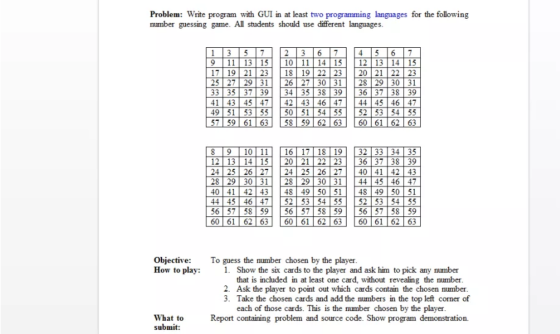
Problem: Write program with GUI in at least two programming languages for the following number guessing game. All students should use different languages.
Any language you want
Problem: Write program with GUI in at least two programming languages for the following number guessing game. All students should use different languages.
To guess the number chosen by the player How to play:
Show the six cards to the player and ask him to pick any number that is included in at least one card, without revealing the number
2. Ask the player to point out which cards contain the chosen number
3. Take the chosen cards and add the numbers in the top left corner of each of those cards. This is the number chosen by the player
Report containing problem and source code. Show program demonstration.
Homework Answers
Number Guessing Game Java
package guessinggame;
import java.awt.Color;
import java.awt.FlowLayout;
import java.awt.event.ActionListener;
import java.awt.event.ActionEvent;
import java.util.Random;
import javax.swing.JFrame;
import javax.swing.JTextField;
import javax.swing.JLabel;
import javax.swing.JButton;
import javax.swing.SwingUtilities;
public class Test extends JFrame {
private int Guesses = 1;
private int GuessOld = 0;
private int number;
private JTextField guessInputJTextField;
private JLabel prompt1JLabel;
private JLabel prompt2JLabel;
private JLabel messageJLabel;
private JLabel message2JLabel;
private JLabel random1 = new JLabel("");
private JButton newGameJButton;
private Color background;
public Test() {
super("Guessing Game");
setLayout(new FlowLayout());
background = Color.LIGHT_GRAY;
prompt1JLabel = new JLabel("I have a number between 1 and
1000.");
add(prompt1JLabel);
prompt2JLabel = new JLabel("Can you guess my number? Enter your
Guess:");
add(prompt2JLabel);
guessInputJTextField = new JTextField(5);
guessInputJTextField.addActionListener(new GuessHandler());
add(guessInputJTextField);
messageJLabel = new JLabel("");
add(messageJLabel);
message2JLabel = new JLabel("");
add(message2JLabel);
newGameJButton = new JButton("New Game");
add(newGameJButton);
Random generator = new Random();
number = generator.nextInt(1001);
newGameJButton.addActionListener(
new ActionListener()
{
public void actionPerformed(ActionEvent e) {
guessInputJTextField.setText("");
Random generator = new Random();
number = generator.nextInt(1001);
random1.setText("" + number);
SwingUtilities.updateComponentTreeUI(random1);
messageJLabel.setText("");
guessInputJTextField.setEditable(true);
Guesses = 0;
message2JLabel.setText("Number of Guesses: " + Guesses);
Guesses++;
}
}
);
theGame();
}
public void theGame() {
}
class GuessHandler implements ActionListener {
public void actionPerformed(ActionEvent e) {
int Guess;
Guess = Integer.parseInt(guessInputJTextField.getText());
if (Math.abs(number - Guess) < Math.abs(number - GuessOld))
{
getContentPane().setBackground(Color.RED);
} else {
getContentPane().setBackground(Color.BLUE);
}
GuessOld = Guess;
if (Guess > number) {
messageJLabel.setText("Too High.");
SwingUtilities.updateComponentTreeUI(messageJLabel);
}
if (Guess < number) {
messageJLabel.setText("Too Low.");
SwingUtilities.updateComponentTreeUI(messageJLabel);
}
if (Guess == number) {
messageJLabel.setText("Correct!");
SwingUtilities.updateComponentTreeUI(messageJLabel);
guessInputJTextField.setEditable(false);
}
message2JLabel.setText("Number of Guesses: " + Guesses++);
}
}
}
package guessinggame;
import javax.swing.JFrame;
public class GuessGame {
public static void main(String args[]) throws Exception {
Test guessgame = new Test();
guessgame.setDefaultCloseOperation(JFrame.EXIT_ON_CLOSE);
guessgame.setSize(550, 150);
guessgame.setVisible(true);
}
}
Python NumberGuessing Game
# Guess my number game
# User must attempt to guess randomly selected number within a
range in fewest possible attempts
from tkinter import *
import random
class Application(Frame):
"""A GUI application which which generates random number and gets
user input"""
def __init__(self, master): #initialize newly created
Application object
"""Initialize the frame"""
Frame.__init__(self, master) # super(Application,
self).__init__(master) in python 3
self.grid()
self.create_widgets()
self.number = random.randint(1, 101)
def create_widgets(self):
"""Get user inputs"""
# create instruction label
Label(self, text = "I'm thinking of a number between 1 and
100.").grid(row = 0, column = 0, sticky = W)
Label(self, text = "Try and guess it in as few attempts as
possible!").grid(row = 1, column = 0, sticky = W)
# create guess input prompt label and entry
Label(self, text = "Take a guess:").grid(row = 2, column = 0,
sticky = W)
self.guess_ent = Entry(self)
self.guess_ent.grid(row = 2, column = 1, sticky = W)
# create start game prompt label and submit button
Label(self, text = "Press submit to start the game!").grid(row = 3,
column = 0, sticky = W)
Button(self, text = "Submit", command = self.run_game).grid(row =
3, column = 1, sticky = W)
# create submit button
#Button(self, text = "Submit", command = )
# create computer feedback text box
self.text = Text(self, width = 75, height = 10, wrap = WORD)
self.text.grid(row = 4, column = 0, columnspan = 4)
def run_game(self):
"""Generate number and get user input"""
guess = int(self.guess_ent.get())
if guess != self.number:
print_text = "You guessed {0}.".format(guess)
if guess > self.number:
print_text += " That's too high. Guess lower..."
elif guess < self.number:
print_text += " That's too low. Guess higher..."
self.text.delete(0.0, END)
self.text.insert(0.0, print_text)
self.guess_ent.delete(0, END)
else:
print_text = "That's the right number! Well done!"
self.text.delete(0.0, END)
self.text.insert(0.0, print_text)
# main
root = Tk()
root.title("Guess my number game!")
app = Application(root)
root.mainloop()
Add Answer to:
Problem: Write program with GUI in at least two programming languages for the following number guessing game. All students should use different languages.
Write a program that allows a user to play a guessing game. Pick a random number...
Write a program that allows a user to play a guessing game. Pick a random number in between 1 and 100, and then prompt the user for a guess. For their first guess, if it’s not correct, respond to the user that their guess was “hot.” For all subsequent guesses, respond that the user was “hot”if their new guess is strictly closer to the secret number than their old guess and respond with“cold”, otherwise. Continue getting guesses from the user...
Number Guessing Game Games Write program in C++. For this game, the computer will select a...
Number Guessing Game Games Write program in C++. For this game, the computer will select a random number between 1 and 100 (inclusive). The computer will then ask the (human) player to guess the number the computer has selected. After the player’s guess is input to the computer, the computer will output one of three responses, depending on the relationship of the number the player guessed to the number the computer selected: “Your guess was too low.” “Your guess was...
Write a Java program that implements the number guessing game where the computer tries to guess...
Write a Java program that implements the number guessing game where the computer tries to guess a number in your head. You pick a number between 0 and 100, and the computer generates a guess. You then type 1 if your number is larger than the computer’s guess, -1 if your number is smaller, and 0 if the number is correct. The computer should keep trying to guess the number by adjusting the guess based on your feedback (so if...
Please write a C# program that where a player will play a guessing game with the...
Please write a C# program that where a player will play a guessing game with the range of 1-100. Each time the play guesses a number, and it is not correct the program should indicate if the number is more or less than what the player guessed. The play should be able to guess until the correct number has been guessed. If an invalid number is entered, such as: 1.24 (real number), or asd (string). The program should tell user...
Python Program Python: Number Guessing Game Write a Python function called "Guess.py" to create a number...
 Python Program
Python: Number Guessing Game Write a Python function called "Guess.py" to create a number guessing game: 1. Function has one input for the number to Guess and one output of the number of attempts needed to guess the value (assume input number will always be between 1 and 1000). 2. If no number was given when the function was called, use random.randint(a,b) to generate a random number between a=1 and b=1000. You will also need to add an...
Python Program
Python: Number Guessing Game Write a Python function called "Guess.py" to create a number guessing game: 1. Function has one input for the number to Guess and one output of the number of attempts needed to guess the value (assume input number will always be between 1 and 1000). 2. If no number was given when the function was called, use random.randint(a,b) to generate a random number between a=1 and b=1000. You will also need to add an...
USE JAVA Problem 1: Guess a Number You are writing a program for a number guessing...
 USE JAVA
Problem 1: Guess a Number You are writing a program for a number guessing game. For playing "Guess a Number", the program will generate a number for player to guess from within a range specified by the player. The program will take as input the lowest number in the range and the highest number in the range from the player, and then a series of guesses of the form: <n,>n, = n, where n is the number guessed....
USE JAVA
Problem 1: Guess a Number You are writing a program for a number guessing game. For playing "Guess a Number", the program will generate a number for player to guess from within a range specified by the player. The program will take as input the lowest number in the range and the highest number in the range from the player, and then a series of guesses of the form: <n,>n, = n, where n is the number guessed....
This program will implement a simple guessing game... Write a program that will generate a random...
This program will implement a simple guessing game... Write a program that will generate a random number between 1 and 50 and then have the user guess the number. The program should tell the user whether they have guessed too high or too low and allow them to continue to guess until they get the number or enter a 0 to quit. When they guess the number it should tell them how many guesses it took. At the end, the...
in c programming and c++filed Exercise 1: A Game of guessing number Set the default upper...
 in c programming and c++filed
Exercise 1: A Game of guessing number Set the default upper and lower limits to be 1-100, and ask you to guess a number. If you do not guess the correct number, the program will nicely" automatically adjust the upper or the lower limits to save your day until you guess it. 2 0 12. 51 - 100 3 2 51 74 22 65 74 85 2 71 74 3 . 2 73 74 75...
in c programming and c++filed
Exercise 1: A Game of guessing number Set the default upper and lower limits to be 1-100, and ask you to guess a number. If you do not guess the correct number, the program will nicely" automatically adjust the upper or the lower limits to save your day until you guess it. 2 0 12. 51 - 100 3 2 51 74 22 65 74 85 2 71 74 3 . 2 73 74 75...
JAVA PROGRAM: Guessing Game Objective The student will write an individualized program that utilizes conditional flow...
JAVA PROGRAM: Guessing Game Objective The student will write an individualized program that utilizes conditional flow of control structures in Java. Specifications For this assignment, you will write a program that guesses a number chosen by your user. Your program will prompt the user to pick a number from 1 to 10. The program asks the user yes or no questions, and the guesses the user’s number. When the program starts up, it outputs a prompt asking the user to...
Write a Java application program that plays a number guessing game with the user. In the...
Write a Java application program that plays a number guessing game with the user. In the starter code that you are given to help you begin the project, you will find the following lines of code: Random generator = args.length == 0 ? new Random() : new Random(Integer.parseInt(args[0])); int secret = generator.nextInt(100); You must keep these lines of code in your program. If you delete these lines, or if you change thse lines in any way, then your program...
 Python Program
Python: Number Guessing Game Write a Python function called "Guess.py" to create a number guessing game: 1. Function has one input for the number to Guess and one output of the number of attempts needed to guess the value (assume input number will always be between 1 and 1000). 2. If no number was given when the function was called, use random.randint(a,b) to generate a random number between a=1 and b=1000. You will also need to add an...
Python Program
Python: Number Guessing Game Write a Python function called "Guess.py" to create a number guessing game: 1. Function has one input for the number to Guess and one output of the number of attempts needed to guess the value (assume input number will always be between 1 and 1000). 2. If no number was given when the function was called, use random.randint(a,b) to generate a random number between a=1 and b=1000. You will also need to add an...
 USE JAVA
Problem 1: Guess a Number You are writing a program for a number guessing game. For playing "Guess a Number", the program will generate a number for player to guess from within a range specified by the player. The program will take as input the lowest number in the range and the highest number in the range from the player, and then a series of guesses of the form: <n,>n, = n, where n is the number guessed....
USE JAVA
Problem 1: Guess a Number You are writing a program for a number guessing game. For playing "Guess a Number", the program will generate a number for player to guess from within a range specified by the player. The program will take as input the lowest number in the range and the highest number in the range from the player, and then a series of guesses of the form: <n,>n, = n, where n is the number guessed....
 in c programming and c++filed
Exercise 1: A Game of guessing number Set the default upper and lower limits to be 1-100, and ask you to guess a number. If you do not guess the correct number, the program will nicely" automatically adjust the upper or the lower limits to save your day until you guess it. 2 0 12. 51 - 100 3 2 51 74 22 65 74 85 2 71 74 3 . 2 73 74 75...
in c programming and c++filed
Exercise 1: A Game of guessing number Set the default upper and lower limits to be 1-100, and ask you to guess a number. If you do not guess the correct number, the program will nicely" automatically adjust the upper or the lower limits to save your day until you guess it. 2 0 12. 51 - 100 3 2 51 74 22 65 74 85 2 71 74 3 . 2 73 74 75...
Most questions answered within 3 hours.
-
Where is the error in this code sequence?
String s1 = "Hello";
String s2 = "ello";...
asked 11 months ago -
Financial data for Joel de Paris, Inc., for last year
follow:
Joel de Paris, Inc.
Balance...
asked 11 months ago -
Consider this reaction:
Al2(SO4)3 (aq)+ BaCl3
(aq) Al2Cl6 (aq)- +
3BaSO4(s) . What is the...
asked 11 months ago -
Suppose that Savneet is considering increasing her
recent random sample from 20 car rentals to 40...
asked 11 months ago -
Trucks arrive at an unloading terminal at an average rate of 120
per hour.
Trucks arrive...
asked 11 months ago -
Why are methanol and ethanol completely soluble in water while
octanol is not very little soluble....
asked 11 months ago -
A facilities manager at a university reads in a research report
that the mean amount of...
asked 11 months ago -
When the CuSO4 is rehydrated by adding water to the anhydrous
compound, is this an endothermic...
asked 11 months ago -
A ray of sunlight is passing from diamond into crown glass; the
angle of incidence is...
asked 11 months ago -
A block of mass 0.249 kg is placed on top of a light, vertical
spring of...
asked 11 months ago -
how do the kidneys compensate in the presences of acidosis
a) trigger hyperventilate
b) reserve acid...
asked 11 months ago -
Question 501 pts
The rental rate of capital to the firm increases. Which of the
following...
asked 11 months ago