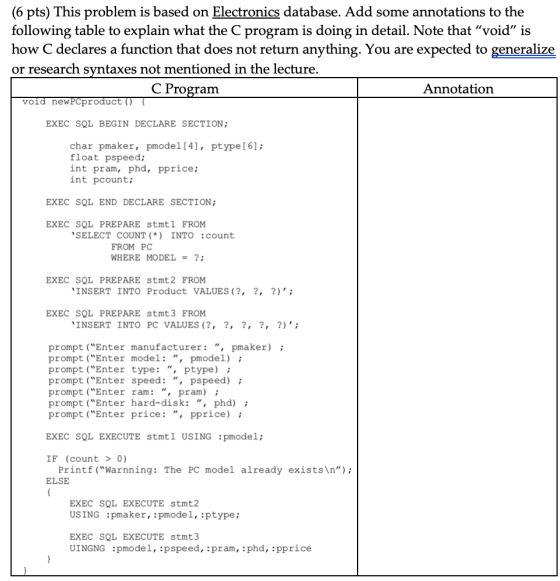
Please help we are suppose to explain what the C code does.
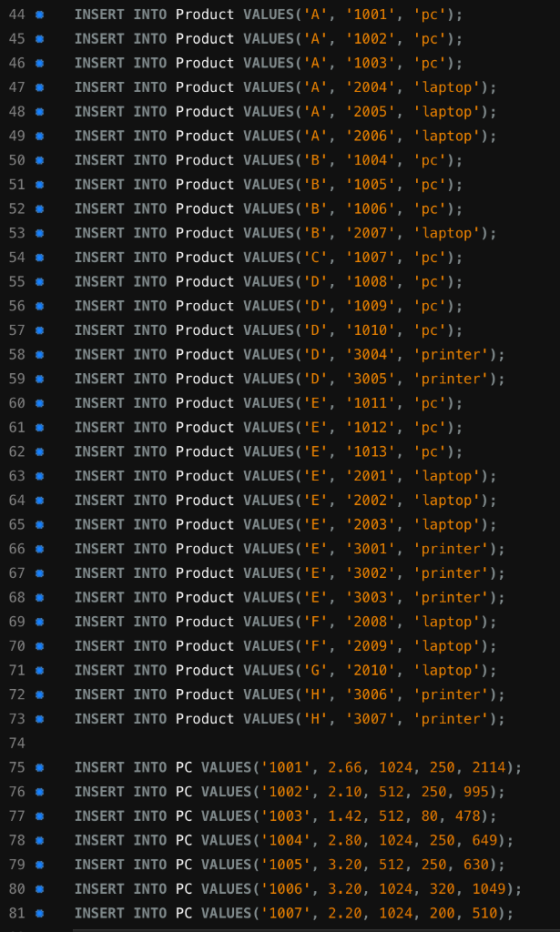
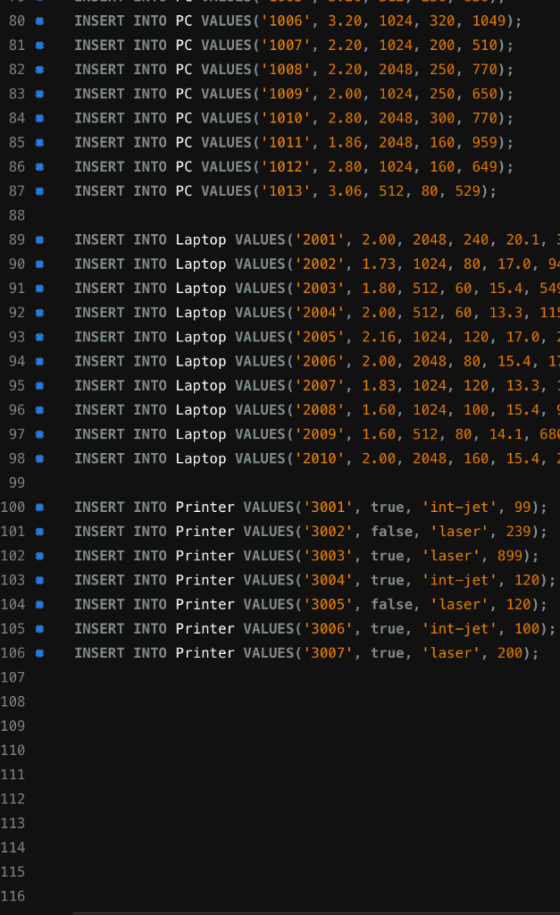
This is the electronics database
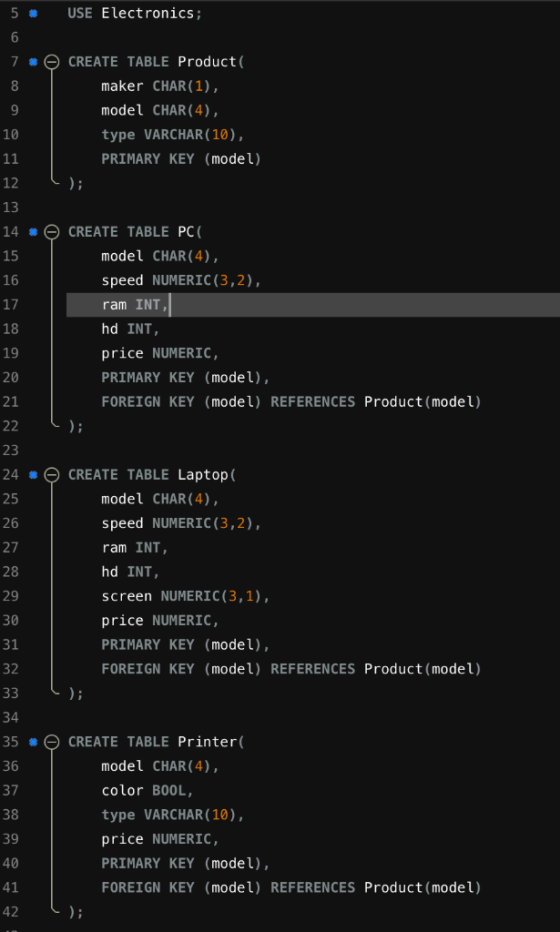
5 USE Electronics; CREATE TABLE Product( 7 8 maker CHAR (1), model CHAR (4) 10 type VARCHAR(10), PRIMARY KEY (model) 12 13 14 CREATE TABLE PC ( 15 model CHAR (4), 16 speed NUMERIC (3,2), 17 ram INT 18 hd INT 19 price NUMERIC, 20 PRIMARY KEY (model), 21 FOREIGN KEY (model) REFERENCES Product (model) 23 24 CREATE TABLE Laptop( model CHAR (4) 25 speed NUMERIC (3,2) 26 27 ram INT 28 hd INT 29 screen NUMERIC(3,1), 30 price NUMERIC, 31 PRIMARY KEY (model), FOREIGN KEY (model) REFERENCES Product (model) 32 34 35CREATE TABLE Printer( model CHAR (4), 36 color BOOL, 37 38 type VARCHAR (10), 39 price NUMERIC, 40 PRIMARY KEY (model), 41 FOREIGN KEY (model) REFERENCES Product(model) 42
INSERT INTO Product VALUES ("A· '1001', 'pc' ); 44 45 # INSERT INTO Product VALUES(' A', '1002. pc' ); 46 # INSERT INTO Product VALUES ('A', '1003', 'pc' ); 47 # INSERT INTO Product VALUES ('A', '2004', 'laptop'); 48 # INSERT INTO Product VALUES('A', '2005', 'laptop'); 49 # INSERT INTO Product VALUES ('A', '2006', 'laptop'); 50 INSERT INTO Product VALUES ('B· '1004', ' pc' ); 51 INSERT INTO Product VALUES ('B· '1005', 'pc' ); 52 # INSERT INTO Product VALUES('B', '1006', 'pc' ); 53 # INSERT INTO Product VALUES ('B', '2007· 'laptop'); 54 # INSERT INTO Product VALUES('C', '1007', 'pc'); 55 # INSERT INTO Product VALUES ('D. '1008', 'pc'); 56 # INSERT INTO Product VALUES ("D. '1009", "pc' ); 57 # INSERT INTO Product VALUES ("D· '1010', 'pc'); 58 INSERT INTO Product VALUES ("D', '3004', 'printer'); 59 # INSERT INTO Product VALUES ('D· '3005', 'printer'); INSERT INTO Product VALUES('E', '1011', 'pc' ); 60 # 61 # INSERT INTO Product VALUES ('E', '1012', 'pc' ); 62 INSERT INTO Product VALUES(' E', '1013', 'pc' ); 63 INSERT INTO Product VALUES ('E· '2001', 'laptop'); 64 # INSERT INTO Product VALUES('E', '2002', 'laptop'); 65 # INSERT INTO Product VALUES(' E', '2003', 'laptop'); 66 # INSERT INTO Product VALUES('E', '3001', 'printer'); 67 # INSERT INTO Product VALUES('E', '3002', 'printer'); 68 # INSERT INTO Product VALUES('E', '3003', 'printer'); 69 # INSERT INTO Product VALUES ('F', '2008· 'laptop'); 70 # INSERT INTO Product VALUES('F', '2009, 'laptop'); 71 INSERT INTO Product VALUES ('G', '2010', 'laptop'); 72 # INSERT INTO Product VALUES('H', '3006', 'printer'); 73 # INSERT INTO Product VALUES ('H· '3007', 'printer'); 74 75 # INSERT INTO PC VALUES('1001., 2.66, 1024, 250, 2114); 76INSERT INTO PC VALUES ('1002, 2.10, 512, 250, 995); 77 # INSERT INTO PC VALUES ('1003', 1.42, 512, 80, 478); 78 # INSERT INTO PC VALUES('1004. 2.80, 1024, 250, 649); INSERT INTO PC VALUES ('1005', 3.20, 512, 250, 630); 79 # 80 # INSERT INTO PC VALUES ('1006', 3.20, 1024, 320, 1049); 81 # INSERT INTO PC VALUES ('1007. 2.20, 1024, 200 , 510);
80 # INSERT INTO PC VALUES ('1006', 3.20, 1024, 320, 1049); 81 # INSERT INTO PC VALUES('1007. 2.20, 1024, 200, 510); 82 INSERT INTO PC VALUES('1008. 2.20, 2048, 250, 770); 83 # INSERT INTO PC VALUES ('1009", 2.00, 1024, 250, 650); 84 # INSERT INTO PC VALUES('1010', 2.80, 2048, 300, 770); 85 # INSERT INTO PC VALUES('1011', 1.86, 2048, 160, 959); 86 INSERT INTO PC VALUES('10 12. 2. 80, 1024, 160, 649); 87 INSERT INTO PC VALUES('1013. 3.06, 512, 80, 529); 89INSERT INTO Laptop VALUES(2001', 2.00, 2048, 240, 20.1, : 90 # INSERT INTO Laptop VALUES ('2002. 1.73, 1024, 80, 17.0, 9 91 # INSERT INTO Laptop VALUES ('2003', 1.80, 512, 60 , 15.4, 54 92 # INSERT INTO Laptop VALUES ('2004, 2.00, 512, 60, 13.3, 115 93 # INSERT INTO Laptop VALUES('2005. 2.16, 1024, 120, 17.0 94 INSERT INTO Laptop VALUES ('2006', 2.00, 2048, 80, 15.4, 1: 95 # INSERT INTO Laptop VALUES('2007. 1.83, 1024, 120, 13.3, 96 INSERT INTO Laptop VALUES ('2008", 1.60, 1024, 100, 15.4, 97 # INSERT INTO Laptop VALUES ("2009", 1.60, 512, 80, 14.1, 686 98 # INSERT INTO Laptop VALUES ('2010', 2.00, 2048, 160, 15.4 100 INSERT INTO Printer VALUES ('3001', true, 'int-jet', 99); INSERT INTO Printer VALUES ('3002', false, 'laser', 239); 101 # 102INSERT INTO Printer VALUES (3003', true, 'laser', 899); 103 # INSERT INTO Printer VALUES('3004. .int-jet', 120); true, 104 # INSERT INTO Printer VALUES ('3005', false, 'laser', 120); 105 # INSERT INTO Printer VALUES ('3006', true, 'int-jet', 100); 106 INSERT INTO Printer VALUES ('3007. true, 'laser', 200); 107 108 109 110 112 113 114 115 116
Homework Answers
The are many sections in the code to understand.
In the first section,
from EXEC SQL BEGIN DECLARE SECTION to EXEC SQL END DECLARE SECTION
we define the variables which will be used in the SQL query.
pmaker is will contain a single character, pmodel, which is a string, can contain at most 4 characters. ptype, which is a string, can contain at most 6 characters. pspeed is a floating point number. pram, phd, pprice, pcount are integers.
Now in the next section, we prepare a statement stmt1,
the is ? in the statement which specifies that this is a placeholder (its value will be provided at the time of query execution). The stmt1 query will count the number of PCs of given model and store the result into count variable.
Now next section create a statement stmt2 which is a query to store an entry into table Product. (all three ? are placeholder and their values need to be provided at the time of query execution.)
And next section create a statement stmt3 which is a query to store an entry into table PC.(all five ? are placeholder and their values need to be provided at the time of query execution.)
Now next few line (prompt) ask the user the inputs.
And then the line,
EXEC SQL EXECUTE stmt1 USING : pmodel;
will execute the query stmt1, which returns the count of PCs using model provided by user. (the result will be stored in count variable).
then we are checking that if (count>0) means there are some PCs of the given model, in this case show a use a warning message.
on other case,
execute the stmt2 query , which will first insert a product into the table Product with the values provided by user.
and then insert an entry into PC table with the value pmodel, pspeed, pram, phd, pprice which are the values provided by user.
Add Answer to:
Please help we are suppose to explain what the C code does. This is the electronics database (6 pts) This problem is...
Find the manufacturer(s) of the computer (PC or laptop) with the highest available speed. Write in...
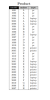 Find the manufacturer(s) of the computer (PC or laptop)
with the highest available speed. Write in Relational
Algebra.
Pc 1002 pc pc Product model maker type 1001 pc 1003 pc 2004 laptop 2005 laptop 2006 laptop 1004 pc 1005 pc 1006 2007 laptop 1007 1008 pc 1009 pc 1010 pc 3004 printer 3005 printer 1011 pc 1012 1013 pc 2001 laptop 2002 laptop 2003 laptop 3001 printer 3002 printer 3003 printer 2008 laptop 2009 laptop 2010 laptop 3006 printer 3007...
Find the manufacturer(s) of the computer (PC or laptop)
with the highest available speed. Write in Relational
Algebra.
Pc 1002 pc pc Product model maker type 1001 pc 1003 pc 2004 laptop 2005 laptop 2006 laptop 1004 pc 1005 pc 1006 2007 laptop 1007 1008 pc 1009 pc 1010 pc 3004 printer 3005 printer 1011 pc 1012 1013 pc 2001 laptop 2002 laptop 2003 laptop 3001 printer 3002 printer 3003 printer 2008 laptop 2009 laptop 2010 laptop 3006 printer 3007...
SQL QUERIES 1) Using the Product and PC relations, create both tables in your database and...
 SQL QUERIES
1) Using the Product and PC relations, create both tables in
your database and insert all the data. Show the SQL statements to
create each table and show a representative SQL insert statement
for the data in each table (i.e. you do not need to show insert
statements for all the data).
– For the remaining questions, assume that your SQL is part of
a program function and the function provides the input needed for
your SQL query....
SQL QUERIES
1) Using the Product and PC relations, create both tables in
your database and insert all the data. Show the SQL statements to
create each table and show a representative SQL insert statement
for the data in each table (i.e. you do not need to show insert
statements for all the data).
– For the remaining questions, assume that your SQL is part of
a program function and the function provides the input needed for
your SQL query....
 Find the manufacturer(s) of the computer (PC or laptop)
with the highest available speed. Write in Relational
Algebra.
Pc 1002 pc pc Product model maker type 1001 pc 1003 pc 2004 laptop 2005 laptop 2006 laptop 1004 pc 1005 pc 1006 2007 laptop 1007 1008 pc 1009 pc 1010 pc 3004 printer 3005 printer 1011 pc 1012 1013 pc 2001 laptop 2002 laptop 2003 laptop 3001 printer 3002 printer 3003 printer 2008 laptop 2009 laptop 2010 laptop 3006 printer 3007...
Find the manufacturer(s) of the computer (PC or laptop)
with the highest available speed. Write in Relational
Algebra.
Pc 1002 pc pc Product model maker type 1001 pc 1003 pc 2004 laptop 2005 laptop 2006 laptop 1004 pc 1005 pc 1006 2007 laptop 1007 1008 pc 1009 pc 1010 pc 3004 printer 3005 printer 1011 pc 1012 1013 pc 2001 laptop 2002 laptop 2003 laptop 3001 printer 3002 printer 3003 printer 2008 laptop 2009 laptop 2010 laptop 3006 printer 3007...
 SQL QUERIES
1) Using the Product and PC relations, create both tables in
your database and insert all the data. Show the SQL statements to
create each table and show a representative SQL insert statement
for the data in each table (i.e. you do not need to show insert
statements for all the data).
– For the remaining questions, assume that your SQL is part of
a program function and the function provides the input needed for
your SQL query....
SQL QUERIES
1) Using the Product and PC relations, create both tables in
your database and insert all the data. Show the SQL statements to
create each table and show a representative SQL insert statement
for the data in each table (i.e. you do not need to show insert
statements for all the data).
– For the remaining questions, assume that your SQL is part of
a program function and the function provides the input needed for
your SQL query....
Most questions answered within 3 hours.
-
Where is the error in this code sequence?
String s1 = "Hello";
String s2 = "ello";...
asked 10 months ago -
Financial data for Joel de Paris, Inc., for last year
follow:
Joel de Paris, Inc.
Balance...
asked 10 months ago -
Consider this reaction:
Al2(SO4)3 (aq)+ BaCl3
(aq) Al2Cl6 (aq)- +
3BaSO4(s) . What is the...
asked 10 months ago -
Suppose that Savneet is considering increasing her
recent random sample from 20 car rentals to 40...
asked 10 months ago -
Trucks arrive at an unloading terminal at an average rate of 120
per hour.
Trucks arrive...
asked 10 months ago -
Why are methanol and ethanol completely soluble in water while
octanol is not very little soluble....
asked 10 months ago -
A facilities manager at a university reads in a research report
that the mean amount of...
asked 10 months ago -
When the CuSO4 is rehydrated by adding water to the anhydrous
compound, is this an endothermic...
asked 10 months ago -
A ray of sunlight is passing from diamond into crown glass; the
angle of incidence is...
asked 10 months ago -
A block of mass 0.249 kg is placed on top of a light, vertical
spring of...
asked 10 months ago -
how do the kidneys compensate in the presences of acidosis
a) trigger hyperventilate
b) reserve acid...
asked 10 months ago -
Question 501 pts
The rental rate of capital to the firm increases. Which of the
following...
asked 10 months ago