Java Programming
.zip or .jar with 4 files: Shape.java, Square.java, TSquare.java, Triangle.java
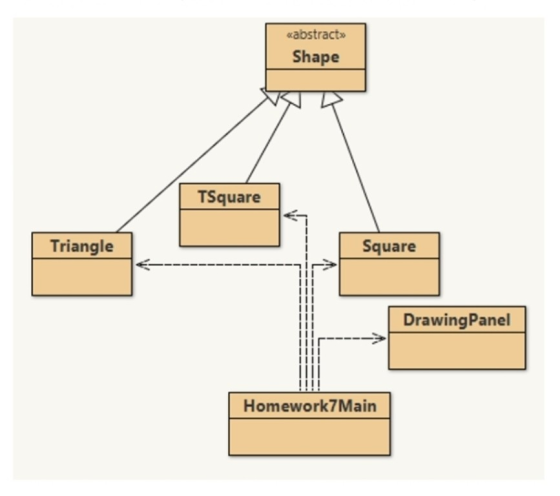
In this homework, you will build the below hierarchy:
Overview:
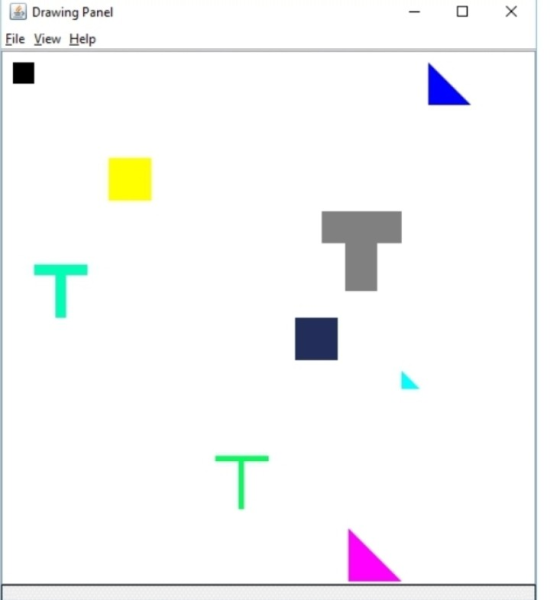
You will implement the supplier code: Shape, Square, TSquare, and Triangle, which will be used by the Homework7Main program. This program will use the DrawingPanel to draw these objects onto a canvas.
Specification:
You will take advantage of inheritance with using a super class, Shape.java. (below) Shape is an abstract class, which means it can be extended, but not instantiated. We will talk more about abstract classes this week.
Notice in Shape that there is only 1 dimension: size, and coordinates for one point. The coordinates represent the point in the top left corner of the shape. Most shapes can be defined with just these 3 pieces of information.
First, there's some work to do in the parent class, Shape:
Implement the isInShape() method. Return true if the coordinates lie within the bounding box of Shape
Implement moveCenterTo(), which moves the center of the bounding box of the Shape to those coordinates.
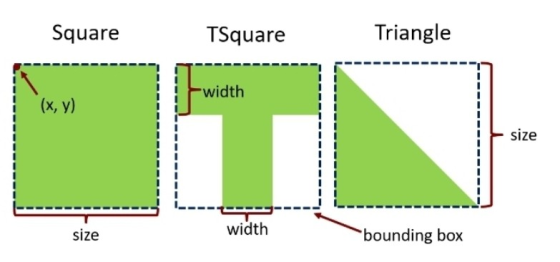
Next, implement the subclasses Square, TSquare, and Triangle, Each of these shapes use the value size to determine the square bounding box.
Be smart with inheritance. Do not introduce new instance variables unless they are needed. Do not implement methods unnecessarily.
Override isInShape(). This method should be accurate for the specific shape, don't just rely on a point lying on the bounding box. Does Square need to override isInShape()?
Each subclass will need to implement the method, drawMe(), to draw the figure on the provided Graphics space.
For the TSquare shape, the width parameter determines the width of the horizontal and vertical blocks of the 'T'. Check out the label on the diagram above. You will need to draw multiple rectangles to create the T shape.
For the Triangle, you will use the fillPolygon method in Graphics, and supply it with the three points of the triangle
Expected Output of Homework7Main program below:
[true, false, true, false, true, false] [true, false, true, false,
true, false] [true, false, true, false, true, true, false]
Homework7Main.java:
import java.awt.*;
import java.util.Arrays;

public class Homework7Main {

    public static void main(String[] args) {

        DrawingPanel canvas = new DrawingPanel(500, 500);
        Graphics g = canvas.getGraphics();

        /**
         * Group 1:
         */

        Shape[] shapes = { new Square(10, 10, Color.BLACK, 20),
              new TSquare(30, 200, new Color( 0, 255, 180 ), 50, 10),
              new Triangle(400, 10, Color.BLUE, 40)};

        shapes[0].drawMe(g);
        shapes[1].drawMe(g);
        shapes[2].drawMe(g);

        boolean[] a = {shapes[0].isInShape(15, 15),
                shapes[0].isInShape(31, 20),
                shapes[1].isInShape(70, 205),
                shapes[1].isInShape(30, 215),
                shapes[2].isInShape( 410, 30),
                shapes[2].isInShape(430, 20)};

        System.out.println(Arrays.toString(a));


        /**
         * Group 2:
         */

        Square s = new Square(100, 100, Color.YELLOW, 40);
        TSquare t = new TSquare(300, 150, Color.GRAY, 75, 30);
        Triangle rt = new Triangle(375, 300, Color.CYAN, 17);

        s.drawMe(g);
        t.drawMe(g);
        rt.drawMe(g);

        boolean[] b = {s.isInShape(100, 139),
                       s.isInShape(140, 140),
                       t.isInShape(374, 150),
                       t.isInShape(370, 220),
                       rt.isInShape( 375, 300),
                       rt.isInShape(390, 305)};

        System.out.println(Arrays.toString(b));


        /**
         * Group 3:
         */

        s.setColor(new Color(35, 45, 90));
        s.setPosition(275, 250);
        t.setColor(new Color(0, 255, 90));
        t.setPosition(200, 380);
        t.setSize(50);
        t.setWidth(5);
        rt.setColor(Color.MAGENTA);
        rt.setSize(50);
        rt.moveCenterTo(350, 473);

        s.drawMe(g);
        t.drawMe(g);
        rt.drawMe(g);

        boolean[] c = {s.isInShape(275, 250),
                       s.isInShape(274, 250),
                       t.isInShape(210, 380),
                       t.isInShape(200, 385),
                       rt.isInShape( 350, 473),
                       rt.isInShape(340, 490),
                       rt.isInShape(328, 450)};

        System.out.println(Arrays.toString(c));
    }
}
Shape.java:
import java.awt.*;

/**
 * Shape is an abstract class. This means that it
 * can be extended, but not instantiated.
 *
 * This means that new Shape(..) is impossible.
 *
 * Child clases will inherit all of the methods
 * and properties below. Child classes will also
 * need to implement the abstract method below.
 *
 * Child class headers will look like this:
 *
 * public class ChildClass extends Shape {
 */
public abstract class Shape{

    /**
     * x and y represent the top, left corner
     * of the bounding box of the shape
     */
    private int x, y;
    private Color color;
    private int size;


    public Shape (int x, int y, Color color, int size){
        this.x = x;
        this.y = y;
        this.color = color;
        this.size = size;
    }

    public int getX(){
        return x;
    }

    public int getY(){
        return y;
    }

    public Color getColor() {
        return color;
    }

    public void setColor (Color color){
        this.color = color;
    }

    public void setPosition (int x, int y){
        this.x = x;
        this.y = y;
    }

    public int getSize() {
        return size;
    }

    public void setSize(int size) {
        this.size = size;
    }

    /**
     * This method will return true if the the
     * x and y arguments are within both the
     * bounding box and the shape itself.
     * @param x
     * @param y
     */
    public boolean isInShape(int x, int y) {
        //Implement this method
        return false;
    }

    /**
     * This will set the center of the bounding box
     * to the x and y parameter.
     *
     * Example: A square of height 10 that uses this
     * method to move its center to (5, 5) will have
     * its top left corner at (0,0)
     *
     * @param x
     * @param y
     */
    public void moveCenterTo(int x, int y){
        //Implement this method
    }

    /**
     * This method is abstract, which means
     * that there is no implementation in this
     * class. However - the child classes will
     * implement this method.
     *
     * The method header in child classes will
     * look like this:
     *
     * public void drawMe(Graphics g) {
     *     //...
     * }
     */
    public abstract void drawMe(Graphics g);

}LI Drawing Panel File View Help
Homework Answers
Shape.java :
import java.awt.*;
/**
* Shape is an abstract class. This means that it
* can be extended, but not instantiated.
*
* This means that new Shape(..) is impossible.
*
* Child clases will inherit all of the methods
* and properties below. Child classes will also
* need to implement the abstract method below.
*
* Child class headers will look like this:
*
* public class ChildClass extends Shape {
*/
public abstract class Shape{
/**
* x and y represent the top, left
corner
* of the bounding box of the shape
*/
private int x, y;
private Color color;
private int size;
public Shape (int x, int y, Color color, int
size){
this.x = x;
this.y = y;
this.color =
color;
this.size = size;
}
public int getX(){
return x;
}
public int getY(){
return y;
}
public Color getColor() {
return color;
}
public void setColor (Color color){
this.color =
color;
}
public void setPosition (int x, int y){
this.x = x;
this.y = y;
}
public int getSize() {
return size;
}
public void setSize(int size) {
this.size = size;
}
/**
* This method will return true if the
the
* x and y arguments are within both
the
* bounding box and the shape itself.
* @param x
* @param y
*/
public boolean isInShape(int x, int y) {
if((size+this.x-1)<x ||
this.x>x){
return
false;
}
if((size+this.y-1)<y ||
this.y>y){
return
false;
}
return true;
}
/**
* This will set the center of the bounding
box
* to the x and y parameter.
*
* Example: A square of height 10 that uses
this
* method to move its center to (5, 5) will
have
* its top left corner at (0,0)
*
* @param x
* @param y
*/
public void moveCenterTo(int x, int y){
this.x = x -
(size/2);
this.y = y -
(size/2);
}
/**
* This method is abstract, which
means
* that there is no implementation in
this
* class. However - the child classes
will
* implement this method.
*
* The method header in child classes
will
* look like this:
*
* public void drawMe(Graphics g) {
* //...
* }
*/
public abstract void drawMe(Graphics g);
}
Square.java:
import java.awt.Color;
import java.awt.Graphics;
public class Square extends Shape {
public Square(int x, int y, Color color, int size)
{
super(x, y, color, size);
}
public void drawMe(Graphics g) {
g.setColor(getColor());
g.fillRect(getX(), getY(),
getSize(), getSize());
}
//Square does not need to override isInShape().
}
TSquare.java:
import java.awt.Color;
import java.awt.Graphics;
public class TSquare extends Shape {
private int width;
public TSquare(int i, int j, Color color, int k, int
l) {
super(i, j, color, k);
this.width = l;
}
public void drawMe(Graphics g) {
g.setColor(getColor());
g.fillRect(getX(), getY(),
getSize(), width);
g.fillRect((getX()+(getSize()/2)-(width/2)), getY(), width,
getSize());
}
public void setWidth(int i) {
width = i;
}
public boolean isInShape(int x, int y) {
if((getSize()+getX()-1)<x ||
getX()>x){
return
false;
}
if((getSize()+getY()-1)<y ||
getY()>y){
return
false;
}
if((getX()+(getSize()/2)-(width/2))>x &&
(width+getY()-1)<y){
return
false;
}
if((getX()+(getSize()/2)+(width/2))<x &&
(width+getY()-1)<y){
return
false;
}
return true;
}
}
Triangle.java:
import java.awt.Color;
import java.awt.Graphics;
import java.awt.Polygon;
public class Triangle extends Shape {
public Triangle(int x, int y, Color color, int
size) {
super(x, y, color, size);
}
public void drawMe(Graphics g) {
g.setColor(getColor());
Polygon poly = new Polygon();
poly.addPoint(getX(),
getY());
poly.addPoint(getX(),
(getY()+getSize()));
poly.addPoint((getX()+getSize()),
(getY()+getSize()));
g.fillPolygon(poly);
}
public boolean isInShape(int x, int y) {
if((getSize()+getX()-1)<x ||
getX()>x){
return
false;
}
if((getSize()+getY()-1)<y ||
getY()>y){
return
false;
}
if((getX()+(y-getY()))<x){
return
false;
}
return true;
}
}
Add Answer to:
Java Programming .zip or .jar with 4 files: Shape.java, Square.java, TSquare.java, Triangle.java In this homework, you w...
Modify the NervousShapes program so that it displays equilateral triangles as well as circles and rectangles....
 Modify the NervousShapes program so that it displays equilateral
triangles as well as circles and rectangles. You will need to
define a Triangle class containing a single instance variable,
representing the length of one of the triangle’s sides. Have the
program create circles, rectangles, and triangles with equal
probability. Circle and Rectangle is done, please comment on your
methods so i can understand
*/
package NervousShapes;
import java.awt.*;
import java.awt.event.*;
import java.awt.image.*;
import javax.imageio.*;
import javax.swing.*;
import javax.swing.event.*;
public class...
Modify the NervousShapes program so that it displays equilateral
triangles as well as circles and rectangles. You will need to
define a Triangle class containing a single instance variable,
representing the length of one of the triangle’s sides. Have the
program create circles, rectangles, and triangles with equal
probability. Circle and Rectangle is done, please comment on your
methods so i can understand
*/
package NervousShapes;
import java.awt.*;
import java.awt.event.*;
import java.awt.image.*;
import javax.imageio.*;
import javax.swing.*;
import javax.swing.event.*;
public class...
(JAVA NetBeans) Write programs in java Example 10.21-24 //Animal.java /** Animal class * Anderson. Franceschi */...
 (JAVA NetBeans)
Write programs in java
Example 10.21-24
//Animal.java
/** Animal class
* Anderson. Franceschi
*/
import java.awt.Graphics;
public abstract class Animal
{
private int x; // x position
private int y; // y position
private String ID; // animal ID
/** default constructor
* Sets ID to empty String
*/
public Animal( )
{
ID = "";
}
/** Constructor
* @param rID Animal ID
* @param rX x position
* @param rY y position
*/
public Animal( String...
(JAVA NetBeans)
Write programs in java
Example 10.21-24
//Animal.java
/** Animal class
* Anderson. Franceschi
*/
import java.awt.Graphics;
public abstract class Animal
{
private int x; // x position
private int y; // y position
private String ID; // animal ID
/** default constructor
* Sets ID to empty String
*/
public Animal( )
{
ID = "";
}
/** Constructor
* @param rID Animal ID
* @param rX x position
* @param rY y position
*/
public Animal( String...
GUI bouncing shapes program use this interface the out put of the program should be a jFr...
 GUI bouncing shapes program
use this interface
the out put of the program should be a jFrame with three
buttons: “add triangle”, “add square” and “add circle” and a blank
screen. when the user clicks any of these buttons the corresponding
shape appears and starts bouncing around the screen. the shape of
these shaoes and randomized and anytime the user clicks the button
you should be able to keeping adding shapes on the screen while the
previosus shape is bouncing...
GUI bouncing shapes program
use this interface
the out put of the program should be a jFrame with three
buttons: “add triangle”, “add square” and “add circle” and a blank
screen. when the user clicks any of these buttons the corresponding
shape appears and starts bouncing around the screen. the shape of
these shaoes and randomized and anytime the user clicks the button
you should be able to keeping adding shapes on the screen while the
previosus shape is bouncing...
JAVA problem: Upgrade and extend the previous programs Draw.java and DrawCanvas.java used in the class to...
JAVA problem: Upgrade and extend the previous programs Draw.java and DrawCanvas.java used in the class to maintain a list of shapes drawn as follows: Replace and upgrade all the AWT components used in the programs to the corresponding Swing components, including Frame, Button, Label, Choice, and Panel. Add a JList to the left of the canvas to record and display the list of shapes that have been drawn on the canvas. Each entry in the list should contain the name...
I have a question about java Implement the isOn(int x, int y) method. Return true if...
 I have a question about java
Implement the isOn(int x, int y) method. Return true if the
coordinates lie within the bounding box of Shapes.
I have already done the first two but I still can not figure
out the triangle one. I cannot specify the area.
The bounding box is square. (width and height are same). We can
use instance variables x and y which represents the point of upper
left corner of bounding box, and height representing width...
I have a question about java
Implement the isOn(int x, int y) method. Return true if the
coordinates lie within the bounding box of Shapes.
I have already done the first two but I still can not figure
out the triangle one. I cannot specify the area.
The bounding box is square. (width and height are same). We can
use instance variables x and y which represents the point of upper
left corner of bounding box, and height representing width...
I have to create a java graphics program which will draw 10 rectangles and 10 ellipses...
I have to create a java graphics program which will draw 10 rectangles and 10 ellipses on the screen. These shapes are to be stored in an arrayList. I have to do this using 6 different class files. I am not sure whether I successfully created an ellipse in the Oval Class & also need help completing the print Class. I need someone to check whether my Oval Class is correct (it successfully creates an ellipse with x, y, width,...
Programming: Java: Fixing errors in code help: The errors are in square.java and rectangle.java and they...
Programming: Java: Fixing errors in code help: The errors are in square.java and rectangle.java and they both say: constructor Shape in class Shape cannot be applied to given types; required: no arguments found: String reason: actual and formal argument lists differ in length The directions say: The files Shape.java and TestArea.java have been finished already, YOU DONT ADD ANYTHING TO THESE TWO. According to the requirement, you need to modify in Square.java and Rectangle.java, respectively a. Implementing constructor with no...
C++ PROGRAMMING Hi! My assignment prompt is below. What I'm having the most trouble understanding is...
 C++ PROGRAMMING
Hi! My assignment prompt is below. What I'm having the most
trouble understanding is where the shapes are being stored. I'm
assuming an array, but I'm not sure how sizing would work. Any help
is appreciated, thanks! I have also attached the .h file we must
use.
Prompt: The goal of HW2 is to implement classes representing
shapes. A given program will use this class to create shapes at
arbitrary locations in the x-y plane and move them....
C++ PROGRAMMING
Hi! My assignment prompt is below. What I'm having the most
trouble understanding is where the shapes are being stored. I'm
assuming an array, but I'm not sure how sizing would work. Any help
is appreciated, thanks! I have also attached the .h file we must
use.
Prompt: The goal of HW2 is to implement classes representing
shapes. A given program will use this class to create shapes at
arbitrary locations in the x-y plane and move them....
import javax.swing.*; import java.awt.*; import java.util.List; import java.util.*; /** * Canvas is a class to allow...
import javax.swing.*; import java.awt.*; import java.util.List; import java.util.*; /** * Canvas is a class to allow for simple graphical drawing on a canvas. * This is a modification of the general purpose Canvas, specially made for * the BlueJ "shapes" example. * * @author: Bruce Quig * @author: Michael Kolling (mik) * Minor changes to canvas dimensions by William Smith 6/4/2012 * * @version: 1.6 (shapes) */ public class Canvas { // Note: The implementation of this class (specifically the...
import javax.swing.*; import java.awt.*; import java.util.List; import java.util.*; /** * Canvas is a class to allow...
import javax.swing.*; import java.awt.*; import java.util.List; import java.util.*; /** * Canvas is a class to allow for simple graphical drawing on a canvas. * This is a modification of the general purpose Canvas, specially made for * the BlueJ "shapes" example. * * @author: Bruce Quig * @author: Michael Kolling (mik) * Minor changes to canvas dimensions by William Smith 6/4/2012 * * @version: 1.6 (shapes) */ public class Canvas { // Note: The implementation of this class (specifically the...
 Modify the NervousShapes program so that it displays equilateral
triangles as well as circles and rectangles. You will need to
define a Triangle class containing a single instance variable,
representing the length of one of the triangle’s sides. Have the
program create circles, rectangles, and triangles with equal
probability. Circle and Rectangle is done, please comment on your
methods so i can understand
*/
package NervousShapes;
import java.awt.*;
import java.awt.event.*;
import java.awt.image.*;
import javax.imageio.*;
import javax.swing.*;
import javax.swing.event.*;
public class...
Modify the NervousShapes program so that it displays equilateral
triangles as well as circles and rectangles. You will need to
define a Triangle class containing a single instance variable,
representing the length of one of the triangle’s sides. Have the
program create circles, rectangles, and triangles with equal
probability. Circle and Rectangle is done, please comment on your
methods so i can understand
*/
package NervousShapes;
import java.awt.*;
import java.awt.event.*;
import java.awt.image.*;
import javax.imageio.*;
import javax.swing.*;
import javax.swing.event.*;
public class...
 (JAVA NetBeans)
Write programs in java
Example 10.21-24
//Animal.java
/** Animal class
* Anderson. Franceschi
*/
import java.awt.Graphics;
public abstract class Animal
{
private int x; // x position
private int y; // y position
private String ID; // animal ID
/** default constructor
* Sets ID to empty String
*/
public Animal( )
{
ID = "";
}
/** Constructor
* @param rID Animal ID
* @param rX x position
* @param rY y position
*/
public Animal( String...
(JAVA NetBeans)
Write programs in java
Example 10.21-24
//Animal.java
/** Animal class
* Anderson. Franceschi
*/
import java.awt.Graphics;
public abstract class Animal
{
private int x; // x position
private int y; // y position
private String ID; // animal ID
/** default constructor
* Sets ID to empty String
*/
public Animal( )
{
ID = "";
}
/** Constructor
* @param rID Animal ID
* @param rX x position
* @param rY y position
*/
public Animal( String...
 GUI bouncing shapes program
use this interface
the out put of the program should be a jFrame with three
buttons: “add triangle”, “add square” and “add circle” and a blank
screen. when the user clicks any of these buttons the corresponding
shape appears and starts bouncing around the screen. the shape of
these shaoes and randomized and anytime the user clicks the button
you should be able to keeping adding shapes on the screen while the
previosus shape is bouncing...
GUI bouncing shapes program
use this interface
the out put of the program should be a jFrame with three
buttons: “add triangle”, “add square” and “add circle” and a blank
screen. when the user clicks any of these buttons the corresponding
shape appears and starts bouncing around the screen. the shape of
these shaoes and randomized and anytime the user clicks the button
you should be able to keeping adding shapes on the screen while the
previosus shape is bouncing...
 C++ PROGRAMMING
Hi! My assignment prompt is below. What I'm having the most
trouble understanding is where the shapes are being stored. I'm
assuming an array, but I'm not sure how sizing would work. Any help
is appreciated, thanks! I have also attached the .h file we must
use.
Prompt: The goal of HW2 is to implement classes representing
shapes. A given program will use this class to create shapes at
arbitrary locations in the x-y plane and move them....
C++ PROGRAMMING
Hi! My assignment prompt is below. What I'm having the most
trouble understanding is where the shapes are being stored. I'm
assuming an array, but I'm not sure how sizing would work. Any help
is appreciated, thanks! I have also attached the .h file we must
use.
Prompt: The goal of HW2 is to implement classes representing
shapes. A given program will use this class to create shapes at
arbitrary locations in the x-y plane and move them....
Most questions answered within 3 hours.
-
Where is the error in this code sequence?
String s1 = "Hello";
String s2 = "ello";...
asked 11 months ago -
Financial data for Joel de Paris, Inc., for last year
follow:
Joel de Paris, Inc.
Balance...
asked 11 months ago -
Consider this reaction:
Al2(SO4)3 (aq)+ BaCl3
(aq) Al2Cl6 (aq)- +
3BaSO4(s) . What is the...
asked 11 months ago -
Suppose that Savneet is considering increasing her
recent random sample from 20 car rentals to 40...
asked 11 months ago -
Trucks arrive at an unloading terminal at an average rate of 120
per hour.
Trucks arrive...
asked 11 months ago -
Why are methanol and ethanol completely soluble in water while
octanol is not very little soluble....
asked 11 months ago -
A facilities manager at a university reads in a research report
that the mean amount of...
asked 11 months ago -
When the CuSO4 is rehydrated by adding water to the anhydrous
compound, is this an endothermic...
asked 11 months ago -
A ray of sunlight is passing from diamond into crown glass; the
angle of incidence is...
asked 11 months ago -
A block of mass 0.249 kg is placed on top of a light, vertical
spring of...
asked 11 months ago -
how do the kidneys compensate in the presences of acidosis
a) trigger hyperventilate
b) reserve acid...
asked 11 months ago -
Question 501 pts
The rental rate of capital to the firm increases. Which of the
following...
asked 11 months ago