Explain each field of SONET STS-1 overhead in detail.
Explain each field of SONET STS-1 overhead in detail.
Homework Answers
SONET STS-1 OVERHEAD

- Basic SONET STS-1 frame consisting of 9 rows and 90 columns is given in the above figure.
- SONET frame is composed of 810 octets (bytes).
- Transmission is carried out row wise from left to right and from top to bottom.
- Bits are transmitted serially.
- The STS-1 frame of SDH is composed of :
- Section overhead
- Transport overhead
- Payload overhead
- Data part.
- The frame starts with fixed A1/A2 bit pattern of 0xf628 used for bit/octet synchronization.
- SONET/SDH is referred as octet synchronous.
- The first three columns of SONET frame is referred as transport overhead.
- The next 87 columns of the frame are referred as Synchronous payload envelope (SPE).
Transport Overhead
- The first three columns of SONET frame is referred as transport overhead.
- It consists of :
- Framing octets (A1,A2)
- Section Trace (J0)
- Parity (B1)
- Order Wire (E1)
- Section User Channel (F1)
- Section Data Communication Channel (D1,D2,D3)
- Pointers and Pointer Action (H1, H2, H3)
- Line Parity (B2)
- Automatic Protection Switching (APS) channel (K1,K2)
- Line Data Communications Channel (D4-D12)
- Synchronization messaging (S1)
- STS-1 REI(M0)
- STS-N REI (M1)
- OrderWire (E2)
1.Framing octets (A1,A2) :
-
These two octets are used to determine start of the SDH frame.
-
A1 is 0xf6 and A2 is 0x28 hexadecimal values.
2.Section Trace (J0) :
- It is used allow connected sections to verify whether the connection is still alive and with the right terminations or not.
3.Parity (B1) :
- This parity octet is used by the receiver for bit error rate estimation.
- As this is of 8 bits, 8 parities are calculated.
4.Order Wire (E1) :
- This is not used today.
- This was used by technicians to test the system while installation.
5.Section User Channel (F1) :
- This is used by the network service provider.
- The octet is carried over from section to section within the line.
6.Section Data Communication Channel (D1,D2,D3) :
- These octets form a communication channel to send administrative messages.
- These are considered as single 192 kbps message.
- Used for maintenance, control, alarm, monitor, administration and the other need of communication between section terminating equipments.
7.Pointers and Pointer Action (H1, H2, H3) :
- These are used to point to the payload (SPE).
- They provide flags to indicate about changes to payload location and provide location for the data.
8.Line Parity (B2) :
- B2 Octet is used for bit error rate estimation.
9.Automatic Protection Switching (APS) channel (K1,K2) :
- These two octets are used for APS signalling between line level entities.
- APS stands for Automatic Protection Switching.
10.Line Data Communications Channel (D4-D12) :
- D4 to D12 octets form communication channel to send administrative messages.
- Used for line data communication and consider as single 576kbps message based channel.
- Used for maintenance, control, monitoring, administration, alarms as well as communication need between line terminating entities.
11.Synchronization messaging (S1) :
- It is used for transporting synchronization status messages and defined for STS-1 of the STS-N signal.
- Bits 5 to 8 are used for this purpose.
12.STS-1 REI(M0) :
- This octet sends no. of errors detected by B octets back to the transmitter.
- This helps in knowing line status as well as receiver status.
13.STS-N REI (M1) :
- The function is same as listed in M0 above.
14.OrderWire (E2) :
- The function is same as listed above for E1.
Payload Overhead
- The first column in synchronous payload envelope (SPE) is referred as Payload overhead (POH).
-
It consists of :
-
Path Trace (J1)
-
Path BIP-8(B3)
-
STS Path Signal Label (C2)
-
Path Status (G1)
-
Path user channel (F2)
-
Multi-frame indicator (H4)
-
Growth octets(Z3,Z4)
-
N1 fields.
-
1.Path Trace (J1):
- It helps two ends to verify the connection status (live or not) and check whether it is connected with right terminations.
- It is used to transmit STS path Access point identifier repetitively, Hence path receiving terminal can verify its continued connection with intended transmitter.
- 64 byte frame is used for the purpose.
2.Path BIP-8(B3):
- It is used by the receiver for BER estimation.
- It is calculated over all the bits of previous STS SPE before the scrambling process.
3.STS Path Signal Label (C2):
- This indicates type of traffic carried in the payload part of the SDH frame.
4.Path Status (G1):
- It is used to convey path terminating status/performance back to the transmitter (Originating STS PTE).
- PTE stands for Path Terminating Equipment.
5.Path user channel (F2):
- It is used for user communication similar to F1 octet in transport overhead.
6.Multi-frame indicator (H4):
- It provides generalized multi-frame indicator for the payloads.
- The first purpose of this indicator is for VT structured payload.
- The second purpose is for support of virtual concatenation of STS-1 SPEs.
7.Growth octets (Z3,Z4):
- Reserved for future use.
8.N1 fields:
- This octet is used to allocate support for tandem connection maintenance and tandem connection data link.
Please explain in detail including the math Yarra Fabrication estimates that its manufacturing overhead will be...
 Please explain in detail
including the math
Yarra Fabrication estimates that its manufacturing overhead will be $2,240,000 in year 1. It further estimates that direct material costs will amount to $1,400,000. Actual manufacturing overhead costs for the year were $2,400,000. Actual direct materials costs were $1,550,000. Manufacturing overhead is applied to jobs based direct materials cost using predetermined rates. Overhead applied in each of the inventory accounts is as follows. Work-in-process inventory Finished goods inventory Cost of goods sold $...
Please explain in detail
including the math
Yarra Fabrication estimates that its manufacturing overhead will be $2,240,000 in year 1. It further estimates that direct material costs will amount to $1,400,000. Actual manufacturing overhead costs for the year were $2,400,000. Actual direct materials costs were $1,550,000. Manufacturing overhead is applied to jobs based direct materials cost using predetermined rates. Overhead applied in each of the inventory accounts is as follows. Work-in-process inventory Finished goods inventory Cost of goods sold $...
Explain in detail. 30. Which of the following vectors can be an electric field? If so,...
 Explain in detail.
30. Which of the following vectors can be an electric field? If so, what is the volume charge density? (b) E a (i, cos θ-ie sin θ) (c) E-a(yi.-xi,)
Explain in detail.
30. Which of the following vectors can be an electric field? If so, what is the volume charge density? (b) E a (i, cos θ-ie sin θ) (c) E-a(yi.-xi,)
Please read instructions provided in the photo..explain your results in detail please. basically ...
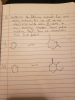 please read instructions provided in the
photo..explain your results in detail please.
basically synthesize compounds from given starting
material. alkyl and alkyl halides under 8 carbons can be added on
or any necessary inorganic reagent such as Ph3P. please draw all
intermediates that reach each product.
ISynthese the eecen Paus reens e Sts matrial You cun add en om alkyl/ alkyl halide mde 8 caden ny neuessny M ndudin that rah proud ainieru vau all temto a)
ISynthese the eecen...
please read instructions provided in the
photo..explain your results in detail please.
basically synthesize compounds from given starting
material. alkyl and alkyl halides under 8 carbons can be added on
or any necessary inorganic reagent such as Ph3P. please draw all
intermediates that reach each product.
ISynthese the eecen Paus reens e Sts matrial You cun add en om alkyl/ alkyl halide mde 8 caden ny neuessny M ndudin that rah proud ainieru vau all temto a)
ISynthese the eecen...
1. For each of the following, explain the term in sufficient detail, such that a reader...
1. For each of the following, explain the term in sufficient detail, such that a reader would understand its meaning or role with regards to networking. a) Client b) Server c) Latency d) Datagram e) Encapsulation f) Store and Forward g) Protocol h) Segmentation
2) Describe the electric field inside a positively charged solid conductor? Explain your reasoning in detail....
 2) Describe the electric field inside a positively charged solid conductor? Explain your reasoning in detail. 3) hat ir aloctrical recinton
1. What are the different states of a process. Explain each state in detail. 2. What...
1. What are the different states of a process. Explain each state in detail. 2. What is the Process Control Block? Explain what it contains about each process. 3. Explain the procedure of switching CPU control from process to process. 4. Explain in details job, device and ready queues. 5. Write and Explain a queuing diagram . 6. Explain the two methods to create new processes. 7. Explain different types of termination of processes and Zombie and orphan processes. 8....
Explain the topic "Overhead costing and activity-based costing" in detail from Managerial Accounting course. what you...
Explain the topic "Overhead costing and activity-based costing" in detail from Managerial Accounting course. what you have learned from this management accounting topic? what is interesting in this topic and why?
In great detail please answer the following (at least 300 words per each question) 1. Explain...
In great detail please answer the following (at least 300 words per each question) 1. Explain the 5 main modes of market entry and describe the benefits of each to a particular situation.
Explain the advantages and disadvantages of DSL, cable, fix wireless, and Sonet (OC-1).
Explain the advantages and disadvantages of DSL, cable, fix wireless, and Sonet (OC-1).
credit for work. pls explain detail 3. 100 charges (each of charge Q) are lined up...
 credit for work. pls explain detail
3. 100 charges (each of charge Q) are lined up on the outside of a plastic cylinder of radius FR and length L. Then the cylinder is spun on its axis, with a rotation frequency of 30 full rotations per second. What is the magnitude and direction of the B-field on the axis of the cylinder?
credit for work. pls explain detail
3. 100 charges (each of charge Q) are lined up on the outside of a plastic cylinder of radius FR and length L. Then the cylinder is spun on its axis, with a rotation frequency of 30 full rotations per second. What is the magnitude and direction of the B-field on the axis of the cylinder?
 Please explain in detail
including the math
Yarra Fabrication estimates that its manufacturing overhead will be $2,240,000 in year 1. It further estimates that direct material costs will amount to $1,400,000. Actual manufacturing overhead costs for the year were $2,400,000. Actual direct materials costs were $1,550,000. Manufacturing overhead is applied to jobs based direct materials cost using predetermined rates. Overhead applied in each of the inventory accounts is as follows. Work-in-process inventory Finished goods inventory Cost of goods sold $...
Please explain in detail
including the math
Yarra Fabrication estimates that its manufacturing overhead will be $2,240,000 in year 1. It further estimates that direct material costs will amount to $1,400,000. Actual manufacturing overhead costs for the year were $2,400,000. Actual direct materials costs were $1,550,000. Manufacturing overhead is applied to jobs based direct materials cost using predetermined rates. Overhead applied in each of the inventory accounts is as follows. Work-in-process inventory Finished goods inventory Cost of goods sold $...
 Explain in detail.
30. Which of the following vectors can be an electric field? If so, what is the volume charge density? (b) E a (i, cos θ-ie sin θ) (c) E-a(yi.-xi,)
Explain in detail.
30. Which of the following vectors can be an electric field? If so, what is the volume charge density? (b) E a (i, cos θ-ie sin θ) (c) E-a(yi.-xi,)
 please read instructions provided in the
photo..explain your results in detail please.
basically synthesize compounds from given starting
material. alkyl and alkyl halides under 8 carbons can be added on
or any necessary inorganic reagent such as Ph3P. please draw all
intermediates that reach each product.
ISynthese the eecen Paus reens e Sts matrial You cun add en om alkyl/ alkyl halide mde 8 caden ny neuessny M ndudin that rah proud ainieru vau all temto a)
ISynthese the eecen...
please read instructions provided in the
photo..explain your results in detail please.
basically synthesize compounds from given starting
material. alkyl and alkyl halides under 8 carbons can be added on
or any necessary inorganic reagent such as Ph3P. please draw all
intermediates that reach each product.
ISynthese the eecen Paus reens e Sts matrial You cun add en om alkyl/ alkyl halide mde 8 caden ny neuessny M ndudin that rah proud ainieru vau all temto a)
ISynthese the eecen...
 2) Describe the electric field inside a positively charged solid conductor? Explain your reasoning in detail. 3) hat ir aloctrical recinton
 credit for work. pls explain detail
3. 100 charges (each of charge Q) are lined up on the outside of a plastic cylinder of radius FR and length L. Then the cylinder is spun on its axis, with a rotation frequency of 30 full rotations per second. What is the magnitude and direction of the B-field on the axis of the cylinder?
credit for work. pls explain detail
3. 100 charges (each of charge Q) are lined up on the outside of a plastic cylinder of radius FR and length L. Then the cylinder is spun on its axis, with a rotation frequency of 30 full rotations per second. What is the magnitude and direction of the B-field on the axis of the cylinder?
Most questions answered within 3 hours.
-
Where is the error in this code sequence?
String s1 = "Hello";
String s2 = "ello";...
asked 10 months ago -
Financial data for Joel de Paris, Inc., for last year
follow:
Joel de Paris, Inc.
Balance...
asked 10 months ago -
Consider this reaction:
Al2(SO4)3 (aq)+ BaCl3
(aq) Al2Cl6 (aq)- +
3BaSO4(s) . What is the...
asked 10 months ago -
Suppose that Savneet is considering increasing her
recent random sample from 20 car rentals to 40...
asked 10 months ago -
Trucks arrive at an unloading terminal at an average rate of 120
per hour.
Trucks arrive...
asked 10 months ago -
Why are methanol and ethanol completely soluble in water while
octanol is not very little soluble....
asked 10 months ago -
A facilities manager at a university reads in a research report
that the mean amount of...
asked 10 months ago -
When the CuSO4 is rehydrated by adding water to the anhydrous
compound, is this an endothermic...
asked 10 months ago -
A ray of sunlight is passing from diamond into crown glass; the
angle of incidence is...
asked 10 months ago -
A block of mass 0.249 kg is placed on top of a light, vertical
spring of...
asked 10 months ago -
how do the kidneys compensate in the presences of acidosis
a) trigger hyperventilate
b) reserve acid...
asked 10 months ago -
Question 501 pts
The rental rate of capital to the firm increases. Which of the
following...
asked 10 months ago