
Homework Answers
#include
#include
int main()
{
//Declaring the variables
int userNum; //Otherwise we can give the number here
int i,j;
printf("Enter the number of lines: ");
// Getting the number of lines to print from the user
scanf("%d",&userNum);
for(i=0;i<=userNum;i++){
for(j=0; j //printing the spaces printf(" "); } // printing the numbers printf("%d ",i); } return 0; } Output: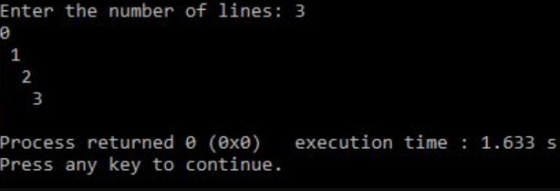
Add Answer to:
AT46.1: Nested loops: Indent text HALLENGE 461: Nested loops: Indent text Print numbers 0,1,2 userNum as...
HALLENGE 4.6.1: Nested loops: Indent text ACTINITY Print numbers 0, 1,2, userNum as shown, with each...
 HALLENGE 4.6.1: Nested loops: Indent text ACTINITY Print numbers 0, 1,2, userNum as shown, with each number indented by that number of spaces. For each printed line, print the leading spaces, then the number, and then a newine. Hint Use i and jas loop variables (initialize i and j explicitly). Note: Avoid any other spaces like spaces after the printed number. Exc userNum 3 prints 0 2
Computer Science I home> 4 8 Nested loops Feedback | 48.1 Nested loops Indent text Print...
 Computer Science I home> 4 8 Nested loops Feedback | 48.1 Nested loops Indent text Print numbers 0, 1,2userNum as shown, with each number indented by that number of spaces For each printed line, print the leading spaces, then the number, and then a newline Hint. Use i and j as loop variables (initialize i and j explicitly). Note. Avoid any other spaces like spaces after the printed number Ex userNum-3 prints
Print numbers 0,1,2,userNum as shown, with each number indented by that number of spaces
 Print numbers 0,1,2,userNum as shown, with each number indented by that number of spaces. For each printed line, print the leading spaces, then the number, and then a newline. Hint Use i and j as loop variables (initialize i and j explicitly). Note: Avoid any other spaces like spaces after the printed number. Ex user Num = 3 prints:
For JAVA Please post code in bold. Thank you. Print numbers 0, 1, 2, ..., userNum...
 For JAVA Please post code in bold. Thank you.
Print numbers 0, 1, 2, ..., userNum as shown, with each number
indented by that number of spaces. For each printed line, print the
leading spaces, then the number, and then a newline. Hint: Use i
and j as loop variables (initialize i and j explicitly). Note:
Avoid any other spaces like spaces after the printed number. Ex:
userNum = 3 prints:
0
1
2
3
Challenge 4.6.1: Nested loops ndent...
For JAVA Please post code in bold. Thank you.
Print numbers 0, 1, 2, ..., userNum as shown, with each number
indented by that number of spaces. For each printed line, print the
leading spaces, then the number, and then a newline. Hint: Use i
and j as loop variables (initialize i and j explicitly). Note:
Avoid any other spaces like spaces after the printed number. Ex:
userNum = 3 prints:
0
1
2
3
Challenge 4.6.1: Nested loops ndent...
C++ Print numbers 0, 1, 2, ..., userNum as shown, with each number indented by that...
C++ Print numbers 0, 1, 2, ..., userNum as shown, with each number indented by that number of spaces. For each printed line, print the leading spaces, then the number, and then a newline. Hint: Use i and j as loop variables (initialize i and j explicitly). Note: Avoid any other spaces like spaces after the printed number. Ex: userNum = 3 prints: 0 1 2 3 #include <iostream> using namespace std; int main() { int userNum; int i; int...
Print numbers 0, 1, 2, ..., userNum as shown, with each number indented by that number...
Print numbers 0, 1, 2, ..., userNum as shown, with each number indented by that number of spaces. For each printed line, print the leading spaces, then the number, and then a newline. Hint: Use i and j as loop variables (initialize i and j explicitly). Note: Avoid any other spaces like spaces after the printed number. Ex: userNum = 3 prints: 0 1 2 3
Not sure how to get rid of the spaces at the end. Thanks for any help...
 Not sure how to get rid of the spaces at the end. Thanks for any
help
learn.zybooks.com 21.7. Nested loops zyBooks My library EGR 219 home 21.7: Nested loops E zyBooks catalog Help/FAQ Dennis Roberts CAHALE.7.1: Nested loops: Indent text Print numbers 0, 1,2,. serNum as shown, with each number indented by that number of spaces. For each printed line, print the leading spaces, then the number, and then a newline. Hint: Use i and j as loop variables (initialize...
Not sure how to get rid of the spaces at the end. Thanks for any
help
learn.zybooks.com 21.7. Nested loops zyBooks My library EGR 219 home 21.7: Nested loops E zyBooks catalog Help/FAQ Dennis Roberts CAHALE.7.1: Nested loops: Indent text Print numbers 0, 1,2,. serNum as shown, with each number indented by that number of spaces. For each printed line, print the leading spaces, then the number, and then a newline. Hint: Use i and j as loop variables (initialize...
Print numbers 0, 1, 2, ..., userNum as shown, with each number indented by that number...
Print numbers 0, 1, 2, ..., userNum as shown, with each number indented by that number of spaces. For each printed line, print the leading spaces, then the number, and then a newline. Hint: Use i and j as loop variables (initialize i and j explicitly). Note: Avoid any other spaces like spaces after the printed number. Ex: userNum = 3 prints: 0 1 2 3 Sample program: #include <stdio.h> int main(void) { int userNum = 0; int i =...
Task 5.2 Numerical Analysis Using Nested Loops (13 pts) Consider the following program: void setup() {...
Task 5.2 Numerical Analysis Using Nested Loops (13 pts) Consider the following program: void setup() { //Read a positive integer from the user //Your code starts here } Complete this program such that it calculates all prime numbers between 1 and the value that is assigned to variable num and outputs them on the screen. A prime number is a positive integer that has no other factors other than itself and 1. You should use a nested loop, i.e., write...
This lab will create a digital clock based on nested FOR loops for hours, minutes, and...
This lab will create a digital clock based on nested FOR loops for hours, minutes, and seconds, and a WHILE loop for doing over and over so that your clock works for all year long without interruption. Note: If a group of students is interested, we could create a real digital wall-mounted clock to be placed in our classroom, so I can keep track of the time during my lectures. The actual clock would be based on the LED Strip...
 HALLENGE 4.6.1: Nested loops: Indent text ACTINITY Print numbers 0, 1,2, userNum as shown, with each number indented by that number of spaces. For each printed line, print the leading spaces, then the number, and then a newine. Hint Use i and jas loop variables (initialize i and j explicitly). Note: Avoid any other spaces like spaces after the printed number. Exc userNum 3 prints 0 2
 Computer Science I home> 4 8 Nested loops Feedback | 48.1 Nested loops Indent text Print numbers 0, 1,2userNum as shown, with each number indented by that number of spaces For each printed line, print the leading spaces, then the number, and then a newline Hint. Use i and j as loop variables (initialize i and j explicitly). Note. Avoid any other spaces like spaces after the printed number Ex userNum-3 prints
 For JAVA Please post code in bold. Thank you.
Print numbers 0, 1, 2, ..., userNum as shown, with each number
indented by that number of spaces. For each printed line, print the
leading spaces, then the number, and then a newline. Hint: Use i
and j as loop variables (initialize i and j explicitly). Note:
Avoid any other spaces like spaces after the printed number. Ex:
userNum = 3 prints:
0
1
2
3
Challenge 4.6.1: Nested loops ndent...
For JAVA Please post code in bold. Thank you.
Print numbers 0, 1, 2, ..., userNum as shown, with each number
indented by that number of spaces. For each printed line, print the
leading spaces, then the number, and then a newline. Hint: Use i
and j as loop variables (initialize i and j explicitly). Note:
Avoid any other spaces like spaces after the printed number. Ex:
userNum = 3 prints:
0
1
2
3
Challenge 4.6.1: Nested loops ndent...
 Not sure how to get rid of the spaces at the end. Thanks for any
help
learn.zybooks.com 21.7. Nested loops zyBooks My library EGR 219 home 21.7: Nested loops E zyBooks catalog Help/FAQ Dennis Roberts CAHALE.7.1: Nested loops: Indent text Print numbers 0, 1,2,. serNum as shown, with each number indented by that number of spaces. For each printed line, print the leading spaces, then the number, and then a newline. Hint: Use i and j as loop variables (initialize...
Not sure how to get rid of the spaces at the end. Thanks for any
help
learn.zybooks.com 21.7. Nested loops zyBooks My library EGR 219 home 21.7: Nested loops E zyBooks catalog Help/FAQ Dennis Roberts CAHALE.7.1: Nested loops: Indent text Print numbers 0, 1,2,. serNum as shown, with each number indented by that number of spaces. For each printed line, print the leading spaces, then the number, and then a newline. Hint: Use i and j as loop variables (initialize...
Most questions answered within 3 hours.
-
Where is the error in this code sequence?
String s1 = "Hello";
String s2 = "ello";...
asked 11 months ago -
Financial data for Joel de Paris, Inc., for last year
follow:
Joel de Paris, Inc.
Balance...
asked 11 months ago -
Consider this reaction:
Al2(SO4)3 (aq)+ BaCl3
(aq) Al2Cl6 (aq)- +
3BaSO4(s) . What is the...
asked 11 months ago -
Suppose that Savneet is considering increasing her
recent random sample from 20 car rentals to 40...
asked 11 months ago -
Trucks arrive at an unloading terminal at an average rate of 120
per hour.
Trucks arrive...
asked 11 months ago -
Why are methanol and ethanol completely soluble in water while
octanol is not very little soluble....
asked 11 months ago -
A facilities manager at a university reads in a research report
that the mean amount of...
asked 11 months ago -
When the CuSO4 is rehydrated by adding water to the anhydrous
compound, is this an endothermic...
asked 11 months ago -
A ray of sunlight is passing from diamond into crown glass; the
angle of incidence is...
asked 11 months ago -
A block of mass 0.249 kg is placed on top of a light, vertical
spring of...
asked 11 months ago -
how do the kidneys compensate in the presences of acidosis
a) trigger hyperventilate
b) reserve acid...
asked 11 months ago -
Question 501 pts
The rental rate of capital to the firm increases. Which of the
following...
asked 11 months ago