Shopping Cart SystemDesign an application that works as a shopping cart system. The user s...
Shopping Cart System
Design an application that works as a shopping cart system. The user should be able to add any of the following items to his or her shopping cart:
Print Books (books on paper):
I Did It Your Way $11.95
The History of Scotland $14.50
Learn Calculus in One Day $29.95
Feel the Stress $18.50
Audio Books (books on tape):
Learn Calculus in One Day $29.95
The History of Scotland $14.50
The Science of Body Language $12.95
Relaxation Techniques $11.50
The application’s main form should appear similar to the one shown in Figure 1.
Figure 1 Shopping Cart main form
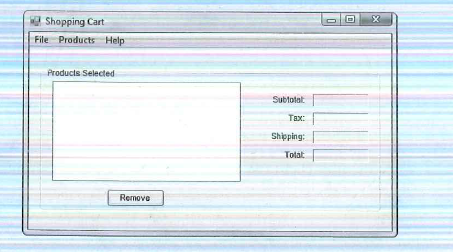
The list box shows all items in the shopping cart. There is a 6% sales tax on the total cost of the items in the shopping cart. Also, for each item in the shopping cart there is a $2.00 shipping charge. To remove an item from the shopping cart, the user selects it in the list box and clicks the Remove button. The subtotal, tax, shipping, and total fields should be adjusted accordingly. The main form’s menu system is sketched in Figure 2.
Figure 2 Shopping Cart main form
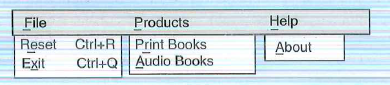
When the user selects Reset from the File menu, all items in the shopping cart should be removed, and the subtotal, tax, shipping, and total fields should be cleared. When the user selects Exit from the File menu, the application should end. When the user selects About from the Help menu, a simple About box should appear. When the user selects Print Books from the Products menu, the form in Figure 3 should appear
Figure 3 Print Books form
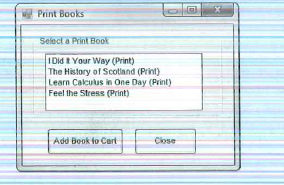
To add one of the items in the list to the shopping cart, the user selects it and clicks the Add Book to Cart button. To cancel the operation, the user simply clicks the Close button without selecting a book. On the main form, when the user selects Audio Books from the Products menu, the form in Figure 4 should appear.
Figure 4 Audio Books form
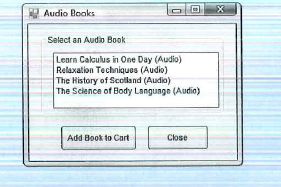
To add one of the items in the list to the shopping cart, the user selects it and clicks the Add Book to Cart button. To cancel the operation, the user simply clicks the Close button without selecting a book.
TIP: When the user selects either a print book or an audio book, use a module with global variables to hold the name and price of the selected book. That way, the main form will be able to retrieve the name and price after the other forms have closed.
Step-by-Step Solution
Request Solution!
We need at least 10 more requests to produce the solution.
0 / 10 have requested this problem solution
The more requests, the faster the answer.
Most questions answered within 3 hours.
-
Calculating the space time for parallel reactions. m-Xylene is reacted over a ZSM-5 zeolit...
-
Determine Vo and ID for the networks of Fig. 2.160.FIG. 2.160
-
The truck travels along a circular road that has a radius of 50 m at a speed of 4 m/s. F...
-
A state legislature enacted a statute that required any motorcycle operator or passenger...
-
A 1024 × 1024 8-bit image with 5.3 bits/pixel entropy [computed from its histogram using E...
-
In Problem 3.3, we estimated the equationwhere we now report standard errors along with th...
-
In each of the following cases, deduce the nature of the light that is consistent with the...
-
Solve Example 20.5 such that the x, y, z axes move with curvilinear translation, Ω = 0 in...
-
In Fig. 6.43, if i = cos 4t and v = sin 4t, the element is:(a)a resistor(b) a capacitor(c)...
-
Sketch vo for each network of Fig. 2.181 for the input shown.FIG. 2.181
-
(Supplement B) Computing and Reporting Cash Flow Effectsof Sale of Plant and EquipmentDuri...
-
A 350-mL spherical flask contains 0.075 mol of an ideal gas at a temperature of 293 K. Wha...