
Homework Answers
The commands that are used for role based CLI are
- Before we start creating the ping command first we need to login into root view using the command Router # “enable view”.
- After login into the view enter into the config-view mode and after that enter the “commands exec include ping” which will create ping.
- For creating the configure view command use the command “configure terminal” and press enter and then enter parser view new account name and press enter.
- For creating the user1 use the command “username user1 password mypwd privilege admin”.
- For creating the super-view enter the enable view first, next enter configure terminal, enter the command “parser view super view name superview” and enter the password.
Add Answer to:
PRATICA (10%) Specify the commands to configure the Role-Based CLI for the following cases: a. Create...
PRATICA (10%) Specify the commands to configure the Role-Based CLI for the following cases: a. Create...
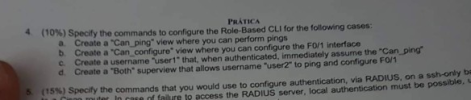 PRATICA (10%) Specify the commands to configure the Role-Based CLI for the following cases: a. Create a "Can ping" view where you can perform pings b. Create a "Can configure" view where you can configure the FO/1 interface C Create a username "user1" that, when authenticated, immediately assume the "Can ping d. Create a "Both" superview that allows username "user2" to ping and configure FO/1 5 (15% ) Specify the commands that you would use to confiqure authentication, via RADIUS,...
PLEASE ATTACH A SCREENSHOT OF YOUR SUCCESSFUL PING IN PACKET TRACER FOR THE END!!!!!!!!!!! THANK YOU! Objectives Part...
 PLEASE ATTACH A SCREENSHOT OF YOUR SUCCESSFUL PING IN
PACKET TRACER FOR THE END!!!!!!!!!!! THANK YOU!
Objectives Part A: Configure a simple static routing . Part B: Configure a simple RIP routing Part A: Configure a simple static routing 1. Create the following network topology on Packet Tracer Router-PT Router-PT Addressing Table Device Interface IP Address Subnet Mask Default Gatewa 10.0.0.1 20.0.0.1 30.0.0.1 20.0.0.2 0.0.0.10 30.0.0.10 N/A 255.0.0.0 255.0.0.0 255.0.0.0 255.0.0.0 255.0.0.0 255.0.0.0 Routero 2/0 NIA NIA NIA 10.0.0.1 30.0.0.1...
PLEASE ATTACH A SCREENSHOT OF YOUR SUCCESSFUL PING IN
PACKET TRACER FOR THE END!!!!!!!!!!! THANK YOU!
Objectives Part A: Configure a simple static routing . Part B: Configure a simple RIP routing Part A: Configure a simple static routing 1. Create the following network topology on Packet Tracer Router-PT Router-PT Addressing Table Device Interface IP Address Subnet Mask Default Gatewa 10.0.0.1 20.0.0.1 30.0.0.1 20.0.0.2 0.0.0.10 30.0.0.10 N/A 255.0.0.0 255.0.0.0 255.0.0.0 255.0.0.0 255.0.0.0 255.0.0.0 Routero 2/0 NIA NIA NIA 10.0.0.1 30.0.0.1...
 PRATICA (10%) Specify the commands to configure the Role-Based CLI for the following cases: a. Create a "Can ping" view where you can perform pings b. Create a "Can configure" view where you can configure the FO/1 interface C Create a username "user1" that, when authenticated, immediately assume the "Can ping d. Create a "Both" superview that allows username "user2" to ping and configure FO/1 5 (15% ) Specify the commands that you would use to confiqure authentication, via RADIUS,...
 PLEASE ATTACH A SCREENSHOT OF YOUR SUCCESSFUL PING IN
PACKET TRACER FOR THE END!!!!!!!!!!! THANK YOU!
Objectives Part A: Configure a simple static routing . Part B: Configure a simple RIP routing Part A: Configure a simple static routing 1. Create the following network topology on Packet Tracer Router-PT Router-PT Addressing Table Device Interface IP Address Subnet Mask Default Gatewa 10.0.0.1 20.0.0.1 30.0.0.1 20.0.0.2 0.0.0.10 30.0.0.10 N/A 255.0.0.0 255.0.0.0 255.0.0.0 255.0.0.0 255.0.0.0 255.0.0.0 Routero 2/0 NIA NIA NIA 10.0.0.1 30.0.0.1...
PLEASE ATTACH A SCREENSHOT OF YOUR SUCCESSFUL PING IN
PACKET TRACER FOR THE END!!!!!!!!!!! THANK YOU!
Objectives Part A: Configure a simple static routing . Part B: Configure a simple RIP routing Part A: Configure a simple static routing 1. Create the following network topology on Packet Tracer Router-PT Router-PT Addressing Table Device Interface IP Address Subnet Mask Default Gatewa 10.0.0.1 20.0.0.1 30.0.0.1 20.0.0.2 0.0.0.10 30.0.0.10 N/A 255.0.0.0 255.0.0.0 255.0.0.0 255.0.0.0 255.0.0.0 255.0.0.0 Routero 2/0 NIA NIA NIA 10.0.0.1 30.0.0.1...
Most questions answered within 3 hours.
-
Where is the error in this code sequence?
String s1 = "Hello";
String s2 = "ello";...
asked 10 months ago -
Financial data for Joel de Paris, Inc., for last year
follow:
Joel de Paris, Inc.
Balance...
asked 10 months ago -
Consider this reaction:
Al2(SO4)3 (aq)+ BaCl3
(aq) Al2Cl6 (aq)- +
3BaSO4(s) . What is the...
asked 10 months ago -
Suppose that Savneet is considering increasing her
recent random sample from 20 car rentals to 40...
asked 10 months ago -
Trucks arrive at an unloading terminal at an average rate of 120
per hour.
Trucks arrive...
asked 10 months ago -
Why are methanol and ethanol completely soluble in water while
octanol is not very little soluble....
asked 10 months ago -
A facilities manager at a university reads in a research report
that the mean amount of...
asked 10 months ago -
When the CuSO4 is rehydrated by adding water to the anhydrous
compound, is this an endothermic...
asked 10 months ago -
A ray of sunlight is passing from diamond into crown glass; the
angle of incidence is...
asked 10 months ago -
A block of mass 0.249 kg is placed on top of a light, vertical
spring of...
asked 10 months ago -
how do the kidneys compensate in the presences of acidosis
a) trigger hyperventilate
b) reserve acid...
asked 10 months ago -
Question 501 pts
The rental rate of capital to the firm increases. Which of the
following...
asked 10 months ago