I have the code buts its not working as this below instruction can anyone help Use...
I have the code buts its not working as this below instruction can anyone help
Use the requirements from the pizza part of Assignment 6 and do the following using CSS and an internal style sheet:
1. Your Javascript function should be in an external file (don’t forget to move it up to studentweb too)
2. Put a red border of 300px in width around the form
3. There should be three Div sections: header, main_body, and footer.
4. Center the name of your company in the header Div
5. The text used in the header div should be in blue
6. Set a background color for the body
7. Set a different background color for the footer Div.
8. Font for footer Div should be Arial and in italics.
9. Include checkboxes for at least three toppings each costing $0.50
10. Output everything from the previous assignment and have the order total now including toppings using innerHTML
Below is my code
<!DOCTYPE html>
<html lang="en">
<head>
<meta charset="utf-8" />
<title> Pizza Form </title>
<script type="text/javascript">
function Pizzaform()
{
var inputName, inputNumber, inputEmail, inputAddress, pizza,drinks,desserts,pizza_price;
// get input entered by the user
inputName=document.getElementById("txtName").value;
inputNumber=document.getElementById("txtNumber").value;
inputEmail=document.getElementById("txtEmail").value;
inputAddress=document.getElementById("txtAddress").value;
pizza=document.getElementById("select_pizza").value;
drinks=document.getElementById("number_of_drinks").value;
desserts=document.getElementById("number_of_desserts").value;
// write out the data to placeholders below
document.getElementById("p1").innerHTML="We have your name is "+ inputName;
document.getElementById("p2").innerHTML="We have your phone number is " + inputNumber;
document.getElementById("p3").innerHTML="We have your email is "+ inputEmail;
document.getElementById("p4").innerHTML="We have your address is "+ inputAddress;
if(pizza.localeCompare("personal")==0){//if pizzza variable contains personal
pizza_price=6;//set pizza_price to 6
}else if(pizza.localeCompare("medium")==0){
pizza_price=9;
}else if(pizza.localeCompare("large")==0){
pizza_price=12;
}else if(pizza.localeCompare("extra")==0){
pizza_price=16;
}
document.getElementById("p5").innerHTML="You selected pizza "+ pizza+", amount $"+pizza_price//print selecrte
document.getElementById("p6").innerHTML="Number of drinks "+ drinks+ ", amount $"+drinks*1;
document.getElementById("p7").innerHTML="Number of desserts "+ desserts+ ", amount $"+desserts*3;
var total=pizza_price+ drinks*1+desserts*3;
document.getElementById("p8").innerHTML="Total cost $"+total;
document.getElementById("p9").innerHTML=getTimeStamp();
}
function getTimeStamp() {
var now = new Date();
return ((now.getMonth() + 1) + '/' +
(now.getDate()) + '/' +
now.getFullYear() + " " +
now.getHours() + ':' +
((now.getMinutes() < 10)
? ("0" + now.getMinutes())
: (now.getMinutes())) + ':' +
((now.getSeconds() < 10)
? ("0" + now.getSeconds())
: (now.getSeconds())));
}
</script>
<style>
p {
font-size:150%;
font-family: Verdana;
color: #00008B;
}
form{
text-align:center;
border: 3px solid #B22222;
width: 300px;
}
#maincontent
{
color: #66FFFF;
}
#tagline{
text-align:center;
}
footer{
border:3px solid;
border-color:#000000;
width:300px;
text-align:center;
background-color:#FF00FF;
}
body{
background-color: #A9A9A9;
}
</style>
</head>
<body>
<div id="header">
<h1> Smile Pizza Place </h1>
</div>
<div id="tagline">
<h2><p> <ins>Join Our Club </ins></p></h2>
</div>
<p><i> Name </i> <input type="text" id="txtName"> </p>
<p> <i> Phone Number </i> <input type="text" id="txtNumber"></p>
<p> <i> Email </i> <input type="text" id="txtEmail"> </p>
<p> <i> Address </i> <input type="text" id="txtAddress"> </p>
Select pizza
<br> <!-- break next two lines -->
<select id="select_pizza">
<option value="personal">personal = $6</option>
<option value="medium">medium = $9</option>
<option value="large">large = $12</option>
<option value="extra">extra large: $16</option>
</select>
<br>
Select number of drinks ($1/drink)
<br>
<select id="number_of_drinks">
<option value="0">0</option>
<option value="1">1</option>
<option value="2">2</option>
<option value="3">3</option>
<option value="4">4</option>
</select>
<br>
Select number of desserts ($3/drink)
<select id="number_of_desserts">
<option value="0">0</option>
<option value="1">1</option>
<option value="2">2</option>
<option value="3">3</option>
<option value="4">4</option>
</select>
<br>
<input type="button" value="Submit" onclick="Pizzaform()">
<!--placeholders to later receive data -->
<p id="p1"></p><!--innerhtml ,display name -->
<p id="p2"></p><!--innerhtml ,display phone number -->
<p id="p3"></p><!--innerhtml ,display email -->
<p id="p4"></p><!--innerhtml ,display address -->
<p id="p5"></p><!--innerhtml ,display pizza details -->
<p id="p6"></p><!--innerhtml ,display drink details -->
<p id="p7"></p><!--innerhtml ,display desserts details -->
<p id="p8"></p><!--innerhtml ,display total amount -->
<p id="p9"></p><!--innerhtml ,display current date -->
<div id="footer">
<h5> <p> <ins>Smile Pizza Place</ins></p>
<p> 8926 N Wisner st</p>
<p> Niles,IL 60714 </p>
<p> (224) 216-1429</p> </h5>
</div>
</body>
</html>
Homework Answers
Please find the update code below:
<!DOCTYPE html>
<html lang="en">
<head>
<meta charset="utf-8" />
<title> Pizza Form </title>
<script type="text/javascript">
function Pizzaform()
{
var inputName, inputNumber, inputEmail, inputAddress, pizza,drinks,desserts,pizza_price;
// get input entered by the user
inputName=document.getElementById("txtName").value;
inputNumber=document.getElementById("txtNumber").value;
inputEmail=document.getElementById("txtEmail").value;
inputAddress=document.getElementById("txtAddress").value;
pizza=document.getElementById("select_pizza").value;
drinks=document.getElementById("number_of_drinks").value;
desserts=document.getElementById("number_of_desserts").value;
// write out the data to placeholders below
document.getElementById("p1").innerHTML="We have your name is "+ inputName;
document.getElementById("p2").innerHTML="We have your phone number is " + inputNumber;
document.getElementById("p3").innerHTML="We have your email is "+ inputEmail;
document.getElementById("p4").innerHTML="We have your address is "+ inputAddress;
if(pizza.localeCompare("personal")==0){//if pizzza variable contains personal
pizza_price=6;//set pizza_price to 6
}else if(pizza.localeCompare("medium")==0){
pizza_price=9;
}else if(pizza.localeCompare("large")==0){
pizza_price=12;
}else if(pizza.localeCompare("extra")==0){
pizza_price=16;
}
document.getElementById("p5").innerHTML="You selected pizza "+ pizza+", amount $"+pizza_price//print selecrte
document.getElementById("p6").innerHTML="Number of drinks "+ drinks+ ", amount $"+drinks*1;
document.getElementById("p7").innerHTML="Number of desserts "+ desserts+ ", amount $"+desserts*3;
var total=pizza_price+ drinks*1+desserts*3;
document.getElementById("p8").innerHTML="Total cost $"+total;
document.getElementById("p9").innerHTML=getTimeStamp();
}
function getTimeStamp() {
var now = new Date();
return ((now.getMonth() + 1) + '/' +
(now.getDate()) + '/' +
now.getFullYear() + " " +
now.getHours() + ':' +
((now.getMinutes() < 10)
? ("0" + now.getMinutes())
: (now.getMinutes())) + ':' +
((now.getSeconds() < 10)
? ("0" + now.getSeconds())
: (now.getSeconds())));
}
</script>
<style>
p {
font-size:150%;
font-family: Verdana;
color: #00008B;
}
#form{
text-align:center;
border: 3px solid #B22222;
width: 300px;
}
#maincontent
{
color: #66FFFF;
}
#tagline{
text-align:center;
}
#footer{
border:3px solid;
border-color:#000000;
width:300px;
text-align:center;
background-color:#FF00FF;
font-family: Arial;
font-style: italic;
}
body{
background-color: #A9A9A9;
}
</style>
</head>
<body>
<div id="header">
<h1> Smile Pizza Place </h1>
</div>
<div id="tagline">
<h2><p> <ins>Join Our Club </ins></p></h2>
</div>
<div id="form">
<table>
<tr><td><i> Name </i></td> <td>
<input type="text" id="txtName"> </td><tr>
<tr><td><i> Phone Number </i></td>
<td> <input type="text" id="txtNumber">
</td><tr>
<tr><td><i> Email </i></td>
<td> <input type="text" id="txtEmail">
</td><tr>
<tr><td><i> Address </i></td>
<td> <input type="text" id="txtAddress">
</td><tr>
<tr><td><i> Select pizza </i></td>
<td> <select id="select_pizza">
<option value="personal">personal = $6</option>
<option value="medium">medium = $9</option>
<option value="large">large = $12</option>
<option value="extra">extra large: $16</option>
</select>
</td><tr>
<tr><td><i> Select number of drinks ($1/drink) </i></td> <td> <select id="number_of_drinks">
<option value="0">0</option>
<option value="1">1</option>
<option value="2">2</option>
<option value="3">3</option>
<option value="4">4</option>
</select></td><tr>
<tr><td><i> Select number of desserts ($3/drink) </i></td> <td> <select id="number_of_desserts">
<option value="0">0</option>
<option value="1">1</option>
<option value="2">2</option>
<option value="3">3</option>
<option value="4">4</option>
</select> </td><tr>
</table>
<input type="button" value="Submit"
onclick="Pizzaform()">
</div>
<!--placeholders to later receive data -->
<p id="p1"></p><!--innerhtml ,display name -->
<p id="p2"></p><!--innerhtml ,display phone number -->
<p id="p3"></p><!--innerhtml ,display email -->
<p id="p4"></p><!--innerhtml ,display address -->
<p id="p5"></p><!--innerhtml ,display pizza details -->
<p id="p6"></p><!--innerhtml ,display drink details -->
<p id="p7"></p><!--innerhtml ,display desserts details -->
<p id="p8"></p><!--innerhtml ,display total amount -->
<p id="p9"></p><!--innerhtml ,display current date -->
<div id="footer">
<h5> <p> <ins>Smile Pizza Place</ins></p>
<p> 8926 N Wisner st</p>
<p> Niles,IL 60714 </p>
<p> (224) 216-1429</p> </h5>
</div>
</body>
</html>
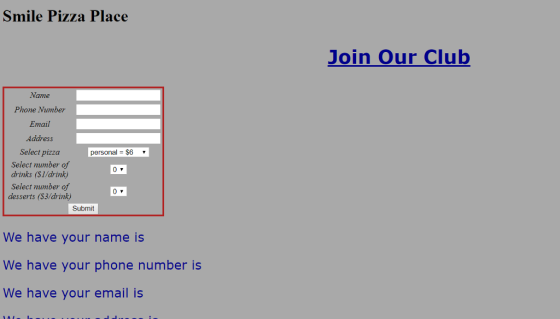
output:
Add Answer to:
I have the code buts its not working as this below instruction
can anyone help
Use...
Hello, this is my code. moest of the things works but when select the price, i...
Hello, this is my code. moest of the things works but when select the price, i just dont get my total. can someone help me out . thank you My queshion is also here The page will simulate the site for a Chicago-based small bus line that travels to St Louis, Milwaukee, and Detroit. Here are the requirements: The home page (i.e. the main page) should simply be the heading, image, and slogan of the site. The home page should NOT...
I can't figure this one out at all. Any help would be appreciated. Here's the question:...
I can't figure this one out at all. Any help would be appreciated. Here's the question: You will need to complete the functions to Toggle the Fries and Drinks sections by adding or removing the 'hide' CSS class I created. I have already created the function to Toggle Burgers and you can use that as an example to build out the full functionality. I have also made created the function to reset the form. Finally, to calculate the total, you...
I am working on a normal javascript program where i have to take two names and...
I am working on a normal javascript program where i have to take two names and put them in array and print out in sorted order.But,when the user clicks the print button it should show the output,but if user clicks second time,it should start again(basically reload the page).I have done the part about userinput and sorting and printing,but couldn't get the function of when user clicks button second time. <!DOCTYPE html> <html> <body> <input type="text" id="Name1" value=""><br> <input type="text" id="Name2"...
Hi, can someone explain to me why my image is not in the middle but all...
Hi, can someone explain to me why my image is not in the middle but all the way to the top of the page? <!DOCTYPE html> <html lang=”en”> <head> <title> Pacific Trails Resort :: Yurts </title> <meta charset="utf-8"> <link rel="stylesheet" type="text/css" href="pacific.css"> <div id="yurthero"></div> </head> <body> <div id="wrapper"></div> <header> <h1 id="hh"> Pacific Trails Resort </h1> </header> <div id=”navbar”></div> <b><a href=”index.html”> Home </a> <a href=”yurt.html”> Yurt </a> <a href=”activities.html”> Activities</a> <a href=”reservation.html”> Reservation </a> </ul> </b> <div> <img src="images/yurts.jpg" alt="Yurt" height="250"...
can you do this js and html question. ill give you the html and js and...
 can you do this js and html question. ill give you the html and
js and css files just fix my error use if and else like what i did
dont use switch just fix my erorr.
<!DOCTYPE html>
<!-- Webpage HTML document for Lab 4.
Authors: Amirhossein Chinaei, Andriy Pavlovych
For: EECS 1012, York University, Lassonde School of Engineering
-->
<html lang="En">
<head>
<meta charset="UTF-8">
<!-- title for web page -->
<title> EECS1012: Lab 4 - Computational Thinking
</title>...
can you do this js and html question. ill give you the html and
js and css files just fix my error use if and else like what i did
dont use switch just fix my erorr.
<!DOCTYPE html>
<!-- Webpage HTML document for Lab 4.
Authors: Amirhossein Chinaei, Andriy Pavlovych
For: EECS 1012, York University, Lassonde School of Engineering
-->
<html lang="En">
<head>
<meta charset="UTF-8">
<!-- title for web page -->
<title> EECS1012: Lab 4 - Computational Thinking
</title>...
I have never created an external style before. This is the main Html that I am...
I have never created an external style before. This is the main Html that I am using. <!doctype html> <html lang="en"> <head> <!--Madison McCuiston--> <meta charset="utf-8"> <title>Amelie Boulangerie</title> <link href="style.css" rel="stylesheet" type="text/css"> </head> <body> <div id="wrapper"> <header>Amelie Boulangerie</header> <!-- change this to header tag --> <nav> <ul> <li><a href="index.html">Home</a></li> <li><a href="pastries.html">Pastries</a></li> <li><a href="events.html">Events</a></li> <li><a href="contact.html">Contact</a></li> </ul> </nav> <main> <H2>Experience the Difference</H2> <p><span class="bakery">Amelie Boulangerie</span> is the master of flavor combinations.The jewel-colored macarons come in the most tempting of flavors. Experience...
I cant seem to get the CSS at the bottom of this HTML to work. <!doctype...
I cant seem to get the CSS at the bottom of this HTML to work. <!doctype html> <html lang="en"> <head> <!--Madison McCuiston--> <meta charset="utf-8"> <title>Amelie Boulangerie</title> <link href="style.css" rel="stylesheet" type="text/css"> </head> <body> <div id="wrapper"> <header>Amelie Boulangerie</header> <!-- change this to header tag --> <nav> <ul> <li><a href="index.html">Home</a></li> <li><a href="pastries.html">Pastries</a></li> <li><a href="events.html">Events</a></li> <li><a href="contact.html">Contact</a></li> </ul> </nav> <main> <H2>Experience the Difference</H2> <p><span class="bakery">Amelie Boulangerie</span> is the master of flavor combinations.The jewel-colored macarons come in the most tempting of flavors. Experience the difference...
As part of this assignment we are using the base Gallery HTML and writing JavaScript code...
As part of this assignment we are using the base Gallery HTML and writing JavaScript code that will: 1) preload the images provided to us, 2) Create rollover functionality for each of the thumbnails in your image gallery 3) Use appropriate images found in the images folder. 4) Write developer comments to describe the variables being declared and explain the functions and logical blocks of JavaScript code pertaining to the gallery. I know it has to be an external JS...
HTML and css using notepad++ WHen you run the code, you will see a horizontal menue...
HTML and css using notepad++ WHen you run the code, you will see a horizontal menue with several options. I want a small horizontal line between each option. I also want that done using div inside a div. Thank you <!DOCTYPE html> <html> <head> <meta charset="UTF-8"> <title>Title of the document</title> <style> body{ background-color:#FFA07A; } #h1{ color:white; text-decoration:none; padding:30px; } #h2{ color:white; text-decoration:none; padding:30px; } #navbar1{ background-color:grey; text-align:center; font-size:35px; height:100%px; border:1px solid black; position:absolute; text-decoration:none; margin-left:300px; } #h3{ color:white; text-decoration:none; padding:30px;...
Hello, I am designing a website for my class. I am using HTML/CSS/Jscript. I need to...
Hello, I am designing a website for my class. I am using HTML/CSS/Jscript. I need to have my text in the body, white. All text and the picture centered but how do I have margins on the left and right side?. I have a figcaption and I dont know have to place it under the picture but I am having a hard time. Can you help me? Thank you! HTML <!DOCTYPE html> <html> <head> <meta name="viewport" content="width=device-width, initial-scale=1"> <link rel="stylesheet"...
 can you do this js and html question. ill give you the html and
js and css files just fix my error use if and else like what i did
dont use switch just fix my erorr.
<!DOCTYPE html>
<!-- Webpage HTML document for Lab 4.
Authors: Amirhossein Chinaei, Andriy Pavlovych
For: EECS 1012, York University, Lassonde School of Engineering
-->
<html lang="En">
<head>
<meta charset="UTF-8">
<!-- title for web page -->
<title> EECS1012: Lab 4 - Computational Thinking
</title>...
can you do this js and html question. ill give you the html and
js and css files just fix my error use if and else like what i did
dont use switch just fix my erorr.
<!DOCTYPE html>
<!-- Webpage HTML document for Lab 4.
Authors: Amirhossein Chinaei, Andriy Pavlovych
For: EECS 1012, York University, Lassonde School of Engineering
-->
<html lang="En">
<head>
<meta charset="UTF-8">
<!-- title for web page -->
<title> EECS1012: Lab 4 - Computational Thinking
</title>...
Most questions answered within 3 hours.
-
Where is the error in this code sequence?
String s1 = "Hello";
String s2 = "ello";...
asked 10 months ago -
Financial data for Joel de Paris, Inc., for last year
follow:
Joel de Paris, Inc.
Balance...
asked 10 months ago -
Consider this reaction:
Al2(SO4)3 (aq)+ BaCl3
(aq) Al2Cl6 (aq)- +
3BaSO4(s) . What is the...
asked 10 months ago -
Suppose that Savneet is considering increasing her
recent random sample from 20 car rentals to 40...
asked 10 months ago -
Trucks arrive at an unloading terminal at an average rate of 120
per hour.
Trucks arrive...
asked 10 months ago -
Why are methanol and ethanol completely soluble in water while
octanol is not very little soluble....
asked 10 months ago -
A facilities manager at a university reads in a research report
that the mean amount of...
asked 10 months ago -
When the CuSO4 is rehydrated by adding water to the anhydrous
compound, is this an endothermic...
asked 10 months ago -
A ray of sunlight is passing from diamond into crown glass; the
angle of incidence is...
asked 10 months ago -
A block of mass 0.249 kg is placed on top of a light, vertical
spring of...
asked 10 months ago -
how do the kidneys compensate in the presences of acidosis
a) trigger hyperventilate
b) reserve acid...
asked 10 months ago -
Question 501 pts
The rental rate of capital to the firm increases. Which of the
following...
asked 10 months ago