C++ Project You should be comfortable with the content in the modules up to and including...
C++ Project
You should be comfortable with the content in the modules up to and including the module "Input Output" for this project.
For this project, download the text file weblog.txt.
Note: To download this file, right click on the link and select SAVE AS
This file is an Apache web log taken from the web server for St. Mary's University. When a visitor goes to their web site, the visitor's browser makes a request to the web server to view a web page, which is a file residing on the server. Each time a page is requested by a browser, the web server records information about that request. This weblog.txt holds the details of some of those requests. See below for a list of fields with an example:
Web Log Example
This file does not include all possible information that could be collected by a web server. The full description of the apache log file format can be found here: http://httpd.apache.org/docs/2.2/logs.html
For this project, you can use each line of the web log file as one string using the string class' getline function.
Minimum Requirements:
Create a non-member function to read each line of the web log file.
Each line should then be stored in a vector such that the first element of the vector is the first line of the web log file. Because each element will hold an entire line from the file, the vector should be declared as a vector of strings. Note: You must declare the vector in a function (main function or any other function) or you will lose all.
Create another non-member function to display the last 5 lines in the vector. You must pass the vector by reference!
Create another non-member function that will accept an integer line number in the parameter list and string return value. When the function is called in main, a line number must be passed to the function. The function should then return the line from the vector that corresponds to that line number. The first line in the file will be line 1. You must pull the line from the vector, not from the file. Because you are required to pull the line from the vector, you must include the vector in the parameter list of this function and pass the vector to this function when it is called by main. The main function should then display the string that is returned by the function.
Create one more non-member function to write the contents of the vector to a file in reverse order. Again, you will need to pass the vector by reference to this function. Each element of the vector should be on its own line in the new file. The output file should look like the original file, but in reverse order (the last line in the original should be the first line in the output file).
Create a main function to test all of your non-member functions)
Homework Answers
copy code
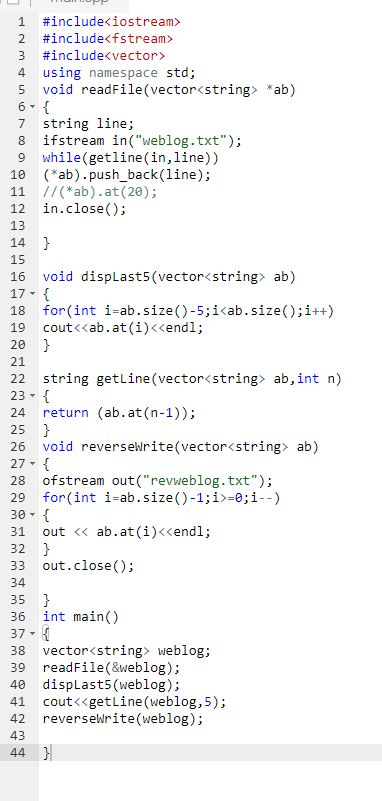
#include<iostream>
#include<fstream>
#include<vector>
using namespace std;
void readFile(vector<string> *ab)
{
string line;
ifstream in("weblog.txt");
while(getline(in,line))
(*ab).push_back(line);
//(*ab).at(20);
in.close();
}
void dispLast5(vector<string> ab)
{
for(int i=ab.size()-5;i<ab.size();i++)
cout<<ab.at(i)<<endl;
}
string getLine(vector<string> ab,int n)
{
return (ab.at(n-1));
}
void reverseWrite(vector<string> ab)
{
ofstream out("revweblog.txt");
for(int i=ab.size()-1;i>=0;i--)
{
out << ab.at(i)<<endl;
}
out.close();
}
int main()
{
vector<string> weblog;
readFile(&weblog);
dispLast5(weblog);
cout<<getLine(weblog,5);
reverseWrite(weblog);
}
screen short
Add Answer to:
C++ Project
You should be comfortable with the content in the modules up to
and including...
Project Description In this project, you will be developing a multithreaded Web server and a simple...
Project Description In this project, you will be developing a multithreaded Web server and a simple web client. The Web server and Web client communicate using a text-based protocol called HTTP (Hypertext Transfer Protocol). Requirements for the Web server The server is able to handle multiple requests concurrently. This means the implementation is multithreaded. In the main thread, the server listens to a specified port, e.g., 8080. Upon receiving an HTTP request, the server sets up a TCP connection to...
Description: In this project, you are asked to install virtualization software on a host computer, install...
Description: In this project, you are asked to install virtualization software on a host computer, install guest operating system on the virtual machine, and finally set up a web server in the guest operating system. Host Operating System: Your host operating system can be any operating system you are familiar with and have access to. Virtualization Software: VMWare Workstation Player or VirtualBox Guest Operating System: Ubuntu Web Server: Apache Steps: 1. Install Virtualization software a. VMWare Player i. Free download...
In this project, the students will finish three functions that are described in Programming Project 4...
In this project, the students will finish three functions that are described in Programming Project 4 (on page 536) and Programming Project 6 (on page 358). The student will also implement the main function and a print function to test these three functions. Please notice, there is a video notes for the solution of Project 6. However, your main function shall have more test than what in video notes. The student may start with the attached code. Please rename the...
Please do this in C++. Thank you in advance. Note that you have to carefully create...
Please do this in C++. Thank you in advance. Note that you have to carefully create your class using the names and capitalization shown below. Put comments into your program, make sure you indent your program properly, and use good naming conventions. Create a class called entry. It should have two private data members of type std::string. One represents a name and the other represents an email address. Make sure you give them ,meaningful names. Create public getters and setters...
C++ HTML files use tags enclosed in angle brackets to denote formatting instructions. For ex- ample,...
C++ HTML files use tags enclosed in angle brackets to denote formatting instructions. For ex- ample, indicates bold, indicates italics, etc. If a web browser is displaying an HTML document that contains ‘<’ or ‘>’ then it may mistake these symbols for tags. This is a common problem with C++ files, which contain many <’s and >’s. For example, the line “#include ” may result in the browser interpreting as a tag. To avoid this problem, HTML uses special symbols...
C++ PLEASE Provide a class for authoring a simple letter. In the constructor, supply the names...
C++ PLEASE Provide a class for authoring a simple letter. In the constructor, supply the names of the sender and the recipient. The header file for this class is given below. #ifndef LETTER_H #define LETTER_H #include #include using namespace std; class Letter { public: //constructor Letter(string from = "John", string to = "Ana"); void add_line(string line); string get_text() const; private: string sender; string recipient; vector lines; }; #endif -Implement the constructor to initialize...
Objective: Learn how to -- read string from a file -- write multiple files Problem: Modify...
Objective: Learn how to -- read string from a file -- write multiple files Problem: Modify the Person class in Lab #4. It has four private data members firstNam (char[20]), day, month, year (all int); and two public member functions: setPerson(char *, int, int, int) and printInfo(). The function setPerson sets the first name and birthday in the order of day, month and year. The function printInfo prints first name and birthday. But it should print the date in the...
This small project is geared to get you started on writing Object Oriented program using either...
This small project is geared to get you started on writing Object Oriented program using either Java or C++. Create a class called Person that will hold information about a single individual. This class should have a data section that consists of the following: Variable Name Data Type firstName string lastName string address string The Person class should have the following mutators: setFirstName(string first); setLastName(string last); setAddress(string address); The Person class should have the following accessors: string getFirstName(); string getLastName();...
In C only Please! This lab is to write a program that will sort an array...
In C only Please! This lab is to write a program that will sort an array of structs. Use the functions.h header file with your program. Create a source file named functions.c with the following: A sorting function named sortArray. It takes an array of MyStruct's and the length of that array. It returns nothing. You can use any of the sorting algorithms, you would like though it is recommended that you use bubble sort, insertion sort, or selection sort...
For this activity, you are required to provide files called fun.cpp as well as a makefile to comp...
For this activity, you are required to provide files called fun.cpp as well as a makefile to compile and run it. In your file, fun.cpp, should have a skeleton of a main program as per normal which you will then fill it in as per the following. The objective of this activity is to demonstrate the basics of functions and their use. For this activity, you will need to declare your functions alongside your main program skeleton. You will use...
Most questions answered within 3 hours.
-
Where is the error in this code sequence?
String s1 = "Hello";
String s2 = "ello";...
asked 10 months ago -
Financial data for Joel de Paris, Inc., for last year
follow:
Joel de Paris, Inc.
Balance...
asked 10 months ago -
Consider this reaction:
Al2(SO4)3 (aq)+ BaCl3
(aq) Al2Cl6 (aq)- +
3BaSO4(s) . What is the...
asked 10 months ago -
Suppose that Savneet is considering increasing her
recent random sample from 20 car rentals to 40...
asked 10 months ago -
Trucks arrive at an unloading terminal at an average rate of 120
per hour.
Trucks arrive...
asked 10 months ago -
Why are methanol and ethanol completely soluble in water while
octanol is not very little soluble....
asked 10 months ago -
A facilities manager at a university reads in a research report
that the mean amount of...
asked 10 months ago -
When the CuSO4 is rehydrated by adding water to the anhydrous
compound, is this an endothermic...
asked 10 months ago -
A ray of sunlight is passing from diamond into crown glass; the
angle of incidence is...
asked 10 months ago -
A block of mass 0.249 kg is placed on top of a light, vertical
spring of...
asked 10 months ago -
how do the kidneys compensate in the presences of acidosis
a) trigger hyperventilate
b) reserve acid...
asked 10 months ago -
Question 501 pts
The rental rate of capital to the firm increases. Which of the
following...
asked 10 months ago