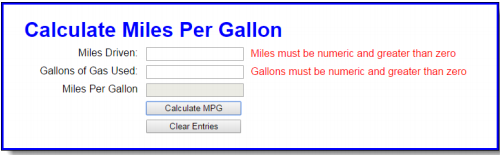
In this exercise, you’ll upgrade a version of the MPG application so the error messages are displayed in span elements to the right of the text boxes.
Open the HTML and JavaScript files in this folder: exercises_short\ch06\mpg\
Then, run the application and click the Calculate MPG button to see that an error message is displayed in an alert dialog box for each of the two input fields.
2. In the HTML file, add a span element after the input element for the first two text boxes.
3. Enhance the data validation so it displays the error messages in the span elements instead of in alert dialog boxes.
4. If the user entries are valid, clear the contents of the span elements.
5. If the user clicks the Clear Entries button, set the contents of each span element to an asterisk.
Current code:
HTML
<!DOCTYPE html>
<html>
<head>
<meta charset="UTF-8">
<title>Calculate MPG</title>
<link rel="stylesheet" href="mpg.css">
<script src="mpg.js"></script>
</head>
<body>
<main>
<h1>Calculate Miles Per Gallon</h1>
<label for="miles">Miles Driven:</label>
<input type="text" id="miles"><br>
<label for="gallons">Gallons of Gas Used:</label>
<input type="text" id="gallons"><br>
<label for="mpg">Miles Per Gallon</label>
<input type="text" id="mpg" disabled><br>
<label> </label>
<input type="button" id="calculate" value="Calculate MPG"><br>
<label> </label>
<input type="button" id="clear" value="Clear Entries"><br>
</main>
</body>
</html>
mpg.js
"use strict";
var $ = function(id) {
    return document.getElementById(id);
};
function calculateMpg(miles, gallons) {
   var mpg = (miles / gallons);
   mpg = mpg.toFixed(1);
   return mpg;
};
var processEntries = function() {
    var miles = $("miles").value;
    var gallons = $("gallons").value;
    var isValid = true;

    if (isNaN(miles) || miles <= 0) {
        alert("Miles must be numeric and greater than zero");
        isValid = false;
    }
    if (isNaN(gallons) || gallons <= 0) {
           alert("Gallons must be numeric and greater than zero");
           isValid = false;
    }
    if (isValid) {
        $("mpg").value = calculateMpg(miles, gallons);
    }
};
var clearEntries = function() {
   $("miles").value = "";
   $("gallons").value = "";
   $("mpg").value = "";
};
window.onload = function() {
    $("calculate").onclick = processEntries;
    $("clear").onclick = clearEntries;
   $("miles").ondblclick = clearEntries;
    $("miles").focus();
};
CSS:
body {
    font-family: Arial, Helvetica, sans-serif;
    background-color: white;
    margin: 0 auto;
    width: 700px;
   padding: 0 2em 1em;
    border: 3px solid blue;
}
h1 {
   color: blue;
   margin-bottom: .25em;
}
label {
   float: left;
    width: 11em;
    text-align: right;
}
input {
    margin-left: 1em;
   margin-right: .5em;
    margin-bottom: .5em;
    width: 11em;
}
span {
   color: red;
}
Homework Answers
Dear Student ,
As per requirement submitted above kindly find below solution.
Here new web page with name "mpg.html" is created which contains below code.
mpg.html :
<!DOCTYPE html>
<html>
<head>
<meta charset="UTF-8">
<!-- title for web page -->
<title>Calculate MPG</title>
<!-- link is used for stylesheet -->
<link rel="stylesheet" href="mpg.css">
<!-- script is used for javascript -->
<script src="mpg.js"></script>
</head>
<body>
<main>
<h1>Calculate Miles Per Gallon</h1>
<label for="miles">Miles Driven:</label>
<input type="text" id="miles">
<!-- span to display error message -->
<span id="milesError"></span><br>
<label for="gallons">Gallons of Gas Used:</label>
<input type="text" id="gallons">
<!-- span to display error message -->
<span id="gallonsError"></span><br>
<label for="mpg">Miles Per Gallon</label>
<input type="text" id="mpg" disabled><br>
<label> </label>
<input type="button" id="calculate" value="Calculate MPG"><br>
<label> </label>
<input type="button" id="clear" value="Clear Entries"><br>
</main>
</body>
</html>
**********************************
mpg.css :
body {
font-family: Arial, Helvetica, sans-serif;
background-color: white;
margin: 0 auto;
width: 700px;
padding: 0 2em 1em;
border: 3px solid blue;
}
h1 {
color: blue;
margin-bottom: .25em;
}
label {
float: left;
width: 11em;
text-align: right;
}
input {
margin-left: 1em;
margin-right: .5em;
margin-bottom: .5em;
width: 11em;
}
span {
color: red;
}
*********************************
mpg.js :
"use strict";
var $ = function(id) {
return document.getElementById(id);
};
function calculateMpg(miles, gallons) {
var mpg = (miles / gallons);
mpg = mpg.toFixed(1);
return mpg;
};
var processEntries = function() {
var miles = $("miles").value;
var gallons = $("gallons").value;
var isValid = true;
if (isNaN(miles) || miles <= 0) {
//display error message on the span
$("milesError").innerHTML="Miles must be numeric and greater than zero";
isValid = false;
}
if (isNaN(gallons) || gallons <= 0) {
//display error message on the span
$("gallonsError").innerHTML="Gallons must be numeric and greater than zero";
isValid = false;
}
if (isValid) {
$("mpg").value = calculateMpg(miles, gallons);
}
};
var clearEntries = function() {
$("miles").value = "";
$("gallons").value = "";
$("mpg").value = "";
$("milesError").innerHTML="";//used to clear span
$("gallonsError").innerHTML="";//used to clear span
};
window.onload = function() {
$("calculate").onclick = processEntries;
$("clear").onclick = clearEntries;
$("miles").ondblclick = clearEntries;
$("miles").focus();
};
==================================
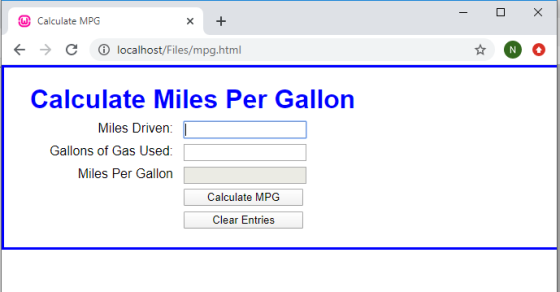
Output :Open web page mpg.html in the browser and will get the screen as shown below.
Screen 1:mpg.html
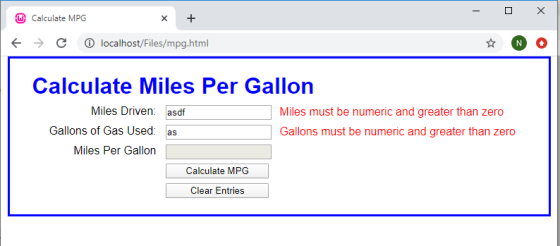
Screen 2:Screen when invalid entries are entered
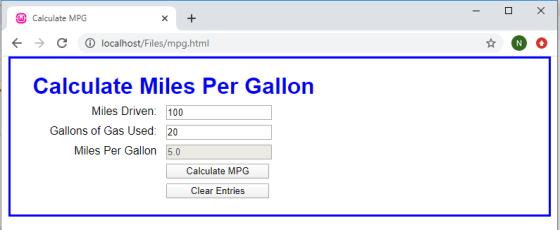
Screen 3:Screen showing Miles Per Gallon
NOTE :PLEASE FEEL FREE TO PROVIDE FEEDBACK ABOUT THE SOLUTION.
Add Answer to:
In this exercise, you’ll upgrade a version of the MPG
application so the error messages are...
Develop the Change Calculator application In this exercise, you’ll create an application that displays the minimum...
Develop the Change Calculator application In this exercise, you’ll create an application that displays the minimum number of quarters, dimes, nickels, and pennies that make up the number of cents specified by the user. Without the use of a JavaScript Library (for coins). 1. Open the HTML and JavaScript files below: 2. In the JavaScript file, note that three functions are supplied. The $ function. The start of a calculateChange function. And an onload event handler that attaches the calculateChange...
***JAVASCRIPT*** I need JAVASCRIPT codes for this question. Also a little explanation and full screenshots of...
 ***JAVASCRIPT***
I need JAVASCRIPT codes for this question. Also a little
explanation and full screenshots of the codes.
Short 6-1 Upgrade the MPG application In this exercise, you'll upgrade a version of the MPG application so the error messages are displayed in span elements to the right of the text boxes. Estimated time: 10 to 15 minutes. Calculate Miles Per Gallon Miles Driven Mies must be numeric and greater than zero Gallons of Gas Used Gallons must be numeric and...
***JAVASCRIPT***
I need JAVASCRIPT codes for this question. Also a little
explanation and full screenshots of the codes.
Short 6-1 Upgrade the MPG application In this exercise, you'll upgrade a version of the MPG application so the error messages are displayed in span elements to the right of the text boxes. Estimated time: 10 to 15 minutes. Calculate Miles Per Gallon Miles Driven Mies must be numeric and greater than zero Gallons of Gas Used Gallons must be numeric and...
Modify an application that lets users add tasks to a list so the tasks can also...
Modify an application that lets users add tasks to a list so the tasks can also be deleted when they’re completed. 1. In the HTML file, enclose the text for each of the three existing list items in a <p> element. Then, Add buttons like the ones shown above preceding the <p> elements. No ids or names are required for these buttons, but they should be assigned to the class named “delete”. 2. In the JavaScript file, modify the event...
In this exercise, you’ll modify the Future Value Calculator application to include a header and footer....
In this exercise, you’ll modify the Future Value Calculator application to include a header and footer. Review the project Open the header.jsp file and note that it contains the code necessary for the start of an HTML page including the opening html, head, and body tags, the title for the web page, and a link including the CSS file. Open the footer.jsp file and note that includes a copyright notice and the closing body and html tags. Modify the code...
Add JavaScript code in the “find_primeV2.js” to allow users to enter a number, and then based...
Add JavaScript code in the “find_primeV2.js” to allow users to enter a number, and then based on the number of user enters, to find out how many prime numbers there are up to and including the user inputted number and then display them on the web page. The following are the detailed steps to complete this assignment: Step 1. [30 points] In “find_primeV2.js”, complete isPrime() function by (1) Adding one parameter in function header. That parameter is used to accept...
In an external JavaScript file, you need to create two global variables for the Quarter name...
In an external JavaScript file, you need to create two global variables for the Quarter name array and the Sales amount array. Create an anonymous function and connect it to the onclick event of the Add to Array button that adds the values from the fields (Quarter and Sales) to the respective arrays. Create an anonymous function and connect it to the onclick event of Display Sales button displays the contents of the arrays, displays the sum of all the...
create an application in VISUAL BASIC that calculates a cars gas mileage. The formula for calculating...
 create an application in VISUAL BASIC that calculates a cars gas
mileage. The formula for calculating the miles that a car can
travel per gallon of gas is MPG = Miles/Gallon
In the formula MPG is miles-per-gallon, miles is the number of
miles that can be driven on a full tank of gas, and gallons is the
number of gallons that the tank holds.
The applications form should have TextBox controls that let the
user enter the number of gallons...
create an application in VISUAL BASIC that calculates a cars gas
mileage. The formula for calculating the miles that a car can
travel per gallon of gas is MPG = Miles/Gallon
In the formula MPG is miles-per-gallon, miles is the number of
miles that can be driven on a full tank of gas, and gallons is the
number of gallons that the tank holds.
The applications form should have TextBox controls that let the
user enter the number of gallons...
How can I connect the html forms to php --> mysql database <!DOCTYPE html> <html lang="en">...
How can I connect the html forms to php --> mysql database <!DOCTYPE html> <html lang="en"> <head> <meta charset="UTF-8"> <title>Title</title> </head> <body> <h2> <center> Average: </h2> <h3> <center> Rate the following: </h2> <h3> <center> Rating Criteria: <br> Developing (0-5), Competent (6-10), Accomplished (10-15); </h3> <center> Judge Name: <input type="text" id="judge"> <br> <br> <center> 1. Articulate requirements and design of the project: <input type="text" id="num1"> <br> <br> 2. Plan the solution and implement the project: <input type="text" id="num2"> <br> <br> 3....
Write a PHP Script containing a function that calculates the tax (8%) on a purchase of...
Write a PHP Script containing a function that calculates the tax (8%) on a purchase of $48.72. What I have so far. index.html <!DOCTYPE html> <html lang="en"> <head> <title>PHP Lab II</title> <meta charset="utf-8"> <link rel="stylesheet" href="main.css"> <meta name="robots" content="noindex, no follow, noarchive" /> <meta name="author" content="Michael Dimond Jr" /> </head> <body> <div id="wrapper"> <header> <h1>PHP Lab II</h1> </header> <main> <form action="display.php" method="post"> <div> <label>Sale Total: </label> <input type="text" name="sale_total"><br> <br> </div> ...
Q1. rewrite the exercise on April 4 by adding the following operations: 1) In the php...
 Q1. rewrite the exercise on April 4 by adding the
following operations:
1) In the php script, create an associative array named
$order that stores the following values:
- the number of cheese toppings;
- the number of pepperoni toppings;
- the number of
ham
toppings;
- the size of the ordered pizza;
- the number of the ordered pizza;
- the total cost of the order;
- the discount rate;
- the total cost after the discount.
2) the...
Q1. rewrite the exercise on April 4 by adding the
following operations:
1) In the php script, create an associative array named
$order that stores the following values:
- the number of cheese toppings;
- the number of pepperoni toppings;
- the number of
ham
toppings;
- the size of the ordered pizza;
- the number of the ordered pizza;
- the total cost of the order;
- the discount rate;
- the total cost after the discount.
2) the...
 ***JAVASCRIPT***
I need JAVASCRIPT codes for this question. Also a little
explanation and full screenshots of the codes.
Short 6-1 Upgrade the MPG application In this exercise, you'll upgrade a version of the MPG application so the error messages are displayed in span elements to the right of the text boxes. Estimated time: 10 to 15 minutes. Calculate Miles Per Gallon Miles Driven Mies must be numeric and greater than zero Gallons of Gas Used Gallons must be numeric and...
***JAVASCRIPT***
I need JAVASCRIPT codes for this question. Also a little
explanation and full screenshots of the codes.
Short 6-1 Upgrade the MPG application In this exercise, you'll upgrade a version of the MPG application so the error messages are displayed in span elements to the right of the text boxes. Estimated time: 10 to 15 minutes. Calculate Miles Per Gallon Miles Driven Mies must be numeric and greater than zero Gallons of Gas Used Gallons must be numeric and...
 create an application in VISUAL BASIC that calculates a cars gas
mileage. The formula for calculating the miles that a car can
travel per gallon of gas is MPG = Miles/Gallon
In the formula MPG is miles-per-gallon, miles is the number of
miles that can be driven on a full tank of gas, and gallons is the
number of gallons that the tank holds.
The applications form should have TextBox controls that let the
user enter the number of gallons...
create an application in VISUAL BASIC that calculates a cars gas
mileage. The formula for calculating the miles that a car can
travel per gallon of gas is MPG = Miles/Gallon
In the formula MPG is miles-per-gallon, miles is the number of
miles that can be driven on a full tank of gas, and gallons is the
number of gallons that the tank holds.
The applications form should have TextBox controls that let the
user enter the number of gallons...
 Q1. rewrite the exercise on April 4 by adding the
following operations:
1) In the php script, create an associative array named
$order that stores the following values:
- the number of cheese toppings;
- the number of pepperoni toppings;
- the number of
ham
toppings;
- the size of the ordered pizza;
- the number of the ordered pizza;
- the total cost of the order;
- the discount rate;
- the total cost after the discount.
2) the...
Q1. rewrite the exercise on April 4 by adding the
following operations:
1) In the php script, create an associative array named
$order that stores the following values:
- the number of cheese toppings;
- the number of pepperoni toppings;
- the number of
ham
toppings;
- the size of the ordered pizza;
- the number of the ordered pizza;
- the total cost of the order;
- the discount rate;
- the total cost after the discount.
2) the...
Most questions answered within 3 hours.
-
Where is the error in this code sequence?
String s1 = "Hello";
String s2 = "ello";...
asked 10 months ago -
Financial data for Joel de Paris, Inc., for last year
follow:
Joel de Paris, Inc.
Balance...
asked 10 months ago -
Consider this reaction:
Al2(SO4)3 (aq)+ BaCl3
(aq) Al2Cl6 (aq)- +
3BaSO4(s) . What is the...
asked 10 months ago -
Suppose that Savneet is considering increasing her
recent random sample from 20 car rentals to 40...
asked 10 months ago -
Trucks arrive at an unloading terminal at an average rate of 120
per hour.
Trucks arrive...
asked 10 months ago -
Why are methanol and ethanol completely soluble in water while
octanol is not very little soluble....
asked 10 months ago -
A facilities manager at a university reads in a research report
that the mean amount of...
asked 10 months ago -
When the CuSO4 is rehydrated by adding water to the anhydrous
compound, is this an endothermic...
asked 10 months ago -
A ray of sunlight is passing from diamond into crown glass; the
angle of incidence is...
asked 10 months ago -
A block of mass 0.249 kg is placed on top of a light, vertical
spring of...
asked 10 months ago -
how do the kidneys compensate in the presences of acidosis
a) trigger hyperventilate
b) reserve acid...
asked 10 months ago -
Question 501 pts
The rental rate of capital to the firm increases. Which of the
following...
asked 10 months ago